JavaScript support for Vue.js - 1.3
Supported versions
| Component | Version | Support |
|---|---|---|
| Vue.js | v2.x | ✅ |
What results can you expect?
Once the analysis has completed, you can view the results in the normal manner:

Objects
The following specific objects are displayed:
| Type | Name | Description |
|---|---|---|
 |
VueJS Delete Request Service | Represents a DELETE request service detected in Vue.js code. |
 |
VueJS Get Request Service | Represents a GET request service detected in Vue.js code. |
 |
VueJS Post Request Service | Represents a POST request service detected in Vue.js code. |
 |
VueJS Put Request Service | Represents a PUT request service detected in Vue.js code. |
Specific support
Store
The “Vuex.Store()” calls are searched for throughout the application, and the first parameter is used to resolve different links.
const store = new Vuex.Store({
  state: {
    pageTitle: 'Home',
    menu: menu,
    user: {},
    token: null,
    message: {
      type: null,
      body: null
    },
    config: config

  },
  mutations: {

    setAuth (state, { user, token }) {
      state.user = user
      state.token = token
      global.helper.ls.set('user', user)
      global.helper.ls.set('token', token)
    },
    setMenu (state, data) {
      state.menu = data
    },
    setPageTitle (state, data) {
      state.pageTitle = data
    },
    showMessage (state, type, body) {
      state.message = { type, body }
    }
  },
  actions: {

    checkAuth ({ commit }) {
      let data = {
        user: global.helper.ls.get('user'),
        token: global.helper.ls.get('token')
      }
      commit('setAuth', data)
    },
    checkPageTitle ({commit, state}, path) {
      for (let k in state.menu) {
        if (state.menu[k].href === path) {
          commit('setPageTitle', state.menu[k].title)
          break
        }
      }
    }
  }
})

export default store
the “sync()” calls are also used:
import store from './store'
import router from './router'
sync(store, router)
Dispatch
This extension supports “Vuex store dispatch” methods which are used to call shared functions. Here is an example of a classic architecture using this method:
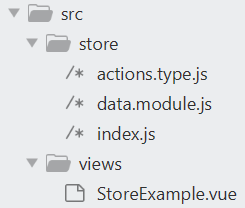
In actions.type.js
export const FETCH_DATA = "fetchData";
In data.module.js
import { FETCH_DATA } from "./actions.type";
import Vue from "vue";
import axios from "axios";
import VueAxios from "vue-axios";


Vue.use(VueAxios, axios);

const actions = {
  [FETCH_DATA]() {
    return return Vue.axios.get('uri/to/data')
  },
};

export default {
  actions
};
In index.js
import Vue from "vue";
import Vuex from "vuex";

import data from "./data.module";

Vue.use(Vuex);

export default new Vuex.Store({
  modules: {
    data
  }
});
In StoreExample.vue
<template>
  <div></div>
</template>

<script>
import { FETCH_DATA } from "@/store/actions.type";

export default {
  name: "StoreExample",
  mounted: function() {
    this.$store.dispatch(FETCH_DATA)
  }
};
</script>
This code gives the following results:
Webservices
Axios
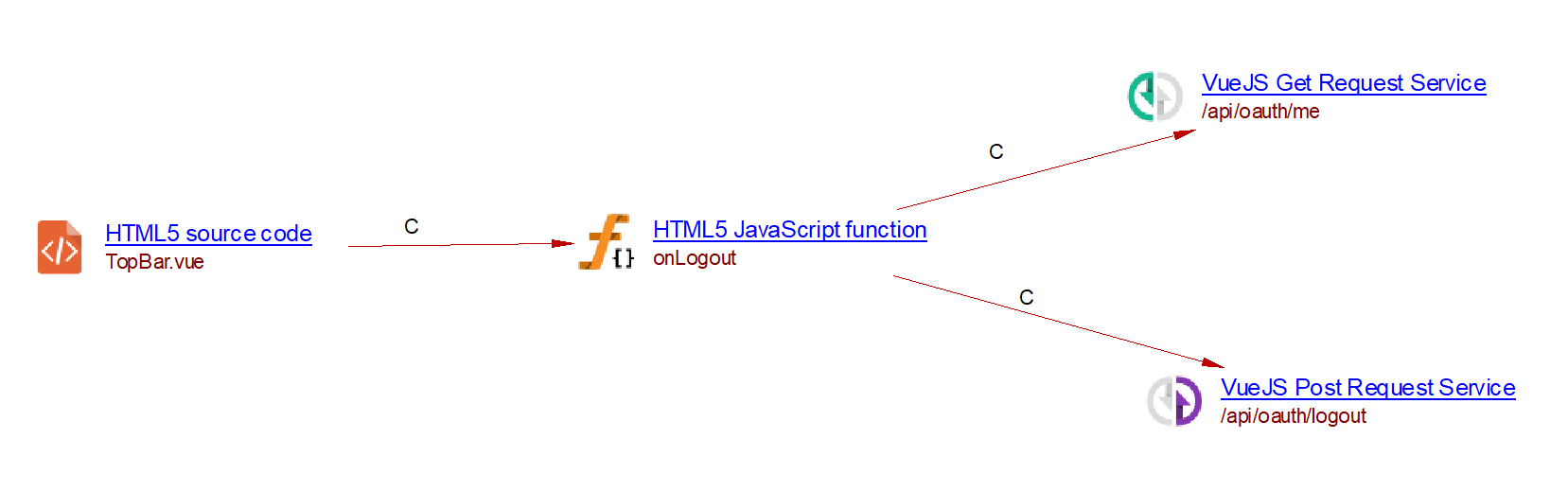
The Vue.js extension supports webservices using Axios:
async onLogout() {
      await this.$axios.$post('/api/oauth/logout');
      this.setLogout(true);
      this.setCurrentUser(null);

      try {
        await this.$axios.$get('/api/oauth/me')
      } catch (e) {
        // middleware redirects to login page
      }
    }
Giving the following result:
Vue-resources
The Vue.js extension supports webservices using vue-resources.
async onLogout() {
      await this.$http.post('/api/oauth/logout');
      this.setLogout(true);
      this.setCurrentUser(null);

      try {
        await this.$http.$get('/api/oauth/me')
      } catch (e) {
        // middleware redirects to login page
      }
    }
Giving the following result:
Fetch
The Vue.js extension supports webservices using fetch:
async onLogout() {
      await fetch('/api/oauth/logout');
      this.setLogout(true);
      this.setCurrentUser(null);

      try {
        await fetch('/api/oauth/me')
      } catch (e) {
        // middleware redirects to login page
      }
    }
Giving the following result: