Analysis results
What results can you expect?
For the complete object and link model, see What results can you expect?.
This versioned page groups Mainframe result notes and version-specific enhancements by technology area.
COBOL
File Management
- The analyzer handles programs in PC file type format. However, in Mainframe, the structure of file/folder trees is not managed in the same way.
- The notion “Library” is not taken into account.
- When program names are identical, these programs may be ignored or may be incorrectly resolved.
COBOL Control Flow
Resolution
Inference Engine
The Inference Engine is implemented for the Mainframe Analyzer, but does have some limitations:
- Renaming (66) is not supported.
- Indexation of arrays, i.e.: the instructions MOVE with (position:length) is not supported
- The length of a variable when given by a constant (declared as 78 - Microfocus) is not supported.
- The Inference Engine will remain local to each program.
Creation of unknown objects
Given the following code:
IF condition A
<do this>
END-IF

IF condition B
<do that>
END-IF
The Inference Engine will consider that <do this> and <do that> can be done in the same control flow path although this is not actually possible. This leads to the situation where the analyzer will generate incorrect subprogram names and therefore an unexpected unresolved object will also be generated, that do not exist anywhere in the Application source code.
EXHIBIT Instruction
No links are created to variables handled by the instructions EXHIBIT.
Cobol code containing “EXIT SECTION” statements
When analyzing Cobol source code implemented in MICRO Focus COBOL / AcuCOBOL, the “EXIT SECTION” statement will cause the Mainframe analyzer to issue the warning “Cannot find section or paragraph”. To avoid this warning, replace the statement “EXIT SECTION” with its short form “EXIT”.
Paragraphs containing termination statement
If a paragraph containing a termination statement (ex: GOBACK, STOP RUN…) is called by a PERFORM statement, then the analyzer will not draw a “Call” link between the paragraph containing the PERFORM statement and the next paragraph..
Nevertheless, there is a limitation if the termination statement is located in a conditional block (IF, EVALUATE). In this specific case, the analyzer will consider that the termination statement is always executed and the “Call” link between the paragraph containing the PERFORM statement and the next paragraph will not be drawn.
Example 1:
PARA-1.
    PERFORM PARA-TERMINATION.
PARA-2.
...
PARA-TERMINATION.
   GOBACK.
No “Call” link will be drawn between PARA-1 and PARA-2.
Example 2:
PARA-1.
    PERFORM PARA-TERMINATION.
PARA-2.
...
PARA-TERMINATION.
  IF <condition>
    GOBACK.
No “Call” link will be drawn between PARA-1 and PARA-2 (limitation).
This can impact the following quality rules based on paragraph calls:
- Avoid OPEN/CLOSE inside loops
- Avoid cyclic calls with PERFORM statements
- Avoid unreferenced Sections and Paragraphs
- Avoid GOTO jumps out of PERFORM range
ReferLink between paragraphs/sections 1.1
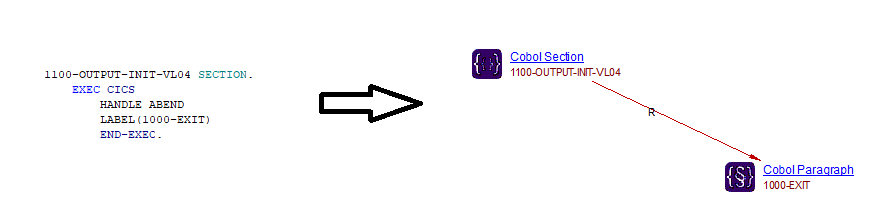
A ReferLink will now be added between sections/paragraphs containing the CICS command HANDLE ABEND LABEL and the sections/paragraphs specified in the LABEL clause. For example:
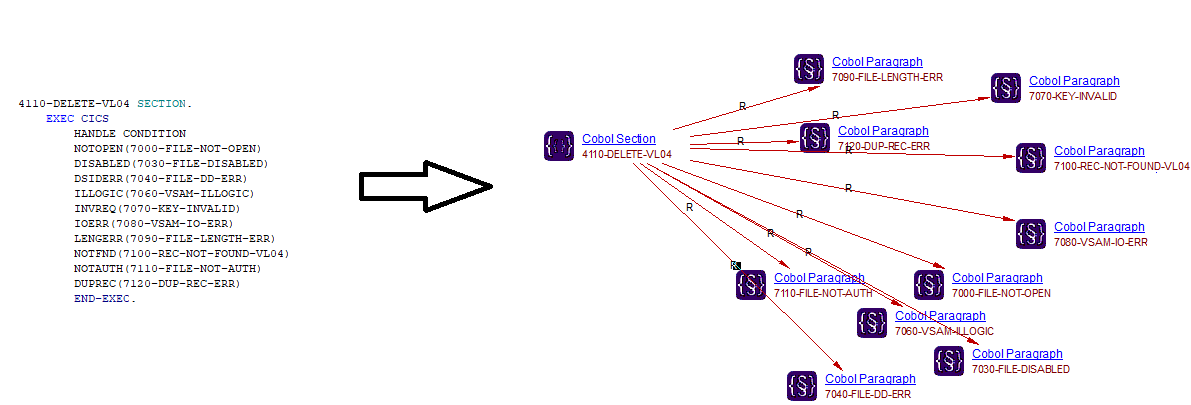
In the same way, a ReferLink is added for the CICS commands HANDLE AID and HANDLE CONDITION:
Supported conditions
Below is a list of the conditions supported by the Mainframe Analyzer ≥ 1.1:
| CICS command | Condition |
|---|---|
| HANDLE ABEND | LABEL |
| HANDLE AID | ANYKEY CLEAR CLRPARTN ENTER LIGHTPEN OPERID PA1, PA2, PA3 PF1 - PF24 TRIGGER |
| HANDLE CONDITION | ALLOCERR CBIDERR CHANNELERR DISABLED DSIDERR DSSTAT DUPKEY DUPREC END ENDDATA ENDFILE ENDINPT ENQBUSY ENVDEFERR EOC EODS EOF ERROR EXPIRED FUNCERR IGREQCD IGREQID ILLOGIC INBFMH INVERRTERM INVEXITREQ INVLDC INVMPSZ INVPARTN INVPARTNSET INVREQ IOERR ISCINVREQ ITEMERR JIDERR LENGERR LOADING LOCKED MAPFAIL NETNAMEIDERR NODEIDERR NOJBUFSP NONVAL NOPASSBKRD NOPASSBKWR NOSPACE NOSPOOL NOSTART NOSTG NOTALLOC NOTAUTH NOTFND NOTOPEN OPENERR OVERFLOW PARTNERIDERR PARTNFAIL PGMIDERR QBUSY QIDERR QZERO RDATT RECORDBUSY RESUNAVAIL RETPAGE ROLLEDBACK RTEFAIL RTESOME SELNERR SESSBUSY SESSIONERR SIGNAL SPOLBUSY SPOLERR STRELERR SUPPRESSED SYSBUSY SYSIDERR TERMERR TASKIDERR TERMIDERR TRANSIDERR TSIOERR UNEXPIN USERIDERR WRBRK |
COBOL Copybook
Analysis of Copybooks / Option “Save Copybook Structure”
-
A Copybook is analyzed implicitly when analyzing the Cobol program including it. You just have to make sure that the copybook is contained in one of the Working Folders defined in the Analysis Unit / Application. However, if you want to save the data structure located under a copybook, you need to activate the option “Save data found in copy books”. Please be aware that in this case the copybook will be analyzed without performing any text replacements.
-
Copybooks containing characters that are not authorized in Cobol identifiers can cause issues if they have been selected in the Cobol page and if the “Save Copybook Structure” option has been selected. This limitation occurs when a copybook is included via the COPY REPLACING statement and if it contains replacement patterns such as ‘&-’ (including the quote characters). In this specific case, the Cobol analyzer cannot extract the Cobol identifier correctly and so it cannot create the corresponding data structure object. However, the Cobol analyzer expands the Cobol programs correctly: the replacement patterns are replaced and the expanded code is correct.
COPY REPLACING
The Mainframe analyzer does not allow to expand several level of copybooks (e.g: a copybooks references another copybook) if at level “n” a REPLACING clause is used to change the name of a referenced copybook in a COPY directive located at a level n+1. In this specific case, these copybooks specified at level n+1 are not found.
For example, considering the 3 levels of inclusion:
- level 1: COPY A REPLACING B BY C.
- level 2 (copybook A): COPY B.
- level 3 (copybook C)
The Mainframe Analyzer will search for copybook B (that could be not found) and C is ignored when it will expand level 2.
Support for REPLACE statement
The Replace statement (used to replace some keywords in COBOL programs) is supported in the Mainframe Analyzer extension ≥ 1.0.10-funcrel.
Cobol Programs without a PROGRAM-ID or a PROCEDURE DIVISION
Cobol Programs (.cob files) that do not contain a PROGRAM-ID paragraph nor a PROCEDURE DIVISION (for example when a COPY statement is used to call a COPYBOOK which contains the PROGRAM-ID) will be considered as copybooks.
Replacement used in COPY REPLACING directives
- Replacements can be applied to words or parts of words
- Patterns used to replace parts of words must be delimited by the following characters: :, (, ), \ or "
- Patterns that are not delimited by the above characters are considered as being used to replace entire words
- LEADING and TRAILING clauses mean that the replacement will be applied on parts of words and as such, patterns must respect rule two (first character and last character will be removed from the pattern).
COBOL Data and SQL
Cobol literals
If a literal is modified between two analyses and if the “Save Data Structures” option is selected then the old version of the literal is not actually removed from the knowledge base.
Cobol Data object Bookmarks
Currently the Mainframe Analyzer is designed such that bookmarks between Cobol Data object do not point to the exact line in which the data is being written to the Cobol Data object (for example MOVE statements) Instead the bookmark is placed at the start of the Cobol Data object.
Embedded SQL support 1.1
For each embedded SQL statement found in Cobol (except INCLUDE statements which are already supported by creating a Copy Book object), an object called Cobol SQL Query is created. For example, the following code will cause this object type to be created:
EXEC SQL
    SELECT ABCDED
    FROM TABLE
END-EXEC
Cobol data links with file handling COBOL statement
What are FILES?
- A FILE is a logical representation of the data that is stored in memory location.
- FILEs are used to store the data permanently in a structured format.
- A FILE contains RECORDs that logically divide the FILE data.
- Each RECORD contains the FIELDs that are typically data items or identifiers in the RECORD definition.
- FILEs are usually stored on DISKS/TAPES in a Mainframe environment.
- Maximum 255 files used in a COBOL program.
What are File Handling Statements?
File Handling Statements are verbs used in COBOL programs which handle FILES, for example:
- OPEN
- CLOSE
- WRITE
- REWRITE
- READ
- DELETE
- START (note that this statement is not currently supported)
How does the Mainframe Analyzer support File Handling Statements?
The Mainframe Analyzer represents FILEs as COBOL File Link objects. When the analyzer finds a file handling statement, an accessReadLink or accessWriteLink is created to the COBOL File Link object. The way in which the links are created by the Mainframe Analyzer depends on the options chosen in AIP Console:
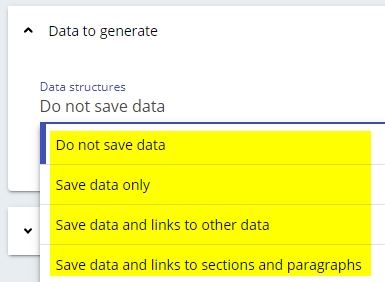
| Do not save data and Save data only | A link is created from the COBOL paragraph to the FILE description only, and no links with COBOL data are created. |
| Save data and links to others data | For READ/WRITE/REWRITE statements, links between COBOL data / COBOL data record and the COBOL File Link object are created. |
| Save data and links to sections and paragraphs | For READ/WRITE/REWRITE statements, links between COBOL paragraph / COBOL sections and COBOL File Link / COBOL data / COBOL data record objects are created. |
| Save data and links to sections/paragraphs/other data | All links are created. |
More detail is provided below:
OPEN-CLOSE
Example code:
000010 DATA DIVISION.
000010    FILE SECTION.
000010    FD STUDENT.
000010    01 STUDENT-FILE.
000010       05 STUDENT-ID PIC 9(5).
000010       05 NAME PIC A(25).
000010
000010    WORKING-STORAGE SECTION.
000010    01 WS-STUDENT.
000010       05 WS-STUDENT-ID PIC 9(5).
000010       05 WS-NAME PIC A(25).
000010    01 WS-EOF PIC A(1).
000010
000010 PROCEDURE DIVISION.
000010    OPEN INPUT STUDENT.
000010       PERFORM UNTIL WS-EOF='Y'
000010          READ STUDENT
000010             NOT AT END DISPLAY STUDENT-FILE
000010          END-READ
000010       END-PERFORM.
000010    CLOSE STUDENT.
000010 STOP RUN.
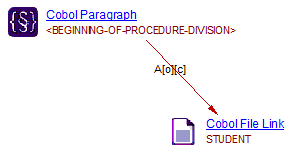
The Mainframe Analyzer will create the accessOpenLink and accessCloseLink links from the COBOL paragraph to the COBOL File Link object by searching the OPEN/CLOSE statement and trying to resolve the file name. These links are supported for all options. Here we open and close the file description name STUDENT for the READ statement:
WRITE-REWRITE
The WRITE and REWRITE statements are similar in that they both write to the file. When we write data into a file, the data are read from the data record associated to the file and pushed into the file stream.
WRITE/REWRITE record-data (Implicit)
This is a data record write to the COBOL File Link object:
000010 DATA DIVISION.
000010    FILE SECTION.
000010    FD STUDENT2.
000010    01 STUDENT2-FILE.
000010       05 STUDENT2-ID PIC 9(5).
000010       05 NAME PIC A(25).
000010
000010    WORKING-STORAGE SECTION.
000010    01 WS-STUDENT2.
000010       05 WS-STUDENT2-ID PIC 9(5).
000010       05 WS-NAME2 PIC A(25).
000010    01 WS-EOF PIC A(1).
000010
000010 PROCEDURE DIVISION.
000010    OPEN EXTEND STUDENT2.
000010       MOVE 1000 TO STUDENT2-ID.
000010       MOVE 'Tim' TO NAME.
000010       MOVE '10' TO CLASS.
000010       WRITE STUDENT2-FILE
000010       END-WRITE.
000010    CLOSE STUDENT2.
000010 STOP RUN.
Result for each option in AIP Console:
Save data and links to other data
- No link from the paragraph to the file.
- accessWriteLink from record-data STUDENT2-FILE to COBOL File Link object STUDENT-2 will be created. In a real-world project, this code should include some MOVE statements from the data to record data before actioning an implicit WRITE/REWRITE.
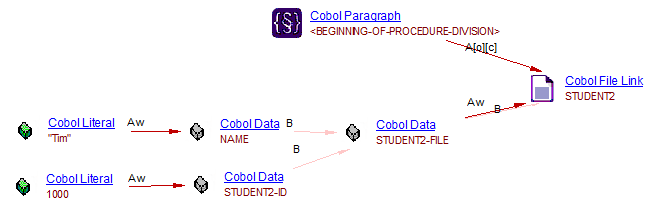
Save data and links to to sections and paragraphs
- accessWriteLink from paragraph to file STUDENT2 will be created.
- accessReadLink from paragraph to file STUDENT2-FILE will be created.
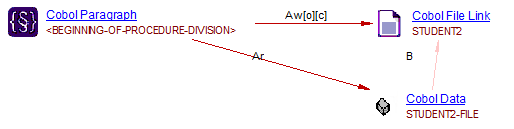
Save data and links to sections/paragraphs/other data
- all links aboved will be created.
Other AIP Console options
With all other AIP Console options only accessWriteLink links will be created from the paragraph to the COBOL File Link.
WRITE/REWRITE RECORD-DATA FROM WS-DATA
The result of a WRITE/REWRITE statement execution with the FROM WS-DATA phrase is equivalent to the execution of the following statements in the order specified:
MOVE WS-DATA TO RECORD-DATA. WRITE RECORD-DATA.
Example:
000010 DATA DIVISION.
000010    FILE SECTION.
000010    FD STUDENT3.
000010    01 STUDENT3-FILE.
000010       05 STUDENT3-ID PIC 9(5).
000010       05 NAME PIC A(25).
000010
000010    WORKING-STORAGE SECTION.
000010    01 WS-STUDENT3.
000010       05 WS-STUDENT3-ID PIC 9(5).
000010       05 WS-NAME3 PIC A(25).
000010    01 WS-EOF PIC A(1).
000010
000010 PROCEDURE DIVISION.
000010    OPEN EXTEND STUDENT3.
000010       MOVE 1000 TO WS-STUDENT3-ID.
000010       MOVE 'Tim' TO WS-NAME3.
000010       WRITE STUDENT3-FILE FROM WS-STUDENT3
000010       END-WRITE.
000010    CLOSE STUDENT3.
000010 STOP RUN.
Result for each option in AIP Console:
Save data and links to others data
- No link from paragraph to file with this option.
- accessWriteLink from ws-data WS-STUDENT3 to record-data STUDENT3-FILE will be created.
- accessWriteLink from record-data STUDENT3-FILE to COBOL File Link object STUDENT-3 will be created.
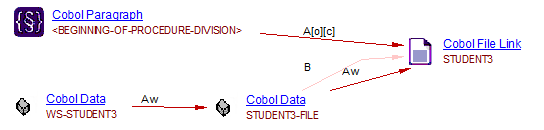
Save data and links to to sections and paragraphs
- accessWriteLink from paragraph to file STUDENT3 will be created.
- accessWriteLink and accessReadLink from paragraph to file STUDENT3-FILE will be created.
- accessReadLink from paragraph to file WS-STUDENT-3 will be created.
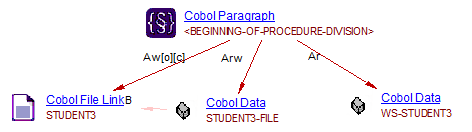
Save data and links to sections/paragraphs/other data
- all links aboved will be created.
Other AIP Console options
With all other AIP Console options, only an accessWriteLink link is created from the paragraph to the COBOL File Link object.
READ
When we read data from a file, the data is pulled from the file stream and written into the data record associated to the file.
READ file-name (Implicit)
This is a COBOL File Link object write to the data record:
000010 DATA DIVISION.
000010    FILE SECTION.
000010    FD STUDENT4.
000010    01 STUDENT4-FILE.
000010       05 STUDENT4-ID PIC 9(5).
000010       05 NAME PIC A(25).
000010
000010    WORKING-STORAGE SECTION.
000010    01 WS-STUDENT4.
000010       05 WS-STUDENT4-ID PIC 9(5).
000010       05 WS-NAME4 PIC A(25).
000010    01 WS-EOF PIC A(1).
000010
000010 PROCEDURE DIVISION.
000010    OPEN INPUT STUDENT4.
000010       PERFORM UNTIL WS-EOF='Y'
000010          READ STUDENT4
000010             NOT AT END DISPLAY STUDENT4-ID
000010          END-READ
000010       END-PERFORM.
000010    CLOSE STUDENT4.
000010 STOP RUN.
Result for each option in AIP Console:
Save data and links to others data
- No link from paragraph to file with this option.
- accessWriteLink link from COBOL File Link object STUDENT4 to record-data STUDENT4-FILE will be created .In a real-world project, this code should include some MOVE statements from the record data to ws-data after actioning an implicit READ.
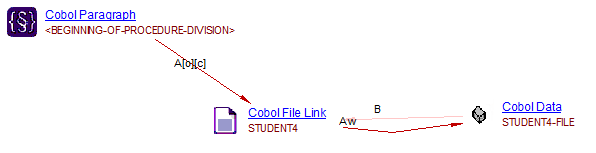
Save data and links to to sections and paragraphs
- accessReadLink link from paragraph to file STUDENT4 will be created.
- accessWriteLink link from paragraph to file STUDENT4-FILE will be created.
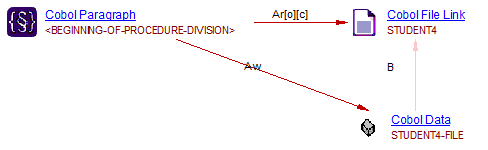
Save data and links to sections/paragraphs/other data
- all links aboved will be created.
Other AIP Console options
With all other AIP Console options, only an accessWriteLink from the paragraph to the COBOL File Link object.
READ file-name INTO WS-DATA
This is a COBOL File Link write to the data record, then record-data write to ws-data:
000010 DATA DIVISION.
000010    FILE SECTION.
000010    FD STUDENT.
000010    01 STUDENT-FILE.
000010       05 STUDENT-ID PIC 9(5).
000010       05 NAME PIC A(25).
000010
000010    WORKING-STORAGE SECTION.
000010    01 WS-STUDENT.
000010       05 WS-STUDENT-ID PIC 9(5).
000010       05 WS-NAME PIC A(25).
000010    01 WS-EOF PIC A(1).
000010
000010 PROCEDURE DIVISION.
000010    OPEN INPUT STUDENT.
000010       PERFORM UNTIL WS-EOF='Y'
000010          READ STUDENT INTO WS-STUDENT
000010             AT END MOVE 'Y' TO WS-EOF
000010             NOT AT END DISPLAY WS-STUDENT-ID
000010          END-READ
000010       END-PERFORM.
000010    CLOSE STUDENT.
000010 STOP RUN.
Result for each option in AIP Console:
Save data and links to others data
- No link from paragraph to file with this option.
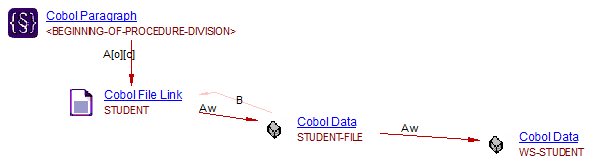
- accessWriteLink link from COBOL File Link STUDENT to record-data STUDENT-FILE will be created.
- accessWriteLink link from record-data STUDENT-FILE to ws-data WS-STUDENT will be created.
Save data and links to to sections and paragraphs
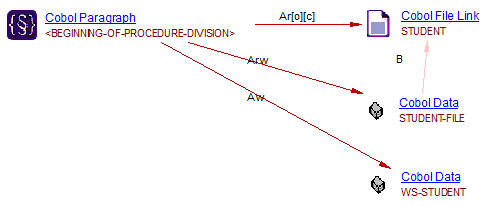
- accessReadLink from paragraph to file STUDENT will be created.
- accessWriteLink/accessReadLink from paragraph to file STUDENT-FILE will be created.
- accessWriteLink from paragraph to file WS-STUDENT will be created.
Save data and links to sections/paragraphs/other data
- all links aboved will be created.
Other AIP Console options
With all other AIP Console options, only an accessWriteLink from the paragraph to the COBOL File Link object is created.
DELETE
The DELETE statement is used to delete a file. The current behavior is to create an accessWriteLink link from the paragraph to the COBOL File Link objects for all options.
000010 DATA DIVISION.
000010    FILE SECTION.
000010    FD STUDENT6.
000010    01 STUDENT6-FILE.
000010       05 STUDENT6-ID PIC 9(5).
000010       05 NAME PIC A(25).
000010
000010    WORKING-STORAGE SECTION.
000010    01 WS-STUDENT6.
000010       05 WS-STUDENT6-ID PIC 9(5).
000010       05 WS-NAME6 PIC A(25).
000010    01 WS-EOF PIC A(1).
000010
000010 PROCEDURE DIVISION.
000010    OPEN EXTEND STUDENT6.
000010    DELETE STUDENT6.
000010    CLOSE STUDENT6.
000010 STOP RUN.
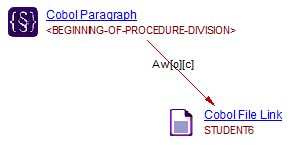
START
START FILE-NAME.
This file handling statement is not supported.
Limitations
Bookmarks
Currently the Mainframe Analyzer is designed such that the bookmark in the Cobol File Link object for the accessWriteLink to the Cobol Data object is not able to point to the exact line in which the data is being written to the Cobol Data object. Instead the bookmark is placed at the start of the Cobol File Link object.
Support for CICS Webservices 1.2
Introduction
Web services make the interactions between programs over a network. There are two types of CICS Webservice:
- Provider: CICS acting as server to provide information
- Requester: CICS acting as client to request information
For example:
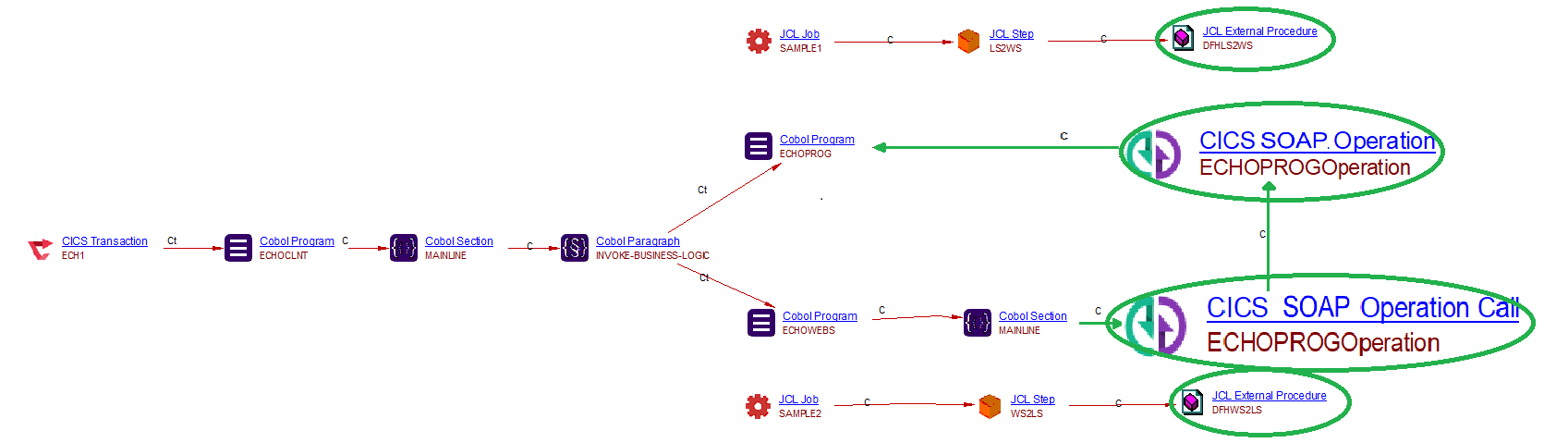
The items highlighted with a green oval represent the new objects and the new links to existing Mainframe type objects. Where:
- Cob program ECHOCLNT: client program to invoke the cob program which handles the CICS Webservice
- Cob program ECHOPROG: the cob program which handles the CICS Webservice as a Provider
- Cob program ECHOWEBS: the cob program which handles the CICS Webservice as a Requester
- CICS Webservice and Call to CICS Webservice: new objects which represents CICS webservice support
- JCL Step LS2WS: JCL step which run a Webservice utility batch to create a web service provider in CICS
- JCL Step WS2LS: JCL step which run a Webservice utility batch to create a web service requester in CICS
CICS SOAP Operation/CICS SOAP Operation Call 1.2
We use the SOAP protocol for these objects.
Linking by port_type.operation_name
Each wsdl is a webservice resource file corresponding to a CICS SOAP Operation or CICS SOAP Operation Call which must consist the URI, PortType and Operation:
<portType name="ECHOPROGPort">
      <operation name="ECHOPROGOperation">
         <input message="tns:ECHOPROGOperationRequest" name="ECHOPROGOperationRequest"/>
         <output message="tns:ECHOPROGOperationResponse" name="ECHOPROGOperationResponse"/>
      </operation>
</portType>
<service name="ECHOPROGService">
      <port binding="tns:ECHOPROGHTTPSoapBinding" name="ECHOPROGPort">
         <!--This soap:address indicates the location of the Web service over HTTP.
              Please replace "my-server" with the TCPIP host name of your CICS region.
              Please replace "my-port" with the port number of your CICS TCPIPSERVICE.-->
         <soap:address location="http://my-server:my-port/ca1p/echoProgProviderBatch"/>
         <!--This soap:address indicates the location of the Web service over HTTPS.-->
         <!--<soap:address location="https://my-server:my-port/ca1p/echoProgProviderBatch"/>-->
         <!--This soap:address indicates the location of the Web service over WebSphere MQSeries.
              Please replace "my-queue" with the appropriate queue name.-->
         <!--<soap:address location="jms:/queue?destination=my-queue&connectionFactory=()&targetService=/ca1p/echoProgProviderBatch&initialContextFactory=com.ibm.mq.jms.Nojndi" />-->
      </port>
 </service>
Linking CICS Webservice objects and Call To CICS Webservice objects 1.2
The CICS Webservice object and Call To CICS Webservice object have the same URI for linking purposes.
Configuration
In order for CAST to be able to fully support CICS Webservices, the extension *.wsdl must be manually added to the CICS File Extensions option in the configuration of Mainframe extension in CAST Console:
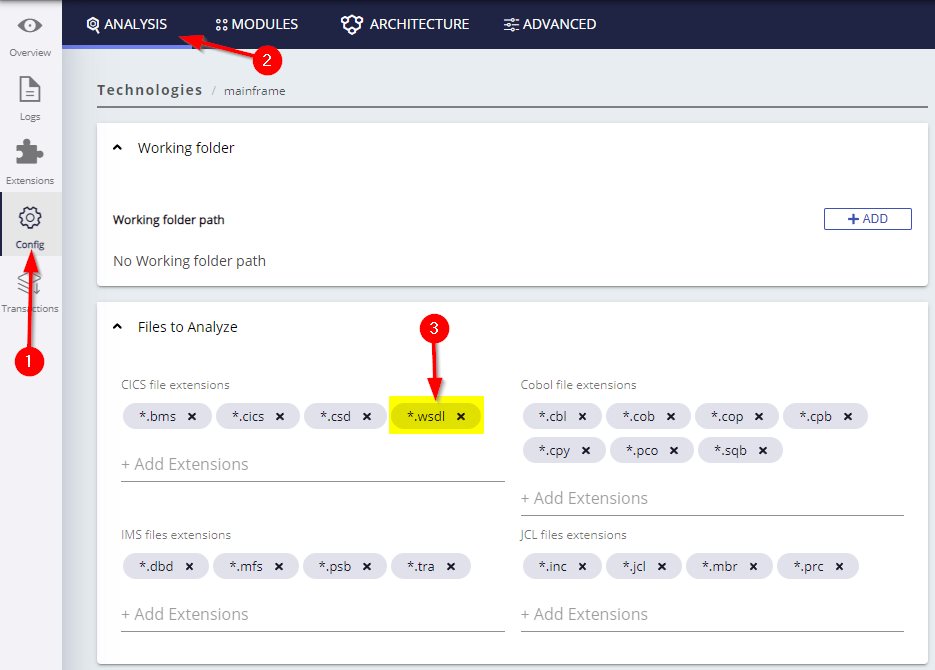
Note: this file extension .wsdl will be added to the CICS File Extensions option by default in a future release of AIP Core.
Example Provider Webservice
SAMPLE1.jcl job has the LS2WS step which run the DFHLS2WS webservice utility and exposed ECHOPROG cob program as a Webservice Provider:
//LS2WS   EXEC DFHLS2WS,
//    JAVADIR='java142s/J1.4',
//    USSDIR='cics650',
//    PATHPREF='',
//    TMPDIR='/tmp',
//    TMPFILE='ls2ws'
//INPUT.SYSUT1 DD *
LOGFILE=<Install_Directory>/ca1p/wsbind/provider/*
echoProgProviderBatch.log
PDSLIB=//<INSTALL_HLQ>.CA1P.COBCOPY
REQMEM=ECHOCOMM
RESPMEM=ECHOCOMM
LANG=COBOL
PGMNAME=ECHOPROG
URI=ca1p/echoProgProviderBatch
PGMINT=COMMAREA
WSBIND=<Install_Directory>/ca1p/wsbind/provider/*
echoProgProviderBatch.wsbind
WSDL=<Install_Directory>/ca1p/wsdl/echoProgProviderBatch.wsdl
MAPPING-LEVEL=1.2
The parameter PGMNAME specifies the name of the cob program that will be exposed as a web service => ECHOPROG.cob
The parameter WSDL specifies the location of the web service description file => echoProgProviderBatch.wsdl
Example Requester Webservice
SAMPLE2.jcl job has the WS2LS step which run the DFHWS2LS webservice utility and exposed ECHOWEBS cob program as a Webservice Requester:
//WS2LS   EXEC DFHWS2LS,
//    JAVADIR='java142s/J1.4',
//    USSDIR='cics650',
//    PATHPREF='',
//    TMPDIR='/tmp',
//    TMPFILE='WS2LS'
//INPUT.SYSUT1 DD *
LOGFILE=<Install_Directory>/ca1p/wsbind/requester/*
echoProgRequesterBatch.log
PDSLIB=//<INSTALL_HLQ>.CA1P.COBCOPY
REQMEM=ECHOPI
RESPMEM=ECHOPO
LANG=COBOL
WSBIND=<Install_Directory>/ca1p/wsbind/requester/*
echoProgRequesterBatch.wsbind
WSDL=<Install_Directory>/ca1p/wsdl/echoProgRequesterBatch.wsdl
MAPPING-LEVEL=1.2
ECHOWEBS.cob must consist a CICS invoke webservice command linking to the same webservice resource echoProgRequesterBatch (echoProgRequesterBatch.wsdl):
MOVE 'echoProgRequesterBatch'
             TO WS-WEBSERVICE-NAME
EXEC CICS INVOKE WEBSERVICE(WS-WEBSERVICE-NAME)
             CHANNEL(WS-CHANNEL-NAME)
             OPERATION(WS-OPERATION-NAME)
             RESP(COMMAND-RESP) RESP2(COMMAND-RESP2)
END-EXEC
COBOL Interoperability
Links to RPG objects 1.2
Cobol File Link objects will link to DDS Display File /DDS Printer File/ DDS Physical File / DDS Logical File of RPG which has the same object name:

Links to Cobol Program objects 1.2
Support EXEC CICS LOAD PROGRAM 1.2
A useLink link will added from Cobol Section objects to Cobol Program objects when the EXEC CICS LOAD PROGRAM statement is used:
EXEC CICS LOAD PROGRAM ('ME00000B')

Support EXEC CICS HANDLE ABEND PROGRAM 1.2
A referLink will be added from Cobol Section objects to Cobol Program objects when the EXEC CICS HAND ABEND PROGRAM statement is used:
EXEC CICS HANDLE ABEND PROGRAM ('ME00000A')

Support INDEX BY 1.2
A new object type Cobol Index is created with a RelyON Link to cobol data using INDEX BY statement, other links are created to the new Cobol Index Object when it is referenced:
15 T-BUCH-VAR          OCCURS 1000  ASCENDING KEY
                                  T-BUCH-ST-2-20
                       INDEXED BY I-BUCH.

...

D0200.
           SET I-BUCH TO 1.

D0202.
           MOVE T-BUCH-VAR (I-BUCH) TO V-BUCH.
Support PROCESSING PROCEDURE 1.2
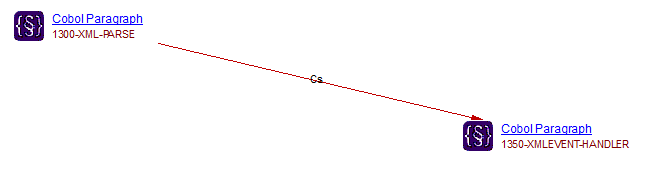
Link between paragraphs is created when they are referenced in PROCESSING PROCEDURE statement:
 1300-XML-PARSE.
             XML PARSE WS-INT-XML-RESPONSE
                       ( 1 : WS-INT-XML-RESPONSE-LEN )
                 PROCESSING PROCEDURE
                   1350-XMLEVENT-HANDLER THRU 1350-EXIT
             END-XML
Miscellaneous Cobol information
Rules for resolving Paragraph names in a Section
The Mainframe Analyzer (Cobol) uses the following rules when resolving Paragraph names defined in Sections:
- If the referenced Paragraph is located in the current Section, Cobol Analyzer will link the calling Paragraph to the called Paragraph
- If the referenced Paragraph is not located in the current section, Cobol Analyzer will issue a syntax error
- If the referenced Paragraph has a unique declaration outside the Section, Cobol Analyzer will create a link to this Paragraph.
- The following syntax is also resolved: “Paragraph Name IN/OF Section Name”. A link will be created to the correct Paragraph (which will be outside the current Section).
Access type links
Access type links are created when your Cobol program calls an external file (Data Set).
-
The instructions that manage classic files (‘File Link’ type) are:
Instructions for opening a file: OPEN Reading data: READ Writing data: WRITE, REWRITE Closing the file: CLOSE
-
Sorting operations on data set files (Data Link type) are carried out via the instructions MERGE and/or SORT. These instructions should generate CALL + PERFORM type links on paragraphs or sections. OPEN and CLOSE instructions are also used.
-
Access (Read/Write) links to “Cobol Constants” and “Cobol Data”:
- Variables used in the flow control: IF, PERFORM, EVALUATE, SEARCH.
- Inclusion of the instructions: MOVE, INITIALIZE, SET, CALL, OPEN, CLOSE, READ, WRITE, REWRITE, MERGE, SORT.
- The following instructions are not yet included: MULTIPLY, SUBTRACT, ADD, DIVIDE, EXHIBIT.
-
CICS files read via CICS instructions in an EXEC CICS … END-EXEC
- Opening of file - Instructions: STARTBR – Acesse(Open) on the file
- Data reading - Instructions: DELETE, WRITE, REWRITE – Access(Write)
- Closing of file - Instruction: ENDBR – Access(Close)
-
Access to the segment in the IMS databases:
- Links to the segment (Access + Write/Read)
- Links to the Program Specification Block
File Selection
Logical Files are declared in the “File Section” part of the program with the FD or SD tag.
- FD: declaration of ‘file link’ type
- SD: declaration of ‘data link’ type
Example declaration of a logical file called MAIL-XREF (type FILE-LINK) in the Cobol program:
004600 FILE SECTION.                          00015900
004700                                          00016000
009000 FD MAIL-XREF                             00020700
009100 LABEL RECORDS ARE STANDARD               00020800
009200 BLOCK CONTAINS 0 RECORDS.                00020900
009300 01 MAIL-XREF-REC.                        00021000
009400 03 MAIL-XREF-KEY.                        00021100
009500 07 MAIL-XREF-ADDRESS.                    00021200
009600 11 MAIL-XREF-ZIP-PRE PIC X(05).          00021300
009700 11 MAIL-XREF-ZIP-SUF PIC X(04).          00021400
009800 07 MAIL-XREF-STATE PIC X(03).            00021500
009900 07 MAIL-XREF-CITY PIC X(25).             00021600
010000 07 MAIL-XREF-POSTAL-CODE PIC X(02).      00021700
010100 03 MAIL-XREF-DATA PIC X(324).            00021800
VSAM
VSAM datasets
| Dataset type | Code example |
|---|---|
VSAM datasets |
A VSAM file can be identified in COBOL programs. In ENVIRONMENT DIVISION / INPUT-OUTPUT SECTION / FILE-CONTROL, logical files are declared with the INDEXED organization. The JCL Dataset object associated to a Cobol File Link object that has the indexed organization is sub-typed as "VSAM". The dataset is defined with IDCAMS utility and VSAM command in SYSIN DD Card are also VSAM datasets (see Support for VSAM files for more information). COBOL JCL |
- The analyzer will detect VSAM files in COBOL programs, just like
other files, however, no specific object type for VSAM will be
resolved in the results. Instead, VSAM files are resolved as follows
:
- COBOL: File Link objects
- JCL: Dataset objects
- Some structural rules have been adapted to take into account this VSAM files, for example:
- The analyzer does not analyze the VSAM system tables that contain technical information about file system management.
- Support for commands in “SYSIN” clauses, for
example:
- ALLOCATE
- ALTER
- DEFINE
- DELETE
- EXAMINE
- LISTALC
- LISTCAT
- LISTDS
- REPRO
- VERIFY
- Support for If IDCAMS utility and VSAM data-set types (for Cobol and
JCL) when they call indexed, relative and sequential organisation:
-
Entry-sequenced data set (ESDS)
-
Key-sequenced data set (KSDS)
-
Relative-record data set (RRDS)
-
Linear data set (LDS) (since 1.0.14-funcrel)
-
- Support since Mainframe Analyzer 1.0.14 funcrel:
- Support to abbreviations command VSAM e.g:
- DEFINE is DEF
- CLUSTER is CL
- EXPORT is EXP, …
- By default, the VSAM data-set types is KSDS
- Support property for KEYS in KSDS VSAM
- Support to abbreviations command VSAM e.g:
JCL
Introduction
JCL is a command language used to execute programs on large systems - primarily Cobol oriented. CAST’s Mainframe Analyzer (JCL) is targeted at IBM’s JCL language for 3090 systems used in conjunction with Cobol projects.
Support for JCL Datasets
The Mainframe Analyzer is able to detect the following specific types of JCL Dataset, which will be visible in CAST Enlighten, CAST Imaging, Architecture Checker and CAST Transaction Configuration:
| Dataset type | Code example |
|---|---|
GDG datasets |
This type of file is identified in JCL DD cards. Its name ends with "(n)" where n is a negative, zero, or positive number. |
PDS datasets |
This type of file is identified in JCL DD cards. Its name ends with the reference to a member enclosed in parentheses. |
DBD datasets |
This type of file can be identified in DBD files, PSB files, and in JCL files:
DBD PSB JCL |
GSAM datasets |
GSAM datasets can be identified in JCL DD card and in PSB files.In PSB files, PCBs associated to a GSAM file are typed GSAM and the name of the DD card that references the dataset is in the NAME attribute. This name must be matched to the DD card with the same name in the STEP that calls the PSB. PSB JCL |
Temporary datasets |
A temporary data set is a data set that is created and deleted in the same job, and is identified by coding one of the following: For a temporary data set For a member of a temporary PDS or PDSE For a temporary data set to be named by the system |
JCL Parameter and Control Files
DSN copied from earlier DD card
The JCL analyzer can not create a link from a step to a data set if the DD card copies a DSN clause from an earlier DD card. For instance, when the following DD cards are analyzed they will not generate a link from the step to the dataset:
//STEP1 EXEC PGM=MYPROG1
//MYDD1 DD DSN=MY.DATA.SET
//MYDD2 DD DSN=*.MYDD01
//STEP2 EXEC PGM=MYPROG2
//MYDD3 DD DSN=*.STEP1.MYDD1
JCL symbols
CAST AIP provides partial support for the resolution of symbols in JCL. The following is supported:
- JCL symbols in procedure EXEC cards - links between procedure steps and programs/procedures where a JCL symbol is used
- JCL symbols in procedure DD cards
- JCL Symbols present in job DD cards
- JCL Symbols present in job EXEC cards
- Where JCL contains PROCS using parameters from a different JCL
- Where JCL calls PROC using a parameter
- JCL Symbols present in external PROCS
In other words:
- Text assigned to symbols will be extracted (e.g: “// SET MYVAR=VALUE”)
- When symbols are replaced with their value (e.g.: “//STEP1 EXEC PGM=&MYPGM”)
- Propagation via PROC calls
- Calling card example: “//STEP1 EXEC MYPROC, PROG=MYPROG”
- Default value assignment example: “//STEP1 PROC, PROG=MYPROG”
Batch utilities using external parameter files
The JCL analyzer can parse, via the AdvancedJCL.xml file (see Mainframe - Analysis configuration for more information), the information sent to programs/utilities through a DD card. However, if this DD card refers to an external file via the DSN parameter, then the analyzer cannot parse this information and create the objects and links. For instance, the following JCL code is correctly analyzed:
//JCLTEST JOB (8452200000),'COBTEST',CLASS=M,MSGCLASS=P,USER=JCH
//*
//PS10 EXEC PGM=IKJEFT01,
//STEPLIB DD DSN=ENV.APPL.LOADLIB,
// DISP=(SHR,KEEP,KEEP)
//SYSOUT DD SYSOUT=*
//SYSPRINT DD SYSOUT=*
//SYSTSPRT DD SYSOUT=*
*//SYSTSIN DD
DSN SYSTEM(DB2P)
RUN PROGRAM(COBTEST) PLAN(TESTPLAN) PARM('1')
END
//*
And the following JCL code cannot currently be analyzed:
//JCLTEST JOB (8452200000),'COBTEST',CLASS=M,MSGCLASS=P,USER=JCH
//*
//PS10 EXEC PGM=IKJEFT01,
//STEPLIB DD DSN=ENV.APPL.LOADLIB,
// DISP=(SHR,KEEP,KEEP)
//SYSOUT DD SYSOUT=*
//SYSPRINT DD SYSOUT=*
//SYSTSPRT DD SYSOUT=*
//SYSTSIN DD DSN=ENV.APPL.PARMLIB(PARMTEST),
// DISP=(SHR,KEEP,KEEP)
//*
External parameter file PARMTEST:
DSN SYSTEM(DB2P)
RUN PROGRAM(COBTEST) PLAN(TESTPLAN) PARM('1')
END
IMS
Support for IMS/DC
Introduction
The IMS/DC (Data Communications) system provides users with online “real time” access to information in IMS databases. MPP transaction programs are NOT submitted with OS JCL. The online IMS Control Region automatically schedules the MPP program necessary to process a transaction. This page summarizes how the Mainframe Analyzer handles IMS/DC.
Prototype link between GSAM DBD and JCL dataset
Inside a PSB file, the PCB connects to the database:
         PCB TYPE=GSAM,DBDNAME=GSAM01,PROCOPT=A,PCBNAME=GSAPCB

*-------------- PSBGEN ----------------------------------------------*
         PSBGEN LANG=COBOL,PSBNAME=COBIMSB1
         PRINT NOGEN
Then we have the definition of the DBD IMS file:
         DBD   NAME=GSAM01,ACCESS=(GSAM,BSAM),                       X
               VERSION='09/22/0812.01'
DSG1     DATASET DD1=GSAM01,                                         X
               DD2=GSAM01,RECFM=FB
         DBDGEN
         FINISH
This IMS file calls the dataset of the JCL file, that calls the PSB file. The logic dataset name is set as GSAM01 and this is found when creating the JCL dataset:
//COBOLB1  EXEC PGM=DFSRRC00,PARM='DLI,COBIMSB1,COBIMSB1'
//STEPLIB  DD DSN=SYSCAST.IMS.SDFSRESL,DISP=SHR
//*                                      * IMS DBD AND PSB LIBS
//IMS      DD DSN=APPCAST.IMS.PSBLIB,DISP=SHR
//         DD DSN=APPCAST.IMS.DBDLIB,DISP=SHR
//*                                      * IMS STATISTICS
//DFSSTAT  DD  SYSOUT=P
//*                                      * IMS SYSTEM LOG
//IEFRDER  DD  DUMMY
//GSAM01   DD  DSN=MYTELCO.IMSGSAM.DATA,DISP=OLD
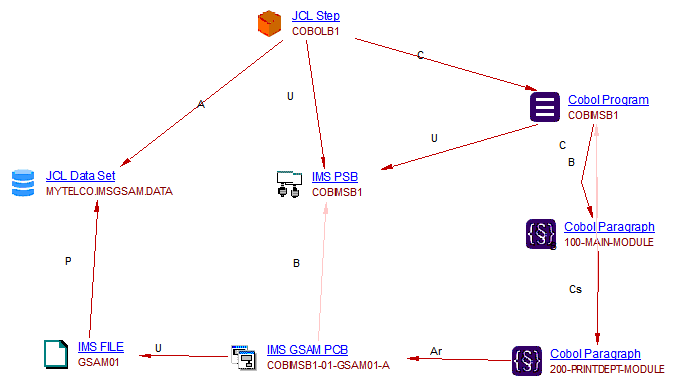
The Mainframe Analyzer will handle this scenario by linking the IMS file to the JCL dataset via a prototype link:
IMS Transaction Manager file
The Mainframe Analyzer will analyze the IMS Transaction file (*.tra) to resolve two macros:
Call link between Cobol Program and IMS Transaction
Code example:
APPLCTN PSB=IMMMBHI,PGMTYPE=TP,SCHDTYP=PARALLEL 06036000
TRANSACT CODE=IMMMBHI,MSGTYPE=(MULTSEG,RESPONSE,65), *06037000
PARLIM=0,SEGNO=400, *06038000
MODE=SNGL,PROCLIM=(03,01) 06039000
In this example, when the TRANSACT macro is created as code, the Mainframe Analyzer will create an IMS transaction object with the code name, then link it to the Cobol program named as PSB = XXX inside the APPLCTN macro.
IMS Transaction Flow
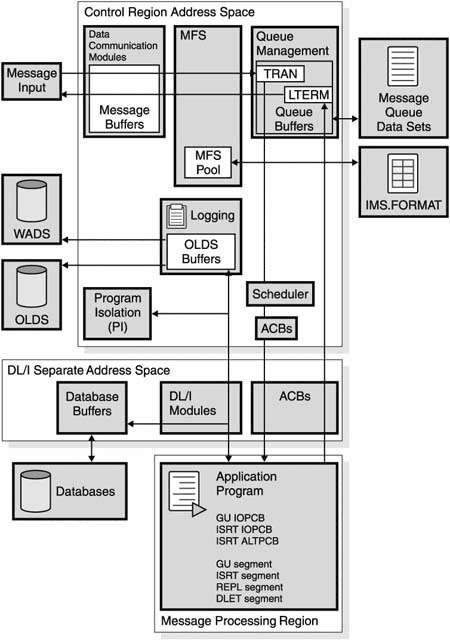
The input data from the terminal is read by the data communication modules. After editing by MFS, if appropriate, and verifying that the user is allowed to execute this transaction, this input data is put in the IMS message queue. The messages in the queue are sequenced by destination, which could be either transaction code (TRAN) or logical terminal (LTERM).
- I/O PCB - in a CICS-DBCTL environment, an input/output PCB (I/O PCB) is needed to issue DBCTL service requests. Unlike other types of PCB, it is not defined with PSB generation. If the application program is using an I/O PCB, this has to be indicated in the PSB scheduling request, as explained in Format of a PSB .
- Alternate TP PCB(s) - an alternate TP PCB defines a logical terminal and can be used instead of the I/O PCB when it is necessary to direct a response to a terminal. Alternate TP PCBs appear in PSBs used in a CICS-DBCTL environment, but are used only in an IMS/VS DC or IMS™ TM environment. CICS applications using DBCTL cannot successfully issue requests that specify an alternate TP PCB, an MSDB PCB, or a GSAM PCB, but PSBs that contain this kind of PCB can be scheduled successfully in a CICS-DBCTL environment. Alternate PCBs are included in the PCB address list returned to a call level application program. The existence of alternate PCBs in the PSB can affect the PCB number used in the PCB keyword in an EXEC DLI application program, depending on whether you are using CICS online, batch programs, or BMPs
Source:
- https://www.slideshare.net/srinipdn/ims-dc-self-study-complete-tutorial .
- https://communities.bmc.com//docs/DOC-9973?jsessionid=00BCE1264A8E5C01EEE4938CAC6A80F6.node0
- https://www.slideshare.net/IBMIMS/coding-mpp-programs-to-process-ims-transactions-66684760
Example
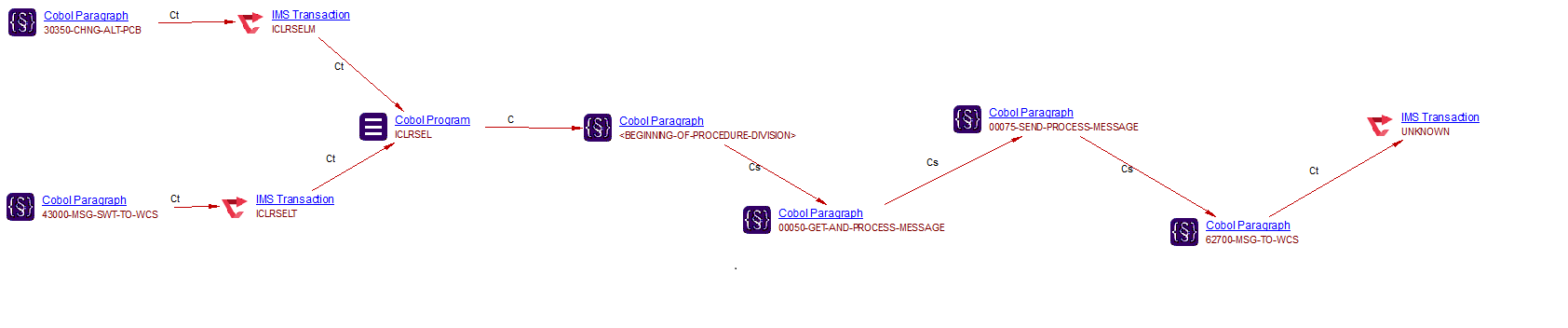
From a Cobol file, the Alternal-PCB contains the destination code (IMS Trans code or LTERM code). Example ALT-PCB:
       01  GNSALTIO-PCB.
           02  GNSALTIO-DESTCODE       PIC  X(008) VALUE 'ICLRSELT'.
           02  GNSALTIO-IMS-RESERVED   PIC  X(002).
           02  GNSALTIO-STATUS-CODE    PIC  X(002).
           02  GNSALTIO-CURRENT-DATE   PIC S9(007)  COMP-3.
           02  GNSALTIO-CURRENT-TIME   PIC S9(007)  COMP-3.
           02  GNSALTIO-MSG-SEQ-NUMBER PIC S9(008)  COMP.
           02  GNSALTIO-MOD-NAME       PIC  X(008).
           02  GNSALTIO-USER-ID        PIC  X(008).
Only the CHNG DLI Call could change the value of destination code. The ISRT DLI Call will send the message to LTERM or IMS Transaction:
IMS MFS Maps file
The Mainframe Analyzer will analyze the IMS MFS Maps file (*.mfs) so that it is possible to find out which Cobol programs use an MFS Map:
- MFS Maps are contained in files with the extension *.mfs.
- FMT macro defines the map (called “format” in IMS vocabulary).
- MSG macro defines MID and MOD messages. MID are those that have the INPUT type and MOD are those that have the OUTPUT type.
- MID and MOD identifiers are specified in the IO-PCB.
- In the MID/MOD structure, there is a field that contains the name of the transaction. This information allows the analyzer to create links between MFS Maps and transactions
As a result:
- See Mainframe Discoverer for more information about how the discoverer handles *.mfs files.
- .mfs files have been added to the list of files that will be automatically analyzed - see for example Mainframe - Analysis configuration
- New object types will be resolved - see Mainframe - Analysis results:
|
IMS Message Format Service |
|
IMS Message Input Descriptor |
|
IMS Message Output Descriptor |



Dynamic Call to CBLTDLI/CEETDLI/AIBTDLI
The IMS CBLTDLI/CEETDLI/AIBTDLI subprogram can be called by using a variable (dynamic call). If the variable is initialized in the DATA DIVISION (VALUE clause of data declaration) then the analyzer detects and manages the calls to IMS correctly. Otherwise, if the variable is only assigned in the PROCEDURE DIVISION (ie: by using a MOVE statement), then the analyzer does not detect a call to IMS.
Embedded IMS SQL statements 1.3
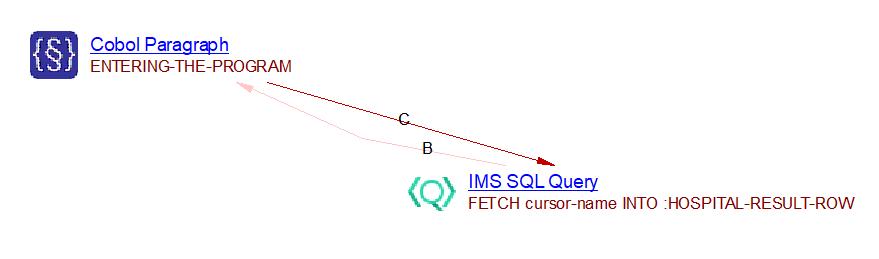
For each embedded IMS SQL statement found in Cobol, an object called IMS SQL Query is created. For example, the following code will cause this object type to be created:
ENTERING-THE-PROGRAM.
EXEC SQLIMS
FETCH cursor-name INTO :HOSPITAL-RESULT-ROW
END-EXEC
Add links from “IMS SQL Query” to “IMS Segment” 1.4
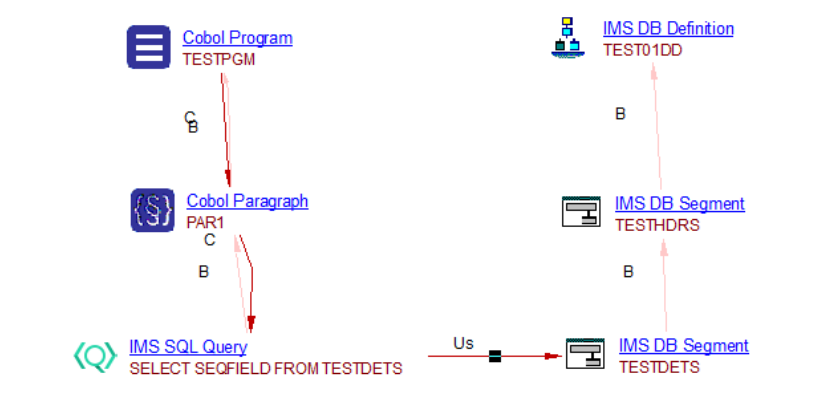
CICS
No version-specific result notes are documented for this area in this version.
IBM MQ
Support for IBM MQSeries
The Mainframe Analyzer supports the publisher/subscriber mode and point-to-point mode for IBM MQSeries. Publisher/Subscriber objects will be generated and Call links between Cobol objects and IBM MQ objects and between IBM MQ objects and Cobol objects will be generated by the Web Services Linker extension - you must ensure that v. ≥ 1.6.8 of this extension is installed, otherwise no links will be generated.
Main supported patterns
Point-to-point: MOVE MQOT-Q TO MQOD-OBJECTTYPE
In point-to-point, message producers are called senders and message consumers are called receivers. Senders produce messages to a queue, and receivers asynchronously consume messages from that queue. For point-to-point to work, connected applications need to know the name of the queue through which they interact. A queue could have a single receiver or be scaled to many, in which case each message is only consumed by one receiver, distributing the workload across them all. This style of messaging is built around the concept of message queues, and around the processing of messages by a single consumer.
Publisher/Subscriber: MOVE MQOT-TOPIC-Q TO MQOD-OBJECTTYPE
The producer of a message is known as a publisher and message consumers are known as subscribers. The publishing and subscribing applications within the infrastructure agree on the name of a topic. For a consumer to signal that they want to receive messages on that topic, they create a subscription to it. Any message published to a topic will be delivered to all the subscriptions, so every subscriber gets a copy. There could be many publishers and many subscribers to each topic, MQ handles the delivery of messages between all of them. For example:
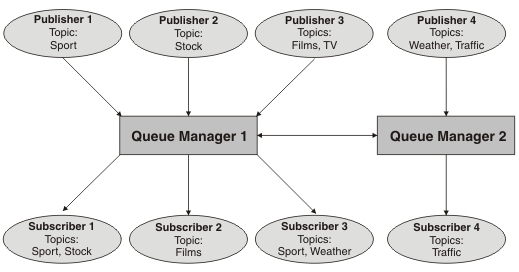
Support for links between different technologies
The Web Services Linker extension will take all IBM MQ publisher and IBM MQ subscriber (of all technologies). Then it will check if they have the same:
- queue manager connection.
- queue name
- at least one topic from the topic list.
For example:
- Publisher TOTO publishes the topics (A, B, C)
- Subscriber TOTO subscribes to the topics (A, D, E) with the same queue manager so in this case a link between publisher and subscriber is created.
API support
The Mainframe Analyzer supports MQI calls and dynamic calling of IBM MQ, see: https://www.ibm.com/docs/en/ibm-mq/8.0?topic=zos-dynamically-calling-mq-stub .
- Batch environment:
- CONNECT: CSQBCONN, CSQBCONNX
- OPEN: CSQBOPEN
- GET: CSQBGET, CSQBSUB
- PUT: CSQBPUT, CSQBPUT1
- CICS environment:
- CONNECT: CSQCCONN, CSQCCONNX
- OPEN: CSQCOPEN
- GET: CSQCGET, CSQCSUB
- PUT: CSQCPUT, CSQCPUT1
- IMS environment:
- CONNECT: MQCONN, MQCONNX
- OPEN: MQOPEN
- GET: MQGET, MQSUB
- PUT: MQPUT, MQPUT1
Automatic support of CMQODV copy book IBM MQ
IBM provides some default .cpy files for object queue name variables, topic name variables or queue manager name variables and sometimes these copybooks are not included in source code deliveries. Note that the file CMQODV is automatically supported.
Example basic Publisher/Subscriber
Publish a topic:
01 OBJECT-DESCRIPTOR.
    COPY CMQODV.
MOVE MQOT-TOPIC TO MQOD-OBJECTTYPE.
MOVE MQOD-VERSION-4 TO MQOD-VERSION.
MOVE ‘Fruit/Vegetal’ TO TARGET-TOPIC.
SET MQOD-OBJECTSTRING-VSPTR TO ADDRESS OF TARGET-TOPIC.
MOVE 18 TO MQOD-OBJECTSTRING-VSLENGTH.
...
DD MQOO-OUTPUT
        MQOO-FAIL-IF-QUIESCING GIVING OPTIONS.

CALL 'MQOPEN' USING HCONN,
              OBJECT-DESCRIPTOR,
              OPTIONS,
              Q-HANDLE,
              MQCC,
              REASON.

CALL 'MQPUT' USING HCONN,
            Q-HANDLE,
            MESSAGE-DESCRIPTOR,
            PMOPTIONS,
            BUFFER-LENGTH,
            BUFFER,
            MQCC,
            REASON.
Subscribe to a topic:
01 SUB-DESCRIPTOR.
    COPY CMQSDV.
ADD MQSO-CREATE MQSO-MANAGED MQSO-FAIL-IF-QUIESCING
                                    GIVING MQSD-OPTIONS.
MOVE ‘Vegetal/Meal’ TO TARGET-TOPIC.
SET MQSD-OBJECTSTRING-VSPTR TO ADDRESS OF TARGET-TOPIC.
MOVE 18 TO MQSD-OBJECTSTRING-VSLENGTH.
...
CALL 'MQSUB' USING HCONN,
            SUB-DESCRIPTOR,
            Q-HANDLE,
            SUB-HANDLE,
            MQCC,
            REASON.

CALL 'MQGET' USING HCONN,
            Q-HANDLE,
            MESSAGE-DESCRIPTOR,
            GMOPTIONS,
            BUFFER-LENGTH,
            BUFFER,
            DATA-LENGTH,
            MQCC,
            REASON.
Result in CAST Enlighten:
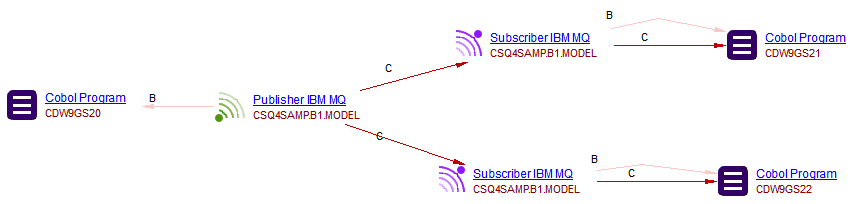
Some main properties are available:
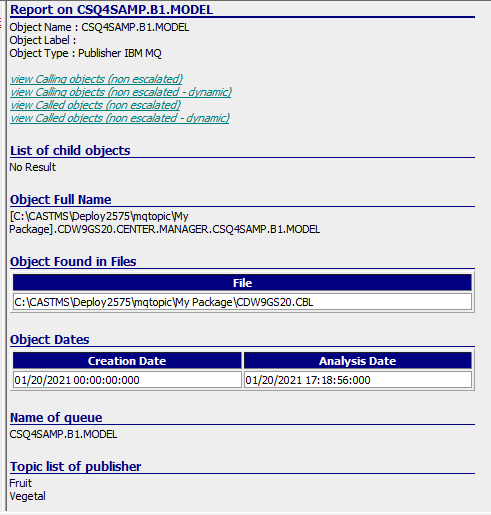
Request/Reply method
The Request/Reply is described by IBM here: https://www.ibm.com/docs/en/was/8.5.5?topic=server-request-reply-messaging-using-websphere-mq. Just as in the send-and-forget pattern sample, this request/reply sample contains two programs. The first one sends a request message to a queue (the REQUEST queue) and waits for a response in another queue (the REPLY queue). The second program acts as the replier and it starts reading messages from a queue (the REQUEST queue). Whenever a message is put onto that queue, it sends a generic response to the REPLY queue.
Example:
Definition of REQUEST/REPLY Queue name
049833 01 WS-MQ-FIELDS.
049834 03 WS-PGM1 PIC X(8) VALUE SPACES.
049835 03 WS-MQ-HCONN PIC S9(9) BINARY.
049836 03 WS-OPEN-OPTIONS PIC S9(9) BINARY.
049837 03 WS-MQ-HOBJ PIC S9(9) BINARY.
049838 03 WS-MQ-RC PIC S9(9) BINARY.
049839 03 WS-MQ-RC-DISPLAY PIC 9(18).
049840 03 WS-MQ-REASON PIC S9(9) BINARY.
049850 03 WS-MQ-REASON-DISPLAY PIC 9(18).
049900 03 WS-QUEUE-MANAGER PIC X(48) VALUE 'MGT0'.
049900 03 WS-QUEUE-MANAGER PIC X(48) VALUE 'MGP0'.
050000 03 WS-REQUEST-QUEUE-NAME PIC X(48) VALUE
050100 'TE.CDS.REQUEST'.
050200 03 WS-REPLY-QUEUE-NAME PIC X(48) VALUE
050300 'TE.CDS.REPLY'.
The Cobol program (publisher) OPENS the REQUEST queue and PUT the message:
236500 3330-MQ-PUT-PROCESS.
236600*
236700* THIS PARA PERFORMS THE REQUEST QUEUE CONNECTION AND ALSO THE
236800* DATA FROM THE TECMQSTU COPYBOOK TO THE CDS.
236900*
237000
237100     PERFORM 3331-OPEN-REQUEST-QUEUE
237200        THRU 3331-EXIT
237300
237400     PERFORM 3332-PUT-MESSAGE
237500        THRU 3332-EXIT
237600
237700     PERFORM 9100-CLOSE-REQUEST-QUEUE
237800        THRU 9100-EXIT.
237900
238000 3330-EXIT.
238100     EXIT.
238200
238300 3331-OPEN-REQUEST-QUEUE.
...
241000     MOVE  WS-REQUEST-QUEUE-NAME      TO TEMQPUT-REPLYTO-QUEUE
...
241900     MOVE TEMQPUT-REPLYTO-QUEUE       TO MQOD-OBJECTNAME OF
242000                                         MQM-OBJECT-DESCRIPTOR
...
241000     MOVE  WS-REQUEST-QUEUE-NAME      TO TEMQPUT-REPLYTO-QUEUE
...
241900     MOVE TEMQPUT-REPLYTO-QUEUE       TO MQOD-OBJECTNAME OF
242000                                         MQM-OBJECT-DESCRIPTOR
...
246200 3332-PUT-MESSAGE.
246300*
246400* THIS PARA PUTS THE MESSAGE INTO THE REQUEST QUEUE.
246500*
...
247900     MOVE TEMQPUT-REPLYTO-QUEUE       TO MQMD-REPLYTOQ OF
248000                                         MQM-MESSAGE-DESCRIPTOR
248100     MOVE TEMQPUT-REPLYTO-QMGR        TO MQMD-REPLYTOQMGR OF
248200                                         MQM-MESSAGE-DESCRIPTOR
...
249900     CALL 'MQPUT'        USING TEMQPUT-HCONN
250000                               TEMQPUT-HOBJ
250100                               MQMD OF MQM-MESSAGE-DESCRIPTOR
250200                               MQPMO OF PM-OPTIONS-O
250300                               TEMQPUT-PUT-DATA-SIZE
250400                               TEMQPUT-PUT-DATA
250500                               WS-MQ-RC
250600                               WS-MQ-REASON
The Cobol Program (subscriber) tries to get the reponse from the request (PUT). Then the response message could be resent to the publisher by REPLY Queue:
GET behavior from REQUEST Queue
252700 3340-MQ-GET-PROCESS.
252800*
252900* THIS PARA PERFORMS THE REPLY QUEUE CONNECTION AND ALSO GETS THE
253000* REPLY MESSAGE FROM THE CDS IN TECMQSTU COPYBOOK.
253100*
253200
253300     PERFORM 3341-OPEN-REPLY-QUEUE
253400        THRU 3341-EXIT
253500
253520     DISPLAY '=> MQGET CORREL ID => ' WS-MSGID
253600     PERFORM 3342-GET-MESSAGE
253700        THRU 3342-EXIT UNTIL WS-END-OF-PROCESSING
253800
253900     PERFORM 9200-CLOSE-REPLY-QUEUE
254000        THRU 9200-EXIT.
254100
254200 3340-EXIT.
254300     EXIT.
254400
254500 3341-OPEN-REPLY-QUEUE.
...
257200     MOVE  WS-REPLY-QUEUE-NAME        TO MQOD-OBJECTNAME OF
257300                                         MQM-OBJECT-DESCRIPTOR
Supported behavior
The Mainframe Analyzer supports the main REQUEST queue, however publisher and subscriber items defined by the REPLY queue will not be created by the analyzer.
Limitations
- When complex situations arise (i.e. due to the use of if_else, evaluate, when etc.), results may be ambiguous and potentially erroneous.
- If the queue names do not detect the request and reply queues, the analyzer cannot correctly detect the REQUEST Publisher/Subscriber queue name. Note that the analyzer attempts to detect items using REQUEST/REPLY keywords and if none are found, all publisher/subscribers are created (no REPLY publishers/subscribers are removed).
Unknown publisher/Unknown subscriber
When the analyzer cannot find the correct resolution between objects, the unknown publisher and unknown subscriber objects will be created, including the ID of the item. Note however that no links are created between unknown publisher and unknown subscriber objects.

IBM MQ objects
MQ Publisher and MQ Subscriber objects are created by the Mainframe Analyzer:
|
Subscriber IBM MQ |
 |
Publisher IBM MQ |

Links
Call links will be generated by the Web Services Linker extension - you must ensure that v. ≥ 1.6.8 of this extension is installed, otherwise no links will be generated:
- between Cobol objects and IBM MQ objects
- between IBM MQ objects and Cobol objects
Cross-technologies enhancements
Links between JCL and JEE technologies
The Mainframe Analyzer extension supports links from JCL Steps to Java Methods through the creation of a JCL_To_JavaProgram object. The JCL_To_JavaProgram object is created when the following utilities are detected in the code:
- JVMLDM
- JZOSVM
- BPXBATCH
- BPXBATSL
Example code with the JVMLDM utility:
//LMGHWRLD JOB (MY,ACCOUNTING,INFO),'HELLO WORLD',
//   CLASS=A,MSGCLASS=H,REGION=0M,NOTIFY=&SYSUID
//STEP1    EXEC PGM=JVMLDM60,
//   PARM='com.foo.bar.HelloWorld'
//STEPLIB  DD DSN=<MY.LIBRARY.PATH>,DISP=SHR
//SYSPRINT DD SYSOUT=*
//SYSOUT   DD SYSOUT=*
//STDOUT   DD SYSOUT=*
//STDERR   DD SYSOUT=*
//STDENV   DD *
. /etc/profile
. ~/.profile
export CLASSPATH=~/HelloWorld
for i in ~/HelloWorld/*.jar; do
    export CLASSPATH=$i:$CLASSPATH
    done
//
Result:
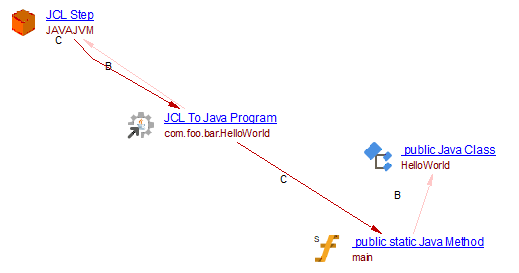
Object sharing
It is possible to create links between objects belonging to different jobs but it is not possible to share objects between these jobs. This means that if a source file is analyzed several times in different Analysis Units, then several instances of objects will be created in the CAST Analysis Service. In addition, copybooks referenced by programs via Working Folders in different analysis jobs will be duplicated in the CAST Analysis Service.
Sensitive data in Mainframe Analyzer
Supported in the Mainframe Analyzer extension ≥ 1.0.10-funcrel. The Mainframe Sensitive Data extension is required. Some dataset and IMS Segment will raise an indicator property if these are a sensitive data.
Unknown / unresolved objects
An unknown unresolved object generally means that there is a missing component, directly or not. Usually unknown/unresolved objects are listed in the analysis log with a “Mainframe.09” warning message:
Warning MODULMSG ; Job execution Mainframe.09: Cannot resolve Entry or program
It is important to distinguish objects which have associated source files from the other objects which do not have a source file.
For instance, a program, a copybook, a screen map, a JCL job or a JCL procedure all have an associated source file. If they are involved in a analysis message which indicates they are unresolved, then you can immediately assume they are missing. On the contrary, data structures, paragraphs, and DD Names do not have a source file. Instead they are defined in a program or in a copybook.
So why is the analyzer not able to find a component? Because it has not been delivered or because the analyzer does not have any information about its location (source file directories or working folders). In the first case you must ask the application team to deliver it. You will find the complete list of missing components at the end of the analysis log. In the second case you must modify the parameters of the analysis unit.
You can also see missing components using the CAST Enlighten tool. The unknown / unresolved objects are classified in “Unknown” folders and you can easily find them with the Object Browser.
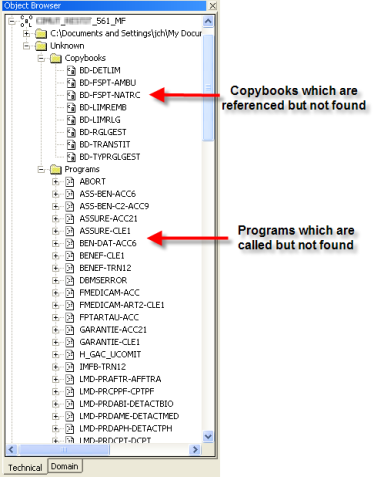
There are technical/system/utility programs which are called by application programs and JCL jobs. The Mainframe Analyzer can also produce “Unresolved objects” messages about them. Their name usually begins with the “DFH”, “DSN”, “IKJ”, “DFS” or “IEB” prefixes. The “DFH” programs are dedicated to CICS, the “DSN” and “IKJ” programs are usually dedicated to DB2 and the “DFS” programs are dedicated to IMS. The JCL job can also invoke utilities such as the IEB family, IEF family or IDCAMS, FILE-AID… Do not ask the application team to deliver them because they do not have the corresponding source files. If they are used to run another program in a JCL job then you should change the analysis parameters. Otherwise, you can ignore the messages.
Note that Unknown Cobol copybooks are classed as external objects for transaction configuration purposes: external objects are not transferred to the Dashboard schema unless the object is an associated value of a violation, therefore AEP enhancement transaction details will not show these objects if they are not associated to a violation (because AEP enhancement values only reflect objects that exist in the Dashboard schema).
Specific information about rule results
Avoid using ALTER (5062)
The rule Avoid using ALTER (5062) is designed to trigger a violation when an ALTER statement is used in a COBOL program. However, when a COBOL copybook is referenced in a COBOL program and the copybook itself contains an ALTER statement, CAST will create a violation on the COBOL program, even though the COBOL program itself does not contain the ALTER statement.
This behaviour may create violations where you were not expecting them.
Analysis messages
The following log messages can be reported by the Mainframe Analyzer during source analysis.
Mainframe.01
| Identifier | Mainframe.01 |
| Message | A potential recursive copybook ‘<COPYBOOK_NAME>’ inclusion has been found. |
| Severity | Warning |
| Explanation | The COBOL analyzer detected a potential recursive copybook inclusion (COPY directive) in the source code. Meaning that a copybook A refers to a copybook B that refers to copybook A. |
| User Action | Check if the copybooks involved in the recursive reference are the expected source files. If not, then replace them by the proper files or remove the file that creates the recursive reference. |
Mainframe.02
| Identifier | Mainframe.02 |
| Message | Cannot resolve Copybook . |
| Severity | Warning |
| Explanation | A copybook is referenced (COPY directive) in the source code but cannot be found by the analyzer. This can occurs when source files have not been delivered or when the source files are not accessible by the analyzer. |
| User Action | Select the object <COPYBOOK_NAME> in the list of objects in the Unknown\Copybooks folder of the technical browser in CAST Enlighten to see where it is referenced. If this is an application specific copybook, then it is recommended to ask the application team for it. This could affect reference resolution and any diagnostic rules you might want around data components. You will find the complete list of missing source elements at the end of the analysis log. |
Mainframe.03
| Identifier | Mainframe.03 |
| Message | Ambiguous resolution of <OBJECT_TYPE> '<OBJECT_NAME>'. |
| Severity | Warning |
| Explanation | The analyzer found a source file or an
object with a name containing characters like '[', ']', '(', or ')'.
These characters are removed leading to duplicate names. This message
can be also generated when the analysis option "Platform: IBM z/OS" is
set to true and the source code comes from another platform that allows
using long names. In that case, names are truncated to 8 characters
leading to duplicated names. |
| User Action | Check the source files and the analysis options. |
Mainframe.04
| Identifier | Mainframe.04 |
| Message | The picture <PICTURE> may not be analysed properly. |
| Severity | Warning |
| Explanation | The COBOL analyzer is not able to parse a variable picture correctly. This can affect quality rules related to data handling. |
| User Action | Check the source code containing the variable declaration. If the picture is correct, then please contact the CAST support . |
Mainframe.05
| Identifier | Mainframe.05 |
| Message | Cannot resolve included file '<INCLUDE_NAME>'. |
| Severity | Warning |
| Explanation | A copybook is referenced (INCLUDE directive) in the source code but cannot be found by the analyzer. This can occurs when source files have not been delivered or when the source files are not accessible by the analyzer. |
| User Action | Select the object in the list of objects in the Unknown\Copybooks folder of the technical browser in CAST Enlighten to see where it is referenced. If this is an application specific copybook, then it is recommended to ask the application team for it. This could affect reference resolution and any quality rules you might want around data components. You will find the complete list of missing source elements at the end of the analysis log. |
Mainframe.06
| Identifier | Mainframe.06 |
| Message | Unclosed string is found. |
| Severity | Warning |
| Explanation | An alphanumeric literal has been found in the source code but the COBOL analyzer is not able to the end of the string. |
| User Action | Open the source file. Check if it contains
COBOL code. |
Mainframe.07
| Identifier | Mainframe.07 |
| Message | The file ‘<FILE_NAME>’ contains invalid ‘0’ characters replaced by ‘#’. |
| Severity | Information |
| Explanation | A binary character has been find in the source code and replaced by a text character. |
| User Action | No action to perform. The binary character has been replaced automatically by an ASCII character. |
Mainframe.08
| Identifier | Mainframe.08 |
| Message | The advanced user configuration file is not found at specified location. As a consequence, JCL files could not be analyzed. Please check the analysis options: |
| Severity | Error |
| Explanation | The “AdvancedJCL.xml” file has not been found in the folder specified in the analysis settings. This prevents the analyzer to parse JCL source files. |
| User Action | Review the Mainframe technology “Platform settings” to specify the correct location of the AdvancedJCL.xml file and restart the analysis. |
Mainframe.09
| Identifier | Mainframe.09 |
| Message | Cannot resolve <OBJECT_TYPE> '<OBJECT_NAME>'. |
| Severity | Warning |
| Explanation | The analyzer encountered a reference to a source code element (for example: a COBOL program, a JCL procedure, a CICS map, a CICS Transient Data item etc.…) but cannot find this item in the analysis folder. |
| User Action | Select the object <OBJECT_NAME> in the list of objects in the Unknown\<OBJECT_TYPE> folder of the technical browser in CAST Enlighten to see where it is referenced. If this is an application specific element, then it is recommended to ask the application team for it. It can affect any quality rules. If the object is a program, it can be called through its PROGRAM-ID name (this is the most frequent case) which is different from its source file name. In this case you must search for it by using a GREP tool. If the message is about a reference to a DD name, then check if there is a JCL step calling the program and defining a DD card with the same DD name. If there is no such JCL element and if there is a supported batch part, then ask the application team for it. Note that the resolution of this type of links is not supported in case the program for which the message has been emitted is a subprogram and you can ignore that message. If the program is a main batch program and there is a JCL step that calls it, then please contact the CAST Support. You will find the complete list of missing source elements at the end of the analysis log. |
Mainframe.10
| Identifier | Mainframe.10 |
| Message | Potential comment is found. |
| Severity | Warning |
| Explanation | The analyzer detected a potential comment line in the COBOL source code. This can be the consequence of an improper indicator area column and the ‘*’ character has not been found at the expected location. |
| User Action | Check the source code and the “Column of the Indicator area” analysis option. You can also check if the corresponding line of code comes from a copybook. In that case, change the indentation of the copybook lines to match the indicator area specified in the analysis option. |
Mainframe.11
| Identifier | Mainframe.11 |
| Message | Reference not found for DSN clause in DD card. |
| Severity | Warning |
| Explanation | The JCL analyzer found a DD card referring to another DD card (its name contains a prefix corresponding to another step in the same job or in an external procedure) but is not able to find that DD card. |
| User Action | Check if the JCL code containing the referred DD card has been delivered and is part of the analysis scope. It could be the case for JCL external procedures. |
Mainframe.12
| Identifier | Mainframe.12 |
| Message | Analyzing <FILE_TYPE> <OBJECT_NAME> (<FILE_NO>/<FILE_NB>. |
| Severity | Information |
| Explanation | The Mainframe Analyzer started to analyze the file. It also displays the file number <FILE_NO> compare to the total number of files <FILE_NB> of type <FILE_TYPE> to be analyzed. |
| User Action | Nothing to do. |
Mainframe.13
| Identifier | Mainframe.13 |
| Message | Invalid option value : <ANALYSIS_OPTION>. |
| Severity | Error |
| Explanation | An analysis option has not been set correctly. This prevents to perform the analysis. |
| User Action | Review the analysis settings and restart the analysis. |
Mainframe.14
| Identifier | Mainframe.14 |
| Message | Potential mismatch between the program and the PSB ‘<PSB_NAME>’. The PCB number <NUMBER> has not been found. |
| Severity | Warning |
| Explanation | The number of PCBs in PSB and in COBOL program are different. This can lead to wrong links between COBOL code and IMS PCB. |
| User Action | Check the PCB list in the PSB and the parameters specified in the PROCEDURE division and the ENTRY DLITCBL or in the LINKAGE SECTION in the COBOL program. Both must have the same number of PCBs in the same order. |
Mainframe.15
| Identifier | Mainframe.15 |
| Message | Cannot analyse <LANGUAGE_ELEMENT> for the moment. |
| Severity | Information |
| Explanation | The COBOL analyzer does not support Object Oriented version of the COBOL programming language and no objects will be created from source code. |
| User Action | Remove corresponding source files from the
source files folder. |
Mainframe.16
| Identifier | Mainframe.16 |
| Message | A potential recursive INCLUDE ‘<INCLUDE_NAME>’ inclusion has been found. |
| Severity | Warning |
| Explanation | The COBOL analyzer detected a potential recursive copybook inclusion (INCLUDE directive) in the source code. Meaning that a copybook A refers to a copybook B that refers to copybook A. |
| User Action | Check if the copybooks involved in the recursive reference are the expected source files. If not, then replace them by the proper files or remove the file that creates the recursive reference. |
Mainframe.17
| Identifier | Mainframe.17 |
| Message | Ambiguous resolution for copybook ‘<INCLUDE_NAME>’ in the folders. |
| Severity | Warning |
| Explanation | The COBOL analyzer detected more than two copybooks with the same name when expanding. The first copybook will be selected. |
| User Action | Check why there are multiple copybooks with the same name in the project and verify if the selected copybook is correct in the Cobol file. |