Java Servlet - 1.0
Description
This extension supports the analysis of Java Servlets - classes that extend javax.servlet.http.HttpServlet or jakarta.servlet.http.HttpServlet to handle HTTP requests inside a servlet container (e.g. Tomcat, WebSphere, JBoss).
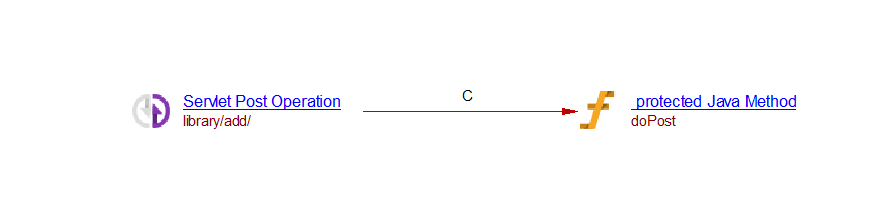
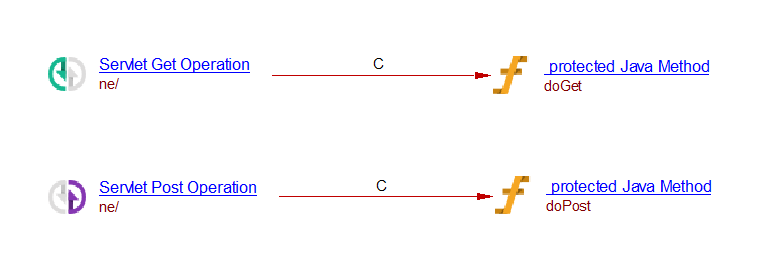
For each servlet found, the extension creates one operation object per HTTP method it exposes (GET, POST, PUT, DELETE, or ANY for servlets that override service() directly), linked to the servlet method that implements it. The URL exposed by an operation is resolved either from a web.xml deployment descriptor (<servlet> / <servlet-mapping>, Servlet 2.x/2.5) or from a @WebServlet annotation (Servlet 3.0+).
In what situation should you install this extension?
If your Java application implements HTTP servlets by extending HttpServlet, whether declared via a web.xml deployment descriptor or annotated with @WebServlet.
Technology support
| Servlet API | Supported |
|---|---|
| javax.servlet.http.HttpServlet | ✅ |
| jakarta.servlet.http.HttpServlet | ✅ |
| javax.servlet.annotation.WebServlet | ✅ |
| jakarta.servlet.annotation.WebServlet | ✅ |
web.xml <servlet> / <servlet-mapping> (Servlet 2.x/2.5) |
✅ |
Transactions
Transaction support is derived from metamodel concepts used to build CAST Imaging Blueprint and structural transaction flows. Entry Points start transactions; Exit Points include both output/boundary concepts and Data Entities manipulated by transactions.
| Role | Support | Breakdown |
|---|---|---|
| Entry Point | N/A | No data available |
| Exit Point | N/A | No data available |
ISO 5055 Structural Rules
Quality support is based on ISO 5055 structural rules available for the selected extension version.
| Reliability | Maintainability | Security | Performance Efficiency |
|---|---|---|---|
| N/A | N/A | N/A | N/A |
Dependencies
Some CAST extensions require the presence of other CAST extensions in order to function correctly. The Java Servlet extension requires the following CAST extensions to be installed:
- Universal Linker
- CAST AIP Internal Extension
- The Java Analyzer is required, but it is not a dependency, this extension will be automatically installed when Java source code is delivered for analysis.
Any dependent extensions are automatically downloaded and installed. You do not need to do anything.
Download and installation instructions
For Java applications using servlet libraries, the extension will be automatically installed. For upgrade, if the Extension Strategy is not set to Auto update, you can manually install the extension using UI.
What results can you expect?
Once the analysis/snapshot generation has completed, you can view the below objects and links created.
Objects
| Icon | Description | Comment |
|---|---|---|
 |
Servlet GET Operation | An object representing the HTTP GET operation exposed by a servlet (doGet) |
 |
Servlet POST Operation | An object representing the HTTP POST operation exposed by a servlet (doPost) |
 |
Servlet PUT Operation | An object representing the HTTP PUT operation exposed by a servlet (doPut) |
 |
Servlet DELETE Operation | An object representing the HTTP DELETE operation exposed by a servlet (doDelete) |
 |
Servlet ANY Operation | An object representing any HTTP method handled by a servlet that overrides service() directly |
Links
| Link Type | Source and Destination Link | Supported Methods |
|---|---|---|
| callLink | From a Servlet GET/POST/PUT/DELETE/ANY Operation to the servlet method that implements it | doGet doPost doPut doDelete service |
Code examples
All source code examples are taken from the source code available for download in sample.zip.
Servlet declared via web.xml (Servlet 2.x/2.5)
package com.example.servlets;

import java.io.IOException;
import javax.servlet.ServletException;
import javax.servlet.http.HttpServlet;
import javax.servlet.http.HttpServletRequest;
import javax.servlet.http.HttpServletResponse;

public class AdminNavigationEngine extends HttpServlet {

    @Override
    protected void doGet(HttpServletRequest request, HttpServletResponse response)
            throws ServletException, IOException {
        response.getWriter().write("Navigation data");
    }

    @Override
    protected void doPost(HttpServletRequest request, HttpServletResponse response)
            throws ServletException, IOException {
        // handle navigation update
    }
}
<web-app ...>
    <servlet>
        <servlet-name>FrontController</servlet-name>
        <servlet-class>com.example.servlets.AdminNavigationEngine</servlet-class>
    </servlet>
    <servlet-mapping>
        <servlet-name>FrontController</servlet-name>
        <url-pattern>/ne</url-pattern>
    </servlet-mapping>
</web-app>
Servlet declared via @WebServlet annotation (Servlet 3.0+)
package com.example.servlets;

import java.io.IOException;
import javax.servlet.ServletException;
import javax.servlet.annotation.WebServlet;
import javax.servlet.http.HttpServlet;
import javax.servlet.http.HttpServletRequest;
import javax.servlet.http.HttpServletResponse;

@WebServlet("/library/add")
public class AddLibrarian extends HttpServlet {

    @Override
    protected void doPost(HttpServletRequest request, HttpServletResponse response)
            throws ServletException, IOException {
        // handle librarian creation
    }
}