Easytrieve - 1.0
Description
If your Mainframe application contains Easytrieve Classic or Easytrieve Plus report generator source code and you want to view these object types and their links with other objects, then you should install this extension.
Download and installation instructions
The extension will be automatically downloaded and installed when any of the file types listed below are delivered in the source code. It can be managed through the Application → Extensions interface.
Supported file types
| Code type | Supported file extension | Required? | Comments |
|---|---|---|---|
| Easytrieve programs | *.ESY |
✅ | 1 program per file. |
| Easytrieve programs | *.EZT |
✅ | 1 program per file. Alternative file extension for Easytrieve Plus source code. |
| Easytrieve macro | *.MAC |
❌ | 1 macro per file. |
Transactions
Technology support
The following languages are supported:
| Language | versions | Supported | Comment |
|---|---|---|---|
| Easytrieve | all versions | ✅ | on z/OS and OS/390 |
| CA-Easytrieve Plus | all versions | ✅ | on z/OS and OS/390 |
| Easytrieve Report Generator | all versions | ✅ | on z/OS |
ISO 5055 Structural Rules
What results can you expect?
Objects
| Icon | Object Name | Comment |
|---|---|---|
 |
Easytrieve Call to Program | Created when a call to a program is not resolved or an external program |
 |
Easytrieve File | Equivalent to Cobol File Link in the Cobol Program |
 |
Easytrieve Macro | Standard Macro declaration |
 |
Easytrieve Procedure | Standard Procedure declaration |
 |
Easytrieve Program | Standard Program declaration |
 |
Easytrieve Report | Standard Report declaration |
 |
Easytrieve SQL Query | An object is created when we encounter EXEC SQL statement |
 |
Missing Schema | Parent of the missing tables and procedures, attached to the Easytrieve Project. |
 |
Missing Table | A table or a view selected/updated/deleted/inserted in an Easytrieve Query missing from the DDL file. |
 |
Missing Procedure | A procedure or a function called in an Eastrieve Query missing from the DDL file. |
Links
non-exhaustive list of links between Easytrieve objects
| link type | Caller type | Callee type | Comment |
|---|---|---|---|
callLink |
Easytrieve Program/Procedure | Easytrieve Procedure | Call to Procedure |
accessReadLink |
Easytrieve Program/Procedure | Easytrieve File | Read Easytrieve File |
accessWriteLink |
Easytrieve Program/Procedure | Easytrieve File | Write Easytrieve File |
includeLink |
Easytrieve Program | Easytrieve Macro | Include Macro |
callLink |
Easytrieve Program/Procedure | Easytrieve Call to Program |
Example of links between Easytrieve objects
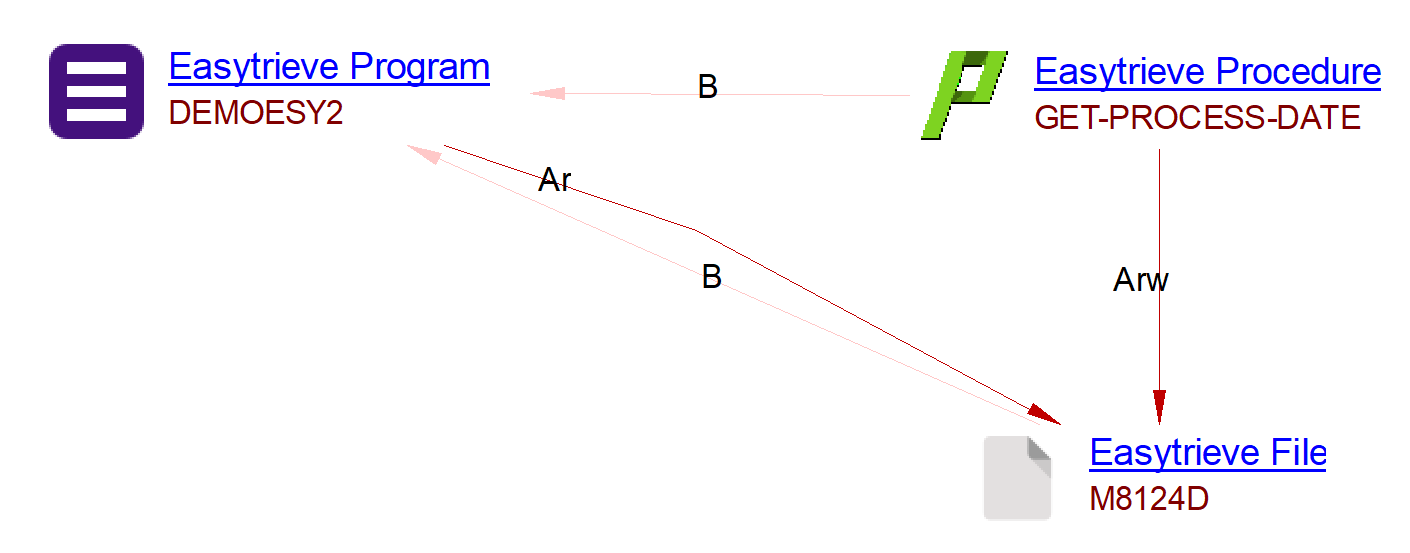
The above result are produced based on following code snippets in file DEMOESY2.ezt:
- The Easytrieve Program is created based on the file presence itself.
- The Easytrieve Procedure is created based on the following PROC statement.
- The Easytrieve File is created based on the following FILE statement.
- Access Read and Access Write links are created based on the following POINT and GET statements inside the Easytrieve Procedure.
- Access Read link is created based on the following JOB statement inside the Easytrieve Program.
...
*
FILE M8124D  VS (2446)
  M-KEY                             2   22  A
  M-001-DELETE-CODE                 1    1  A
  M-005-BANK-NUMBER                 2    2  N
  M-010-OBLIGOR-NUMBER              4   10  N
  M-012-APPLICATION-CODE           14    1  N
  M-015-OBLIGATION-NUMBER          15    6  P 0
  M-025-RECORD-CODE                21    3  N
...
 GET-PROCESS-DATE. PROC
      MOVE ' ' TO KEY-M-KEY
      POINT M8124D   GE KEY-M-KEY, STATUS
      IF EOF M8124D , OR FILE-STATUS (M8124D) NOT ZERO
             DISPLAY ' UNSUCCESSFUL START FOR OBLIGATION FILE ' +
                        KEY-M-KEY
         STOP
      END-IF
      GET   M8124D
      IF EOF M8124D , OR FILE-STATUS (M8124D) NOT ZERO
         DISPLAY ' UNSUCCESSFUL READ FOR OBLIGATION INTEGRITY RECORD ' +
                   KEY-M-KEY
         STOP
      END-IF
      DATE-OUT   =     M-DATE
      MOVE MM-OUT    TO MM-IN
      MOVE DD-OUT    TO DD-IN
      MOVE YY-OUT    TO YY-IN
      MOVE DATE-IN   TO PROC-DATE
 END-PROC
...
JOB INPUT M8124D START(START-OBLIGAT-PROC) FINISH(LAST-REC-PROC)
...

The above result are produced based on following code snippets in file DEMOBD2A.ezt:
- The Easytrieve Program is created based on the file presence itself.
- The Easytrieve Procedure is created based on the following PROC statement.
- The Easytrieve SQL Query is created based on the following SQL key word.
- Call Link between the Program and the Procedure is created based on the following PERFORM statement inside the Easytrieve Program.
- Call Link between the Procedure and the SQL Query is created based on the following SQL statement inside the Easytrieve Procedure.
List of links between Mainframe, SQL standard objects and Easytrieve objects
| link type | Caller type | Callee type | Comment |
|---|---|---|---|
matchLink |
COBOL Unknown Program | Easytrieve Program | wWen Unknown Program matches the name of an Easytrieve program |
callLink |
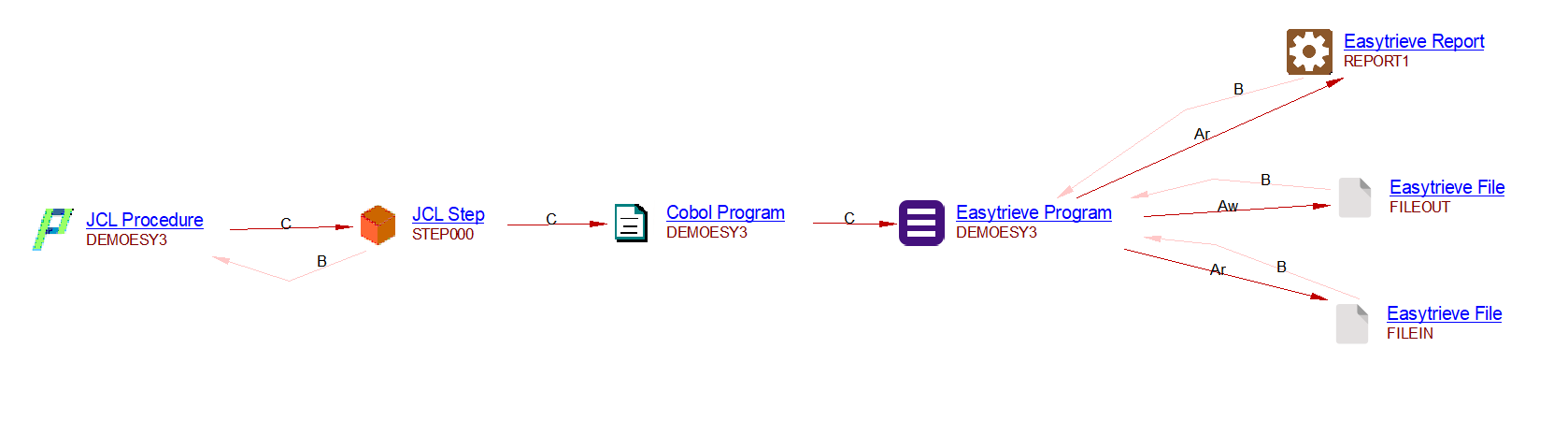
JCL Step | Easytrieve Program | Use of EZTPA00 to launch Easytrieve Programs (customisation of AdvancedJCL.xml) |
useLink |
Easytrieve Program/Procedure/Macro | SQL Table, SQL View, SQL Procedure | UA profile configured with ESQLSearchable category |
useLink |
Easytrieve Program/Procedure/Macro | SQL Table, SQL View, SQL Procedure | UA profile configured with ESQLSearchable category |
callLink |
Easytrieve Call to Program | any matching program (COBOL, Assembler, Rexx,…) | Program linking protocol by Universal Linker |
Example of links between Easytrieve and JCL objects
Quality rules
- None on Easytrieve language
- Quality rules computed by com.castsoftware.sql on Easytrieve SQL Query objects.