Cloud Configuration - 1.1
Description
This extension provides support for some cloud computing frameworks that are using configuration files for setting up AWS services:
- AWS CloudFormation
- AWS SAM
- Serverless Framework
- Terraform for AWS
In what situation should you install this extension?
If your application uses AWS CloudFormation, AWS SAM, Serverless Framework (for deploying AWS services), or Terraform for AWS.
Function Point, Quality and Sizing support
- Function Points (transactions): a green tick indicates that OMG Function Point counting and Transaction Risk Index are supported
- Quality and Sizing: a green tick indicates that CAST can measure size and that a minimum set of Quality Rules exist
| Function Points (transactions) | Quality and Sizing |
|---|---|
| ✅ | ❌ |
Files analyzed
The files with the following extensions are analyzed:
.json.yaml.yml.template.tf
What results can I expect?
Generic objects and links created
This section describes the objects, properties, and links that this extension creates in the CAST model. Each sub-section covers one AWS concept that is supported for at least one of the configuration tools; not every concept is supported for every tool. For the exact resources and syntax recognised by each tool, see the Detailed support per configuration tool section below.
Objects created
The following objects are created regardless of which deployment tool is used.
| Icon | Description |
|---|---|
 |
AWS Get API Gateway |
 |
AWS Post API Gateway |
 |
AWS Put API Gateway |
 |
AWS Delete API Gateway |
 |
AWS Any API Gateway |
|
AWS Post Request |
 |
AWS Lambda Function |
 |
Call to AWS Lambda Function |
 |
AWS Simple Queue Service Receiver |
 |
AWS SNS Subscriber |
 |
AWS Simple Queue Service Publisher |
 |
AWS SMS, AWS Email |
|
AWS SNS Publisher |
Lambda Function
An AWS Lambda Function object is created for each AWS Lambda defined in the configuration.
Link to the handler
The Lambda Function carries three properties that identify its handler:
CAST_AWS_WithHandler.runtime— the Lambda runtime (e.g.nodejs20.x,python3.12)CAST_AWS_WithHandler.handler— the raw handler value as written in the configuration (e.g.handler.computeorindex.handler)CAST_AWS_WithHandler.path_to_handler— a hint about the likely location of the handler source code; derived fromCodeUri(CloudFormation/SAM), the source directory (Serverless), or thefilename/archive_file(Terraform). Not set for Java or .NET runtimes, where the handler is a fully-qualified class name that is sufficient for locating the handler.
The link from the Lambda Function to the actual handler function is resolved by one of the following extensions depending on the runtime:
| Runtime | Extension |
|---|---|
| java | com.castsoftware.awsjava |
| dotnet | com.castsoftware.awsdotnet |
| python | com.castsoftware.python |
| nodejs | com.castsoftware.nodejs (.js handlers)com.castsoftware.typescript ( .ts handlers) |
Note: For Java and .NET runtimes the handler value is a fully-qualified class name, which is sufficient to locate the handler regardless of the deployment package structure. For all other runtimes (Python, Node.js, …) the handler source code is typically distributed as a ZIP file or via an S3 bucket. Even when the source code is present in the analysis, the configuration often only expose the path to the deployment package (e.g.
lambda.zip) rather than the path to the actual source files, causingpath_to_handlerto point to the wrong location and the link to the handler function to fail.
Lambda triggers
When configuring a lambda function, it is possible to set up automatic triggers. The following trigger types are supported as follow:
SQS queue — an SQS Receiver object is created and linked to the Lambda Function.
SNS topic — an SNS Subscriber object is created and linked to the Lambda Function.
API Gateway — an API Gateway object GET, POST, PUT, DELETE, or is created. The linking behaviour depends on how many API Gateway triggers the Lambda has:
| Number of API Gateways on the Lambda | Behaviour |
|---|---|
| Exactly 1 | A direct callLink is created from the API Gateway to the Lambda Function |
| 2 or more | CAST_AWS_WithHandler properties (handler, runtime, path_to_handler) are set on each API Gateway object so that the cross-technology linker (com.castsoftware.wbslinker) can resolve the link to the handler function |
S3 bucket — see S3 bucket events.
DynamoDB stream — no standalone trigger object is created. Instead, the
table name is stored as the CAST_AWS_Lambda.dynamodb_events property on the
Lambda Function. This property is then used by com.castsoftware.wbslinker to
create a callLink from any callable that carries a CRUD operation on that dynamodb table
to the lambda function.
SNS subscriptions
When an SNS topic has subscriptions, an SNS Subscriber object is created named as the topic. A callLink is drawn from the SNS Subscriber to a downstream object for each subscription:
| Protocol | Object created | Icon | Name of the object |
|---|---|---|---|
email |
AWS Email | |
an email (the email addresses are not evaluated) |
http / https |
AWS Post Request | |
the URL (evaluated from the endpoint) |
sqs |
AWS SQS Publisher | |
the name of the queue (evaluated from the endpoint) |
lambda |
AWS Lambda Call | |
the name of the lambda function (evaluated from the endpoint) |
sms |
AWS SMS | |
an SMS (the SMS numbers are not evaluated) |
Whenever the endpoint is an ARN, the ARN may be hardcoded:
- Protocol: sqs
  Endpoint: arn:aws:sqs:us-east-2:123456789012:my_queue_name
The name of the service (my_queue_name in this example) is extracted from
the ARN.
S3 bucket events
S3 bucket events can target a Lambda Function directly, an SQS queue, or an SNS topic. In all three cases no standalone trigger object is created; instead, the bucket name and event type are recorded on the target object and cross-technology linkers use the event type to create callLinks from the right S3 callers:
| S3 event_type | Matching link types |
|---|---|
| No event_type | all |
| ObjectCreated | useInsert |
| ObjectRemoved | useDelete |
| ObjectRestore | None |
| ReducedRedundancyLostObject | None |
| Replication | None |
In AWS, the event_type can be more specific by adding information after the semicolon. However, the analyzer does not consider this information. For instance, it will make no distinction between ObjectCreated:* and ObjectCreated:Put or ObjectCreated:Post event types. A Filter field can also be added to trigger the lambda only for some specific files. This is currently not supported and may lead to wrong links. The links from S3Bucket callers to the lambda object will be created only if the extension which created the S3 bucket is recent enough as described below.
Depending on the configured target:
- Lambda Function — the S3 event is stored as the
CAST_AWS_Lambda.s3_eventsproperty on the Lambda Function. No new object is created. - SQS queue — an SQS Publisher object is created for the referenced queue. The S3 bucket is recorded as the publisher’s source.
- SNS topic — an SNS Publisher object is created for the referenced topic. The S3 bucket is recorded as the publisher’s source.
Detailed support per configuration tool
CloudFormation
Cloudformation uses configuration files for setting up AWS architecture. The configuration files use yaml or json format. Most examples shown in this section are using the yaml format but json format is also supported. Resources are defined within the Resources section of the configuration files. Each resource is defined as follow:
Resources:
  NameOfTheResource:
    Type: AWS::ResourceIdentifier
    Properties:
       SomeProperty:
         #...
  NameOfOtherResource:
    #...
The resources of the following types are analyzed:
AWS::Lambda::Function
When analysing the following source code:
Resources:
  lambdaResourceName:
    Type: AWS::Lambda::Function
    Properties:
      FunctionName: lambdaName
      Handler: handler.compute
      Runtime: nodejs8.10
A Lambda Function object named lambdaName is created. See
Link to the handler for how the handler properties are handled.
If the property FunctionName is not provided, the name of the function
is by default the name of the resource (lambdaResourceName in this
example).
AWS::DynamoDB::Table, AWS::SQS::Queue, and AWS::S3::Bucket
These types of resources are used to set up some services. This extension analyses them to get the name of the services. For instance when analyzing the following:
Resources:
  SQSResourceName:
    Type: AWS::SQS::Queue
    Properties:
        QueueName: QueueName
        #...
the analyzer will find that any reference to the resource SQSResourceName will refer to the SQS Queue named QueueName. If no name is provided, the resource name is used.
AWS::SNS::Topic
This resource is used to set up an SNS topic with its subscription. When analyzing the following source code:
Resources:
 Queue:
   Type: AWS::SQS::Queue
   Properties:
      QueueName: my_queue_name
 LambdaFunction:
   Type: AWS::Lambda::Function
   Properties:
      FunctionName: my_lambda_name
      Handler: handler.compute
      Runtime: nodejs8.10
 MySNSTopic:
   Type: AWS::SNS::Topic
   Properties:
     Subscription:
       - Endpoint: cloudkatha@gmail.com
         Protocol: email
       - Endpoint: some_number
         Protocol: sms
       - Protocol: https
         Endpoint: foo/https
       - Protocol: http
         Endpoint: foo/http
       - Protocol: lambda
         Endpoint: !GetAtt LambdaFunction.Arn
       - Protocol: sqs
         Endpoint: !GetAtt Queue.Arn
     TopicName: my_topic_name
you will get the following result:
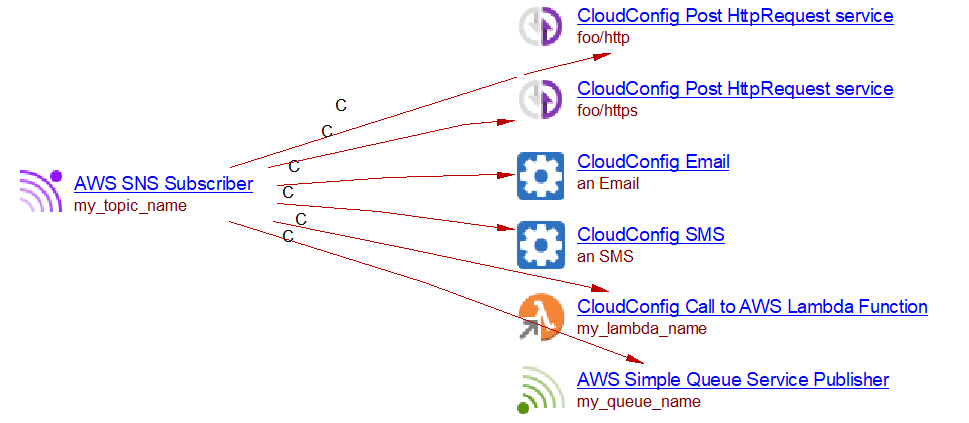
An SNS Subscriber object named my_topic_name is created. For the full list
of supported protocols and objects created, see
SNS subscriptions.
AWS::SNS::Subscription
The subscriptions to an SNS topic can be made inside an AWS::SNS::Subscription resource. When analyzing the following source code,
Resources:
  SnsTopic:
    Type: AWS::SNS::Topic
    Properties:
        TopicName: my_topic_name
  Queue:
    Type: AWS::SQS::Queue
    Properties:
      QueueName: my_queue_name
  SnsSubscription:
    Type: AWS::SNS::Subscription
    Properties:
      Protocol: sqs
      Endpoint: !GetAtt Queue.Arn
      Region: !Ref TopicRegion
      TopicArn: !GetAtt SnsTopic.Arn
you will get the following result:

The same endpoints as those for the AWS::SNS::Topic resource are supported.
AWS::Lambda::EventSourceMapping
CloudFormation allows setting up triggers for lambda functions using AWS::Lambda::EventSourceMapping. When these events occur, the lambda function will be executed. The supported events are DynamoDB and SQS and SNS. The analysis of the following source code:
Resources:
  DataResourceTable:
    Type: AWS::DynamoDB::Table
    Properties:
      TableName: my_table_name
      # ...

  SQSResourceName:
    Type: AWS::SQS::Queue
    Properties:
      QueueName: my_queue_name
      #...

  lambdaResourceName:
    Type: AWS::Lambda::Function
    Properties:
      FunctionName: my_lambda_name
      Handler: handler.compute
      Runtime: nodejs8.10

  SQSToLambdaEventSourceMapping:
    Type: AWS::Lambda::EventSourceMapping
    Properties:
      EventSourceArn: !GetAtt SQSResourceName.Arn
      FunctionName: !GetAtt lambdaResourceName.Arn
      #...

  DynamodbToLambdaEventSourceMapping:
    Type: AWS::Lambda::EventSourceMapping
    Properties:
      EventSourceArn: !GetAtt DataResourceTable.StreamArn
      FunctionName: !GetAtt lambdaResourceName.Arn
      #...
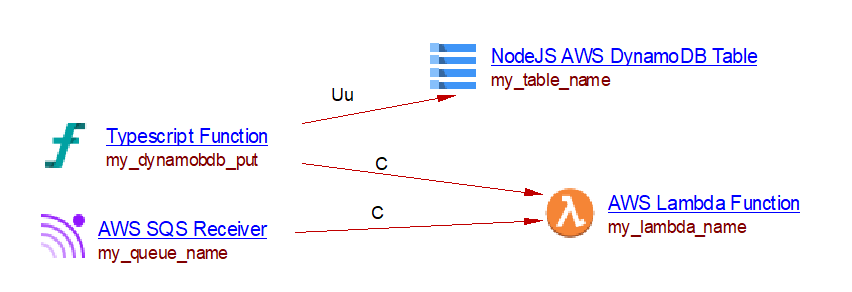
Lead to the following result (assuming that there is some TypeScript source code with a my_put function with a useUpdateLink to a my_table_name DynamoDB table):
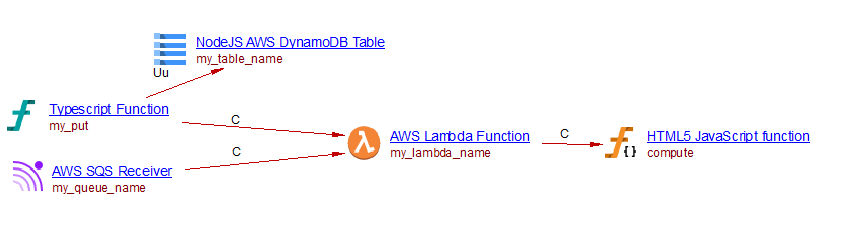
For an SQS event to Lambda, an SQS Receiver object is created with a direct callLink to the Lambda Function object.
Parameters
Some variables can be defined in the parameter section of the yaml file. When the name of a service is that of a parameter and a default value is given, the extension will create the service with that default value. For instance when analyzing the following source code, a lambda function named my_lambda_name is created.
Parameters:

  LambdaName:
    Type: String
    Default: my_lambda_name

Resources:
  lambdaResourceName:
    Type: AWS::Lambda::Function
    Properties:
      FunctionName: !Ref LambdaName
      Handler: handler.compute
      Runtime: nodejs8.10
Intrinsic functions
CloudFormation provides some intrinsic functions. Only the Join, GetAtt, and Ref functions are supported.
SAM (Serverless Application Model)
AWS SAM is an extension of AWS CloudFormation. All that is supported for CloudFormation is supported for SAM. It provides other Types for declaring resources. The following SAM resources are supported:
AWS::Serverless::Function
This resource allows defining a lambda function. It has an Events property which allows setting up some triggers for the lambda function. The supported events types are S3, DynamoDB, SNS, SQS, and HttpApi. When analyzing the following source code (in combination with some JavaScript and TypeScript source code which we do not display here):
Resources:
  MyLambdaResource:
    Type: 'AWS::Serverless::Function'
    Properties:
      FunctionName: my_lambda
      Handler: handler.compute
      Runtime: nodejs4.3
      Events:
        S3Event:
          Type: S3
          Properties:
            Bucket:
              Ref: S3Bucket
            Events:
              - s3:ObjectCreated:*
        Stream:
          Type: DynamoDB
          Properties:
            Stream: !GetAtt DynamoDBTable.StreamArn
            BatchSize: 100
            StartingPosition: TRIM_HORIZON
        SNSEvent:
          Type: SNS
          Properties:
            Topic:
              Ref: SNSTopic1
        MySQSEvent:
          Type: SQS
          Properties:
            Queue: !GetAtt MySqsQueue.Arn
            BatchSize: 10
        MyHttpEvent:
          Type: HttpApi
          Properties:
            ApiId: !Ref HttpApi
            Path: /foo/path
            Method: GET

  MySqsQueue:
    Type: AWS::SQS::Queue
    Properties:
      QueueName: my_queue_name

  DynamoDBTable:
    Type: AWS::DynamoDB::Table
    Properties:
      TableName: my_table_name

  S3Bucket:
    Type: AWS::S3::Bucket
    Properties:
      BucketName: my_bucket_name

  SNSTopic1:
    Type: 'AWS::SNS::Topic'
    Properties:
      TopicName: 'my_topic_name'
We get the following result:
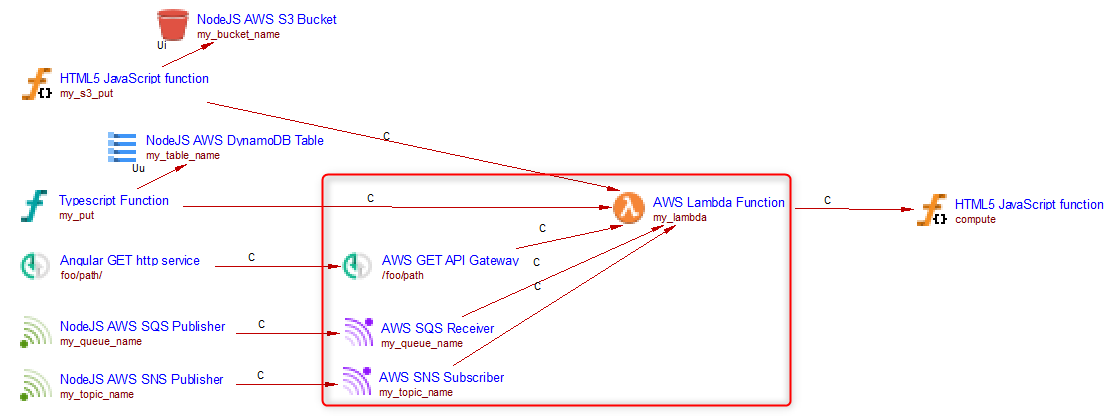
Only the objects in the red square are created when analyzing this source code with this extension. The SQS Receiver and SNS Subscriber objects are linked to the Lambda Function with a direct callLink. For API Gateway linking behaviour see Lambda triggers.
Support for S3 event
See Lambda triggers for the event type to link type mapping that applies to S3 triggers.
Support for DynamoDB event
The analyzer creates a call link to the lambda function object from all callables linked to the DynamoDB table define in the event.
Support for SNS, SQS and HttpApi events
For these triggers the following objects are created:
- SNS → an SNS Subscriber object, linked to the Lambda Function with a callLink
- SQS → an SQS Receiver object, linked to the Lambda Function with a callLink
- HttpApi → an API Gateway object
For API Gateway linking behaviour, see Lambda triggers.
Serverless Framework
Serverless framework can be used to build AWS applications. It provides its own way of defining lambda functions and their events. Other services can be created within the Resources section of the configuration files and using the CloudFormation nomenclature. The com.castsoftware.cloudformation extension analyzes anything which is inside the Resources section of a serverless framework configuration file as CloudFormation resources and will create objects as described in the CloudFormation section above.
Lambda support
The Lambda support is similar to that for SAM. When analyzing the following source code (in combination with some JavaScript and TypeScript source code which we do not display here).
service: irp-searchCompanies
provider:
  name: aws
  runtime: nodejs4.3
  profile: serverless #user profile used for sls deploy
  versionFunctions: false
  region: us-west-2

functions:
  my_lambda:
    handler: handler.compute
    events:
      - stream: arn:aws:dynamodb:region:XXXXXX:table/my_table_name/stream/1970-01-01T00:00:00.000
      - sns:
         arn:
          Fn::GetAtt:
            - SNSTopic1
            - Arn
      - http: GET foo/path
      - s3:
          bucket: my_bucket_name  #bucket name
          event: s3:ObjectCreated:*
          rules:
            - prefix: logs/ #folder inside a bucket
          existing: true #mark as true if bucket already exists
      - sqs:
          arn:
            Fn::GetAtt:
              - MyQueue
              - Arn

resources:
 Resources:
  SNSTopic1:
    Type: 'AWS::SNS::Topic'
    Properties:
      TopicName: 'my_topic_name'
  MyQueue:
    Type: "AWS::SQS::Queue"
    Properties:
      QueueName: "my_queue_name"
We get the following result:
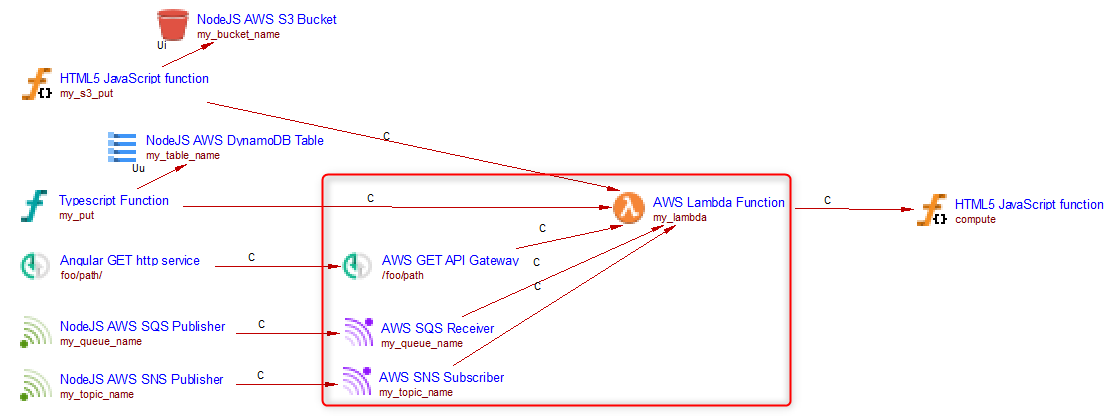
Only the objects in the red square are created when analyzing this
source code with this extension. The SQS Receiver and SNS Subscriber
objects are linked to the Lambda Function with a direct callLink. The
API Gateway (http: GET foo/path) is also linked with a direct callLink
because there is only one API Gateway trigger on this Lambda (see
Lambda triggers).
Terraform
This extension analyses Terraform .tf files (HashiCorp Configuration Language). Supported versions of Terraform are:
| Versions | Supported |
|---|---|
| < 0.12 | ❌ |
| 0.x > 0.12 | ✅ |
| 1.x | ✅ |
Resources are declared using resource blocks:
resource "aws_resource_type" "logical_name" {
  attribute = value
}
Cross-resource references use the syntax
aws_resource_type.logical_name.attribute (e.g.
aws_sqs_queue.my_queue.arn). The extension resolves these references
when building links between objects.
The resources of the following types are analyzed:
aws_lambda_function
resource "aws_lambda_function" "my_fn" {
  function_name = "my_lambda_name"
  handler       = "index.handler"
  runtime       = "nodejs20.x"
  filename      = "lambda.zip"
  source_code_hash = filebase64sha256("lambda.zip")
  role          = aws_iam_role.lambda_role.arn
}
A Lambda Function object named my_lambda_name is created. Handler
properties (handler, runtime, path_to_handler) are set as described in
Link to the handler.
The path_to_handler is derived from the filename attribute (the directory
of the .zip file, or the source_dir of a referenced archive_file data
source). Not set for Java or .NET runtimes.
If function_name is not provided the Terraform logical name (my_fn)
is used as the object name.
aws_sqs_queue
resource "aws_sqs_queue" "my_queue" {
  name = "my_queue_name"
}
The queue name is recorded and used to resolve references from event
source mappings and SNS subscriptions. If name is omitted the logical
name is used.
aws_sns_topic
resource "aws_sns_topic" "my_topic" {
  name = "my_topic_name"
}
The topic name is recorded and used to resolve references from SNS subscriptions.
aws_dynamodb_table
resource "aws_dynamodb_table" "my_table" {
  name           = "my_table_name"
  stream_enabled = true
  stream_view_type = "NEW_AND_OLD_IMAGES"
}
The table name (and its stream ARN) is recorded and used when an
aws_lambda_event_source_mapping references this table’s stream.
aws_s3_bucket
resource "aws_s3_bucket" "my_bucket" {
  bucket = "my_bucket_name"
}
The bucket name is recorded and used when an
aws_s3_bucket_notification links the bucket to a Lambda, SQS queue,
or SNS topic.
aws_api_gateway_rest_api and aws_api_gateway_resource / aws_api_gateway_method (API Gateway v1)
An API Gateway operation object (GET, POST, PUT, DELETE) is created for
each aws_api_gateway_integration that references a Lambda function via
uri. The path is resolved by walking the aws_api_gateway_resource
chain up to the root. The API Gateway object is linked to the Lambda
Function according to the single/multiple gateway rule described in
Lambda triggers.
For instance, when analyzing the following source code:
resource "aws_lambda_function" "queue_worker" {
  function_name = "queue_worker"
  handler       = "index.handler"
  runtime       = "nodejs20.x"
  filename      = "lambda.zip"
  source_code_hash = filebase64sha256("lambda.zip")
  role          = aws_iam_role.lambda_role.arn
}

resource "aws_api_gateway_rest_api" "orders_api" {
  name = "orders-api"
}

resource "aws_api_gateway_resource" "orders" {
  rest_api_id = aws_api_gateway_rest_api.orders_api.id
  parent_id   = aws_api_gateway_rest_api.orders_api.root_resource_id
  path_part   = "path/to/orders"
}

resource "aws_api_gateway_method" "get_orders" {
  rest_api_id   = aws_api_gateway_rest_api.orders_api.id
  resource_id   = aws_api_gateway_resource.orders.id
  http_method   = "GET"
  authorization = "NONE"
}

resource "aws_api_gateway_integration" "get_orders_integration" {
  rest_api_id = aws_api_gateway_rest_api.orders_api.id
  resource_id = aws_api_gateway_resource.orders.id
  http_method = aws_api_gateway_method.get_orders.http_method
  type        = "AWS_PROXY"
  uri         = aws_lambda_function.api_handler.invoke_arn
}
Assuming that the javascript handler function is present in the analysis, you will get the following result

aws_apigatewayv2_api and aws_apigatewayv2_route / aws_apigatewayv2_integration (API Gateway v2)
An API Gateway operation object is created for each aws_apigatewayv2_route whose
target resolves to an aws_apigatewayv2_integration that references
a Lambda function. The HTTP method and path are extracted from
route_key. The same single/multiple gateway linking rule applies as
described in Lambda triggers.
For instance, when analyzing the following source code:
resource "aws_apigatewayv2_api" "products_api" {
  name          = "products-api"
  protocol_type = "HTTP"
}

resource "aws_apigatewayv2_integration" "products_integration" {
  api_id             = aws_apigatewayv2_api.products_api.id
  integration_type   = "AWS_PROXY"
  integration_uri    = aws_lambda_function.api_handler.invoke_arn
}

resource "aws_apigatewayv2_route" "get_products" {
  api_id    = aws_apigatewayv2_api.products_api.id
  route_key = "GET /path/to/products"
  target    = "integrations/${aws_apigatewayv2_integration.products_integration.id}"
}

aws_lambda_event_source_mapping
This resource maps a DynamoDB stream or SQS queue as a trigger for a Lambda function.
- When
event_source_arnpoints to an SQS queue, an SQS Receiver object is created and linked to the Lambda Function with a direct callLink. - When
event_source_arnpoints to a DynamoDB table stream, a DynamoDB Trigger object is stored as a property on the Lambda Function (CAST_AWS_Lambda.dynamodb_events), as described in Lambda triggers.
For instance when analyzing the following source code:
resource "aws_lambda_function" "my_fn" {
  function_name = "my_lambda_name"
  handler       = "index.handler"
  runtime       = "nodejs20.x"
  filename      = "lambda.zip"
  source_code_hash = filebase64sha256("lambda.zip")
  role          = aws_iam_role.lambda_role.arn
}

resource "aws_sqs_queue" "my_queue" {
  name = "my_queue_name"
}

resource "aws_dynamodb_table" "my_table" {
  name           = "my_table_name"
  stream_enabled = true
  stream_view_type = "NEW_AND_OLD_IMAGES"
}

resource "aws_lambda_event_source_mapping" "sqs_to_lambda" {
  event_source_arn = aws_sqs_queue.my_queue.arn
  function_name    = aws_lambda_function.my_fn.arn
}

resource "aws_lambda_event_source_mapping" "dynamo_to_lambda" {
  event_source_arn = aws_dynamodb_table.my_table.stream_arn
  function_name    = aws_lambda_function.my_fn.arn
}
you will get the following result
aws_sns_topic_subscription
This resource subscribes an endpoint to an SNS topic. The following
protocols are supported: lambda, sqs, http, https, email,
email-json, and sms.
For all protocols, an SNS Subscriber object is created named after
the topic. The topic_arn can be either a resource reference
(aws_sns_topic.my_topic.arn) or a hardcoded ARN string; in the latter
case the topic name is extracted from the ARN. A callLink is drawn
from the SNS Subscriber to a downstream object whose type depends on
the protocol, as described in SNS subscriptions.
Protocol: lambda
The downstream object is an SNS Subscriber.
For instance, when analyzing the following source code
resource "aws_lambda_function" "my_fn" {
  function_name = "my_lambda_name"
  handler       = "index.handler"
  runtime       = "nodejs20.x"
  filename      = "lambda.zip"
  source_code_hash = filebase64sha256("lambda.zip")
  role          = aws_iam_role.lambda_role.arn
}

resource "aws_sns_topic" "my_topic" {
  name = "my_topic_name"
}

resource "aws_sns_topic_subscription" "sns_to_lambda" {
  topic_arn = aws_sns_topic.my_topic.arn
  protocol  = "lambda"
  endpoint  = aws_lambda_function.my_fn.arn
}
you will get the following result:

Protocol: sqs
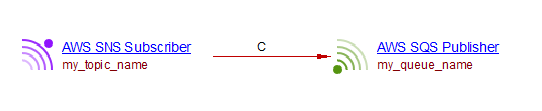
The downstream object is a SQS Publisher object (for the queue) named as the queue name.
For example, when analyzing the following source code:
resource "aws_sns_topic" "my_topic" {
  name = "my_topic_name"
}

resource "aws_sqs_queue" "my_queue" {
  name = "my_queue_name"
}

resource "aws_sns_topic_subscription" "sns_to_sqs" {
  topic_arn = aws_sns_topic.my_topic.arn
  protocol  = "sqs"
  endpoint  = aws_sqs_queue.my_queue.arn
}
you will get the following result:
Protocols: http and https
The downstream object is an AWS Post Request, named after the endpoint URL.
Its CAST_ResourceService.uri property is set to the URL.
Protocols: email and email-json
The downstream object is an AWS Email object named An Email. The actual email
addresses are not evaluated.
Protocol: sms
The downstream object is an AWS SMS object named An SMS is created. The actual phone
numbers are not evaluated.
aws_s3_bucket_notification
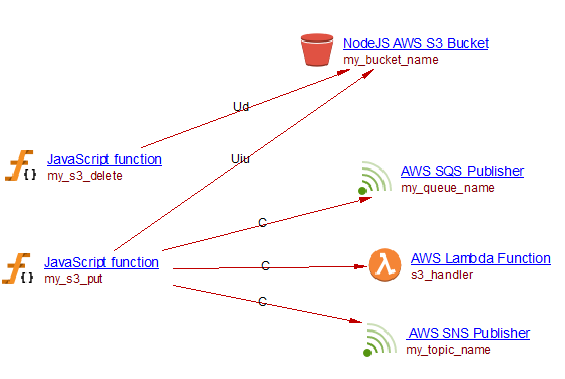
This resource configures event notifications on an S3 bucket. Three target types are supported: Lambda functions, SQS queues, and SNS topics.
- For each
lambda_functionblock, an S3 Event is stored as a property on the Lambda Function (CAST_AWS_Lambda.s3_events), as described in S3 bucket events. - For each
queueblock, an SQS Publisher object is created for the referenced SQS queue. The S3 bucket is recorded as the publisher’s source so that cross-technology links can be resolved, as described in S3 bucket events. - For each
topicblock, an SNS Publisher object is created for the referenced SNS topic. The S3 bucket is recorded as the publisher’s source, as described in S3 bucket events.
For instance, when analyzing the following source code:
resource "aws_s3_bucket" "my_bucket" {
  bucket = "my_bucket_name"
}

resource "aws_lambda_function" "s3_handler" {
  function_name = "s3_handler"
  handler       = "index.handler"
  runtime       = "nodejs20.x"
  filename      = "lambda.zip"
  source_code_hash = filebase64sha256("lambda.zip")
  role          = aws_iam_role.lambda_role.arn
}

resource "aws_sns_topic" "my_topic" {
  name = "my_topic_name"
}

resource "aws_sqs_queue" "my_queue" {
  name = "my_queue_name"
}

resource "aws_s3_bucket_notification" "bucket_events" {
  bucket = aws_s3_bucket.my_bucket.id

  lambda_function {
    lambda_function_arn = aws_lambda_function.s3_handler.arn
    events              = ["s3:ObjectCreated:*"]
  }

  queue {
    queue_arn = aws_sqs_queue.my_queue.arn
    events    = ["s3:ObjectCreated:*"]
  }

  topic {
    topic_arn = aws_sns_topic.my_topic.arn
    events    = ["s3:ObjectCreated:*"]
  }
}
you will get the following result
count and for_each meta-arguments
Terraform’s count and for_each meta-arguments allow a single
resource block to create multiple instances. The extension expands these
into individual named Lambda Function objects.
count
resource "aws_lambda_function" "worker" {
  count         = 2
  function_name = "worker-${count.index}"
  runtime       = "python3.11"
  handler       = "app_${count.index}.handler"
}
Two Lambda Function objects are created: worker-0 and worker-1,
with handlers app_0.handler and app_1.handler respectively. When
another resource references one of these functions with a bracket index
(e.g. aws_lambda_function.worker[0].arn), the reference is resolved
to the matching instance.
for_each with a map
resource "aws_lambda_function" "handlers" {
  for_each      = { handler_a = "dist/a/index.handler", handler_b = "dist/b/index.handler" }
  function_name = each.key
  handler       = each.value
  runtime       = "nodejs20.x"
  role          = aws_iam_role.lambda_role.arn
}
Two Lambda Function objects are created: handler_a and handler_b,
with handlers dist/a/index.handler and dist/b/index.handler
respectively. Both each.key and each.value are resolved per
instance.
If the
countvalue orfor_eachexpression cannot be resolved at analysis time (e.g. it references a Terraform variable with no default value), a single resource with the logical resource name is created as a fallback.
Minimal versions for proper linking
Many objects created by this extension may be linked with objects created by other extensions. However for these linkings to work, the minimal version required for these extensions is shown in the following table:
| runtime | extension | minimal version for link to handler | minimal version for link from object calling a S3 bucket to lambda function |
|---|---|---|---|
| java | com.castsoftware.awsjava | 1.2.0-alpha3 | 1.2.0-alpha2 |
| dotnet | com.castsoftware.awsdotnet | 1.0.0-alpha5 | 1.0.0-alpha4 |
| python | com.castsoftware.python | 1.4.0-beta7 | 1.4.0-beta4 |
| nodejs | com.castsoftware.nodejs | 2.7.0-beta3 (when the handler is written in .js) | 2.6.0-funcrel |
| nodejs | com.castsoftware.typescript | 1.9.0-alpha1 (when the handler is written in .ts) | 1.8.1-funcrel |
Known limitations
- Exports and imports are not supported
- Use of complex mapping key in YAML files is not supported and may lead to missing objects
- Custom resources are not supported in CloudFormation
- Filters in S3 event source for lambda are not supported and may lead to wrong links
- Inline source code for Lambda functions provided in CloudFormation or SAM configuration files is not supported:
      Code:
        ZipFile: |
          var aws = require('aws-sdk')
          var response = require('cfn-response')
          exports.handler = function(event, context) {
              //...
          }
- In Terraform, only
countvalues that resolve to integer literals or Terraform variables with a numericdefaultare expanded; dynamic expressions (e.g.length(var.list)) fall back to a single instance - In Terraform,
for_eachexpressions are expanded only when the value is atoset([...])call, an inline list["a","b"], or an inline map{ a = "x", b = "y" }; references to external variables or data sources fall back to a single instance