Amazon Web Services CDK V2 support for Node.js
Introduction
This section describes the support for the AWS CDK V2 framework. AWS CDK (Cloud Development Kit) is a framework that lets you define and provision AWS infrastructure.
WARNING: Note that no support is provided for AWS CDK V1.
Objects
| Icon | Description |
|---|---|
 |
NodeJS AWS Lambda Function |
 |
NodeJS Call to AWS Lambda Function |
 |
NodeJS Call to AWS Unknown Lambda Function |
 |
NodeJS AWS SNS Publisher |
 |
NodeJS AWS Unknown SNS Publisher |
 |
NodeJS AWS SNS Subscriber |
 |
NodeJS AWS Unknown SNS Subscriber |
|
NodeJS AWS SQS Publisher |
|
NodeJS AWS Unknown SQS Publisher |
|
NodeJS AWS SQS Receiver |
|
NodeJS AWS Unknown SQS Receiver |
|
NodeJS AWS Kinesis Producer |
|
NodeJS AWS Unknown Kinesis Producer |
|
NodeJS AWS Kinesis Consumer |
|
NodeJS AWS Unknown Kinesis Consumer |
|
NodeJS AWS Firehose Producer |
|
NodeJS AWS Unknown Firehose Producer |
|
NodeJS AWS Firehose Stream Delivery |
|
NodeJS AWS Unknown Firehose Stream Delivery |
 |
NodeJS AWS S3 Bucket |
 |
NodeJS AWS Unknown S3 Bucket |
 |
NodeJS Email |
|
NodeJS SMS |
 |
NodeJS Get HttpRequest service |
 |
NodeJS Post HttpRequest service |
|
AWS GET API Gateway |
 |
AWS PUT API Gateway |
|
AWS POST API Gateway |
 |
AWS DELETE API Gateway |
|
AWS PATCH API Gateway |
 |
AWS ANY API Gateway |
List of supported APIs
A partial support is provided for all the following APIs:
- aws-cdk-lib/aws-lambda.Function
- aws-cdk-lib/aws-lambda.SingletonFunction
- aws-cdk-lib/aws-lambda-nodejs.NodejsFunction
- aws-cdk-lib/aws-lambda-event-sources.SqsEventSource
- aws-cdk-lib/aws-lambda-event-sources.SnsEventSource
- aws-cdk-lib/aws-lambda-event-sources.S3EventSource
- aws-cdk-lib/aws-lambda-event-sources.S3EventSourceV2
- aws-cdk-lib/aws-lambda-event-sources.DynamoEventSource
- aws-cdk-lib/aws-lambda-event-sources.KinesisEventSource
- aws-cdk-lib/aws-lambda-event-sources.KinesisConsumerEventSource
- aws-cdk-lib/aws-apigateway.RestApi
- aws-cdk-lib/aws-apigateway.LambdaRestApi
- aws-cdk-lib/aws-apigatewayv2.HttpApi.addRoutes
- aws-cdk-lib/aws-sns.Topic.addSubscription
- aws-cdk-lib/aws-sns-subscriptions.LambdaSubscription
- aws-cdk-lib/aws-sns-subscriptions.UrlSubscription
- aws-cdk-lib/aws-sns-subscriptions.SqsSubscription
- aws-cdk-lib/aws-sns-subscriptions.EmailSubscription
- aws-cdk-lib/aws-sns-subscriptions.SmsSubscription
- aws-cdk-lib/aws-s3.Bucket.addEventNotification
- aws-cdk-lib/aws-s3-notifications.LambdaDestination
- aws-cdk-lib/aws-s3-notifications.SqsDestination
- aws-cdk-lib/aws-s3-notifications.SnsDestination
- aws-cdk-lib/aws-kinesis.Stream
- aws-cdk-lib/aws-kinesis.StreamConsumer
- aws-cdk-lib/aws-kinesisfirehose.DeliveryStream
Physical name of the AWS service instances
When setting up a service (such as a Lambda) with AWS CDK,
one can provide an explicit physical name for the instance of the service (for example, using functionName for a Lambda).
When an explicit physical name is provided, and the service type is supported, this analyzer creates an object whose name exactly matches the provided physical name.
Often, the physical name is not provided and is automatically generated by AWS based on:
- the construct ID passed to the service constructor;
- the stack name in which the service is defined;
- a hash/suffix that guarantees uniqueness.
In this case, for supported services, this extension creates a corresponding object named using the following pattern:
{StackName}-{ConstructID}-{}
The trailing ‘-{}’ represents the Hash value that cannot be predicted.
The {StackName} is inferred from:
- the
stackNameproperty provided in the StackProps during stack instantiation.
If stackName is not specified, then:
{StackName}defaults to the Stack ID (the second argument of the stack constructor).
In the following example, a Lambda function is created without providing an explicit physical name
(the functionName property is commented out).
Therefore, the generated Lambda physical name will be FooStack-LambdaConstructID-{}.
// lib/lambda-stack.js

const cdk = require('aws-cdk-lib');
const lambda = require('aws-cdk-lib/aws-lambda');

class LambdaStack extends cdk.Stack {
  constructor(scope, id, props) {
    super(scope, id, props);
    const fn = new lambda.Function(this, 'LambdaConstructID', {
      runtime: lambda.Runtime.NODEJS_18_X,
      handler: 'index.handler',
      code: mycode,
      //functionName: 'FooLambda'
    });

    this.mylambda_name = fn.functionName;
  }
}

module.exports = { LambdaStack };
// index.js

const cdk = require('aws-cdk-lib');
const { LambdaStack } = require('./lib/lambda-stack');

const app = new cdk.App();
new LambdaStack(app, 'StackId', {
  stackName: 'FooStack'
});
Lambda support
Supported APIs
A basic support for the following API is provided:
- aws-cdk-lib/aws-lambda.Function
- aws-cdk-lib/aws-lambda.SingletonFunction
- aws-cdk-lib/aws-lambda-nodejs.NodejsFunction
Detailed support for aws-lambda.Function and Lambda aws-lambda.SingletonFunction
When an instantiation of aws-cdk-lib/aws-lambda.Function or aws-cdk-lib/aws-lambda.SingletonFunction is found
in the analyzed source code, a NodeJS AWS Lambda Function object is created.
It has a properties storing the handler path and the runtime.
The linking from the lambda function to the handler function is then carried out by one
of the following extensions (depending on the runtime):
| Runtime | Extension |
|---|---|
| java | com.castsoftware.awsjava |
| dotnet | com.castsoftware.awsdotnet |
| python | com.castsoftware.python |
| node.js | com.castsoftware.nodejs (when the handler is written in .js)com.castsoftware.typescript (when the handler is written in .ts) |
Note that the link to the handler function only works when the code property is provided via lambda.Code.fromAsset
pointing to a directory, not to a pre-compressed ZIP file.
When analyzing the following source codes:
// lib/lambda-stack.js

const cdk = require('aws-cdk-lib');
const lambda = require('aws-cdk-lib/aws-lambda');

class LambdaLayerStack extends cdk.Stack {
  constructor(scope, id, props) {
    super(scope, id, props);

    const fn = new lambda.Function(this, 'LambdaConstructID', {
      runtime: lambda.Runtime.NODEJS_LATEST,
      code: lambda.Code.fromAsset('resources/lambda'),
      handler: 'index.handler',
      functionName: 'FooFunction',
    });
  }
}

module.exports = { LambdaLayerStack };
// resources/lambda/index.js

exports.handler = async (event) => {
  console.log('Received event:', JSON.stringify(event));
  return { statusCode: 200, body: 'OK' };
};
a NodeJS AWS Lambda Function object named FooFunction is created with link to the handler function
as shown in the following snippet:

Known limitations
- for node.js or python runtime, the link to the handler will be correctly created only when the code is provided through
lambda.Code.fromAsset. In other cases, this extension will try to find the best match but may not find the right handler or select a wrong handler; - for node.js or python runtime, the
lambda.Code.fromAssetshould not take a compressed file; - code provided using
lambda.Code.fromInlineis not analyzed.
Detailed support for aws-lambda-nodejs.NodejsFunction
When an instantiation of aws-cdk-lib/aws-lambda-nodejs.NodejsFunction is found in the analyzed source code,
a NodeJS AWS Lambda Function object is created. It has a properties storing the handler path and the runtime.
A link to the handler function is created.
For example, when analyzing the following source codes:
// lib/my-stack.js

const path = require('path');
const { Stack } = require('aws-cdk-lib');
const { NodejsFunction } = require('aws-cdk-lib/aws-lambda-nodejs');
const lambda = require('aws-cdk-lib/aws-lambda');

class MyStack extends Stack {
  constructor(scope, id, props) {
    super(scope, id, props);

    new NodejsFunction(this, 'MyFunction', {
      runtime: lambda.Runtime.NODEJS_18_X,
      entry: path.join(__dirname, '../lambda/handler.js'),
      handler: 'handler',
      functionName: 'FooPhysicalName'
    });
  }
}

module.exports = { MyStack };
// lambda/handler.js

exports.handler = async (event) => {
  console.log('Received event:', JSON.stringify(event));
  return { statusCode: 200, body: 'OK' };
};
a NodeJS AWS Lambda Function object named FooPhysicalName is created with link to the handler function
as shown in the following snippet:

Detailed support for aws-lambda-event-sources
Whenever the source code contains a call to the addEventSource API of an instance of a lambda Function
(either aws-cdk-lib/aws-lambda.Function or aws-cdk-lib/aws-lambda-nodejs.NodejsFunction),
the first argument of the addMethod API is checked.
A support is provided if that argument is an instance of one of the following EventSource:
- aws-cdk-lib/aws-lambda-event-sources.SqsEventSource
- aws-cdk-lib/aws-lambda-event-sources.SnsEventSource
- aws-cdk-lib/aws-lambda-event-sources.S3EventSource
- aws-cdk-lib/aws-lambda-event-sources.S3EventSourceV2
- aws-cdk-lib/aws-lambda-event-sources.DynamoEventSource
- aws-cdk-lib/aws-lambda-event-sources.KinesisEventSource
- aws-cdk-lib/aws-lambda-event-sources.KinesisConsumerEventSource
Detailed support for each EventSource is given in the following subsections.
SqsEventSource
When the call to the addEventSource API takes an instance of aws-cdk-lib/aws-lambda-event-sources.SqsEventSource,
a NodeJS AWS SQS Receiver or a NodeJS AWS Unknown SQS Receiver (if the evaluation of the queue name fails)
object is created with a callLink to the lambda.
For example, when analyzing the following source code:
const cdk = require('aws-cdk-lib');
const sqs = require('aws-cdk-lib/aws-sqs');
const lambda = require('aws-cdk-lib/aws-lambda');
const { SqsEventSource } = require('aws-cdk-lib/aws-lambda-event-sources');

class SqsLambdaStack extends cdk.Stack {
  constructor(scope, id, props) {
    super(scope, id, props);

    const fn = new lambda.Function(this, 'MyLambda', {
      runtime: lambda.Runtime.NODEJS_18_X,
      code: lambda.Code.fromAsset('resources/lambda'),
      handler: 'index.handler',
      functionName: 'FooFunction',
    });

    const queue = new sqs.Queue(this, 'MyQueue', {
      queueName: 'fooqueue',
    });
    fn.addEventSource(new SqsEventSource(queue));
  }
}
you will get the following result:

SnsEventSource
When the call to the addEventSource API takes an instance of aws-cdk-lib/aws-lambda-event-sources.SnsEventSource,
a NodeJS AWS SNS Subscriber or a NodeJS AWS Unknown SNS Subscriber (if the evaluation of the topic name fails)
object is created with a callLink to the lambda.
For example, when analyzing the following source code:
const cdk = require('aws-cdk-lib');
const sns = require('aws-cdk-lib/aws-sns');
const lambda = require('aws-cdk-lib/aws-lambda');
const { SnsEventSource } = require('aws-cdk-lib/aws-lambda-event-sources');

class SnsLambdaStack extends cdk.Stack {
  constructor(scope, id, props) {
    super(scope, id, props);

    const fn = new lambda.Function(this, 'MyLambda', {
      runtime: lambda.Runtime.NODEJS_18_X,
      code: lambda.Code.fromAsset('resources/lambda'),
      handler: 'index.handler',
      functionName: 'FooFunction',
    });

    const topic = new sns.Topic(this, 'MyTopic', {
      topicName: 'fooTopic',
    });
    fn.addEventSource(new SnsEventSource(topic));
  }
}
you will get the following result:

S3EventSource and S3EventSourceV2
When the call to the addEventSource API takes an instance of aws-cdk-lib/aws-lambda-event-sources.S3EventSource
or aws-cdk-lib/aws-lambda-event-sources.S3EventSourceV2, a property Names of s3 events triggering the lambda
is added to the lambda.
This property saves the name of the S3 bucket as well event type that would trigger the lambda.
The analyzer creates a callLink to the lambda function object from all callables linked to the given bucket
through a link of matching type.
The following table tells which link type will match which event type (in the table, the * matches any string).
| Event type | Matching link types |
|---|---|
| No event type | all |
| OBJECT_CREATED | useInsert, useUpdate |
| OBJECT_CREATED_* | useInsert, useUpdate |
| OBJECT_REMOVED | useDelete |
| OBJECT_REMOVED_* | useDelete |
| other event types | None |
For example, when analyzing the following source code:
const cdk = require('aws-cdk-lib');
const lambda = require('aws-cdk-lib/aws-lambda');
const { S3EventSource } = require('aws-cdk-lib/aws-lambda-event-sources');
const s3 = require('aws-cdk-lib/aws-s3');

class S3LambdaStack extends cdk.Stack {
  constructor(scope, id, props) {
    super(scope, id, props);

    const fn = new lambda.Function(this, 'MyLambda', {
      runtime: lambda.Runtime.NODEJS_18_X,
      code: lambda.Code.fromAsset('resources/lambda'),
      handler: 'index.handler',
      functionName: 'FooFunction',
    });

    const bucket = new s3.Bucket(this, 'MyBucket', {
      bucketName: 'fooBucket',
    });
    fn.addEventSource(
      new S3EventSource(bucket, {
        events: [s3.EventType.OBJECT_CREATED],
      })
    );
  }
}
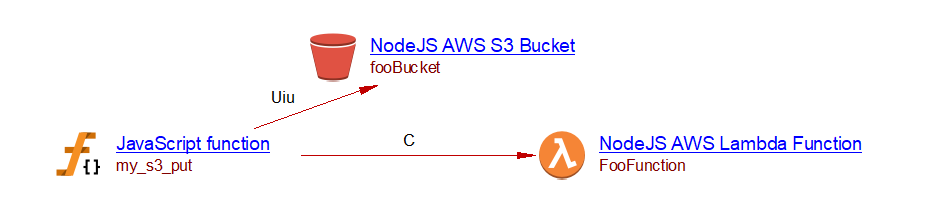
and there is a my_s3_put function that puts an object in the fooBucket S3 Bucket:
const { S3Client, PutObjectCommand } = require('@aws-sdk/client-s3');

const client = new S3Client();

async function my_s3_put() {
  await client.send(new PutObjectCommand({
    Bucket: 'fooBucket',
    Key: 'my-object-key',
    Body: 'Hello World',
  }));
}

module.exports = { my_s3_put };
you will get the following result:
Known limitations
Some filters can also be specified in the S3EventSource to determine which objects trigger this event. These are not supported, and this extension will create links regardless of filters.
DynamoEventSource
When the call to the addEventSource API takes an instance of aws-cdk-lib/aws-lambda-event-sources.DynamoEventSource,
a property Name of dynamodb tables triggering the lambda is added to the lambda.
This property saves the name of the dynamoDB Tables that would trigger the lambda.
The analyzer creates a callLink to the lambda function object from all callables linked to the given table.
For example, when analyzing the following source code:
const cdk = require('aws-cdk-lib');
const lambda = require('aws-cdk-lib/aws-lambda');
const { DynamoEventSource } = require('aws-cdk-lib/aws-lambda-event-sources');
const dynamodb = require('aws-cdk-lib/aws-dynamodb');

class DynamoLambdaStack extends cdk.Stack {
  constructor(scope, id, props) {
    super(scope, id, props);

    const fn = new lambda.Function(this, 'MyLambda', {
      runtime: lambda.Runtime.NODEJS_18_X,
      code: lambda.Code.fromAsset('resources/lambda'),
      handler: 'index.handler',
      functionName: 'FooFunction',
    });

    const table = new dynamodb.Table(this, 'MyTable', {
      tableName: 'fooTable',
    });
    fn.addEventSource(new DynamoEventSource(table, {
      startingPosition: lambda.StartingPosition.LATEST,
    }));
  }
}
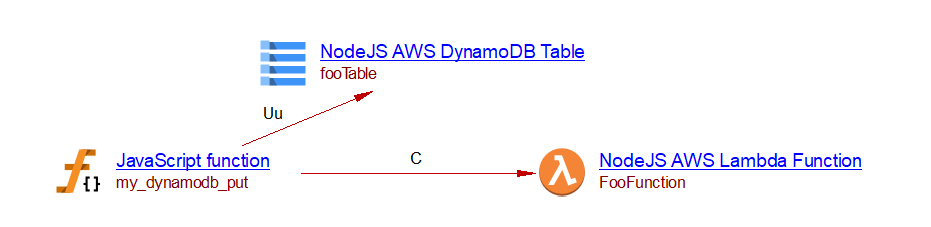
and there is a my_dynamodb_put function that puts an item in the fooTable DynamoDB table:
const { DynamoDBClient, PutItemCommand } = require('@aws-sdk/client-dynamodb');

const client = new DynamoDBClient();

async function my_dynamodb_put() {
  await client.send(new PutItemCommand({
    TableName: 'fooTable',
    Item: {
      id: { S: '123' },
      name: { S: 'example' },
    },
  }));
}

module.exports = { my_dynamodb_put };
you will get the following result:
KinesisEventSource and KinesisConsumerEventSource
When the call to the addEventSource API takes an instance of aws-cdk-lib/aws-lambda-event-sources.KinesisEventSource
or aws-cdk-lib/aws-lambda-event-sources.KinesisConsumerEventSource, a NodeJS AWS Kinesis Consumer or
a NodeJS AWS Unknown Kinesis Consumer (if the evaluation of the stream name fails)
object is created with a callLink to the lambda.
KinesisEventSourcetakes akinesis.Streaminstance as its first argument. The stream name is read from thestreamNameproperty of the stream’s props, or falls back to the{StackName}-{ConstructID}-{}pattern.KinesisConsumerEventSourcetakes akinesis.StreamConsumerinstance. The stream name is resolved by following thestreamproperty of the consumer’s props back to its parentkinesis.Stream.
For example, when analyzing the following source code:
const cdk = require('aws-cdk-lib');
const lambda = require('aws-cdk-lib/aws-lambda');
const kinesis = require('aws-cdk-lib/aws-kinesis');
const { KinesisEventSource } = require('aws-cdk-lib/aws-lambda-event-sources');

class KinesisLambdaStack extends cdk.Stack {
  constructor(scope, id, props) {
    super(scope, id, props);

    const fn = new lambda.Function(this, 'MyLambda', {
      runtime: lambda.Runtime.NODEJS_18_X,
      code: lambda.Code.fromAsset('resources/lambda'),
      handler: 'index.handler',
      functionName: 'FooFunction',
    });

    const stream = new kinesis.Stream(this, 'MyStream', {
      streamName: 'fooStream',
    });
    fn.addEventSource(new KinesisEventSource(stream, {
      startingPosition: lambda.StartingPosition.LATEST,
    }));
  }
}
a NodeJS AWS Kinesis Consumer object named fooStream is created with a callLink to the lambda,
you will get the following result:

Known limitations
- if the lambda instance is accessed through the
fromFunctionArnor thefromFunctionNameAPI the eventSource support will not work.
API Gateway support
Supported APIs
A basic support is provided for the following APIs:
- aws-cdk-lib/aws-apigateway.RestApi
- aws-cdk-lib/aws-apigateway.LambdaRestApi
- aws-cdk-lib/aws-apigatewayv2.HttpApi.addRoutes
Detailed support for aws-apigateway
We support RestApi instantiated with both:
- aws-cdk-lib/aws-apigateway.RestApi
- aws-cdk-lib/aws-apigateway.LambdaRestApi
The RestApi instances have a root attribute that represents the root resource of the API endpoint (’/’).
From this root, a path can be built using a succession of addResource method calls.
When an addMethod API call is found on a Resource, an AWS {Verb} API Gateway object is created
(where {Verb} is derived from the first argument of the API call).
The second argument of the addMethod API is checked:
- if it is an instance of
aws-cdk-lib/aws-apigateway.LambdaIntegration, a callLink from the API Gateway to the correspondingNodeJS AWS Lambda Functionis created. - if it is an instance of
aws-cdk-lib/aws-apigateway.HttpIntegration, aNodeJS {Verb} HttpRequest serviceobject is created, along with a callLink from the API Gateway to that object. The name of this object is derived from the argument passed to the HttpIntegration instantiation. - if it is an instance of
aws-cdk-lib/aws-apigateway.AwsIntegrationand if the service property is ‘sqs’ or ‘sns’ aNodeJS AWS SQS PublisherorNodeJS AWS SNS Publisherobject is created, along with a callLink from the API Gateway to that object.
When no integration is provided to the addMethod API, and the RestApi was instantiated using LambdaRestApi,
a callLink is created from the API Gateway to the NodeJS AWS Lambda Function that was passed as the handler property
to the LambdaRestApi instantiation.
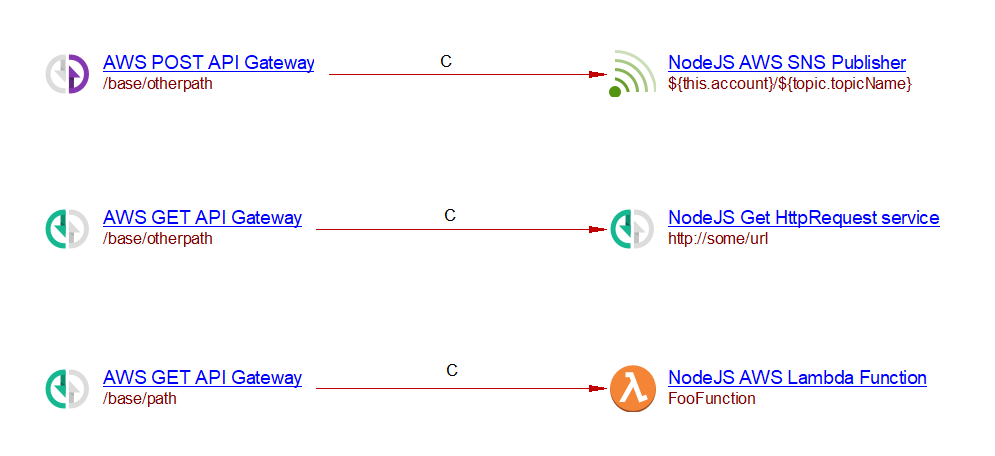
Here is an example, when analyzing the following source code:
const cdk = require('aws-cdk-lib');
const apigateway = require('aws-cdk-lib/aws-apigateway');
const lambda = require('aws-cdk-lib/aws-lambda');
const sns = require('aws-cdk-lib/aws-sns');

class LambdaLayerStack extends cdk.Stack {
  constructor(scope, id, props) {
    super(scope, id, props);

    const fn = new lambda.Function(this, 'LambdaConstructID', {
      runtime: lambda.Runtime.NODEJS_LATEST,
      code: lambda.Code.fromAsset('resources/lambda'),
      handler: 'index.handler',
      functionName: 'FooFunction'
    });

    const topic = new sns.Topic(this, 'MyTopic', {
      topicName: 'my_topic',
    });

    const api = new apigateway.RestApi(this, 'myapi', {
      proxy: false
    });

    const base = api.root.addResource('base');
    const r1 = base.addResource('path');
    r1.addMethod('GET', new apigateway.LambdaIntegration(fn));

    const r2 = base.addResource('otherpath');
    r2.addMethod('GET', new apigateway.HttpIntegration('http://some/url'));
    r2.addMethod('POST', new apigateway.AwsIntegration({
      service: 'sns',
      integrationHttpMethod: 'POST',
      path: `${this.account}/${topic.topicName}`,
      options: {}
    }));
  }
}
you will get the following result:
Known limitations
aws-cdk-lib/aws-apigateway.AwsIntegrationis supported only for sns and sqs servicesaddProxyAPI is not supported
Detailed support aws-apigatewayv2
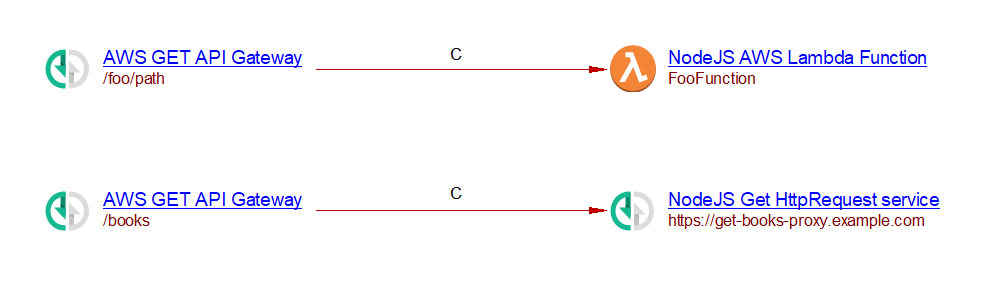
When the aws-cdk-lib/aws-apigatewayv2.HttpApi.addRoutes API is used in a .js source file,
an AWS {Verb} API Gateway object is created, where {Verb} is extracted from the methods property.
The name of this object is derived from the path property.
If the integration property is instance of aws-cdk-lib/aws-apigatewayv2-integrations.HttpLambdaIntegration,
a link is created from the API Gateway to the corresponding NodeJS AWS Lambda Function.
If the integration property is an instance of aws-cdk-lib/aws-apigatewayv2-integrations.HttpUrlIntegration,
a NodeJS {Verb} HttpRequest service object is created along with a callLink from the API Gateway to that object.
The name of that object is derived from the second argument passed to the HttpUrlIntegration instantiation.
For example, when analyzing the following source code:
const cdk = require('aws-cdk-lib');
const apigwv2 = require('aws-cdk-lib/aws-apigatewayv2');
const lambda = require('aws-cdk-lib/aws-lambda');
const integrations = require('aws-cdk-lib/aws-apigatewayv2-integrations');

class LambdaLayerStack extends cdk.Stack {
  constructor(scope, id, props) {
    super(scope, id, props);

    const fn = new lambda.Function(this, 'LambdaConstructID', {
      runtime: lambda.Runtime.NODEJS_LATEST,
      code: lambda.Code.fromAsset('resources/lambda'),
      handler: 'index.handler',
      functionName: 'FooFunction'
    });

    const api = new apigwv2.HttpApi(this, 'HttpApi');

    api.addRoutes({
      path: '/foo/path',
      methods: [apigwv2.HttpMethod.GET],
      integration: new integrations.HttpLambdaIntegration(
        'LambdaIntegration',
        fn,
      ),
    });

    api.addRoutes({
      path: '/books',
      methods: [apigwv2.HttpMethod.GET],
      integration: new integrations.HttpUrlIntegration(
        'GetBooksIntegration',
        'https://get-books-proxy.example.com'
      ),
    });
  }
}
you will get the following result:
Detailed support for aws-sns-subscriptions
When an instance of aws-cdk-lib/aws-sns.Topic is found in the analyzed source code,
and that instance invokes the addSubscription API at least once with a supported subscription type as its argument,
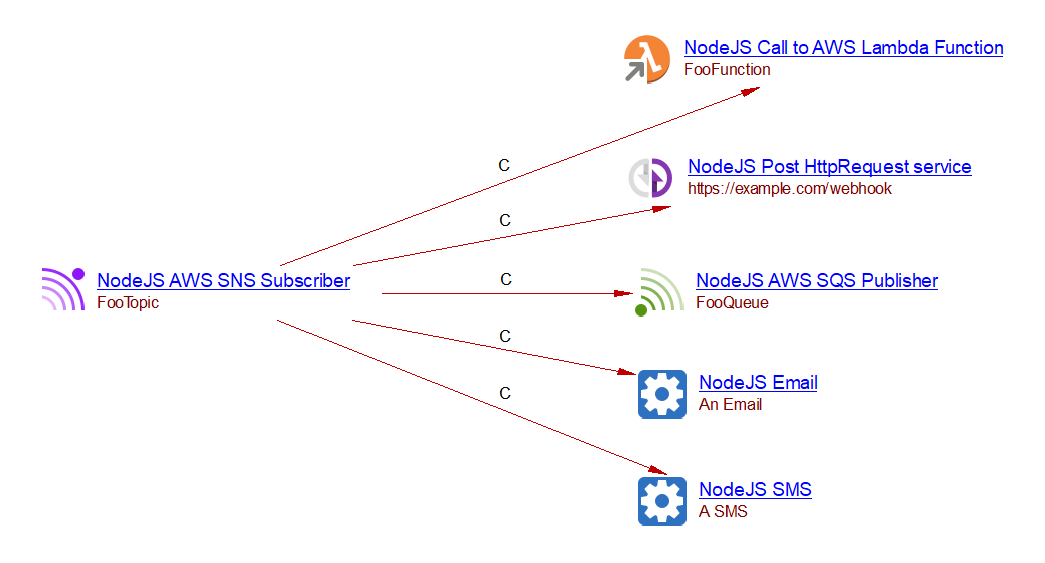
a NodeJS AWS SNS Subscriber object is created.
The name of the NodeJS AWS SNS Subscriber object is derived from the name of the SNS Topic.
For each supported subscription passed to addSubscription, a corresponding object is created,
and a callLink is established from the NodeJS AWS SNS Subscriber to that object.
The table below lists the supported subscription types and the corresponding objects that the extension creates:
| Supported subscription | Object created |
|---|---|
| aws-cdk-lib/aws-sns-subscriptions.LambdaSubscription | NodeJS Call to AWS Lambda Function |
| aws-cdk-lib/aws-sns-subscriptions.UrlSubscription | NodeJS Post HttpRequest service |
| aws-cdk-lib/aws-sns-subscriptions.SqsSubscription | NodeJS AWS SQS Publisher |
| aws-cdk-lib/aws-sns-subscriptions.EmailSubscription | NodeJS Email |
| aws-cdk-lib/aws-sns-subscriptions.SmsSubscription | NodeJS SMS |
For example, when analyzing the following source code:
const { Stack } = require('aws-cdk-lib');
const sns = require('aws-cdk-lib/aws-sns');
const subscriptions = require('aws-cdk-lib/aws-sns-subscriptions');
const lambda = require('aws-cdk-lib/aws-lambda');
const sqs = require('aws-cdk-lib/aws-sqs');

class SnsLambdaStack extends Stack {
  constructor(scope, id, props) {
    super(scope, id, props);

    const topic = new sns.Topic(this, 'Topic', {
      topicName: 'FooTopic',
    });

    const fn = new lambda.Function(this, 'Handler', {
      functionName: 'FooFunction',
      runtime: lambda.Runtime.NODEJS_18_X,
      handler: 'index.handler',
      code: lambda.Code.fromInline(`
        exports.handler = async (event) => {
          console.log(JSON.stringify(event, null, 2));
        };
      `),
    });

    topic.addSubscription(
      new subscriptions.LambdaSubscription(fn)
    );

    const queue = new sqs.Queue(this, 'MyQueue', {
      queueName: 'FooQueue',
    });

    topic.addSubscription(
      new subscriptions.UrlSubscription(
        'https://example.com/webhook',
      )
    );

    topic.addSubscription(
      new subscriptions.SqsSubscription(queue)
    );

    topic.addSubscription(
      new subscriptions.EmailSubscription(
        'user@example.com'
      )
    );

    topic.addSubscription(
      new subscriptions.SmsSubscription(
        '+1234567890'
      )
    );
  }
}
you will get the following result:
Support for aws-s3.Bucket.addEventNotification
When a call to the aws-cdk-lib/aws-s3.Bucket.addEventNotification API is detected,
the first argument of the call (the event type) and the destination object are analyzed.
Support is provided only when the destination argument is an instance of one of the following types:
- aws-cdk-lib/aws-s3-notifications.LambdaDestination
- aws-cdk-lib/aws-s3-notifications.SqsDestination
- aws-cdk-lib/aws-s3-notifications.SnsDestination
For supported destinations, the corresponding S3 Event Handler is inferred and linked as described below.
Detailed support for aws-s3-notifications.LambdaDestination
When the addEventNotification API is called with an instance of
aws-cdk-lib/aws-s3-notifications.LambdaDestination, the corresponding
NodeJS AWS Lambda Function object is inferred from the first argument of the destination instantiation.
This NodeJS AWS Lambda Function object is considered the S3 Event Handler.
The property CAST_AWS_S3_Event_Handler.s3_events is stored on that object and contains:
- the bucket name
- the S3 event type that triggers the handler
Detailed support for aws-s3-notifications.SqsDestination
When the addEventNotification API is called with an instance of
aws-cdk-lib/aws-s3-notifications.SqsDestination, the queue name is inferred from the
first argument of the destination instantiation.
If the queue name is successfully inferred, a NodeJS AWS SQS Publisher object is created.
Otherwise, a NodeJS AWS Unknown SQS Publisher object is created.
The created object is considered the S3 Event Handler.
The property CAST_AWS_S3_Event_Handler.s3_events is stored on that object and contains:
- the bucket name
- the S3 event type that triggers the handler
The com.castsoftware.wbslinker extension then creates a callLink to this S3 Event Handler based on the stored s3_events property.
Detailed support for aws-s3-notifications.SnsDestination
When the addEventNotification API is called with an instance of
aws-cdk-lib/aws-s3-notifications.SnsDestination, the topic name is inferred from the
first argument of the destination instantiation.
If the topic name is successfully inferred, a NodeJS AWS SNS Publisher object is created.
Otherwise, a NodeJS AWS Unknown SNS Publisher object is created.
The created object is considered the S3 Event Handler.
The property CAST_AWS_S3_Event_Handler.s3_events is stored on that object and contains:
- the bucket name
- the S3 event type that triggers the handler
The com.castsoftware.wbslinker extension then creates a callLink to this S3 Event Handler based on the stored s3_events property.
Link to the S3 Event Handler
Based on the bucket name and event type provided in CAST_AWS_S3_Event_Handler.s3_events,
the com.castsoftware.wbslinker extension
creates a callLink to the S3 Event Handler object.
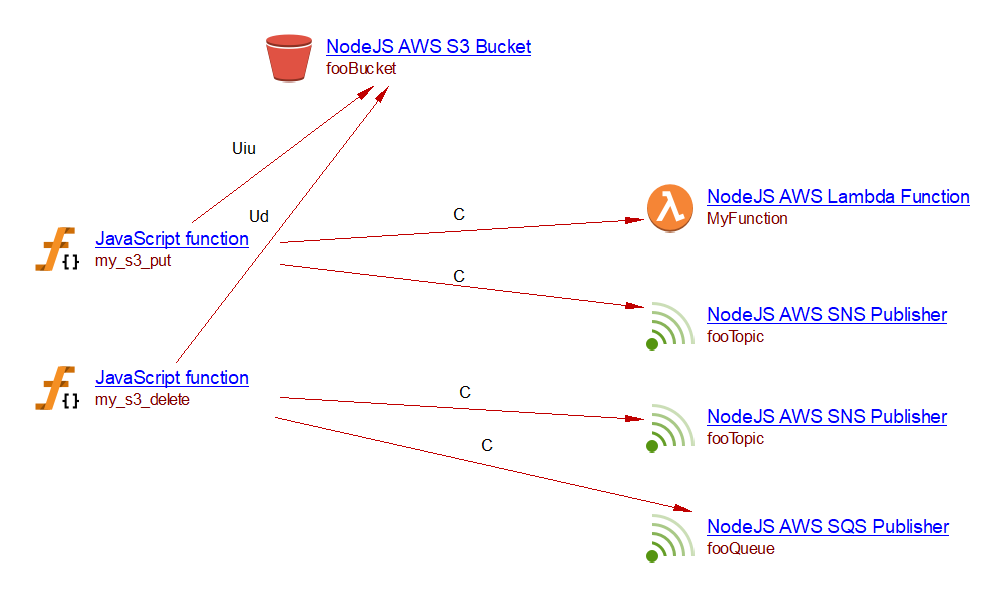
The link is created from all callables already linked to the given bucket through a matching link type, as defined in the table below (* matches any string):
| Event type | Matching link types |
|---|---|
| OBJECT_CREATED | useInsert, useUpdate |
| OBJECT_CREATED_* | useInsert, useUpdate |
| OBJECT_REMOVED | useDelete |
| OBJECT_REMOVED_* | useDelete |
| other event types | None |
Filters (such as prefix or suffix) can be specified in the
addEventNotificationcall to restrict which objects trigger the event. These filters are not currently supported, and links are created regardless of filters.
Example
When analyzing the following source code:
const cdk = require('aws-cdk-lib');
const s3 = require('aws-cdk-lib/aws-s3');
const sqs = require('aws-cdk-lib/aws-sqs');
const s3n = require('aws-cdk-lib/aws-s3-notifications');
const sns = require('aws-cdk-lib/aws-sns');
const lambda = require('aws-cdk-lib/aws-lambda');

class SimpleStack extends cdk.Stack {
  constructor(scope, id, props) {
    super(scope, id, props);

    const bucket = new s3.Bucket(this, 'MyBucket', {
      bucketName: 'fooBucket',
    });

    const queue = new sqs.Queue(this, 'MyQueue', {
      queueName: 'fooQueue',
    });

    const topic = new sns.Topic(this, 'MyTopic', {
      topicName: 'fooTopic',
    });

    const fn = new lambda.Function(this, 'MyFunction', {
      runtime: lambda.Runtime.NODEJS_18_X,
      handler: 'index.handler',
      functionName: 'MyFunction',
      code: lambda.Code.fromInline(
        'exports.handler = async (event) => { console.log(JSON.stringify(event)); };'
      ),
    });

    bucket.addEventNotification(
      s3.EventType.OBJECT_CREATED,
      new s3n.LambdaDestination(fn)
    );

    bucket.addEventNotification(
      s3.EventType.OBJECT_DELETED,
      new s3n.SqsDestination(queue)
    );

    bucket.addEventNotification(
      s3.EventType.OBJECT_CREATED,
      new s3n.SnsDestination(topic)
    );

    bucket.addEventNotification(
      s3.EventType.OBJECT_DELETED,
      new s3n.SnsDestination(topic)
    );
  }
}
and there are two my_s3_put and my_s3_delete functions that acts an object in the fooBucket S3 Bucket:
const { S3Client, PutObjectCommand } = require('@aws-sdk/client-s3');

const client = new S3Client();

async function my_s3_put() {
  await client.send(new PutObjectCommand({
    Bucket: 'fooBucket',
    Key: 'my-object-key',
    Body: 'Hello World',
  }));
}

module.exports = { my_s3_put };
const { S3Client, DeleteObjectCommand } = require('@aws-sdk/client-s3');

const client = new S3Client();

async function my_s3_delete() {
  await client.send(new DeleteObjectCommand({
    Bucket: 'fooBucket',
    Key: 'my-object-key',
    Body: 'Hello World',
  }));
}

module.exports = { my_s3_delete };
you will get the following result:
Known limitations
- if the lambda instance is accessed through the
fromFunctionArnor thefromFunctionNameAPI the LambdaDestination support will not work.
Firehose support
Supported APIs
A basic support is provided for the following APIs:
- aws-cdk-lib/aws-kinesisfirehose.DeliveryStream
- aws-cdk-lib/aws-kinesisfirehose.KinesisStreamSource
Detailed support for aws-kinesisfirehose.DeliveryStream
When an instantiation of aws-cdk-lib/aws-kinesisfirehose.DeliveryStream is found in the analyzed source code,
a NodeJS AWS Firehose Stream Delivery object is created (or a NodeJS AWS Unknown Firehose Stream Delivery
if the name cannot be resolved). Its name is derived from the streamName property of the props argument.
If streamName is not provided, the name falls back to the construct ID pattern {StackName}-{ConstructID}-{}.
The destination property of the props is analyzed to determine the delivery target.
For supported delivery an object is created with a link from the NodeJS AWS Firehose Stream Delivery object
to that object. The following destination classes are supported:
| Destination class | Object created | Link type |
|---|---|---|
| S3Bucket | NodeJS S3 Bucket | useInsertLink |
| HttpEndpointDestination | NodeJS Post HttpRequest service | callLink |
When an S3Bucket destination includes a LambdaFunctionProcessor in its processors list,
an additional callLink is created from the delivery stream to the corresponding
NodeJS Call to AWS Lambda Function.
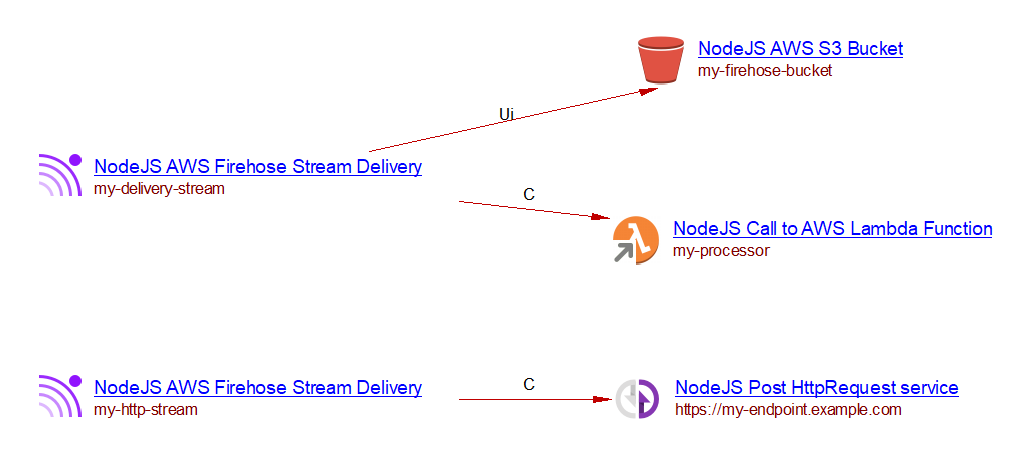
For example, when analyzing the following source code:
const cdk = require('aws-cdk-lib');
const firehose = require('aws-cdk-lib/aws-kinesisfirehose');
const s3 = require('aws-cdk-lib/aws-s3');
const lambda = require('aws-cdk-lib/aws-lambda');

class FirehoseStack extends cdk.Stack {
  constructor(scope, id, props) {
    super(scope, id, props);

    const bucket = new s3.Bucket(this, 'MyBucket', {
      bucketName: 'my-firehose-bucket'
    });

    const fn = new lambda.Function(this, 'Processor', {
      runtime: lambda.Runtime.NODEJS_18_X,
      handler: 'index.handler',
      code: lambda.Code.fromAsset('resources/lambda'),
      functionName: 'my-processor',
    });

    new firehose.DeliveryStream(this, 'MyStream', {
      streamName: 'my-delivery-stream',
      destination: new firehose.S3Bucket(bucket, {
        processors: [new firehose.LambdaFunctionProcessor(fn)],
      }),
    });

    new firehose.DeliveryStream(this, 'HttpStream', {
      streamName: 'my-http-stream',
      destination: new firehose.HttpEndpointDestination(
        'https://my-endpoint.example.com'
      ),
    });
  }
}
this will produce the following results:
- a
NodeJS AWS Firehose Stream Deliveryobject named my-delivery-stream with a useInsertLink to the S3 bucketmy-firehose-bucketand a callLink to the Lambda functionmy-processor; - a
NodeJS AWS Firehose Stream Deliveryobject named my-http-stream with a callLink to theNodeJS Post HttpRequest servicehttps://my-endpoint.example.com .
Detailed support for aws-kinesisfirehose.KinesisStreamSource
When a DeliveryStream is configured with a KinesisStreamSource as its source property,
a NodeJS AWS Kinesis Consumer object is created (or a NodeJS AWS Unknown Kinesis Consumer
if the stream name cannot be resolved) with a callLink to the NodeJS AWS Firehose Stream Delivery object.
The Kinesis stream name is resolved from:
- the
streamNameproperty of the stream’s props (when the stream is instantiated inline), or - the stream name extracted from the ARN (when the stream is imported via
kinesis.Stream.fromStreamArnorkinesis.Stream.fromStreamAttributes).
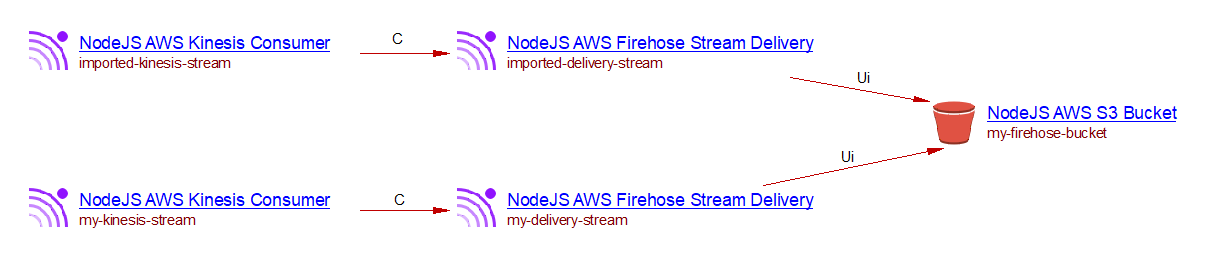
For example, when analyzing the following source code:
const { cdk } = require('aws-cdk-lib');
const firehose = require('aws-cdk-lib/aws-kinesisfirehose');
const s3 = require('aws-cdk-lib/aws-s3');
const kinesis = require('aws-cdk-lib/aws-kinesis');

class FirehoseKinesisStack extends cdk.Stack {
  constructor(scope, id, props) {
    super(scope, id, props);

    const bucket = new s3.Bucket(this, 'MyBucket', {
      bucketName: 'my-firehose-bucket',
    });

    // Inline stream creation
    const stream = new kinesis.Stream(this, 'MyStream', {
      streamName: 'my-kinesis-stream',
    });

    new firehose.DeliveryStream(this, 'MyDeliveryStream', {
      streamName: 'my-delivery-stream',
      source: new firehose.KinesisStreamSource(stream),
      destination: new firehose.S3Bucket(bucket),
    });

    // Imported stream via ARN
    const importedStream = kinesis.Stream.fromStreamArn(
      this, 'ImportedStream',
      'arn:aws:kinesis:us-east-1:123456789012:stream/imported-kinesis-stream'
    );

    new firehose.DeliveryStream(this, 'ImportedDeliveryStream', {
      streamName: 'imported-delivery-stream',
      source: new firehose.KinesisStreamSource(importedStream),
      destination: new firehose.S3Bucket(bucket),
    });
  }
}
this will produce the following results:
- a
NodeJS AWS Kinesis Consumerobject named my-kinesis-stream with a callLink to theNodeJS AWS Firehose Stream Deliverynamed my-delivery-stream; - a
NodeJS AWS Kinesis Consumerobject named imported-kinesis-stream with a callLink to theNodeJS AWS Firehose Stream Deliverynamed imported-delivery-stream; - both
NodeJS AWS Firehose Stream Deliveryobjects have a useInsertLink to theNodeJS AWS S3 Bucketnamed my-firehose-bucket.