PL/1 - 1.3
Description
This extension provides support for applications written using Enterprise PL/I for z/OS languages.
Although this extension is officially supported by CAST, please note that it has been developed within the technical constraints of the CAST Universal Analyzer technology and to some extent adapted to meet specific customer needs. Therefore the extension may not address all of the coding techniques and patterns that exist for the target technology and may not produce the same level of analysis and precision regarding e.g. quality measurement and/or function point counts that are typically produced by other analyzers.
Supported Versions of PL/I
| Enterprise PL/I for z/OS | Supported |
|---|---|
| 6.x | ✅ |
| 5.x | ✅ |
| 4.x | ✅ |
| 3.x | ✅ |
Transactions
Transaction support is derived from metamodel concepts used to build CAST Imaging Blueprint and structural transaction flows. Entry Points start transactions; Exit Points include both output/boundary concepts and Data Entities manipulated by transactions.
| Role | Support | Breakdown |
|---|---|---|
| Entry Point | No direct concept type details | |
| Exit Point |
Unresolved Storage
Data Entity with Accurate FP
|
Data version: 1.2.2-funcrel
ISO 5055 Structural Rules
Quality support is based on ISO 5055 structural rules available for the selected extension version. Counts are grouped by ISO 5055 characteristic.
| Reliability | Maintainability | Security | Performance Efficiency |
|---|---|---|---|
Data version: 1.2.2-funcrel
Dependencies with other extensions
Some CAST extensions require the presence of other CAST extensions in order to function correctly. The com.castsoftware.pl1 extension requires that the following other CAST extensions are also installed:
- com.castsoftware.sqlanalyzer (installed automatically)
- com.castsoftware.wbslinker (installed automatically) — required for CICS and IMS integration
Download and installation instructions
The extension will be automatically downloaded and installed when you deliver PL/1 code.
Prepare and deliver the source code
The following file extensions are recognised by CAST Console:
.PLC.PLI
However, PL/I source code files can sometimes be created with any extension (most commonly a .TXT extension) or no extension at all. If these type of files are encountered during the source code delivery process, CAST will try to determine whether the file is a valid PL/I
source file and if so, a built-in preprocessor will change the extension to .PLI or .PLC (for files with extensions other than .PLI or .PLC, such as .TXT) and will add a .PLI or .PLC extension for files with no extension.
Please note the following recommendations and notes about source code:
- It is important to organize the PL/1 source code in a specific way otherwise the preprocessor will not be launched during the delivery:
- In general, CAST recommends ensuring that all PL/I source code (
.PLC/.PLI/.TXT/ files with no extension) is located in one single folder dedicated to PL/1 in the delivery. You can also use multiple folders for your PL/1 source code if necessary. Other source code for other technologies should be located in separate dedicated folders.- to trigger the PL/1 preprocessor, the presence of at least one
.PLCor.PLIfile in a folder in the delivery (including the root if this is used) is required - Do not mix other file types with the PL/1 source code in the same folder (including the root if this used) - these other files may be processed by the PL/1 preprocessor rendering them corrupt and causing the subsequent analysis to fail.
- to trigger the PL/1 preprocessor, the presence of at least one
- In general, CAST recommends ensuring that all PL/I source code (
- The PL/I extension ignores empty files and they will not be considered as valid source code files.
- Binary files should be avoided since it is not always possible to detect whether a given file is binary or not. Presenting binary files in the source code delivery will not result in a packaging failure, but an error message can be expected in the packaging/extraction log.
Source code discovery
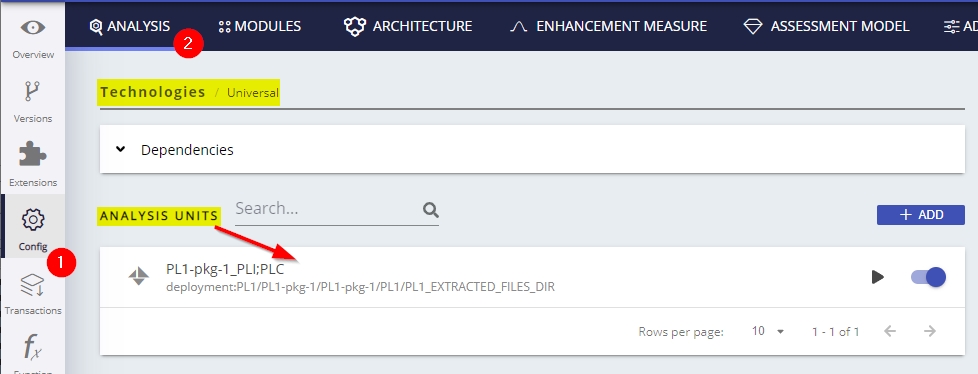
A discoverer is provided with the extension to automatically detect PL/1 code: a PL/1 project will be discovered for the package’s root folder when at least one .PLC or .PLI file in a folder (including post preprocessing) is detected in the root folder or any sub-folders. For every PL/1 project located, one Universal Technology Analysis Unit will be created:
Deliver the source code
- Upload the ZIP file containing your Application source (or define a folder in which to deposit your source code)
- Configure any file/folder exclusions and objectives
- If you want to inspect the version (recommended), disable the analysis/snapshot at this point
- Start the delivery process - the extension will be auto-downloaded during this phase.
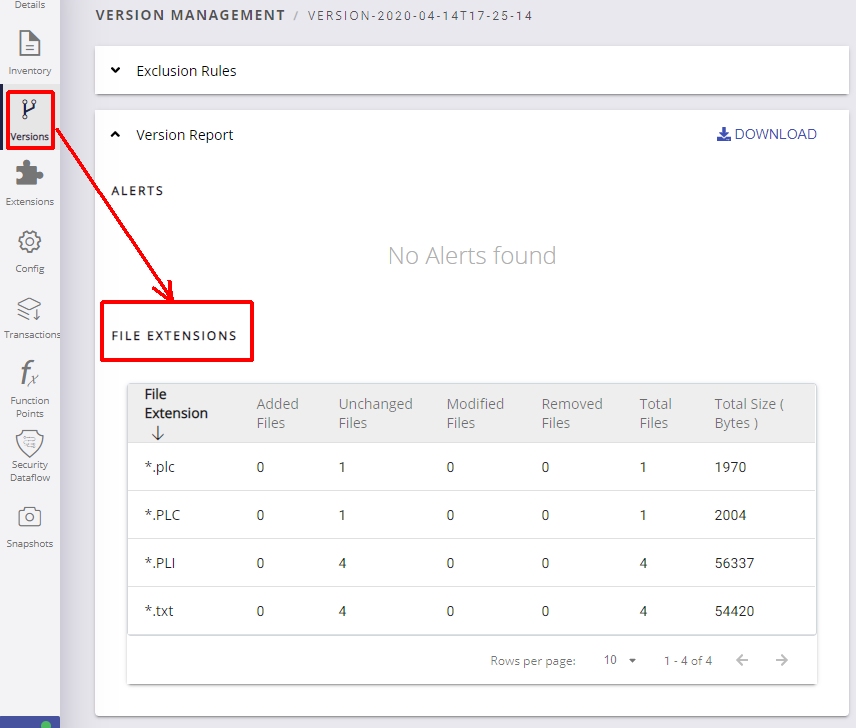
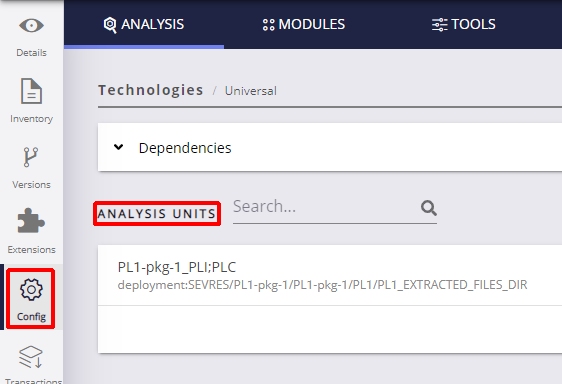
- Validate and accept the version - inspect the delivered files and ensure that you have an Analysis Unit for your PL/I source code:
Logging mechanism
Analysis log files
| Error/Warning Message | Action |
|---|---|
| Unable to find the object end for type ‘XXXXXXX’ | This is caused by complex source code that makes the engine miss the end of the object, whereas the begin of object type was captured. Object won’t be created in Analysis Service, will lead to incomplete analysis. Issue must be reported to CAST Support, along with source code (original source file + preprocessed source code) to allow reproduction and investigation. A few such warnings for object types like PLIProcedure, PLCProcedure, PLIFunction could be acceptable. Same warning for PLIMainProcedure is problematic : the whole program is not saved in Analysis Service. |
| An unnamed object of type ‘PLIWhenCall’ has been detected | This is because PLIWhenCall has no specific name, as such, the CAST framework will give them the name “unnamed”. You can safely ignore this warning. |
| Duplicate object of type ‘PLIWhenCall’ has been detected: ‘ Duplicate object of type ‘PLIErrorBlock’ has been detected |
As mentioned above, PLIWhenCall and PLIErrorBlock have no specific name and are automatically given the name “unnamed” by CAST - as such multiple objects with the name “unnamed” will exist and will cause this error. You can safely ignore this warning. Same for PLIProcSubscriptedVar object type. |
| Duplicate object of type ‘PLIProcedure’ has been detected Duplicate object of type ‘PLCProcedure’ has been detected |
PLIProcedure and PLCProcedure are supposed to be unique within the same source file. So such warning is the sign of an incorrect object type identification. Issue must be reported to CAST Support. |
| end of string ’’’ not found end of string ‘[’]’ not found File skipped |
UA engine did not find the end of a string, whereas the begin of the string was captured. This generally leads to a second warning : File skipped, meaning the source file and contained objects have not been saved in Analysis Service. On large applications, a few such warnings could be acceptable. Otherwise, issue must be reported to CAST Support, along with source code (original source file + preprocessed source code) to allow reproduction and investigation. |
| end of comment ‘[*][/]’ not found | Alone, this warning can be safely ignored. Check if other warnings are present for the same source file. |
| Could not calculate code depth correctly for file File: Could not calculate code depth correctly for file, added |
The analyzer is not capable of detecting the source code depth correctly. |
| PL1 Extractor Version: |
A simple information message to help identify the version of the extractor that is being used. |
PL/I Preprocessor
PL/I source code needs to be preprocessed so that CAST can understand it and analyze it correctly. This source code preprocessing is actioned automatically. In other words you only need to package, deliver and launch an analysis/generate a snapshot for the preprocessing to be completed.
Note that as part of the source code pre-processing phase, from PL1 1.0.5 onwards, CAST will now add “$$” to all PL/I source code just prior to the “;”. For example:
| Original source code | Source code after pre-processing in ≥ 1.0.5 |
|---|---|
someproc:proc; |
someproc:proc$$; |
The impact of this change is as follows:
- When upgrading to PL1 ≥ 1.0.5, existing objects will be shown as updated when a post upgrade snapshot is run.
- There will be a reduction in the number of messages of the type “
end of object of type \<PLC\PLIProcedure\|Function\> not found” that were previously displayed in the log.
This change has been implemented because of a limitation in the analyzer with regard to the way object start and end patterns are handled. In PL/I, object start and end patterns do not match (contrary to most other languages, such as PHP where { and } are used) and therefore the analyzer is not able to correctly identify when an object ends.
Analysis failures
The PL1 extension needs to process all the file extensions delivered in the version because PL/I files can have any extension. During this
parsing if the file is from a different technology, a failure will occur. The file that has caused the failure will be stored under a
“ParsingFailures” folder at the package level and the file extension of the file will be changed to “pfail”. A reason for the failure will also be recorded in each subfolder with name of the exception that caused it. For example StringCommentProcessorException:

What results can you expect?
Objects
PL/I
| Icon | Object Type | Description |
|---|---|---|
 |
PLI Error Block | |
 |
PLI FileStructure | |
 |
PLI Function | |
 |
PLI MainProcedure | |
 |
PLI Procedure | |
 |
PLI Project | |
 |
PLI Entry Point | An alternate entry point defined with an ENTRY statement inside a PLI procedure. A call link from the entry point to its enclosing procedure is created. |
 |
PLI Missing Include | An include file referenced via %INCLUDE or -INC that could not be resolved in the codebase. |
 |
PLI Missing Program | An external program called via CALL that could not be resolved in the codebase. |
 |
PLI SQL Query | An object is created for each SQL query found in an EXEC SQL bloc inside a PLI file. |
 |
PLI Missing Schema | Parent of the missing tables and procedures, attached to the PLI Project. |
 |
PLI Missing Table | A table or a view selected/updated/deleted/inserted in a PLI Query object missing from a DDL file. |
 |
PLI Missing Procedure | A procedure or a function called in a PLI Query missing from a DDL file. |
PLC
| Icon | Object Type | Description |
|---|---|---|
 |
PLC FileStructure | |
 |
PLC Function | |
 |
PLC Include | |
 |
PLC Procedure | |
 |
PLC Project | |
 |
PLC Entry Point | An alternate entry point defined with an ENTRY statement inside a PLC procedure. A call link from the entry point to its enclosing procedure is created. |
|
PLC SQL Query | An objects is created for each SQL query found in an EXEC SQL bloc inside a PLC file. |
|
PLC Missing Schema | Parent of the missing tables and procedures, attached to the PLC Project. |
|
PLC Missing Table | A table or a view selected/updated/deleted/inserted in a PLC Query object missing from a DDL file. |
|
PLC Missing Procedure | A procedure or a function called in a PLC Query missing from a DDL file. |
CICS
CICS command objects are created when EXEC CICS blocks are encountered in PLI or PLC source files. Links to the actual CICS elements (queues, datasets, transactions, maps) are produced by the com.castsoftware.wbslinker extension.
PLI CICS objects
| Icon | Object Type | Description |
|---|---|---|
 |
PLI CICS WriteQ TD Queue | EXEC CICS WRITEQ TD QUEUE(...) — write to a Transient Data Queue. |
 |
PLI CICS ReadQ TD Queue | EXEC CICS READQ TD QUEUE(...) — read from a Transient Data Queue. |
 |
PLI CICS DeleteQ TD Queue | EXEC CICS DELETEQ TD QUEUE(...) — delete a Transient Data Queue. |
 |
PLI CICS Read Dataset | EXEC CICS READ FILE(...) — read from a CICS dataset. |
 |
PLI CICS Write Dataset | EXEC CICS WRITE FILE(...) — write to a CICS dataset. |
 |
PLI CICS Rewrite Dataset | EXEC CICS REWRITE FILE(...) — rewrite a record in a CICS dataset. |
 |
PLI CICS Delete Dataset | EXEC CICS DELETE FILE(...) — delete a record from a CICS dataset. |
 |
PLI CICS Browse Dataset | EXEC CICS STARTBR/READNEXT/READPREV FILE(...) — browse a CICS dataset. |
 |
PLI CICS Start Transaction | EXEC CICS START TRANSID(...) — start a CICS transaction. |
 |
PLI CICS Return Transaction | EXEC CICS RETURN TRANSID(...) — return and pass control to a transaction. |
 |
PLI CICS Cancel Transaction | EXEC CICS CANCEL TRANSID(...) — cancel a scheduled transaction. |
 |
PLI CICS Send Map | EXEC CICS SEND MAP(...) MAPSET(...) — send a BMS map. |
 |
PLI CICS Receive Map | EXEC CICS RECEIVE MAP(...) MAPSET(...) — receive a BMS map. |
 |
PLI CICS Unknown TD Queue | A WRITEQ TD, READQ TD or DELETEQ TD command whose queue name could not be statically resolved. |
 |
PLI CICS Unknown Dataset | A dataset command (READ, WRITE, REWRITE, DELETE, STARTBR…) whose file name could not be statically resolved. |
 |
PLI CICS Unknown Transaction | A START, RETURN or CANCEL command whose transaction id could not be statically resolved. |
 |
PLI CICS Unknown Map | A SEND MAP or RECEIVE MAP command whose map name could not be statically resolved. |
PLC CICS objects
| Icon | Object Type | Description |
|---|---|---|
 |
PLC CICS WriteQ TD Queue | EXEC CICS WRITEQ TD QUEUE(...) — write to a Transient Data Queue. |
 |
PLC CICS ReadQ TD Queue | EXEC CICS READQ TD QUEUE(...) — read from a Transient Data Queue. |
 |
PLC CICS DeleteQ TD Queue | EXEC CICS DELETEQ TD QUEUE(...) — delete a Transient Data Queue. |
 |
PLC CICS Read Dataset | EXEC CICS READ FILE(...) — read from a CICS dataset. |
 |
PLC CICS Write Dataset | EXEC CICS WRITE FILE(...) — write to a CICS dataset. |
 |
PLC CICS Rewrite Dataset | EXEC CICS REWRITE FILE(...) — rewrite a record in a CICS dataset. |
 |
PLC CICS Delete Dataset | EXEC CICS DELETE FILE(...) — delete a record from a CICS dataset. |
 |
PLC CICS Browse Dataset | EXEC CICS STARTBR/READNEXT/READPREV FILE(...) — browse a CICS dataset. |
 |
PLC CICS Start Transaction | EXEC CICS START TRANSID(...) — start a CICS transaction. |
 |
PLC CICS Return Transaction | EXEC CICS RETURN TRANSID(...) — return and pass control to a transaction. |
 |
PLC CICS Cancel Transaction | EXEC CICS CANCEL TRANSID(...) — cancel a scheduled transaction. |
 |
PLC CICS Send Map | EXEC CICS SEND MAP(...) MAPSET(...) — send a BMS map. |
 |
PLC CICS Receive Map | EXEC CICS RECEIVE MAP(...) MAPSET(...) — receive a BMS map. |
 |
PLC CICS Unknown TD Queue | A WRITEQ TD, READQ TD or DELETEQ TD command whose queue name could not be statically resolved. |
 |
PLC CICS Unknown Dataset | A dataset command (READ, WRITE, REWRITE, DELETE, STARTBR…) whose file name could not be statically resolved. |
 |
PLC CICS Unknown Transaction | A START, RETURN or CANCEL command whose transaction id could not be statically resolved. |
 |
PLC CICS Unknown Map | A SEND MAP or RECEIVE MAP command whose map name could not be statically resolved. |
IMS DL/I
IMS DL/I objects are created when a program calls the PLITDLI, AIBTDLI, or CEETDLI interfaces. Links to the actual IMS PCBs and transactions are produced by the com.castsoftware.wbslinker extension.
PLI IMS objects
| Icon | Object Type | Description |
|---|---|---|
 |
PLI IMS DL/I Read PCB | A DL/I read call (GU, GN, GNP, GHU, GHN, GHNP) targeting a PCB. |
 |
PLI IMS DL/I Write PCB | A DL/I write call (ISRT, REPL, DLET) targeting a PCB. |
 |
PLI IMS DL/I Start Transaction | A DL/I CHNG call to change the destination of a modifiable alternate PCB. |
 |
PLI IMS DL/I Unknown | A DL/I call whose function code could not be statically resolved. |
PLC IMS objects
| Icon | Object Type | Description |
|---|---|---|
 |
PLC IMS DL/I Read PCB | A DL/I read call (GU, GN, GNP, GHU, GHN, GHNP) targeting a PCB. |
 |
PLC IMS DL/I Write PCB | A DL/I write call (ISRT, REPL, DLET) targeting a PCB. |
 |
PLC IMS DL/I Start Transaction | A DL/I CHNG call to change the destination of a modifiable alternate PCB. |
 |
PLC IMS DL/I Unknown | A DL/I call whose function code could not be statically resolved. |
IBM MQ
IBM MQ objects are created when a program puts to or gets from an MQ queue. Links between publishers and subscribers are produced by the com.castsoftware.wbslinker extension.
PLI IBM MQ objects
| Icon | Object Type | Description |
|---|---|---|
 |
PLI IBM MQ Publisher | An MQPUT1 call, or an MQOPEN call with an output direction, targeting a resolved queue name. |
 |
PLI IBM MQ Subscriber | An MQOPEN call with an input direction targeting a resolved queue name. |
 |
PLI IBM MQ Unknown Publisher | An MQPUT1 or output MQOPEN call whose queue name could not be statically resolved. |
 |
PLI IBM MQ Unknown Subscriber | An input MQOPEN call whose queue name could not be statically resolved. |
PLC IBM MQ objects
| Icon | Object Type | Description |
|---|---|---|
 |
PLC IBM MQ Publisher | An MQPUT1 call, or an MQOPEN call with an output direction, targeting a resolved queue name. |
 |
PLC IBM MQ Subscriber | An MQOPEN call with an input direction targeting a resolved queue name. |
 |
PLC IBM MQ Unknown Publisher | An MQPUT1 or output MQOPEN call whose queue name could not be statically resolved. |
 |
PLC IBM MQ Unknown Subscriber | An input MQOPEN call whose queue name could not be statically resolved. |
Example scenarios for SQL queries
SQL query with a table defined in a DDL file
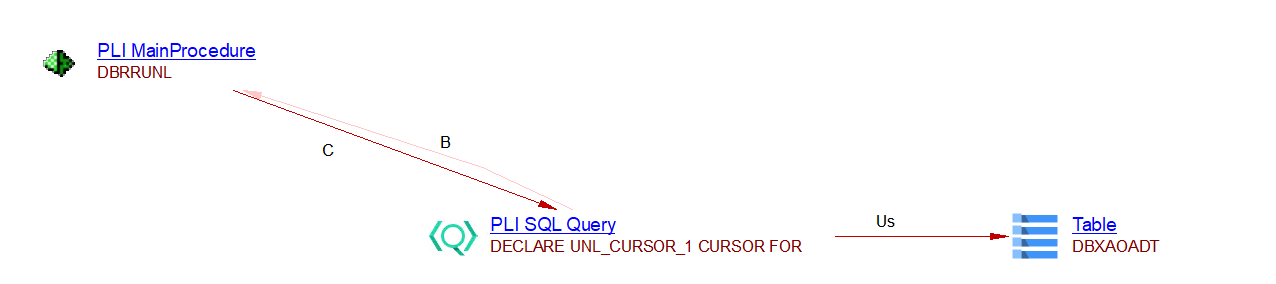
If a table is defined in a DDL file, a table object is created by the extension SQL Analyzer.
Given the following code snippet:
-DBRRUNL: PROC(DUMMY_PTR) OPTIONS(MAIN) REORDER;
...
  EXEC SQL
     DECLARE UNL_CURSOR_1 CURSOR
      FOR
     SELECT *
     FROM DBXAOADT;
and the following DDL file:
CREATE TABLE DBXAOADT (
 ...
) ;
The following objects and links are created:
SQL query with tables not defined in a DDL file
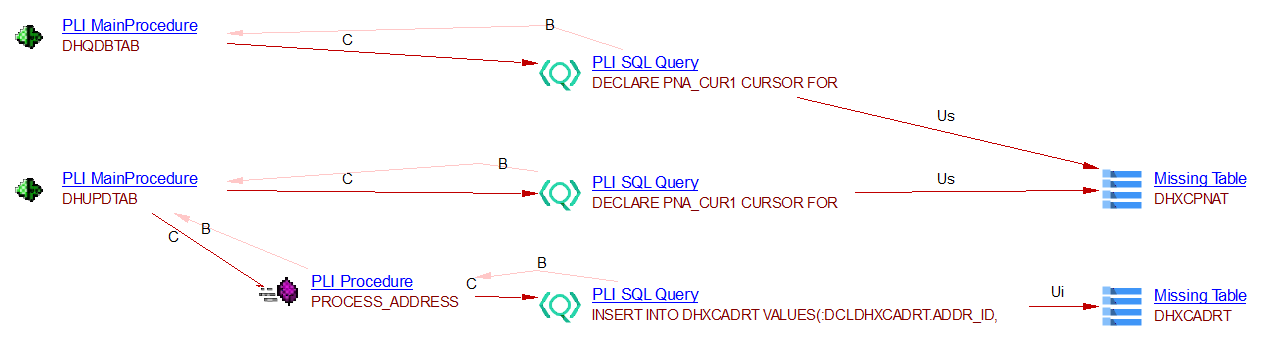
When a table used in a SQL query CRUD operation is not defined in a DDL file, a Missing Table object is created.
Given the following SQL snippets, if no DDL file is provided:
 EXEC SQL
   DECLARE PNA_CUR1 CURSOR FOR
   SELECT *
     FROM DHXCPNAT;
 EXEC SQL
   INSERT INTO DHXCADRT
     VALUES(...);
...
Missing Table objects are created as follows:
Similarly for PLC code:

SQL query for calling a stored procedure
When a stored procedure is called in a SQL query, if the procedure is not defined in a DDL file, a procedure object is created.

ENTRY points
PL/I programs can define alternate entry points using the ENTRY statement. This allows a single procedure to be called by multiple names, each entering the procedure at a different point.
When the analyzer encounters an ENTRY statement, it creates a PLI Entry Point (or PLC Entry Point) object as a child of the enclosing main procedure, and establishes a call link from the entry point to its enclosing procedure. When another program calls the entry point by name, a call link is created to the entry point object.
MYPROG: PROC(ARG1);
    /* code before ALTENTRY */
    ...
    ENTRY ALTENTRY(ARG2);
    /* code after ALTENTRY */
    ...
END MYPROG;
/* In another file: */
DCL ALTENTRY ENTRY;
CALL ALTENTRY(VALUE);   /* link created to PLIEntryPoint 'ALTENTRY' */
Call to external program
When a PL/I or PLC program calls an external procedure using a CALL statement or a function reference, the analyzer attempts to resolve the callee:
- If the callee is found in the codebase (another PLI or PLC file): a call link is created directly to the target procedure or function.
- If the callee is declared as
EXTERNAL ENTRYbut its definition is in a file recognised as a PLC include (.PLC): the analyzer creates a call link to the PLC procedure defined in that include file. - If the callee cannot be resolved: a PLI Missing Program object is created and a call link is established to it. All subsequent calls to the same unresolved name reuse the same Missing Program object.
DCL EXTPROG EXTERNAL ENTRY;
CALL EXTPROG(ARG1, ARG2);   /* link to PLIMissingProgram if not found */
Include files (-INC syntax)
In addition to the standard %INCLUDE directive, the -INC syntax is now supported:
-INC MYINCLUDE
This is treated identically to %INCLUDE MYINCLUDE. If the referenced include file cannot be found in the codebase, a PLI Missing Include object is created.
CICS integration
PL/I and PLC programs can interact with CICS using EXEC CICS blocks. The analyzer parses these blocks and creates typed objects representing each CICS command. These objects are then linked to the actual CICS elements (TD queues, datasets, transactions, BMS maps) by the com.castsoftware.wbslinker extension (version ≥ 1.7.49).
The following CICS commands are supported:
| CICS command | Object created | Resource option |
|---|---|---|
WRITEQ TD |
CICS WriteQ TD Queue | QUEUE |
READQ TD |
CICS ReadQ TD Queue | QUEUE |
DELETEQ TD |
CICS DeleteQ TD Queue | QUEUE |
READ |
CICS Read Dataset | FILE |
WRITE |
CICS Write Dataset | FILE |
REWRITE |
CICS Rewrite Dataset | FILE |
DELETE |
CICS Delete Dataset | FILE |
STARTBR / READNEXT / READPREV |
CICS Browse Dataset | FILE |
START |
CICS Start Transaction | TRANSID |
RETURN (with TRANSID) |
CICS Return Transaction | TRANSID |
CANCEL |
CICS Cancel Transaction | TRANSID |
SEND MAP |
CICS Send Map | MAP / MAPSET |
RECEIVE MAP |
CICS Receive Map | MAP / MAPSET |
LINK / XCTL |
call link to program | PROGRAM |
For EXEC CICS LINK PROGRAM(...) and EXEC CICS XCTL PROGRAM(...), the analyzer creates a call link to the target program (or to a PLI Missing Program if the program is not found in the codebase).
Resource names are resolved at analysis time: if the resource name is a string literal it is used directly; if it is a variable, the analyzer evaluates the variable to find its possible values. When the name cannot be resolved, an Unknown object of the appropriate category is created instead (e.g. PLI CICS Unknown TD Queue).
Example:
EXEC CICS WRITEQ TD QUEUE('ERRQUEUE') FROM(MSG) LENGTH(MSGLEN);
EXEC CICS READ FILE('CUSTFILE') INTO(WS-REC) RIDFLD(WS-KEY);
EXEC CICS START TRANSID('TRX1') INTERVAL(100);
EXEC CICS SEND MAP('MAINMAP') MAPSET('MAINMAPS') ERASE;
EXEC CICS LINK PROGRAM('SUBPROG');
IMS DB integration
PL/I and PLC programs can interact with IMS DB through the standard DL/I call interfaces: PLITDLI, AIBTDLI, and CEETDLI. The analyzer detects calls to these interfaces and creates typed objects representing the DL/I operations. These objects are then linked to the actual IMS PCBs and transactions by the com.castsoftware.wbslinker extension.
The function code (second argument for PLITDLI/AIBTDLI, first argument for CEETDLI) determines the type of object created:
| Function code(s) | Object created |
|---|---|
GU, GN, GNP, GHU, GHN, GHNP, GUL, GNL, GNPL |
IMS DL/I Read PCB |
ISRT, REPL, DLET |
IMS DL/I Write PCB |
CHNG |
IMS DL/I Start Transaction |
| (unresolvable) | IMS DL/I Unknown |
When the function code argument cannot be statically resolved, an IMS DL/I Unknown object is created.
Example:
/* Read call using PLITDLI */
CALL PLITDLI(3, GU_FUNC, IO_AREA, SSA);

/* Insert call using AIBTDLI */
CALL AIBTDLI(AIB_PTR, ISRT_FUNC, IO_AREA);

/* Read call using CEETDLI (no parmcount) */
CALL CEETDLI(GN_FUNC, PCB_PTR, IO_AREA);
IBM MQ integration
PL/I and PLC programs can interact with IBM MQ by calling the standard MQ API (MQPUT1, MQOPEN). The analyzer detects these calls and creates Publisher or Subscriber objects named after the target queue. Links between publishers and subscribers sharing the same queue name are produced by the com.castsoftware.wbslinker extension.
The queue name is read from the MQOD.OBJECTNAME field of the object descriptor structure. The direction (publisher or subscriber) is determined from the options passed to MQOPEN, or inferred from MQPUT1 (always a publisher).
When the queue name cannot be statically resolved, an Unknown Publisher or Unknown Subscriber object is created instead.
Quality rules
You can also find a global list here: https://technologies.castsoftware.com/AIP/technologies/1004000 .
Known Limitations
PL/1 integration
- PL/I integration with Database is supported.
- PL/I integration with CICS is supported (TD queues, datasets, transactions, BMS maps, program calls via LINK/XCTL). CICS WEB and CICS SOCKET commands are not yet supported.
- PL/I integration with IMS DB is supported via
PLITDLI,AIBTDLIandCEETDLIcalls (read, write, and CHNG operations). IMS DC (message queue operations) is not yet supported. - PL/I integration with IBM MQ is supported (
MQPUT1,MQOPEN).
Rules searching for the use of the builtin DATE function
The following two rules do not work as expected. Instead of searching for use of the DATE builtin function, they search for inclusion of the function. This is a limitation. These rules are disabled from 1.1.0-funcrel “out of the box”. If they are enabled, it will list all the files that include DATE function through “declare DATE BUILTIN;” statement rather than actual use of function DATE.
-
Avoid Main procedures using the DATE builtin function (PL1) - 1001164
-
Avoid Main procedures using the DATE builtin Function via include PLC (PL1) - 1001166
Metrics Assistant (embedded in CAST Imaging Core)
Searches not limited only to embedded SQL
The MA (Metric Assistant) which is used for metric search cannot search only in embedded SQL. In order to overcome this limitation the processing for some metrics/rules has been moved to the extractor in 1.1.0-funcrel. However, the following rules still can be affected by this limitation and may produce false violations:
- Avoid Main Procedures having queries with joins on more than 4 Tables (PL1) - 1001128
- Avoid Main Procedures with High Raw SQL Complexity (SQL complexity greater than X) (PL1) - 1001130
Cannot calculate metric excluding comments
The MA (Metric Assistant) which is used for metric search cannot search correctly while excluding comments especially if comments start or end adjacent to the keyword. If such a condition exists, random false violations may occur.