JEE Maven Http Extractor - 4.2
Extension description
This extension extracts JAR-based source code via http/https from a remote Maven repository, or from a Maven repository on your file system (file://).
In what situation should you install this extension?
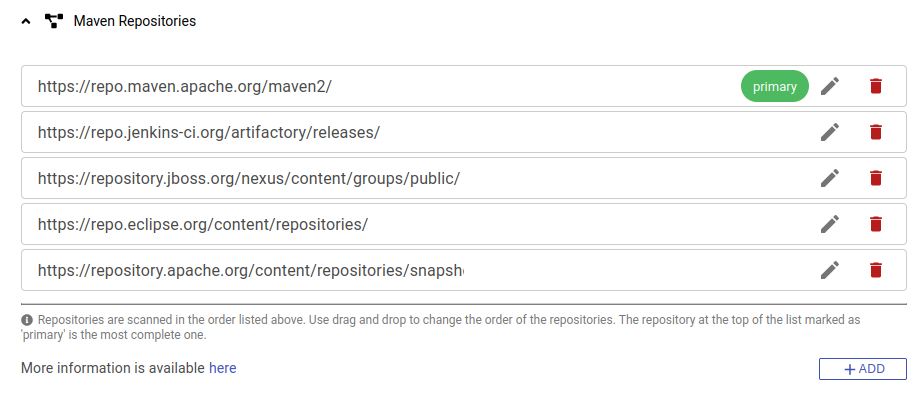
This extension is automatically installed when your application source code refers to Maven artifacts stored in a Maven repository defined in the Maven Repositories settings within the Global Configuration:
Technical information
- This extractor supports both remote Maven repositories and Maven repositories on your file system. The URL format must use the http/https/file protocols.
- When using com.castsoftware.aip ≥ 8.3.62 and com.castsoftware.imaging.core ≥ 8.4.10, Maven artifact extraction now benefits from a caching system. This makes successive extractions faster and more reliable - for example, if the connection to a Maven repository is unavailable during a subsequent extraction, cached artifacts are used as a fallback. Disk usage is also reduced for equivalent extraction configurations, since artifacts are shared across applications and their respective versions.
Supported Maven releases
| Maven release | Supported |
|---|---|
| 3.x.x | ✅ |
| 2.x.x | ✅ |
| 1.x.x | ✅ |
Packaging and extraction messages
These messages may appear in the analysis log:
| Message ID | Format | Message | Action |
|---|---|---|---|
.http.connectionFailed |
ERROR | Connection failed for %URL%: %MESSAGE% | Check the connection URL. |
.http.authenticationFailed |
ERROR | Authentication failed: %MESSAGE% | Check the credentials are correct. |
.http.artifactRetrievalFailed |
ERROR | Technical error during the extraction of the artifact from %URL% failed: %MESSAGE% | Check the access to the repository. |
.http.artifactMetadataRetrievalFailed |
ERROR | Technical error during the extraction of the maven-metadata.xml file from %URL% failed: %MESSAGE% | Without the data required to identify the versions for this artifact, we can’t determine a best version. Please contact CAST Technical Support and report a bug. |
.http.versionMetadataRetrievalFailed |
ERROR | Technical error during the extraction of the maven-metadata.xml file from %URL% failed: %MESSAGE% | Without the data required to identify the files for the SNAPSHOT, the artifact can’t be extracted. Please contact CAST Technical Support and report a bug. |
.http.pomReadContentError |
ERROR | Technical error while reading the pom file for the artifact [%GROUP_ID%][%ARTIFACT_ID%][%VERSION%]: %MESSAGE% | If the relocation is defined, the jar file will not be extracted. Please contact CAST Technical Support and report a bug. |
.http.artifactWithoutVersion |
WARNING | No version has been provided for the artifact [%GROUP_ID%][%ARTIFACT_ID%]. | In the maven dependency, the version should be defined or inherited from the parent. Check the packaging of the source code. |
.http.artifactWithVersionVariable |
WARNING | Version has been provided with variable for the artifact [%GROUP_ID%][%ARTIFACT_ID%]. | The variable should be defined or inherited from the parent. Check the packaging of the source code. |
.http.notSupportedArtifactWithRange |
WARNING | The automated extraction of artifacts with range is not supported: artifact [%GROUP_ID%][%ARTIFACT_ID%][%VERSION%]. | Please contact CAST Technical Support and report a feature request. |
.http.getArtifact |
INFO | Start to retrieve the artifact [%GROUP_ID%][%ARTIFACT_ID%][%VERSION%] from the repository. | None. |
.http.notFoundArtifact |
INFO | The artifact %GROUP_ID% %ARTIFACT_ID% has not been found in the repository. | Check the configuration details and update if necessary. |
.http.notFoundArtifactMetadata |
INFO | The metadata for artifact %GROUP_ID% %ARTIFACT_ID% has not been found in the repository. | Check the configuration details and update if necessary. |
.combined.invalidURL |
ERROR | .combined.invalidURL => %URL%=%MESSAGE% | Check the repository url provided. supported protocols: file://, http://, https:// |
Limitations
Parent POM files scanned
- Parent POM files are scanned but a limit is added to the recursive extraction of the Maven dependent artifacts. When packaging a Maven resource package, if a pom file has a parent, the parent file is scanned and the extractor will extract all JAR dependencies from the first level.
Packaging Type <POM>
A POM file with the packaging type <pom> will not extract additional JAR, WAR, or ZIP resources.
Extraction
Extraction levels are limited to:
- Two for dependent artifacts
- No limit for parent artifacts
The total number of artifacts extracted using additional levels is limited to ten times the number of remediation artifacts (extracted at the base level), the first two additional levels are not started if this number is greater than three times the number of remediation artifacts.