SQL support for Node.js
Introduction
This extension supports some libraries offering access to SQL databases.
The SQL frameworks analysis is based on the evaluation of the first
argument of the query() and execute() method calls. The first
argument is evaluated and if it corresponds to an SQL query, a
NodeJS SQL Query object is created. In the case where the first
argument does not correspond to a SQL query, we evaluate the second
argument if it exists. Text only and parameterized SQL queries are
supported. This heuristic allows us to support a large number of SQL
database frameworks.
The following libraries are supported:
- PostgreSQL
- MySQL
- MySQL2
- Microsoft SQL Server (mssql)
- Oracle Server
- SQLite3
- Tedious
- Snowflake
- Prisma
Object
This extension creates the following NodeJS SQL Query objects:
| Icon | Description |
|---|---|
 |
NodeJS SQL Query |
Examples
When executing a SQL query directly, the Node.js extension will create a NodeJS SQL Query object.
PostgreSQL
Take the following code:
var pg = require('pg');
var conString = "pg://operator:CastAIP@localhost:2280/postgres";
var client = null;

function getTables(schema, cbTables) {
    "use strict";
    client = new pg.Client(conString);
    client.connect();
    var select_query = "SELECT table_name FROM information_schema.tables WHERE table_schema";
    var queryTables = client.query(select_query),
        i;

    queryTables.on("row", function (row, result) {
        result.addRow(row);
    });
    queryTables.on("end", function (result) {
        var tables = [];
        for (i = 0; i < result.rows.length; i += 1) {
            tables.push(result.rows[i].table_name);
        }
        client.end();
        cbTables(tables);
    });
}
In this example, a NodeJS SQL Query object is created and a callLink
between the function getTables and that query is added.
The SQL Analyzer
or Missing tables and procedures for Node.js
can then link that query with the corresponding table.

MySQL
Take the following code:
var mysql      = require('mysql');
var connection = mysql.createConnection({
  host     : 'localhost',
  user     : 'me',
  password : 'secret',
  database : 'my_db'
});

connection.connect();
function getMostUsedApps() {
    var getmostusedapps = "SELECT a.created_by,a.name,a.category_id,t.app_id as id,COUNT(t.app_id) AS total,a.serviceUrl,a.contractId,"+
    "c.name as catname,p.company_name FROM track_ussd t "+ "RIGHT JOIN apps a ON t.app_id = a.id INNER JOIN categories c" +
    " ON a.category_id = c.id INNER JOIN profiles p ON a.created_by = p.user_id WHERE t.msisdn = '"+msisdn+"' AND a.status = 'ACTIVATE'" +
    "GROUP BY t.app_id ORDER BY total DESC LIMIT 3";

    connection.query(getmostusedapps, function(err_getmostusedapps, rows_getmostusedapps, fields_getmostusedapps) {
        render(rows_getmostusedapps);
    });
};
;
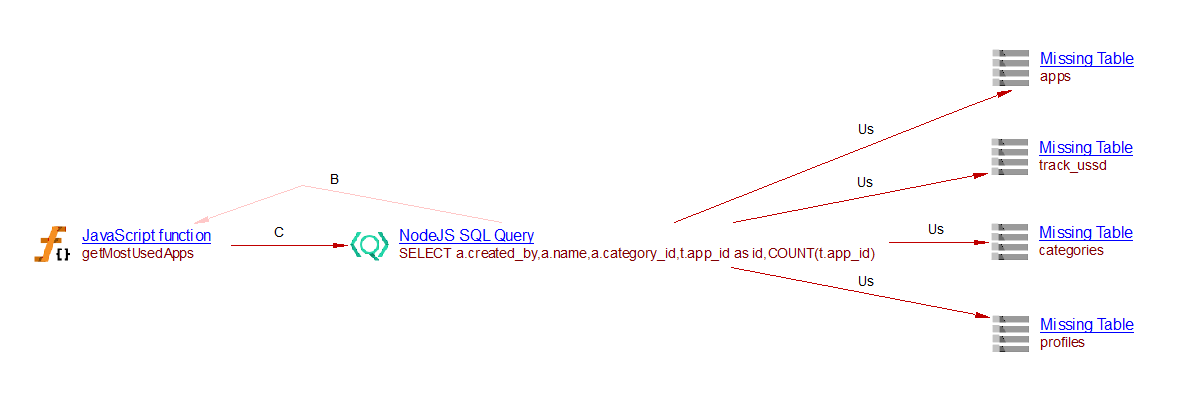
In this example, a NodeJS SQL Query object is created and a callLink
between the function getMostUsedApps and that query is added.
The SQL Analyzer
or Missing tables and procedures for Node.js
can then link that query with the corresponding table. In the situation described above, this
extension creates four useSelectLink to the four missing tables:
MySQL2
Take the following code:
const mysql = require('mysql2');
var express = require('express');
var router = express.Router();
var utils = require('./utils');
var Q = require('q');

const connection = mysql.createConnection(
  'mysql://root:password@localhost:3306/test'
);
connection.addListener('error', (err) => {
  console.log(err);
});

router.get('/', function(req, res, next) {
    var msisdn;
    var countryShort;
    var templateData;

    function init() {
        var url = req.get('host') + req.originalUrl;
        var pathArray = url.split( '/' );
        countryShort = pathArray[1].toUpperCase();
        msisdn = utils.getHeaderInfo(req.headers).userMsisdn;
        var localeObject = utils.initiateLocale(req);
        templateData = localeObject.__(countryShort+'_'+"MOSTUSEDPAGETEXT");
    };

    function render(data) {
        res.render('most_used', {
            most_used : data,
            countryShort : countryShort,
            lcWelcome :templateData
        });
    };

    function getMostUsedApps() {
        var getmostusedapps = "SELECT a.created_by,a.name,a.category_id,t.app_id as id,COUNT(t.app_id) AS total,a.serviceUrl,a.contractId,"+
        "c.name as catname,p.company_name FROM track_ussd t "+ "RIGHT JOIN apps a ON t.app_id = a.id INNER JOIN categories c" +
        " ON a.category_id = c.id INNER JOIN profiles p ON a.created_by = p.user_id WHERE t.msisdn = '"+msisdn+"' AND a.status = 'ACTIVATE'" +
        "GROUP BY t.app_id ORDER BY total DESC LIMIT 3";
        connection.query(getmostusedapps, function(err_getmostusedapps, rows_getmostusedapps, fields_getmostusedapps) {
            render(rows_getmostusedapps);
        });
    };

    Q.fcall(init)
    .then(getMostUsedApps)
    .catch(function (error) {
        return next(error);
    })
    .done();
});
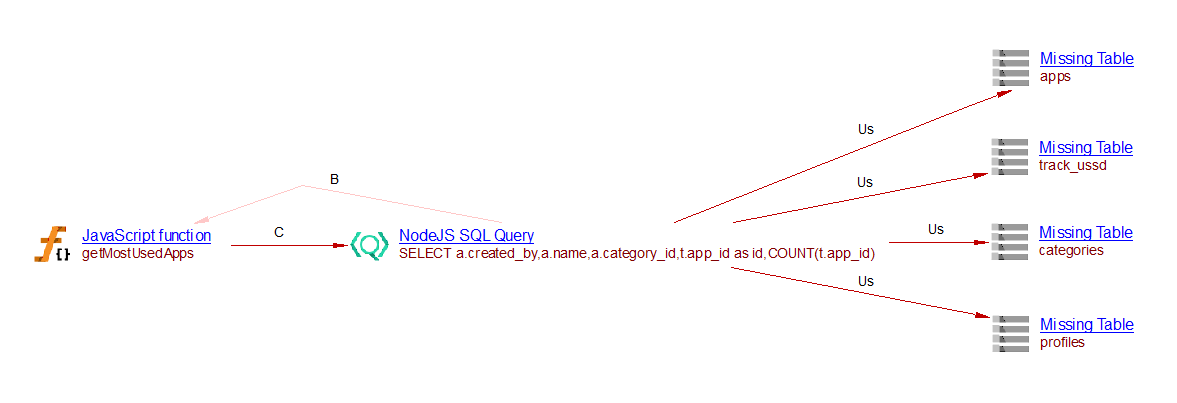
In this example, a NodeJS SQL Query object is created and a callLink
between the function getMostUsedApps and that query is added.
The SQL Analyzer
or Missing tables and procedures for Node.js
can then link that query with the corresponding table. In the situation described above, this
extension creates four useSelectLink to the four missing tables:
Microsoft SQL Server (mssql)
Take the following code:
var sql = require('mssql');

var config = {
    user: '...',
    password: '...',
    server: 'localhost',
    database: '...',
    options: {
        encrypt: true
    }
}

var connection = new sql.Connection(config, function(err) {
    var request = new sql.Request(connection); // or: var request = connection.request();
    request.query('select * from authors', function(err, recordset) {
        console.dir(recordset);
    });
    var request = new sql.Request(connection);
    request.input('input_parameter', sql.Int, 10);
    request.output('output_parameter', sql.VarChar(50));
    request.execute('procedure_name', function(err, recordsets, returnValue) {
        console.dir(recordsets);
    });
});
In this example, a NodeJS SQL Query object is created and a callLink
between the function sql_Connection_PARAM_2 and that query is added.
The SQL Analyzer
or Missing tables and procedures for Node.js
can then link that query with the corresponding table. In the situation described above, this
extension creates a useSelectLink to the missing table authors:

Oracle Server
Take the following code:
var oracledb = require('oracledb');

connection = oracledb.getConnection(
  {
    user          : "hr",
    password      : "welcome",
    connectString : "localhost/XE"
  }
);

oracledb.getConnection(
  {
    user          : "hr",
    password      : "welcome",
    connectString : "localhost/XE"
  },
  function(err, connection)
  {
    if (err) { console.error(err); return; }
    connection.execute(
      "SELECT department_id, department_name "
    + "FROM titles "
    + "WHERE department_id < 70 "
    + "ORDER BY department_id",
      function(err, result)
      {
        if (err) { console.error(err); return; }
        console.log(result.rows);
      });
  });
In this example, a NodeJS SQL Query object is created and a callLink
between the function oracledb_getConnection_PARAM_2 and that query is added.
The SQL Analyzer
or Missing tables and procedures for Node.js
can then link that query with the corresponding table. In the situation described above, this
extension creates a useSelectLink to the missing table titles:

SQLite3
Take the following code:
var sq = require('sqlite3');
sq.verbose();

var db = new sq.Database(__dirname + '/touslesmessages.db3');

db.each("SELECT * FROM message", function(err, row) {
    if (err) {
        console.log(err);
    } else {
        console.log(row.nom + " read '" + row.content + "'");
    }
});
In this example, a NodeJS SQL Query object is created and a callLink
between the source code sqlite3.js and that query is added. The
SQL Analyzer
or Missing tables and procedures for Node.js
can then link that query with the corresponding table. In the situation described above, this
extension creates a useSelectLink to the missing table message:

Tedious
Take the following code:
var Connection = require('tedious').Connection;
var Request = require('tedious').Request;

const config = {
  server: '192.168.1.212',
  authentication: {
    type: 'default',
    options: {
      userName: 'test',
      password: 'test'
    }
  },
  options: {
    port: 1433
  }
};

const connection = new Connection(config);

connection.connect((err) => {
  if (err) {
    console.log('Connection Failed');
    throw err;
  }

  const sql = 'CREATE TABLE ${table} ([c1] [int]  DEFAULT 58, [c2] [varchar](30))';
  const request = new Request(sql, (err) => {
    if (err) {
      throw err;
    }
  });

  connection.execSql(request);
});
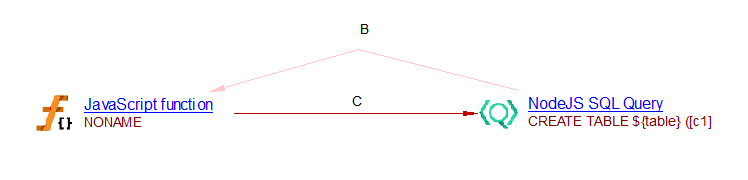
In this example, a NodeJS SQL Query object is created and a callLink
between the function NONAME and that query is added. The
SQL Analyzer
or Missing tables and procedures for Node.js
can then link that query with the corresponding table:
Snowflake
Whenever an execute call of a snowlake-sdk.Connection instance is found, a NodeJS SQL Query object is created.
Take the following code:
import * as snowflake from 'snowflake-sdk';

const connection = snowflake.createConnection({
    account: 'myaccount',
    username: 'myuser',
    password: 'mypassword',
    database: 'MYDB',
    schema: 'PUBLIC',
    warehouse: 'COMPUTE_WH'
});

function runQuery() {
    connection.execute({
        sqlText: 'SELECT * FROM myschema.mytable WHERE id = 1',
        complete: function(err, stmt, rows) { }
    });
}
In this example, a NodeJS SQL Query object is created with the CAST_SQL_MetricableQuery.sqlQuery
property storing the actual query. A callLink between the runQuery function and the query is added.