ASP.NET Web API Framework and Security Rules - 1.6
Description
This extension provides support for ASP.NET Web API, ASP.NET Core Web API, ASP.Net Core Minimal API, ASMX and ASHX and OData server-side. This extension will create links from client side to back-end. It also provides a set of quality rules related to security.
In what situation is this extension installed ?
CAST installs this extension whenever you are analyzing a .NET application.
ASP.NET Web API support
The following frameworks are supported by this extension:
| Library | Version | Supported |
|---|---|---|
| Web API | 2.2 | ✅ |
| ASP.NET Core Web API | .Net 10 | ✅ |
| ASHX / ASMX | all releases | ✅ |
| OData server side | 9.4.1 | ✅ |
Files analyzed
| Icons | File | Extension | Note |
|---|---|---|---|
| - | C# | *.cs |
|
 |
.NET Razor | *.cshtml |
|
 |
VB.NET | *.vb |
|
| - | JSON | *.json, *.jsonld |
|
 |
ASPX | *.aspx |
|
| - | ASHX | *.ashx |
|
| - | ASMX | *.asmx |
|
| - | XML | *.xml |
|
| - | Configuration | web.config, appsettings.json |
This extension broadcasts an XML parser for others extensions to analyze web.config files. |
Transactions
Transaction support is derived from metamodel concepts used to build CAST Imaging Blueprint and structural transaction flows. Entry Points start transactions; Exit Points include both output/boundary concepts and Data Entities manipulated by transactions.
| Role | Support | Breakdown |
|---|---|---|
| Entry Point |
|
|
| Exit Point | No direct concept type details |
Data version: 1.5.2-funcrel
ISO 5055 Structural Rules
Quality support is based on ISO 5055 structural rules available for the selected extension version.
| Reliability | Maintainability | Security | Performance Efficiency |
|---|---|---|---|
Data version: 1.5.2-funcrel
Download and installation instructions
The extension is automatically downloaded and installed whenever .NET source code is delivered.
What results can you expect?
Objects
| Icon | Description |
|---|---|
 |
DotNet Get Operation |
 |
DotNet Delete Operation |
 |
DotNet Post Operation |
 |
DotNet Put Operation |
|
DotNet Patch Operation |
|
DotNet Any Operation |
|
DotNet Controller Action |
Links
A DotNet Controller Action is created for each controller method, and a call link is created from this action to the method:

public class DepartmentController: Controller
{
    public IActionResult Details()
    {
        return View();
    }
}
These controller actions may be directly called from clients through HTML5 Razor method calls present in cshtml files:

<td>
     @Html.ActionLink("Details", "Details", new { id = item.DepartmentID })
</td>
One or more DotNet operations are created for one DotNet Controller Action, because the DotNet Server may be called by other clients than Razor clients. From HTML files or sections of HTML in .cshtml files:
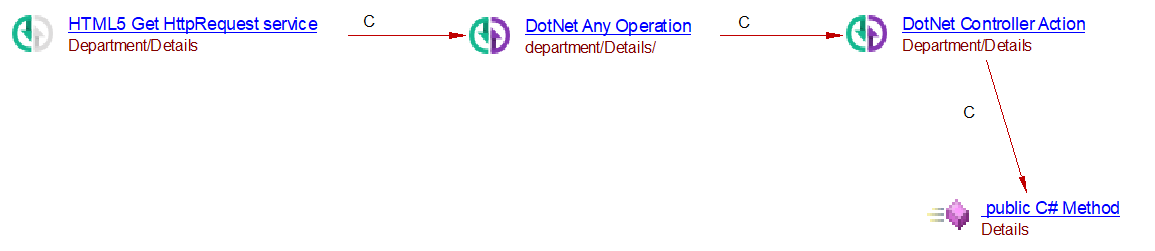
<div href="Department/Details">
Controller actions are therefore always present in transactions, but operations are present only for purely HTMLclients (not clients using razor).
ASP.NET Core Minimal API Support
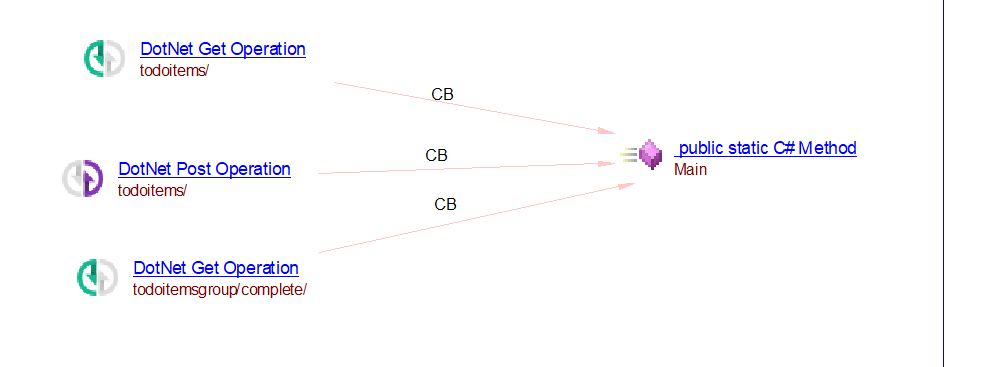
One or more DotNet operations will be created for each Minimal API endpoints and a link from the operation to the method implementing the endpoint will be created.
The extension now detects ASP.NET Core Minimal API endpoints and creates the corresponding DotNet operations in your analysis results — the same operation objects you already get for controller-based endpoints.
What gets detected
Endpoints declared directly on the app/route builder (typically in Program.cs), for example:
var app = builder.Build();

app.MapGet("/todoitems", handler);      // resolved as /todoitems/
app.MapPost("/todoitems", handler);     // resolved as /todoitems/

var group = app.MapGroup("/todoitemsgroup");
group.MapGet("/complete", handler);        // resolved as /todoitemsgroup/complete/
Supported mapping methods:
| Method | Operation created |
|---|---|
| MapGet | GET |
| MapPost | POST |
| MapPut | PUT |
| MapDelete | DELETE |
| MapPatch | PATCH |
| Map | ANY (no verb constraint) |
| MapMethods | one operation per HTTP verb listed |
| MapFallback | ANY |
Route groups (MapGroup) are understood as prefixes: the endpoint’s full URL is built by combining the group prefix with the endpoint’s own route pattern, including nested groups.
How URLs are resolved
Route patterns are resolved using CAST’s expression-evaluation engine, so the URL is recovered even when it is built from string concatenation, variables, or constants across methods — not only from a literal string. Route parameters (e.g. {id}) are removed in the operation name (todoitems/{}/).
When a URL cannot be resolved, no operation is created and the reason is written to the analysis log (rather than producing a misleading/empty endpoint).
What you’ll see
- One DotNet operation object per resolved endpoint (GET/POST/PUT/DELETE/PATCH/ANY), attached to the code that declares it.
- A log line for each endpoint created, and for each URL that could not be resolved.
Current limitations
- The operation currently links back to the declaring method; linking directly to the endpoint handler (lambda/delegate) is planned but not yet in place.
- Conventional controller/attribute routing is handled separately (unchanged by this feature).
ASHX/ASMX support
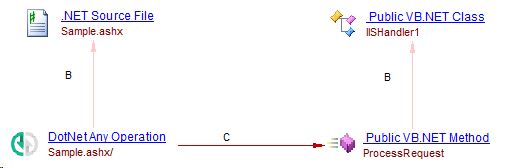
WebHandle/ProcessRequest
In ashx/asmx file:
<%@ WebHandler Language="C#" class="PREFIX.TaxServerInfo" %>
In IISHandler1.vb:
Imports System.Web
Public Class IISHandler1
    Implements IHttpHandler

    Public Sub ProcessRequest(ByVal context As HttpContext) Implements IHttpHandler.ProcessRequest

        ' Write your handler implementation here.

    End Sub
End Class
Will create an operation:
WebService/WebMethod
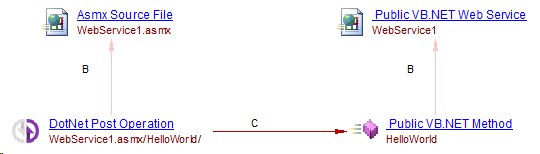
In asmx file:
<%@ WebService Language="vb" CodeBehind="WebService1.asmx.vb" class="WebApplication1.WebService1" %>
In vb file:
Imports System.Web.Services
Imports System.Web.Services.Protocols
Imports System.ComponentModel

' To allow this Web Service to be called from script, using ASP.NET AJAX, uncomment the following line.
' <System.Web.Script.Services.ScriptService()> _
<System.Web.Services.WebService(Namespace:="http://tempuri.org/")> _
<System.Web.Services.WebServiceBinding(ConformsTo:=WsiProfiles.BasicProfile1_1)> _
<ToolboxItem(False)> _
Public Class WebService1
    Inherits System.Web.Services.WebService

    <WebMethod()> _
    Public Function HelloWorld() As String
       Return "Hello World"
    End Function

End Class
Will create an operation for each WebMethod annotated methods:
OData server side support
Controller actions and DotNet operations will be created from each ODataController method following OData naming conventions. The naming of each Controller action will keep the same standard. The naming of the DotNet operations will concatenate the OData service route prefix and the OData path. The odata route prefix is set during the registration of the OData service.The OData path is defined by convention or by attributes in the ODataController.
OData v8 routing prefix in ASP.NET Core Web API
The OData services is added by calling the AddOData method. The AddRouteComponents method is used to register a route, passing along the Edm model to associate it with.
// Program.cs
using Lab01.Models;
using Microsoft.AspNetCore.OData;
using Microsoft.OData.ModelBuilder;

var builder = WebApplication.CreateBuilder(args);

var modelBuilder = new ODataConventionModelBuilder();
modelBuilder.EntityType<Order>();
modelBuilder.EntitySet<Customer>("Customers");

builder.Services.AddControllers().AddOData(
    options => options.Select().Filter().OrderBy().Expand().Count().SetMaxTop(null).AddRouteComponents(
        "odata2",
        modelBuilder.GetEdmModel()));

var app = builder.Build();

app.UseRouting();

app.UseEndpoints(endpoints => endpoints.MapControllers());

app.Run();
In this example the odata route prefix is odata2.
OData v7 routing prefix in ASP.NET Core
The OData services is added by calling the UseMvc method. The MapODataServiceRoutemethod is used to register a route, passing along the Edm model to associate it with.
public void ConfigureServices(IServiceCollection services)
{
    services.AddMvc();
    services.AddOData();
}

public void Configure(IApplicationBuilder app)
{
    var builder = new ODataConventionModelBuilder(app.ApplicationServices);

    builder.EntitySet<Product>("Products");

    app.UseMvc(routeBuilder =>
    {
        // and this line to enable OData query option, for example $filter
        routeBuilder.Select().Expand().Filter().OrderBy().MaxTop(100).Count();

        routeBuilder.MapODataServiceRoute("ODataRoute", "odata3", builder.GetEdmModel());

        // uncomment the following line to Work-around for #1175 in beta1
        // routeBuilder.EnableDependencyInjection();
    });
}
In this example the odata route prefix is odata3.
OData routing prefix in ASP.NET Web API
The OData services is added by calling the MapODataServiceRoute method to register a route, passing along the Edm model to associate it with.
public static class WebApiConfig
{
    public static void Register(HttpConfiguration config)
    {
        var builder = new ODataConventionModelBuilder();

        builder.EntitySet<Product>("Products");

        config.MapODataServiceRoute("ODataRoute", "odata1", model);
    }
}
In this example the odata route prefix is odata1.
OData paths
CRUD operations routing
| Request | Example URI | Action Name | Example Action | Cast Operation name | Cast Operation type |
|---|---|---|---|---|---|
| GET /entityset | odata/Products | GetEntitySet or Get GetProducts | odata/products | CAST_DotNet_GetOperation | |
| GET /entityset(key) | odata/Products(1) | GetEntitySet or Get | GetProduct(int key) | odata/products/{} | CAST_DotNet_GetOperation |
| GET /entityset/cast | odata/Products/Models.Book | GetControllerNameFromEntityType or GetFromEntityType | GetProductsFromBook() or GetFromBook() | odata/products/models.book | CAST_DotNet_GetOperation |
| GET /entityset(key)/cast | odata/Products(1)/Models.Book | GetEntityType | GetBook(int key) | odata/products/{}/models.book | CAST_DotNet_GetOperation |
| POST /entityset | odata/Products | PostEntitySet or Post | PostProduct(Product prod) | odata/products | CAST_DotNet_PostOperation |
| POST /entityset/cast | odata/Products/Models.Book | PostFromEntityType or PostEntitySetFromEntityType | PostFromBook(Book book) or PostProductFromBook(Book book) | odata/products/models.book | CAST_DotNet_PostOperation |
| PUT /entityset(key) | odata/Products(1) | PutEntityType or Put | PutProduct(int key, Product prod) | odata/products/{} | CAST_DotNet_PutOperation |
| PUT /entityset(key)/cast | odata/Products(1)/Models.Book | PutEntityType or Put | PutBook(int key, Book book) | odata/products/{}/models.book | CAST_DotNet_PutOperation |
| PATCH /entityset(key) | /Products(1) | PatchEntitySet or Patch | PatchProduct(int key, Product prod) | odata/products/{} | CAST_DotNet_PatchOperation |
| PATCH /entityset(key)/cast | /Products(1)/Models.Book | PatchEntityType or Patch | PatchBook(int key, Book book) | odata/products/{}/models.book | CAST_DotNet_PatchOperation |
| DELETE /entityset(key) | /Products(1) | DeleteEntitySet or Delete | DeleteProduct(int key) | odata/products/{} | CAST_DotNet_DeleteOperation |
| DELETE /entityset(key)/cast | /Products(1)/Models.Book | DeleteEntityType or Delete | DeleteBook(int key) | odata/products/{}/models.book | CAST_DotNet_DeleteOperation |
OData navigation property routing
| Request | Example URI | Action Name | Example Action | Cast Operation expected name | Cast Operation type |
|---|---|---|---|---|---|
| GET /entityset(key)/navigation | odata/Products(1)/Supplier | GetProperty or GetPropertyFromEntitySet | GetSupplier(int key) or GetSupplierFromProduct(int key) | odata/products/{}/supplier | CAST_DotNet_GetOperation |
| GET /entityset(key)/cast/navigation | odata/Products(1)/Models.Book/Author | GetProperty or GetPropertyFromEntityType | GetAuthor(int key) or GetAuthorFromBook(int key) | odata/products/{}/models.book/author | CAST_DotNet_GetOperation |
| POST /entityset(key)/navigation | odata/Customers(1)/Orders | PostToProperty or PostToPropertyFromEntitySet | PostToOrdersFromCustomer(int key) or PostToOrders(int key) | odata/customers/{}/orders | CAST_DotNet_PostOperation |
| POST /entityset(key)/cast/navigation | odata/Customers(1)/Models.Vip/Orders | PostToPropertyFromEntityType | PostToOrdersFromVip(int key) | odata/customers/{}/models.vip/orders | CAST_DotNet_PostOperation |
| PUT /entityset(key)/navigation | odata/Customers(1)/Friend | PutToProperty or PutToPropertyFromEntitySet | PutToFriend(int key) or PutToFriendFromCustomer(int key) | odata/customers/{}/friend | CAST_DotNet_PutOperation |
| PUT /entityset(key)/cast/navigation | odata/Customers(1)/Models.Vip/Friend | PutToPropertyFromEntityType | PutToFriendFromVip(int key) | odata/customers/{}/models.vip/friend | CAST_DotNet_PutOperation |
| PATCH /entityset(key)/navigation | /Customers(1)/Friend | PatchToProperty or PatchToPropertyFromEntitySet | PatchToFriend(int key) or PatchToFriendFromCustomer(int key) | odata/customers/{}/friend | CAST_DotNet_PatchOperation |
| PATCH /entityset(key)/cast/navigation | /Customers(1)/Models.Vip/Friend | PatchToProperty or PatchToPropertyFromEntitySet | PatchToFriendFromVip(int key) | odata/customers/{}/models.vip/friend | CAST_DotNet_PatchOperation |
Attribute routing
Attribute routing is enabled in OData but several syntaxes exist depending on the version exist:
- Use ODataRouteAttribute(“routepath”) for OData version 7.x or 6.x;
- Use Http[verb]Attribute(“routepath”) for OData version 8.x;
- Use RouteAttribute(“routepath”) with Http[verb]Attribute
Links created
We create links between controller action and DotNet operations. When used with the extension com.castsoftware.dotnet.odata we also create links towards web services.
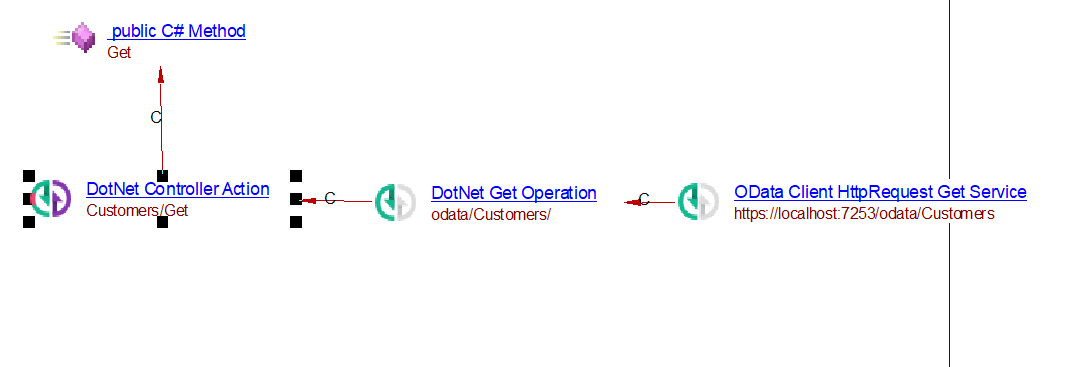
public class CustomersController : ODataController
{
    [EnableQuery]
    public IActionResult Get()
    {
        return Ok(Customers);
    }
}
OData limitations
These functionalities are not supported:
- OData functions
- OData actions
- Query options
Quality rules
Limitations
- URLs present in annotations, which are in a variable, are not supported.