Java Thymeleaf - 1.0
Description
This extension adds analysis support for Thymeleaf, a modern server-side template engine for Java-based web and standalone applications. Thymeleaf generates dynamic web pages by processing HTML templates and merging them with application data at runtime.
Supported technologies
| Component | Version | Supported | Supported Technology |
|---|---|---|---|
| Thymeleaf | <=3.1.5 | ✅ | Java |
Transactions
Transaction support is derived from metamodel concepts used to build CAST Imaging Blueprint and structural transaction flows. Entry Points start transactions; Exit Points include both output/boundary concepts and Data Entities manipulated by transactions.
| Role | Support | Breakdown |
|---|---|---|
| Entry Point | N/A | No data available |
| Exit Point | N/A | No data available |
ISO 5055 Structural Rules
Quality support is based on ISO 5055 structural rules available for the selected extension version.
| Reliability | Maintainability | Security | Performance Efficiency |
|---|---|---|---|
| N/A | N/A | N/A | N/A |
Download and installation instructions
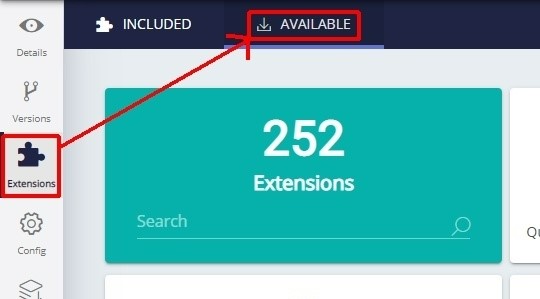
The extension will be automatically downloaded and installed in CAST Console. It can be managed through the Application → Extensions interface.
What results can you expect?
Objects
| Icon | Description | Creation Context |
|---|---|---|
 |
Java Thymeleaf Parameter | An object is created for each execution of template process APIs |
 |
Java Thymeleaf Call To Context | An object is created for each Thymeleaf attribute variable expression in HTML file |
Links
| Link Type | Source and destination link | Supported Methods |
|---|---|---|
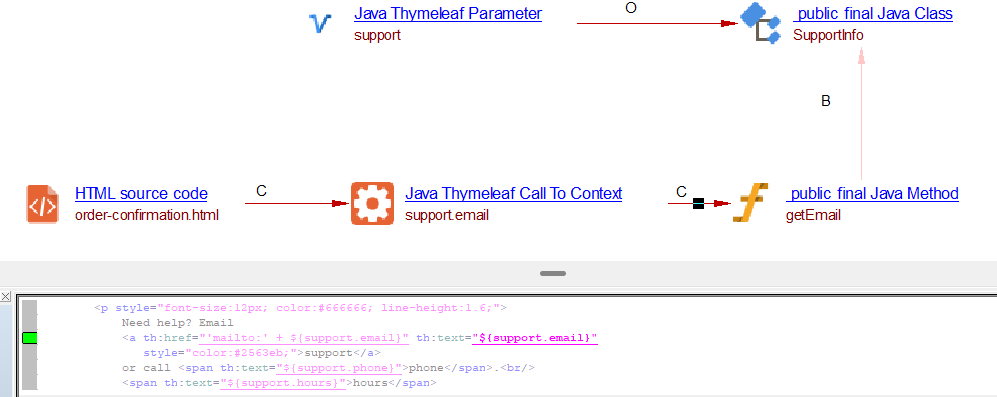
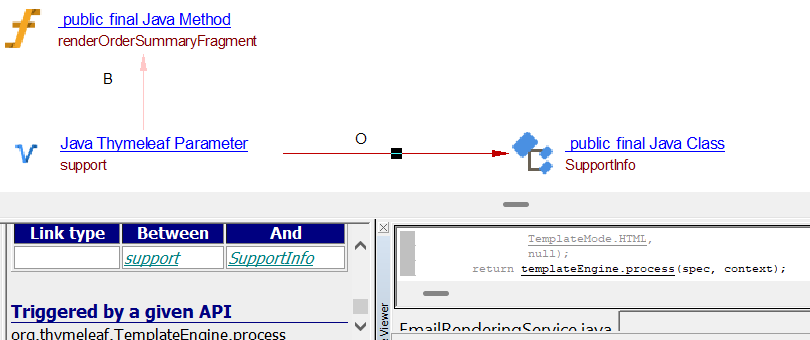
| relyonLink | Between Java Thymeleaf Parameter and and respective Data Model JAVA class | org.thymeleaf.TemplateEngine.process org.thymeleaf.TemplateEngine.processThrottled |
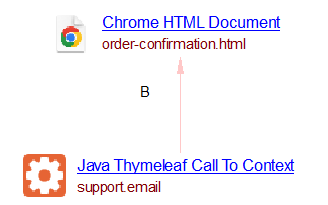
| callLink | Between HTML source code objects of HTML file and Java Thymeleaf Call To Context objects. | |
| callLink | Between Java Thymeleaf Call To Context objects and JAVA methods. |
Code examples
Thymeleaf Core
Thymeleaf Engine code - EmailRenderingService.java
package com.example.email.service;

import org.thymeleaf.TemplateEngine;
import org.thymeleaf.context.IContext;
import org.thymeleaf.TemplateSpec;
import org.thymeleaf.templatemode.TemplateMode;
import org.thymeleaf.templateresolver.ClassLoaderTemplateResolver;
import org.thymeleaf.templateresolver.StringTemplateResolver;

import java.util.Collections;

/**
 * Renders order emails. Every method funnels through
 * {@link TemplateEngine#process(TemplateSpec, org.thymeleaf.context.IContext)}.
 *
 * Two resolvers are chained:
 *   1. ClassLoaderTemplateResolver — serves file templates under templates/emails/*
 *   2. StringTemplateResolver      — treats the "template name" as literal content,
 *                                     used for the inline plain-text body.
 * A resolvable-pattern on the first resolver keeps the two from colliding.
 */
public final class EmailRenderingService {

    private final TemplateEngine templateEngine;

    public EmailRenderingService() {
        ClassLoaderTemplateResolver fileResolver = new ClassLoaderTemplateResolver();
        fileResolver.setPrefix("templates/");
        fileResolver.setSuffix(".html");
        fileResolver.setTemplateMode(TemplateMode.HTML);
        fileResolver.setCharacterEncoding("UTF-8");
        fileResolver.setResolvablePatterns(Collections.singleton("emails/*"));
        fileResolver.setCacheable(true);
        fileResolver.setOrder(1);

        StringTemplateResolver stringResolver = new StringTemplateResolver();
        stringResolver.setOrder(2);
        // Mode is forced per-call via the TemplateSpec, so it is not fixed here.

        TemplateEngine engine = new TemplateEngine();
        engine.addTemplateResolver(fileResolver);
        engine.addTemplateResolver(stringResolver);
        this.templateEngine = engine;
    }

    /**
     * (1) Full HTML confirmation email.
     * TemplateSpec = template name + HTML mode.
     */
    public String renderHtmlConfirmation(IContext context) {
        TemplateSpec spec = new TemplateSpec("emails/order-confirmation", TemplateMode.HTML);
        return templateEngine.process(spec, context);
    }

    /**
     * (2) Only the order-summary table, selected with a markup selector.
     * TemplateSpec = template name + selector set + HTML mode.
     * Useful for embedding the same summary into an SMS gateway, a chat
     * message, an admin dashboard, etc.
     */
    public String renderOrderSummaryFragment(IContext context) {
        TemplateSpec spec = new TemplateSpec(
                "emails/order-confirmation",
                Collections.singleton("orderSummary"), // matches th:fragment="orderSummary"
                TemplateMode.HTML,
                null);
        return templateEngine.process(spec, context);
    }

    /**
     * (3) Plain-text alternative body, rendered from an inline string template
     * in TEXT mode. The TemplateSpec's template mode overrides the resolver's,
     * so the very same engine produces correct textual output.
     */
    public String renderTextConfirmation(IContext context) {
        String textTemplate =
                "Hi [(${customer.name})],\n" +
                "\n" +
                "Thanks for your order [(${order.orderNumber})] ([(${order.status.label})]).\n" +
                "\n" +
                "[# th:each=\"item : ${order.items}\"]" +
                "  - [(${item.quantity})] x [(${item.productName})]  ->  [(${item.lineTotal.formatted})]\n" +
                "[/]" +
                "\n" +
                "Subtotal: [(${order.subtotal.formatted})]\n" +
                "Shipping: [(${order.shipping.formatted})]\n" +
                "Total:    [(${order.total.formatted})]\n" +
                "\n" +
                "Estimated delivery: [(${order.estimatedDeliveryDisplay})]\n" +
                "\n" +
                "Questions? [(${support.email})] / [(${support.phone})]\n";

        TemplateSpec spec = new TemplateSpec(textTemplate, TemplateMode.TEXT);
        return templateEngine.process(spec, context);
    }
}
Context Class - SupportInfo.java
package com.example.email.model;

/** Support contact block shown in the footer. */
public final class SupportInfo {

    private final String email;
    private final String phone;
    private final String hours;

    public SupportInfo(String email, String phone, String hours) {
        this.email = email;
        this.phone = phone;
        this.hours = hours;
    }

    public String getEmail() {
        return email;
    }

    public String getPhone() {
        return phone;
    }

    public String getHours() {
        return hours;
    }
}
HTML Template - order-confirmation.html
<!DOCTYPE html>
<html xmlns:th="http://www.thymeleaf.org">
<head>
    <meta charset="UTF-8"/>
    <title>Order Confirmation</title>
</head>
<body style="font-family: Arial, Helvetica, sans-serif; color:#222222; margin:0; padding:0; background:#fafafa;">
    <div style="max-width:600px; margin:0 auto; padding:24px; background:#ffffff;">

        <h1 style="font-size:20px; margin:0 0 16px;">
            Thanks for your order, <span th:text="${customer.name}">Customer</span>!
        </h1>

        <p style="margin:0 0 16px; line-height:1.5;">
            We've received order
            <strong th:text="${order.orderNumber}">#000</strong>,
            placed on <span th:text="${order.placedAtDisplay}">date</span>.
            Current status: <strong th:text="${order.status.label}">Status</strong>.
        </p>

        <!--
          This table is a named fragment. The service can render the whole
          email, or select just this block via a TemplateSpec markup selector
          ("orderSummary"), reusing the exact same data and markup.
        -->
        <table th:fragment="orderSummary" width="100%" cellpadding="8" cellspacing="0"
               style="border-collapse:collapse; margin:8px 0 16px; font-size:14px;">
            <thead>
                <tr style="background:#f4f4f5; text-align:left;">
                    <th>Item</th>
                    <th style="text-align:center;">Qty</th>
                    <th style="text-align:right;">Unit</th>
                    <th style="text-align:right;">Line total</th>
                </tr>
            </thead>
            <tbody>
                <tr th:each="item : ${order.items}" style="border-bottom:1px solid #eeeeee;">
                    <td th:text="${item.productName}">Product</td>
                    <td style="text-align:center;" th:text="${item.quantity}">1</td>
                    <td style="text-align:right;" th:text="${item.unitPrice.formatted}">$0.00</td>
                    <td style="text-align:right;" th:text="${item.lineTotal.formatted}">$0.00</td>
                </tr>
            </tbody>
            <tfoot>
                <tr>
                    <td colspan="3" style="text-align:right;">Subtotal</td>
                    <td style="text-align:right;" th:text="${order.subtotal.formatted}">$0.00</td>
                </tr>
                <tr>
                    <td colspan="3" style="text-align:right;">Shipping</td>
                    <td style="text-align:right;" th:text="${order.shipping.formatted}">$0.00</td>
                </tr>
                <tr>
                    <td colspan="3" style="text-align:right; font-weight:bold;">Total</td>
                    <td style="text-align:right; font-weight:bold;" th:text="${order.total.formatted}">$0.00</td>
                </tr>
            </tfoot>
        </table>

        <p style="margin:0 0 16px; line-height:1.5;">
            Estimated delivery:
            <strong th:text="${order.estimatedDeliveryDisplay}">date</strong>.
            A confirmation was sent to
            <span th:text="${customer.email}">email</span>.
        </p>

        <hr style="border:none; border-top:1px solid #eeeeee; margin:24px 0;"/>

        <p style="font-size:12px; color:#666666; line-height:1.6;">
            Need help? Email
            <a th:href="'mailto:' + ${support.email}" th:text="${support.email}"
               style="color:#2563eb;">support</a>
            or call <span th:text="${support.phone}">phone</span>.<br/>
            <span th:text="${support.hours}">hours</span>
        </p>
    </div>
</body>
</html>