Easytrieve - 1.1
Description
If your Mainframe application contains Easytrieve Classic or Easytrieve Plus report generator source code and you want to view these object types and their links with other objects, then you should install this extension.
The extension provides Easytrieve programs, macros, procedures, files and reports, the calls between them and to other programs, the SQL queries, the links from JCL steps and from COBOL programs, the cyclomatic complexity and the code and comment line counts, and quality rules.
Download and installation instructions
The extension will be automatically downloaded and installed when any of the file types listed below are delivered in the source code. It can be managed through the Application → Extensions interface.
Supported file types
| Code type | Supported file extension | Required? | Comments |
|---|---|---|---|
| Easytrieve programs | *.ESY |
✅ | 1 program per file. |
| Easytrieve programs | *.EZT |
✅ | 1 program per file. Alternative file extension for Easytrieve Plus source code. |
| Easytrieve macro | *.MAC |
❌ | 1 macro per file. |
File extensions are case insensitive. A file whose first card starts with MACRO is an Easytrieve Macro, whatever its extension; any other file is an Easytrieve Program. Only columns 1 to 72 of each card are analyzed: columns 73 to 80 (sequence numbers) are ignored. A line longer than 80 columns is not a card image, and is analyzed whole.
Technology support
The following languages are supported:
| Language | Versions | Supported | Comment |
|---|---|---|---|
| Easytrieve | all versions | ✅ | on z/OS and OS/390 |
| CA-Easytrieve Plus | all versions | ✅ | on z/OS and OS/390 |
| Easytrieve Report Generator | all versions | ✅ | on z/OS |
Transactions
Transaction support is derived from metamodel concepts used to build CAST Imaging Blueprint and structural transaction flows. Entry Points start transactions; Exit Points include both output/boundary concepts and Data Entities manipulated by transactions.
| Role | Support | Breakdown |
|---|---|---|
| Entry Point | No direct concept type details | |
| Exit Point |
Unresolved Storage
Data Entities
|
Data version: 1.0.3-funcrel
ISO 5055 Structural Rules
Quality support is based on ISO 5055 structural rules available for the selected extension version.
| Reliability | Maintainability | Security | Performance Efficiency |
|---|---|---|---|
Data version: 1.0.3-funcrel
What results can you expect?
Programs, procedures and calls
Each source file is an Easytrieve Program, or an Easytrieve Macro (see Supported file types). In a program, each name. PROC statement is an Easytrieve Procedure, each FILE name statement an Easytrieve File and each REPORT name statement an Easytrieve Report.
Statements create links from the program or the procedure they are written in. The target is found as follows:
PERFORM name,START name,RESTART nameandFINISH name(including theSTARTandFINISHoptions ofJOB): the procedure of the same program with this name.CALL nameandLINK name: the analyzed Easytrieve programs with this name. When several programs have this name, the closest ones in the folder tree are used, all of them when they are equally close. Macros are never the target of aCALLor aLINK.%name(macro invocation): the analyzed Easytrieve macros with this name. When several macros have this name, the closest ones in the folder tree are used, all of them when they are equally close.
When a CALL or a LINK matches no analyzed Easytrieve program, an Easytrieve Call to Program object is created, which can be linked to programs of other languages (see Calls to other languages).
A macro is analyzed as a whole for its metrics only: the extension creates no object and no link from the statements of a macro. The use links of the ESQLSearchable search (see Links) can still start from a macro.
File and report access
Statements on files create an access read link or an access write link from the program or the procedure to the Easytrieve File of the same program:
- Access read:
GET,READ,SEARCH(the table file),JOB INPUT(every file of the list, synchronized files included), the input file ofSORTand theFROMfile ofPUTandWRITE. - Access write:
PUT,WRITE,POINTand theTOfile ofSORT.
PRINT name creates an access write link to the Easytrieve Report of the same program, and SUMFILE name in a REPORT creates an access write link from the report to the file.
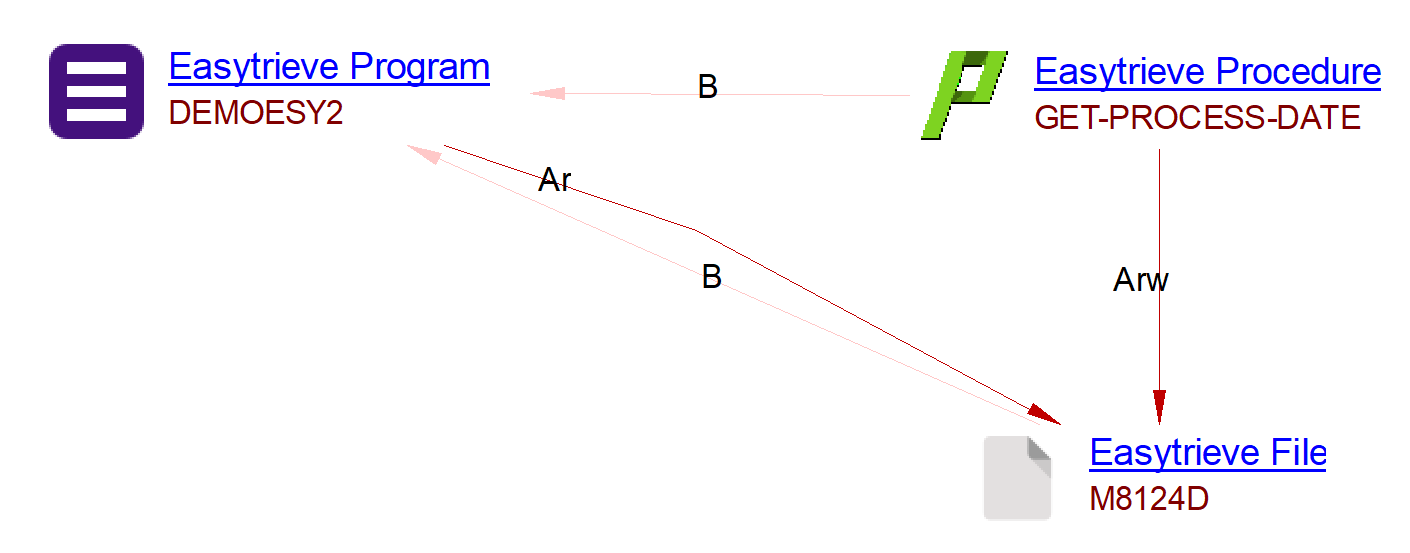
For example, in the file DEMOESY2.ezt below:
- The Easytrieve Program is created based on the file presence itself.
- The Easytrieve Procedure GET-PROCESS-DATE is created based on the
PROCstatement. - The Easytrieve File M8124D is created based on the
FILEstatement. - The access read and access write links are created based on the
GETandPOINTstatements inside the procedure. - The access read link from the program is created based on the
JOB INPUTstatement. ItsSTARTandFINISHoptions also create call links to the procedures START-OBLIGAT-PROC and LAST-REC-PROC, declared in the part of the file not shown here.
...
*
FILE M8124D  VS (2446)
  M-KEY                             2   22  A
  M-001-DELETE-CODE                 1    1  A
  M-005-BANK-NUMBER                 2    2  N
  M-010-OBLIGOR-NUMBER              4   10  N
  M-012-APPLICATION-CODE           14    1  N
  M-015-OBLIGATION-NUMBER          15    6  P 0
  M-025-RECORD-CODE                21    3  N
...
 GET-PROCESS-DATE. PROC
      MOVE ' ' TO KEY-M-KEY
      POINT M8124D   GE KEY-M-KEY, STATUS
      IF EOF M8124D , OR FILE-STATUS (M8124D) NOT ZERO
             DISPLAY ' UNSUCCESSFUL START FOR OBLIGATION FILE ' +
                        KEY-M-KEY
         STOP
      END-IF
      GET   M8124D
      IF EOF M8124D , OR FILE-STATUS (M8124D) NOT ZERO
         DISPLAY ' UNSUCCESSFUL READ FOR OBLIGATION INTEGRITY RECORD ' +
                   KEY-M-KEY
         STOP
      END-IF
      DATE-OUT   =     M-DATE
      MOVE MM-OUT    TO MM-IN
      MOVE DD-OUT    TO DD-IN
      MOVE YY-OUT    TO YY-IN
      MOVE DATE-IN   TO PROC-DATE
 END-PROC
...
JOB INPUT M8124D START(START-OBLIGAT-PROC) FINISH(LAST-REC-PROC)
...
SQL support
The extension creates an Easytrieve SQL Query object for each SQL statement, and for the SELECT of a JOB INPUT SQL activity. The query is linked from the program or the procedure that holds it, and is named after its first four words (two words for a query that starts with EXEC or EXECUTE). Links from the queries to the tables, views and procedures are created by the SQL Analyzer extension, which also creates the Easytrieve Missing Table, Missing Procedure and Missing Schema objects (see Objects) for the tables and procedures that are not found in the analyzed DDL.
For example, in the file DEMOBD2A.ezt:
- The Easytrieve Program is created based on the file presence itself.
- The Easytrieve Procedure is created based on the
PROCstatement. - The Easytrieve SQL Query is created based on the
SQLstatement. - The call link between the program and the procedure is created based on the
PERFORMstatement inside the program. - The call link between the procedure and the SQL query is created based on the
SQLstatement inside the procedure.

Calls to other languages
Easytrieve programs are linked to and from programs written in other languages (COBOL, PL/I, Assembler, …) by the Universal Linker extension (1.7.51 or later):
- An Easytrieve Call to Program is linked to the program of any language with the same name.
- A COBOL Program Prototype is linked to the Easytrieve Program with the same name. The prototype is created by the Mainframe Analyzer for a program that is not a COBOL program, called by a COBOL
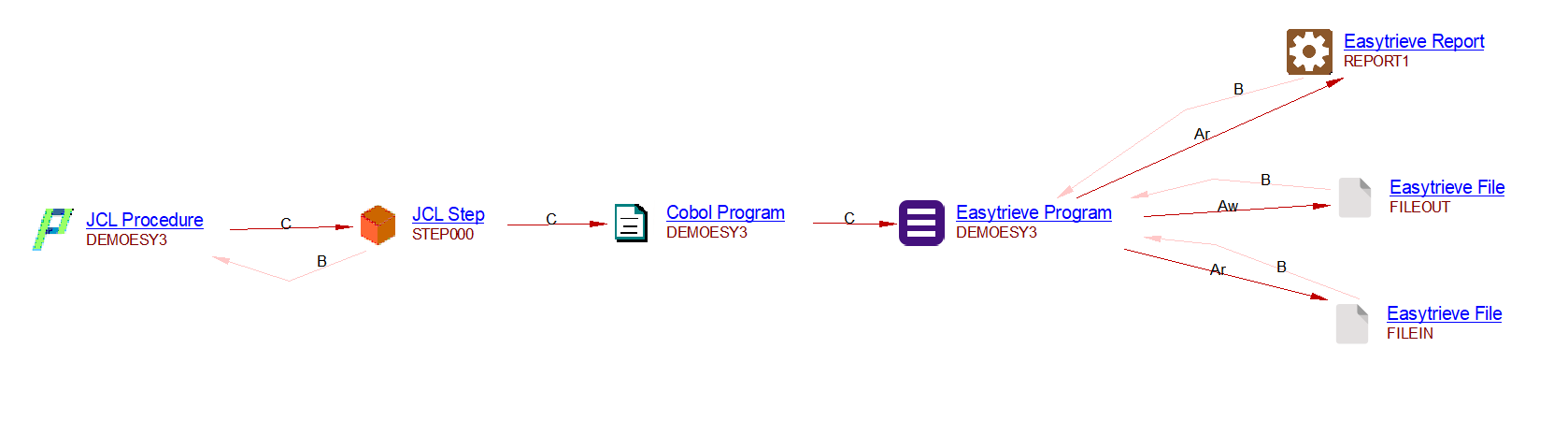
CALLor run by a JCL step withEXEC PGM=name. This is how a JCL step withEXEC PGM=namereaches the Easytrieve program: JCL Step → COBOL Program Prototype → Easytrieve Program.
Links from JCL
The extension links JCL objects, created by the Mainframe Analyzer extension, to Easytrieve programs:
- A JCL step that runs the
EZTPA00utility is linked to the Easytrieve Program it names, with a call link. This needs the JCL analysis to reportEZTPA00as a utility program called by the step, and the Easytrieve program as a second program called by the same step (customization ofAdvancedJCL.xml). - A JCL data set with a member, such as MY.PROC.LIB(PAYROLL), used by a JCL step, is linked to the Easytrieve Program named after the member (PAYROLL), with an access link. Members whose name is a number or contains
+,-or&are ignored.
Metrics
The extension computes, for each Easytrieve Program, Procedure and Macro:
- The cyclomatic complexity: 1, plus 1 for each
IF,ELSE-IF,DO WHILE,DO UNTILandWHEN, and for eachAND,ORand extra value of a series (IF CODE EQ 'A', 'B') in a condition. The complexity of a program does not include the complexity of its procedures. - The number of code lines, of comment lines before the object and of comment lines in the object. Easytrieve Files and Reports also get these line counts, and so does each source file.
Objects
| Type | Object Name | Creation rule |
|---|---|---|
 |
Easytrieve Program | Created for each source file that is not a macro, named after the file. |
 |
Easytrieve Macro | Created for each source file whose first card starts with MACRO, whatever its extension, named after the file. |
 |
Easytrieve Procedure | Created for each name. PROC statement of a program, the procedures of a REPORT included. Its code runs to its END-PROC, or to the next statement for an older procedure without END-PROC. |
 |
Easytrieve File | Created for each FILE name statement of a program. Equivalent to the COBOL File Link in a COBOL program. |
 |
Easytrieve Report | Created for each REPORT name statement of a program. |
 |
Easytrieve SQL Query | Created for each SQL statement, and for the SELECT of JOB INPUT SQL, attached to the program or procedure that holds it. Named after the first four words of the query (two words for EXEC or EXECUTE). |
 |
Easytrieve Call to Program | Created when a CALL name or LINK name matches no analyzed Easytrieve program. There is one object per caller and called name, attached to the caller. |
 |
Missing Schema | Created by the SQL Analyzer. Parent of the missing tables and procedures, attached to the Easytrieve Project. |
 |
Missing Table | Created by the SQL Analyzer for a table or a view selected/updated/deleted/inserted in an Easytrieve Query missing from the DDL file. |
 |
Missing Procedure | Created by the SQL Analyzer for a procedure or a function called in an Easytrieve Query missing from the DDL file. |
Links
Easytrieve links — UA analysis
| Caller type | Caller description | Link | Callee type | Callee description | Creation rule |
|---|---|---|---|---|---|
|
Easytrieve Program | call Link | |
Easytrieve Procedure | Created when the program runs a procedure of the same program with PERFORM, START, RESTART or FINISH, including the options of JOB. |
|
Easytrieve Program | call Link | |
Easytrieve Program | Created when the program calls another analyzed Easytrieve program with CALL name or LINK name. The closest programs of this name are used. |
|
Easytrieve Program | call Link | |
Easytrieve Call to Program | Created when the program calls, with CALL name or LINK name, a name that is not an analyzed Easytrieve program. |
|
Easytrieve Program | call Link | |
Easytrieve SQL Query | Created when the program runs SQL with an SQL statement or JOB INPUT SQL. |
|
Easytrieve Program | include Link | |
Easytrieve Macro | Created when the program invokes a macro with %name. The closest macros of this name are used. |
|
Easytrieve Program | accessRead Link | |
Easytrieve File | Created when the program reads the file with GET, READ, SEARCH, JOB INPUT, SORT (input file), or PUT or WRITE (FROM file). |
|
Easytrieve Program | accessWrite Link | |
Easytrieve File | Created when the program writes the file with PUT, WRITE, POINT or SORT (TO file). |
|
Easytrieve Program | accessWrite Link | |
Easytrieve Report | Created when the program prints the report with PRINT. |
|
Easytrieve Procedure | call Link | |
Easytrieve Procedure | Created when the procedure runs a procedure of the same program with PERFORM, START, RESTART or FINISH. |
|
Easytrieve Procedure | call Link | |
Easytrieve Program | Created when the procedure calls an analyzed Easytrieve program with CALL name or LINK name. The closest programs of this name are used. |
|
Easytrieve Procedure | call Link | |
Easytrieve Call to Program | Created when the procedure calls, with CALL name or LINK name, a name that is not an analyzed Easytrieve program. |
|
Easytrieve Procedure | call Link | |
Easytrieve SQL Query | Created when the procedure runs SQL with an SQL statement. |
|
Easytrieve Procedure | accessRead Link | |
Easytrieve File | Created when the procedure reads the file with GET, READ, SEARCH, or PUT or WRITE (FROM file). |
|
Easytrieve Procedure | accessWrite Link | |
Easytrieve File | Created when the procedure writes the file with PUT, WRITE or POINT. |
|
Easytrieve Procedure | accessWrite Link | |
Easytrieve Report | Created when the procedure prints the report with PRINT. |
|
Easytrieve Report | accessWrite Link | |
Easytrieve File | Created when the report writes its control totals to the file named by SUMFILE. |
Easytrieve links — Application level (cross-technology)
| Caller type | Caller description | Link | Callee type | Callee description | Creation rule |
|---|---|---|---|---|---|
 |
JCL Step | call Link | |
Easytrieve Program | Created when a JCL step, analyzed by the Mainframe Analyzer, runs the EZTPA00 utility and names an analyzed Easytrieve program (customization of AdvancedJCL.xml). |
 , ,  |
JCL Data Set | access Link | |
Easytrieve Program | Created when a JCL step uses a data set with a member, such as MY.PROC.LIB(PAYROLL), and the member is the name of an analyzed Easytrieve program. Members that are numbers or contain +, - or & are ignored. |
|
COBOL Program Prototype | call Link | |
Easytrieve Program | Created by the Universal Linker (1.7.51 or later) when the prototype, created by a COBOL CALL or a JCL EXEC PGM=name, has the name of an analyzed Easytrieve program. |
|
Easytrieve Call to Program | call Link | Any matching program (COBOL, Assembler, …) | Program | Created by the Universal Linker when a program of another language has the called name. |
|
Easytrieve SQL Query | use Link | SQL Table, SQL View, SQL Procedure, Missing … | SQL objects | Created by the SQL Analyzer for the tables, views and procedures the query uses. |
| , , |
Easytrieve Program/Procedure/Macro | use Link | SQL Table, SQL View, SQL Procedure | SQL objects | Created when the UA profile is configured with the ESQLSearchable category. |
Quality rules
- 1.1.0-beta1
- Quality rules computed by SQL Analyzer on Easytrieve SQL Query objects.
Known limitations
- Procedures: the procedure named in the
BEFOREoption ofSORTis not linked. - Macros:
- The extension creates an Easytrieve Macro object only: the files, procedures, SQL statements and calls of a macro produce no object and no link, and a
%nameinside a macro creates no link. - A
%namethat matches no analyzed macro creates no object and no link. - A
%nameon the first code card of a program, with no comment before it, is not analyzed.
- The extension creates an Easytrieve Macro object only: the files, procedures, SQL statements and calls of a macro produce no object and no link, and a
- Files:
COPY file, which copies the field definitions of another file of the program, creates no link. - Other technologies:
- From JCL, only three cases are linked: a step that runs
EZTPA00, a step withEXEC PGM=name(through the COBOL Program Prototype), and a data set member named after a program (see Links from JCL). Easytrieve source written in-stream in a JCL step (SYSIN DD *) is not analyzed. - For a step that runs
EZTPA00, only one Easytrieve program is linked, even when several analyzed programs have the name. - An Easytrieve Call to Program is resolved by the Universal Linker by name only: it is linked to every program of another language with this name, whatever its technology.
- IMS/DL-I, CICS and IDMS statements are not analyzed: no link to their resources is created.
- From JCL, only three cases are linked: a step that runs
- Source format:
- Only a card that starts with
*is a comment. A comment after a period on a code card (COUNT = 1. * remark) is read as code, which affects the line counts. - A word cut by a
+continuation (WS-LONG-NA+followed byMEon the next card) is read as two words, so a name cut this way is not resolved. - The statement area is always columns 1 to 72: a different statement area set by an installation option is not supported.
- Only a card that starts with