Python - Amazon Web Services CDK support
Introduction
This section describes the support for the Python AWS CDK framework. AWS CDK (Cloud Development Kit) is a framework that lets you define and provision AWS infrastructure.
WARNING: Note that no support is provided for AWS CDK V1.
Objects
| Icon | Description |
|---|---|
 |
Python AWS Lambda Function |
 |
Python Call to AWS Lambda Function |
 |
Python Call to Unknown AWS Lambda Function |
 |
Python AWS SQS Publisher Python AWS SNS Publisher |
 |
Python AWS SQS Receiver Python AWS SNS Subscriber |
 |
Python AWS SQS Unknown Publisher Python AWS SNS Unknown Publisher |
 |
Python AWS SQS Unknown Receiver Python AWS SNS Unknown Subscriber |
 |
Python S3 Bucket |
 |
Python Web Service Get Operation (used for URL/HTTP integrations) |
 |
Python Email Python SMS |
 |
Python AWS API Gateway GET |
 |
Python AWS API Gateway POST |
 |
Python AWS API Gateway PUT |
 |
Python AWS API Gateway DELETE |
 |
Python AWS API Gateway PATCH |
 |
Python AWS API Gateway ANY |
 |
Python AWS Kinesis Producer |
 |
Python AWS Unknown Kinesis Producer |
 |
Python AWS Kinesis Consumer Python AWS Firehose Stream Delivery |
 |
Python AWS Unknown Kinesis Consumer Python AWS Unknown Firehose Stream Delivery |
List of supported APIs
A partial support is provided for all the following APIs:
- aws_cdk.aws_lambda.Function
- aws_cdk.aws_lambda.CfnFunction
- aws_cdk.aws_lambda.SingletonFunction
- aws_cdk.aws_lambda_python.PythonFunction (legacy, pre-alpha module path)
- aws_cdk.aws_lambda_python_alpha.PythonFunction (CDK V2 module path)
- aws_cdk.aws_lambda_event_sources.SqsEventSource
- aws_cdk.aws_lambda_event_sources.SnsEventSource
- aws_cdk.aws_lambda_event_sources.S3EventSource
- aws_cdk.aws_lambda_event_sources.S3EventSourceV2
- aws_cdk.aws_lambda_event_sources.DynamoEventSource
- aws_cdk.aws_lambda_event_sources.KinesisEventSource
- aws_cdk.aws_lambda_event_sources.KinesisConsumerEventSource
- aws_cdk.aws_apigatewayv2.HttpApi.add_routes
- aws_cdk.aws_apigateway.RestApi
- aws_cdk.aws_apigateway.LambdaRestApi
- aws_cdk.aws_sns.Topic.add_subscription
- aws_cdk.aws_sns_subscriptions.LambdaSubscription
- aws_cdk.aws_sns_subscriptions.SqsSubscription
- aws_cdk.aws_sns_subscriptions.UrlSubscription
- aws_cdk.aws_sns_subscriptions.EmailSubscription
- aws_cdk.aws_sns_subscriptions.SmsSubscription
- aws_cdk.aws_s3.Bucket.add_event_notification
- aws_cdk.aws_s3_notifications.LambdaDestination
- aws_cdk.aws_s3_notifications.SqsDestination
- aws_cdk.aws_s3_notifications.SnsDestination
- aws_cdk.aws_kinesisfirehose(_alpha).DeliveryStream
- aws_cdk.aws_kinesisfirehose(_alpha).KinesisStreamSource
Physical name of the AWS service instances
When setting up a service (such as a Lambda) with AWS CDK,
one can provide an explicit physical name for the instance of the service (for example, using function_name for a Lambda).
When an explicit physical name is provided, and the service type is supported, this analyzer creates an object whose name exactly matches the provided physical name.
Often, the physical name is not provided and is automatically generated by AWS based on:
- the construct ID passed to the service constructor
- the stack name in which the service is defined
- a hash/suffix that guarantees uniqueness
In this case, for supported services, this extension creates a corresponding object named using the following pattern:
{StackName}-{ConstructID}-{}
The trailing ‘-{}’ represents the Hash value that cannot be predicted.
The {StackName} is inferred from:
- the
stack_namekeyword argument provided during stack instantiation
If stack_name is not specified, then:
- {StackName} defaults to the Stack ID (the second argument of the stack constructor).
In the following example, a Lambda function is created without providing an explicit physical name
(the function_name argument is commented out).
Therefore, the generated Lambda physical name will be FooStack-LambdaConstructID-{}.
# lambda_stack.py
import aws_cdk as cdk
import aws_cdk.aws_lambda as lambda_
from constructs import Construct

class LambdaStack(cdk.Stack):
    def __init__(self, scope: Construct, id: str, **kwargs) -> None:
        super().__init__(scope, id, **kwargs)
        fn = lambda_.Function(self, "LambdaConstructID",
            runtime=lambda_.Runtime.PYTHON_3_9,
            handler="index.handler",
            code=lambda_.Code.from_asset("resources/lambda"),
            # function_name="FooLambda"
        )
# app.py
from lambda_stack import LambdaStack
import aws_cdk as cdk

app = cdk.App()
LambdaStack(app, "StackId", stack_name="FooStack")
app.synth()
Lambda support
Supported APIs
A support for the following APIs is provided:
- aws_cdk.aws_lambda.Function
- aws_cdk.aws_lambda.CfnFunction
- aws_cdk.aws_lambda.SingletonFunction
- aws_cdk.aws_lambda_python.PythonFunction (legacy, pre-alpha module path)
- aws_cdk.aws_lambda_python_alpha.PythonFunction (CDK V2 module path)
Detailed support for aws_cdk.aws_lambda.Function, CfnFunction, SingletonFunction and aws_cdk.aws_lambda_python(_alpha).PythonFunction
When an instantiation of one of these constructs is found in the analyzed source code, an AWS Lambda Function object is created. It has properties storing the runtime and the expected path to the handler function. The linking from the lambda function to the handler function is then carried out by one of the following extensions (depending on the runtime):
| Runtime | Extension |
|---|---|
| java | com.castsoftware.awsjava |
| dotnet | com.castsoftware.awsdotnet |
| python | this extension |
| nodejs | com.castsoftware.nodejs (when the handler is written in .js)com.castsoftware.typescript (when the handler is written in .ts) |
Note that for runtimes other than Java and .NET, which use a fully qualified handler name, the analyzer may not always be able to link the handler correctly. This is especially true when the Lambda code is provided as a pre-compressed ZIP archive or stored in an Amazon S3 bucket.
When analyzing the following source code:
import aws_cdk as cdk
import aws_cdk.aws_lambda as lambda_
from constructs import Construct

class LambdaLayerStack(cdk.Stack):
    def __init__(self, scope: Construct, id: str, **kwargs) -> None:
        super().__init__(scope, id, **kwargs)

        fn = lambda_.Function(self, "LambdaConstructID",
            runtime=lambda_.Runtime.PYTHON_3_9,
            code=lambda_.Code.from_asset("resources/lambda"),
            handler="index.handler",
            function_name="FooFunction"
        )
an AWS Lambda Function object named FooFunction is created with a link to the handler function (assuming that the code of the handler function is also analyzed).

Specificity for SingletonFunction
SingletonFunction’s uuid argument (required by CDK to de-duplicate the singleton across the
app) is appended to the construct ID to form the logical name, mirroring CDK’s own logical-ID
construction — e.g. SingletonFunction(self, "MyFunc", uuid="FooUuid") is named MyFuncFooUuid.
When function_name is also provided, it takes priority over id + uuid.
Environment variables
When a Lambda’s environment={...} dictionary (or, for CfnFunction, the wrapped
environment=CfnFunction.EnvironmentProperty(variables={...}) form) assigns a value that
references another CDK-declared construct’s generated identity, the environment variable is
resolved to that construct’s name rather than left as an opaque expression:
| Attribute referenced on the value | Resolved via |
|---|---|
bucket_name |
the referenced aws_cdk.aws_s3.Bucket |
table_name |
the referenced aws_cdk.aws_dynamodb.Table |
queue_url, queue_name, queue_arn |
the referenced aws_cdk.aws_sqs.Queue |
topic_arn, topic_name |
the referenced aws_cdk.aws_sns.Topic |
stream_name, stream_arn |
the referenced aws_cdk.aws_kinesis.Stream |
Each resolved entry is stored as CAST_AWS_Lambda.env_vars = "<KEY>$VALUE$<resolved-name>".
Values that don’t match one of the above and aren’t a plain literal (or string concatenation) are
silently skipped rather than erroring.
from aws_cdk import aws_lambda as lambda_, aws_sqs as sqs, aws_sns as sns, aws_kinesis as kinesis

queue = sqs.Queue(self, "Queue", queue_name="my-queue")
topic = sns.Topic(self, "Topic", topic_name="my-topic")
stream = kinesis.Stream(self, "Stream", stream_name="my-stream")

lambda_.Function(self, "MyFunc",
    function_name="environment-variables-function",
    runtime=lambda_.Runtime.PYTHON_3_9,
    handler="index.handler",
    code=lambda_.Code.from_inline("..."),
    environment={
        "QUEUE_URL": queue.queue_url,
        "TOPIC_ARN": topic.topic_arn,
        "STREAM_NAME": stream.stream_name,
    }
)
This produces env_vars containing QUEUE_URL$VALUE$my-queue, TOPIC_ARN$VALUE$my-topic, and
STREAM_NAME$VALUE$my-stream — note the env var is always resolved to the construct’s name,
regardless of which specific attribute (.queue_url/.queue_arn/.queue_name) was referenced.
This is a distinct, complementary mechanism from the boto3-side environment-variable resolution described in the SDK support page: this one covers infrastructure code declaring what an environment variable is set to; the boto3-side mechanism covers handler code reading it back at runtime. The two are not currently cross-referenced against each other by this extension.
Known limitations
table_nameresolution only works for a plainaws_cdk.aws_dynamodb.Table; aTableV2construct referenced in anenvironment={}dict is not resolved.- Values that cannot be resolved are omitted entirely, with no placeholder.
Detailed support of lambda Event Source
Whenever the source code contains a call to the add_event_source API of an instance of a lambda
Function, the first argument is checked. A support is provided if that argument is an instance of
one of the following EventSource types:
- aws_cdk.aws_lambda_event_sources.SqsEventSource
- aws_cdk.aws_lambda_event_sources.SnsEventSource
- aws_cdk.aws_lambda_event_sources.S3EventSource
- aws_cdk.aws_lambda_event_sources.S3EventSourceV2
- aws_cdk.aws_lambda_event_sources.DynamoEventSource
- aws_cdk.aws_lambda_event_sources.KinesisEventSource
- aws_cdk.aws_lambda_event_sources.KinesisConsumerEventSource
Detailed support for each EventSource is given in the following subsections.
SqsEventSource, SnsEventSource and Kinesis event sources
SqsEventSource, SnsEventSource, KinesisEventSource, and KinesisConsumerEventSource are
supported in a similar way: each creates a dedicated object with a callLink to the lambda. The
resolved queue/topic/stream name falls back to the {StackName}-{ConstructID}-{} pattern when no
explicit name is given (queue_name, topic_name, stream_name), exactly as described above.
SqsEventSource→ a Python AWS SQS Receiver object (or a Python AWS SQS Unknown Receiver if the queue name cannot be resolved), with acallLinkto the lambda.SnsEventSource→ a Python AWS SNS Subscriber object (or Unknown Subscriber), with acallLinkto the lambda.KinesisEventSourceandKinesisConsumerEventSource→ a Python AWS Kinesis Consumer object (or Unknown Kinesis Consumer), with acallLinkto the lambda.KinesisEventSourcetakes akinesis.Streaminstance directly; the stream name is read from itsstream_nameproperty, or falls back to the physical-name pattern.KinesisConsumerEventSourcetakes akinesis.StreamConsumerinstance; its stream name is resolved by following the consumer back to its parentStream.
S3 event source
When the call to add_event_source takes an instance of
aws_cdk.aws_lambda_event_sources.S3EventSource (or S3EventSourceV2), a property
CAST_AWS_Lambda.s3_events is added to the lambda. This property saves the name of the S3 bucket
as well as the event type that would trigger the lambda ("bucket_name$EVENTTYPE$event_type", or
just the bucket name if no event type is given). The analyzer creates a callLink to the lambda
function object from all callables already linked to the given bucket through a link of matching
type. The following table tells which link type will match which event type (* matches any
string):
| event type | matching link types |
|---|---|
| No event type | all |
| OBJECT_CREATED | useInsertLink, useUpdateLink |
| OBJECT_CREATED_* | useInsertLink, useUpdateLink |
| OBJECT_REMOVED | useDeleteLink |
| OBJECT_REMOVED_* | useDeleteLink |
| other event types | None |
Known limitations
Some filters can also be specified in the S3EventSource to determine which objects trigger this
event. These are not supported, and this extension will create links regardless of filters.
DynamoDB event source
When the call to add_event_source takes an instance of
aws_cdk.aws_lambda_event_sources.DynamoEventSource, a property CAST_AWS_Lambda.dynamodb_events
is added to the lambda. This property saves the name of the DynamoDB table that would trigger the
lambda. The analyzer creates a callLink to the lambda function object from all callables already
linked to the given table.
DynamoEventSource additionally resolves the table name against a TableV2 construct via a
class-name-based fallback, in addition to a plain Table.
Example
The following example exercises all five source kinds attached to a single lambda:
import aws_cdk.aws_lambda as lambda_
import aws_cdk.aws_lambda_event_sources as sources
import aws_cdk.aws_sqs as sqs
import aws_cdk.aws_sns as sns
import aws_cdk.aws_kinesis as kinesis
import aws_cdk.aws_dynamodb as dynamodb
import aws_cdk.aws_s3 as s3

queue = sqs.Queue(self, "Q", queue_name="my-queue")
topic = sns.Topic(self, "T", topic_name="my-topic")
stream = kinesis.Stream(self, "S", stream_name="my-stream")
table = dynamodb.Table(self, "D", table_name="my-table")
bucket = s3.Bucket(self, "B", bucket_name="my-bucket")

fn = lambda_.Function(self, "MyFn",
    function_name="event-source-consumer",
    runtime=lambda_.Runtime.PYTHON_3_9,
    handler="index.handler",
    code=lambda_.Code.from_inline("..."),
)
fn.add_event_source(sources.SqsEventSource(queue))
fn.add_event_source(sources.SnsEventSource(topic))
fn.add_event_source(sources.KinesisEventSource(stream))
fn.add_event_source(sources.DynamoEventSource(table))
fn.add_event_source(sources.S3EventSource(bucket, events=[s3.EventType.OBJECT_CREATED]))

Api Gateway support
Supported APIs
A basic support is provided for the following APIs:
- aws_cdk.aws_apigatewayv2.HttpApi.add_routes
- aws_cdk.aws_apigateway.RestApi
- aws_cdk.aws_apigateway.LambdaRestApi
Detailed support for aws_cdk.aws_apigateway (v1)
We support RestApi instantiated with both RestApi and LambdaRestApi. The RestApi instances have
a root attribute representing the root resource (’/’). From this root, a path is built using a
succession of add_resource calls.
When add_method(verb, integration) is found on a Resource, an AWS {Verb} API Gateway object is
created. The second argument is checked:
-
aws_cdk.aws_apigateway.LambdaIntegration(fn)→ acallLinkfrom the API Gateway to the corresponding AWS Lambda Function. -
aws_cdk.aws_apigateway.AwsIntegration(service=..., path=...)→ a generic AWS-service passthrough:service=Target Link type sqsPython AWS SQS Publisher (queue name from the last pathsegment)callLinksnsPython AWS SNS Publisher (topic name from the last pathsegment)callLinkdynamodbthe DynamoDB table (shared with the boto3-discovered tables) useSelectLink(GET) /useInsertLink(POST) /useUpdateLink(PUT, PATCH) /useDeleteLink(DELETE)kinesisPython AWS Kinesis Producer callLink -
aws_cdk.aws_apigateway.HttpIntegration(url)→ a Python {Verb} service request object, along with acallLinkfrom the API Gateway to that object.
When no integration is provided and the RestApi was instantiated as LambdaRestApi, a callLink
is created to the Lambda passed as the handler argument — this default is only used for a route
that doesn’t specify its own integration.
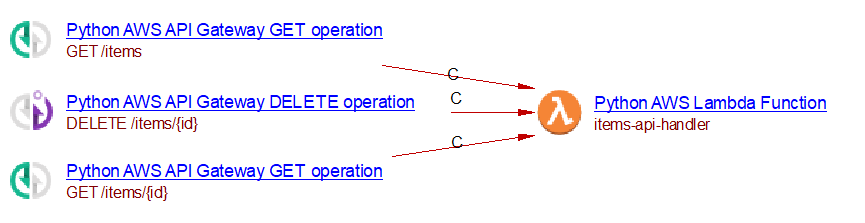
Here is an example:
import aws_cdk.aws_lambda as lambda_
import aws_cdk.aws_apigateway as apigw

fn = lambda_.Function(self, "MyFn", function_name="items-api-handler",
    runtime=lambda_.Runtime.PYTHON_3_8,
    handler="index.handler", code=lambda_.Code.from_inline("..."))

api = apigw.LambdaRestApi(self, "MyApi", handler=fn, proxy=False)
items = api.root.add_resource("items")
items.add_method("GET")

item = items.add_resource("{id}")
item.add_method("GET")
item.add_method("DELETE")
Known limitations
aws_cdk.aws_apigateway.AwsIntegrationis only supported forsqs,sns,dynamodb, andkinesisservices.add_proxyis not supported.
Detailed support for aws_cdk.aws_apigatewayv2 (v2)
When aws_cdk.aws_apigatewayv2.HttpApi.add_routes is used, an AWS {Verb} API Gateway object is
created, where {Verb} is extracted from the methods argument (default ANY when omitted). The
name of this object is derived from the path argument.
If the integration argument is an instance of
aws_cdk.aws_apigatewayv2_integrations.HttpLambdaIntegration, a callLink is created to the
corresponding AWS Lambda Function. If it’s an instance of HttpUrlIntegration, a Python {Verb}
service request object is created along with a callLink from the API Gateway to that object. If
it’s an instance of HttpSqsIntegration, a callLink is created to a Python AWS SQS Publisher.
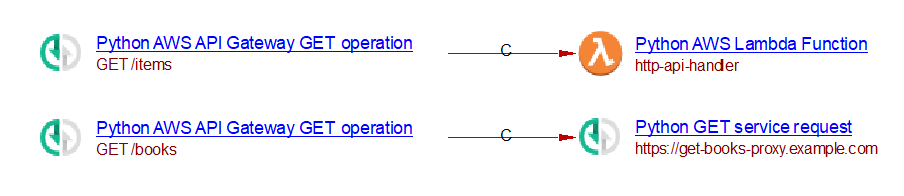
For example:
import aws_cdk.aws_apigatewayv2 as apigwv2
import aws_cdk.aws_apigatewayv2_integrations as integrations
import aws_cdk.aws_lambda as lambda_

fn = lambda_.Function(self, "MyFn", function_name="http-api-handler",
    runtime=lambda_.Runtime.PYTHON_3_8,
    handler="index.handler", code=lambda_.Code.from_inline("..."))

api = apigwv2.HttpApi(self, "MyApi")
api.add_routes(
    path="/items",
    methods=[apigwv2.HttpMethod.GET],
    integration=integrations.HttpLambdaIntegration("GetItems", fn)
)
api.add_routes(
    path="/books",
    methods=[apigwv2.HttpMethod.GET],
    integration=integrations.HttpUrlIntegration("GetBooksIntegration", "https://get-books-proxy.example.com"),
)
Support for aws_cdk.aws_sns_subscriptions
When an instance of aws_cdk.aws_sns.Topic invokes add_subscription at least once with a
supported subscription type, a Python AWS SNS Subscriber object is created, named after the SNS
Topic.
For each add_subscription calls on the topic, if the subscription type is supported, an object is created with a callLink from the
Subscriber to it:
| Supported subscription | Object created |
|---|---|
| aws_cdk.aws_sns_subscriptions.LambdaSubscription | Python Call to AWS Lambda Function |
| aws_cdk.aws_sns_subscriptions.UrlSubscription | Python POST service request |
| aws_cdk.aws_sns_subscriptions.SqsSubscription | Python AWS SQS Publisher |
| aws_cdk.aws_sns_subscriptions.EmailSubscription | Python Email |
| aws_cdk.aws_sns_subscriptions.SmsSubscription | Python SMS |
For example:
import aws_cdk.aws_lambda as lambda_
import aws_cdk.aws_sns as sns
import aws_cdk.aws_sns_subscriptions as subs
import aws_cdk.aws_sqs as sqs

alert_queue = sqs.Queue(self, "AlertQueue", queue_name="analytics-alerts")
alerts_topic = sns.Topic(self, "AlertsTopic", topic_name="analytics-alerts")

alerts_topic.add_subscription(subs.SqsSubscription(alert_queue))
alerts_topic.add_subscription(subs.UrlSubscription("https://hooks.example.com/analytics-alerts"))
alerts_topic.add_subscription(subs.EmailSubscription("ops-team@example.com"))
alerts_topic.add_subscription(subs.SmsSubscription("+1234567890"))

alert_handler_fn = lambda_.Function(self, "AlertHandlerFunction",
    function_name="analytics-alert-handler",
    runtime=lambda_.Runtime.PYTHON_3_11,
    handler="handler.lambda_handler",
    code=lambda_.Code.from_asset("lambda/alert_handler"))
alerts_topic.add_subscription(subs.LambdaSubscription(alert_handler_fn))
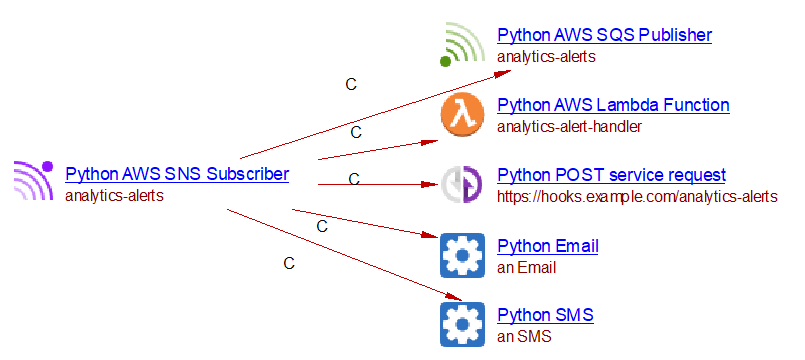
This produces a single Python AWS SNS Subscriber named analytics-alerts, with a callLink to
each of: a Python AWS SQS Publisher (analytics-alerts), a Python POST service request
(_https://hooks.example.com/analytics-alerts_) , a Python Email, a Python SMS, and directly to
the real analytics-alert-handler Lambda Function.
Known limitations
- Only
LambdaSubscription,SqsSubscription,UrlSubscription,EmailSubscription, andSmsSubscriptionare supported — no filter policies, topic-to-topic subscriptions, or mobile-push (application) subscriptions.
Support for aws_cdk.aws_s3.Bucket.add_event_notification
When add_event_notification(event_type, destination) is called on a Bucket, the destination is
checked. Support is provided when the destination is an instance of one of:
- aws_cdk.aws_s3_notifications.LambdaDestination
- aws_cdk.aws_s3_notifications.SqsDestination
- aws_cdk.aws_s3_notifications.SnsDestination
For each, a property is stored describing the bucket name and event type
("bucket_name$EVENTTYPE$event_type", or just the bucket name if no event type is known), on the
object chosen as the S3 Event Handler:
- LambdaDestination: the property
CAST_AWS_Lambda.s3_eventsis stored directly on the target Lambda Function object. - SqsDestination: a Python AWS SQS Publisher (or Unknown Publisher) is created carrying the property
CAST_AWS_S3_Event_Handler.s3_events. - SnsDestination: same pattern using a Python AWS SNS Publisher (or Unknown Publisher).
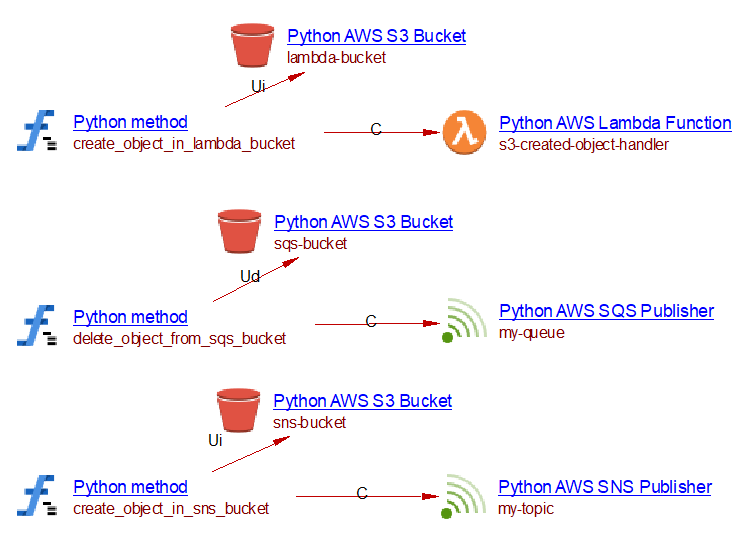
The link from callables that interact with the bucket to the S3 Event Handler object is carried
out the same way as described in the S3 event source subsection above: based
on the stored s3_events property, a callLink is created to the S3 Event Handler object from all
callables already linked to the given bucket through a link of matching type — see the event
type / link type table in that subsection.
Example
import aws_cdk.aws_lambda as lambda_
import aws_cdk.aws_sqs as sqs
import aws_cdk.aws_sns as sns
import aws_cdk.aws_s3 as s3
import aws_cdk.aws_s3_notifications as s3n

fn = lambda_.Function(self, "MyFn", function_name="s3-created-object-handler",
    runtime=lambda_.Runtime.PYTHON_3_9,
    handler="index.handler", code=lambda_.Code.from_inline("..."))
lambda_bucket = s3.Bucket(self, "LambdaBucket", bucket_name="lambda-bucket")
lambda_bucket.add_event_notification(s3.EventType.OBJECT_CREATED, s3n.LambdaDestination(fn))

queue = sqs.Queue(self, "Q", queue_name="my-queue")
sqs_bucket = s3.Bucket(self, "SqsBucket", bucket_name="sqs-bucket")
sqs_bucket.add_event_notification(s3.EventType.OBJECT_REMOVED, s3n.SqsDestination(queue))

topic = sns.Topic(self, "T", topic_name="my-topic")
sns_bucket = s3.Bucket(self, "SnsBucket", bucket_name="sns-bucket")
sns_bucket.add_event_notification(s3.EventType.OBJECT_CREATED, s3n.SnsDestination(topic))
Known limitations
- Only
LambdaDestination,SqsDestination, andSnsDestinationare supported — no EventBridge destination. - Filters (prefix/suffix) on
add_event_notificationare not evaluated; matching (via the wbslinker) happens regardless of any configured filter.
Firehose support
Supported APIs
A basic support is provided for the following APIs:
- aws_cdk.aws_kinesisfirehose(_alpha).DeliveryStream
- aws_cdk.aws_kinesisfirehose(_alpha).KinesisStreamSource
Detailed support for DeliveryStream
When an instantiation of DeliveryStream is found, a Python AWS Firehose Stream Delivery object
is created (or Unknown Firehose Stream Delivery if the name cannot be resolved). Its name comes
from delivery_stream_name, falling back to the {StackName}-{ConstructID}-{} pattern.
The destinations argument is analyzed:
| Destination class | Object created | Link type |
|---|---|---|
S3Bucket |
Python S3 Bucket | useInsertLink |
HttpEndpointDestination |
Python POST service request (named after the URL) | useInsertLink |
When an S3Bucket destination includes a LambdaFunctionProcessor in its processors list, a
callLink is also created from the delivery stream to the corresponding Lambda Function.
When source=KinesisStreamSource(stream) is provided, a Python AWS Kinesis Consumer object is
created (or Unknown Kinesis Consumer) with a callLink to the delivery stream.
Example
import aws_cdk.aws_kinesisfirehose_alpha as firehose
import aws_cdk.aws_kinesisfirehose_destinations_alpha as destinations
import aws_cdk.aws_kinesis as kinesis
import aws_cdk.aws_s3 as s3

event_stream = kinesis.Stream(self, "EventStream", stream_name="analytics-event-stream")
analytics_bucket = s3.Bucket(self, "AnalyticsBucket", bucket_name="realtime-analytics-data")

firehose.DeliveryStream(
    self, "EventDeliveryStream",
    delivery_stream_name="analytics-event-delivery",
    source=firehose.KinesisStreamSource(event_stream),
    destinations=[destinations.S3Bucket(analytics_bucket)],
)

firehose.DeliveryStream(
    self, "HttpDeliveryStream",
    delivery_stream_name="analytics-http-delivery",
    destinations=[destinations.HttpEndpointDestination("https://analytics-endpoint.example.com")],
)

This produces a Python AWS Firehose Stream Delivery object named analytics-event-delivery with
a useInsertLink to the realtime-analytics-data S3 bucket, and a Python AWS Kinesis Consumer
named analytics-event-stream with a callLink to the delivery stream. A second Python AWS
Firehose Stream Delivery object named analytics-http-delivery is created with a useInsertLink
to a Python POST service request named https://analytics-endpoint.example.com .
Known limitations
Stream.from_stream_arn/from_stream_attributes(as opposed to a locally-instantiatedStream) are not resolved by this feature, nor by any other Kinesis-name resolution in this extension.