Linking an Amazon Web Services lambda with its Python handler
AWS Lambda
Lambda services allow executing some source code on the cloud. The execution can be set to be
triggered by some AWS events. Lambda functions can be deployed using several deployment
frameworks. The AWS Lambda functions declared in deployment framework configuration files (such
as CloudFormation or Serverless .yml files) are analyzed by a different extension
(com.castsoftware.cloudconfig). The Python analyzer is responsible, however, for creating the
link between Lambda Function objects having a runtime property value consistent with a python
runtime (python3.5, …) and the corresponding handler (a Python method object) during the
application-level analysis step.
WARNING: It is highly recommended to add the com.castsoftware.cloudconfig extension so that proper migration of AWS objects takes place upon upgrading com.castsoftware.python extension from versions < 1.4.0-beta7.
Basic example
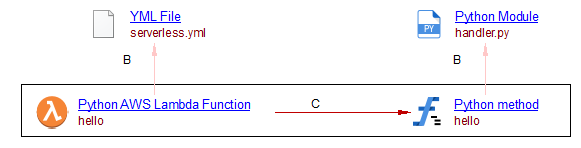
In the .yml deployment file below (taken from the Serverless examples for AWS) a Lambda function
is defined (hello) and the handler’s method name is referred:
service: aws-python # NOTE: update this with your service name

frameworkVersion: '2'


provider:
  name: aws
  runtime: python3.8
  lambdaHashingVersion: 20201221

functions:
  hello:
    handler: handler.hello
Where the Python code of the handler:
# handler.py

def hello(event, context):
    body = {
        "message": "Go Serverless v2.0! Your function executed successfully!",
        "input": event,
    }

    return {"statusCode": 200, "body": json.dumps(body)}
Results: