Apache Struts - 1.6
Description
This extension provides support for Apache Struts - this support is in addition to the basic support provided for Apache Struts in the JEE Analyzer. This extension’s main role is to improve the detection of links and transaction computations where Apache Struts is implicated.
In what situation should you install this extension?
If your JEE application source code uses the Apache Struts framework you should install this extension to benefit from improved support for Apache Struts.
Supported Apache Struts versions
| Apache Struts | Supported |
|---|---|
| 1.x | ✅ |
| 2.x | ✅ |
Supported client frameworks
| Client framework | Supported |
|---|---|
| jQuery | ✅ |
| AngularJS | ✅ |
Supported annotations
| Annotation | Annotation Fullname | Analyzer Action |
|---|---|---|
| @Actions | org.apache.struts2.convention.annotation.Actions | Analyzes @Action inside |
| @Action | org.apache.struts2.convention.annotation.Action | Creates a Struts Operation and a call link to the method |
| @Results | org.apache.struts2.convention.annotation.Results org.apache.struts2.config.Results |
Creates a Struts Operation and a call link to public methods of type String |
| @Result | org.apache.struts2.convention.annotation.Result org.apache.struts2.config.Result |
Creates a Struts Result. At class level, it is shared by the @Action methods of the class |
| @Namespace | org.apache.struts2.convention.annotation.Namespace | Prefixes the operation URLs of the actions of the class |
Transactions
Transaction support is derived from metamodel concepts used to build CAST Imaging Blueprint and structural transaction flows. Entry Points start transactions; Exit Points include both output/boundary concepts and Data Entities manipulated by transactions.
| Role | Support | Breakdown |
|---|---|---|
| Entry Point |
|
|
| Exit Point | No direct concept type details |
Data version: 1.5.10-funcrel
ISO 5055 Structural Rules
Quality support is based on ISO 5055 structural rules available for the selected extension version.
| Reliability | Maintainability | Security | Performance Efficiency |
|---|---|---|---|
Data version: 1.5.10-funcrel
Dependencies with other extensions
Some CAST extensions require the presence of other CAST extensions in order to function correctly. The Apache Struts extension requires that the following other CAST extensions are also installed:
- JEE Analyzer
- HTML5/JavaScript extension
- Universal Linker
- com.castsoftware.internal.platform (internal extension)
Note that:
- any dependent extensions are automatically downloaded and installed for you. You do not need to do anything.
For support of
SelectAction, use HTML5/JavaScript ≥ 2.0.7 and Web Services Linker ≥ 1.6.7.
What results can you expect?
Objects
| Icon | Description | Type |
|---|---|---|
 |
Struts Operation | CAST_Struts_Operation |
 |
Struts Forward (Struts 1 only) | CAST_Struts_Forward |
 |
Struts Result (Struts 2 only) | CAST_Struts_Result |
A Struts Operation carries a single bookmark, on its definition site. Its parent is the file that declares it. For XML-declared actions, this is the Struts configuration file, not the Java Action class.
Multi-application analyses
When several web applications are delivered in one analysis, each is resolved against its own configuration. This covers:
- the Struts version and the
web.xmlurl-patterns; - Spring beans and aliases;
- Dynamic Method Invocation settings;
- wildcard expansion and forward/result targets.
Two applications can declare the same Spring bean name or action name. They then produce distinct operations, each parented on its own configuration file.
Features
Object structure and links
- Creates Struts Operations which represent entry-points for web services. For each operation, one Struts Operation object is created.
- Creates Struts Forward objects (Struts 1.x) and Struts Result
objects (Struts 2.x). One is created for each possible outcome (e.g.
success,error) of a Struts Operation. A call link goes from the operation to each of them. - Creates a link from each Forward/Result object to its target. The target is a JSP page, or another operation when the outcome forwards, redirects or chains. Global forwards/results of a package are used when an action declares none.
- The dependent Universal Linker is responsible for detecting and creating links between the UI (JSP/HTML etc) to the “Struts Operation object” created by the extension.
Struts 1.1 support
Application configuration
In the “web.xml” file, the extension will detect the servlet pointing to “org.apache.struts.action.ActionServlet” class, indicating that Struts 1.1 is being used. The extension will detect the servlet-mapping (i.e. “*.perform” in the example below):
<web-app id="WebApp">
...
    <servlet>
        <servlet-name>action</servlet-name>
        <display-name>Struts Action</display-name>
        <servlet-class>org.apache.struts.action.ActionServlet</servlet-class>
....
    </servlet>
...
    <servlet-mapping>
        <servlet-name>action</servlet-name>
        <url-pattern>*.perform</url-pattern>
    </servlet-mapping>
....
</web-app>
In the struts config xml files (struts-XXX.xml), the extension will detect the correspondence between an URL and a java class (i.e. /logout corresponds to the “com.company.lightspeed.struts.logon.StrutsActionLogout” java class):
<struts-config>
...
  <action-mappings>
    <action
        path="/logout"
        type="com.company.lightspeed.struts.logon.StrutsActionLogout">
        <forward name="loggedOut" path="lightspeed/LoggedOut.jsp" />
    </action>
....
  </action-mappings>
</struts-config>
The extension will search for the execute method in the
corresponding java class (here StrutsActionLogout class) and create
a StrutsOperation named with the corresponding URL (here /logout). A
call link between the StrutsOperation and the execute method will
be created.
Note that the execute method may be defined in a parent class
of StrutsActionLogout. This specific case which is common to
both struts 1 and struts 2 is described in section “Modelling when the
execute method is defined in a parent Struts class”.
Forwards
For each <forward> of an <action>, the extension creates a Struts
Forward object. It adds a call link from the Struts Operation to it.
When the action declares no forward, the <global-forwards> are used.
The forward is then linked to its target:
- the JSP page, when
pathpoints to a JSP file; - another Struts Operation, when
pathpoints to another action.
The extension removes the action suffix before resolving the target
action. It reads the suffix from the <url-pattern> entries of
web.xml. Custom suffixes (*.action, *.xyz) work like *.do.
Several patterns are supported, in one mapping or in several. .do is
the fallback when web.xml is not delivered.
When several forwards of an action share a name, the last declaration wins, as in Struts.
A forward and a redirect (redirect="true") produce the same Struts
Forward object and link. The extension does not distinguish them.
An <action> may declare its target with the forward attribute,
without an Action class:
<action forward="xxx.jsp" path="/foo" />
This shorthand creates a Struts Forward named success.
The forward is linked to the JSP page or to the
target action. A child <forward name="success"> takes precedence.
Form validation
When an action declares a form bean (name attribute) and validation is
enabled, a call link is created. It goes from the Struts Operation to
the validate() method of the form bean. Validation is enabled when
validate="true" or when the attribute is absent.
<action path="/orders" type="com.demo.struts1.action.OrderAction"
        name="orderForm" validate="true" parameter="method">
Modules and global forwards
A Struts 1 module is a sub-application declared in web.xml, with its
own configuration file. It scopes its global forwards, as its prefix
scopes the action paths. Same-named global forwards of two modules stay
separate. A module may be configured by several comma-separated files.
A global forward declared in them is represented once. It is reachable
from every action of the module.
Classes inheriting from org.apache.struts.actions.DispatchAction
The extension will search for all java classes implementing “org.apache.struts.actions.DispatchAction”.
For example:
import org.apache.struts.actions.DispatchAction;

    public class BookEditAction extends DispatchAction {


    public ActionForward editBook(
            ActionMapping mapping,
            ActionForm form,
            HttpServletRequest request,
            HttpServletResponse response) {
            BookEditForm bookEditForm = (BookEditForm) form;

            Integer id = Integer.valueOf(request.getParameter("id"));
            LibraryManager libraryManager = new LibraryManager();
            bookEditForm.setBook(libraryManager.getBookByPrimaryKey(id));
            return mapping.findForward("showEdit");
    }

...
}
We create a Struts Operation with the name “/BookEdit?do=editBook” (this name is found in the struts web xml file or, by default, is the class name without the Action part), and a call link to the “editBook” method. The “do” after the “?” is found in the struts web xml file in the “parameter” field of the “action” tag. The same is done for every method of the class.
Example of a struts-config.xml:
<!DOCTYPE struts-config PUBLIC "-//Apache Software Foundation//DTD Struts Configuration 1.2//EN" "http://struts.apache.org/dtds/struts-config_1_2.dtd">
<struts-config>
   <action-mappings>

      <!-- Operation /bookEdit?do=deleteBook  (DispatchAction: parameter="do") -->
      <action
         attribute="bookEditForm"
         input="/jsp/bookEdit.jsp"
         name="bookEditForm"
         parameter="do"
         path="/bookEdit"
         scope="request"
         type="com.library.struts.action.BookEditAction">
         <forward name="showBorrow" path="/jsp/borrowBook.jsp" />
         <forward name="showEdit" path="/jsp/bookEdit.jsp" />
         <forward name="showList" path="/bookList.do" redirect="true" />
         <forward name="showAdd" path="/jsp/bookAdd.jsp" />
      </action>

      <!-- Operation /customerEdit?do=prepareEdit  (same DispatchAction class) -->
      <action
         attribute="bookEditForm"
         name="bookEditForm"
         parameter="do"
         path="/customerEdit"
         scope="request"
         type="com.library.struts.action.BookEditAction">
         <forward name="showEdit" path="/jsp/bookEdit.jsp" />
      </action>

      <!-- Redirect target for the showList forward above -->
      <action
         path="/bookList"
         type="com.library.struts.action.BookListAction">
         <forward name="success" path="/jsp/bookList.jsp" />
      </action>

   </action-mappings>
</struts-config>
Result:
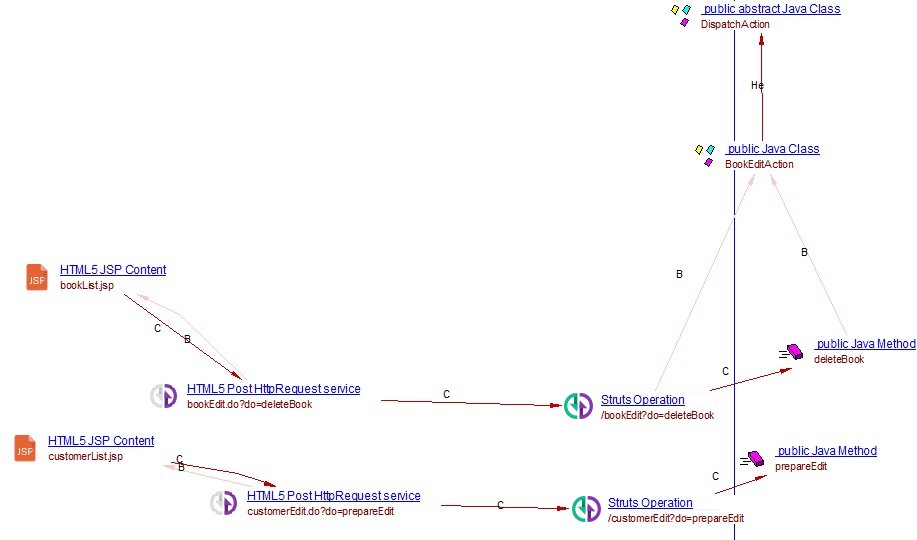
A <forward> on a DispatchAction/LookupDispatchAction mapping cannot be
told apart by path alone. Every method of the action shares the mapping.
If the parameter attribute (here “do”) matches the target query string
(e.g. ?do=editBook), the forward is linked to that method’s operation.
Otherwise it is linked to every operation of the target action.
The other Struts 1 dispatch actions are handled as follows:
MappingDispatchAction: one operation, for the method named in theparameterattribute.EventDispatchAction: one operation for each method listed in theparameterattribute.- Methods inherited from a delivered parent action are included.
- An inherited
executeorperformmethod gets no operation. Struts refuses it as a dispatch target.
Classes inheriting from net.jspcontrols.dialogs.actions.SelectAction
The extension will search for all java classes implementing “net.jspcontrols.dialogs.actions.SelectAction”.
For example:
public class MaintainMyAccountAction extends SelectAction{


     protected Map getKeyMethodMap() {
        Map map = new HashMap();
        map.put(getInitKey() + "-GET", "getfoo");
        map.put(getInitKey() + "-SAVE", "save");
        map.put(getInitKey() + "-CANCEL", "cancel");
        return map;
    }

    public ActionForward getfoo(ActionMapping mapping,
        ActionForm form,
        HttpServletRequest request,
        HttpServletResponse response)
        throws IOException, ServletException {
        ActionForward forward = null;
        UserForm userForm = (UserForm)form;

        UserVO userVO = (UserVO) UserSecurityManager.getUserContainer(request);
        if(userVO != null) CopyUtils.copyProperties(userForm,userVO);

        forward = mapping.findForward(Constant.SUCCESS);
        return(forward);
     }


...
}
In a SelectAction class, the method getKeyMethodMap provides a mapping between the methods and a parameter name. In the previous example, the method “getfoo” is mapped with a parameter DIALOG-EVENT-GET (DIALOG-EVENT is the output of getInitKey()).
We create a Struts Operation with the name “/MaintainMyAccount?DIALOG-EVENT-GET” (this name is found in the struts web xml file or, when no reference to this class is found in the web xml file, this name is set to the class name without the Action part), and a call link to the “getfoo” method.
Struts 1.x + Spring
DelegatingActionProxy
Spring provides a special action class org.springframework.web.struts.DelegatingActionProxy that acts as a proxy for struts actions, allowing more indirections:
<struts-config>
...
  <action-mappings>
    <action path="/user" type="org.springframework.web.struts.DelegatingActionProxy">
....
  </action-mappings>
</struts-config>
The class name is then found in a bean:
<bean name="/user" scope="prototype" autowire="byName" class="org.example.web.UserAction"/>
or in a bean alias.
<bean name="/someBean" scope="prototype" autowire="byName" class="org.example.web.UserAction"/>
<alias alias="/user" name="/someBean"/>
DelegatingRequestProcessor / DelegatingTilesRequestProcessor
Spring also allows Struts 1 applications to delegate action resolution at
the struts-config level through the controller processorClass. In this
mode, <action> entries may not define a type attribute, and the target
class is resolved at runtime by matching the action path to a Spring bean
name.
Supported controller syntaxes are:
<controller processorClass="org.springframework.web.struts.DelegatingRequestProcessor"/>
and:
<controller>
    <set-property property="processorClass" value="org.springframework.web.struts.DelegatingTilesRequestProcessor"/>
</controller>
When one of these Spring delegating processors is detected, each action
mapping in the file is treated as using Spring delegation. The extension
then applies the same bean-by-path resolution as for
org.springframework.web.struts.DelegatingActionProxy (for example,
path="/user" resolved through a bean named /user or an alias).
If no matching bean is found, the original action class resolution is kept (as with Spring fallback behavior), so configurations mixing delegation and explicit action classes continue to be supported.
Struts 2.x support
Application configuration
In the web.xml file, the extension will detect the filter pointing to
“org.apache.struts2.dispatcher.FilterDispatcher” class, indicating that
Struts 2.x is being used. The extension will detect the servlet-mapping
(i.e. *.action;/* in the example below). The extension will also
obtain the filter struts2 and BaseStrutsFilter
because BaseStrutsFilter points to a class that exists in the
analysis.
<web-app xmlns:xsi="http://www.w3.org/2001/XMLSchema-instance" xmlns="http://java.sun.com/xml/ns/javaee" xmlns:jsp="http://java.sun.com/xml/ns/javaee/jsp" xmlns:web="http://java.sun.com/xml/ns/javaee/web-app_2_5.xsd" xsi:schemaLocation="http://java.sun.com/xml/ns/javaee http://java.sun.com/xml/ns/javaee/web-app_2_5.xsd" id="WebApp_ID" version="2.5">
...
    <filter>
        <filter-name>struts2</filter-name>
        <filter-class>org.apache.struts2.dispatcher.FilterDispatcher</filter-class>
        <init-param>
            <param-name>actionPackages</param-name>
            <param-value>com.mapa.sipe.apresentacao.action, br.gov.mapa.arquitetura.apresentacao.struts</param-value>
        </init-param>
    </filter>

    <filter>
        <display-name>BaseStrutsFilter</display-name>
        <filter-name>BaseStrutsFilter</filter-name>
        <filter-class>com.mapa.sipe.apresentacao.filter.BaseStrutsSipeFilter</filter-class>
        <init-param>
            <param-name>public-url</param-name>
            <param-value>/sipe/imprimirGruPublica.action</param-value>
        </init-param>
    </filter>

    <filter-mapping>
        <filter-name>BaseStrutsFilter</filter-name>
        <url-pattern>*.action</url-pattern>
        <dispatcher>REQUEST</dispatcher>
        <dispatcher>FORWARD</dispatcher>
    </filter-mapping>

    <filter-mapping>
        <filter-name>struts2</filter-name>
        <url-pattern>/*</url-pattern>
        <dispatcher>REQUEST</dispatcher>
        <dispatcher>ERROR</dispatcher>
    </filter-mapping>
....
</web-app>
If a struts config file exists as shown below, the extension can obtain
a correspondence between the path and a java class: in the example
below, name="Login" gives the name of the operation that will be
created:
<struts>
...
    <package name="chapterSixPublic" namespace="/chapterSix" extends="struts-default">

        <action name="Login" class="manning.chapterSix.Login">
                    <result type="redirect">/chapterSix/secure/AdminPortfolio.action</result>
                    <result name="input">/chapterSix/Login.jsp</result>
        </action>

....
    </package>

</struts>
The extension will search for the execute method in the
corresponding java class (here manning.chapterSix.Login class) and
create a StrutsOperation named with the corresponding URL
(here /Login). A call link between the StrutsOperation and
the execute method will be created.
The execute method may be defined in a parent class
of StrutsActionLogout. This specific case which is common to
both struts 1 and struts 2 is described in section “Modelling when the
execute method is defined in a parent Struts class”.
An application may split its configuration over several files: a main
struts.xml and sub-module struts-*.xml files. The first file seen is
the main one. The others are secondary.
Namespaces
A Struts 2 <package> can declare a namespace (e.g. /shop). It
prefixes every operation of the package (e.g. /shop/cart). The root
namespace applies when namespace is absent, empty or /.
A redirectAction or chain result without namespace is resolved in
the namespace of its action, as in Struts.
Redirect and chain targets
The target of a redirectAction, redirect or chain result is
resolved as follows:
- the
<param name="method">is read. The target is then theaction!methodoperation; - the action extension (
.action,.do…) is accepted and removed; - a
redirectnaming an action is linked to that operation. Aredirectnaming a view is linked to the view; - the
<default-action-ref>of the package is used when no other candidate matches; - every operation can be a target, including actions without a
<result>and!methodoperations; - if no action is served at the URL and several actions only end with it, no link is created. An information message lists the candidates.
Results
For each <result> of an <action>, the extension creates a Struts
Result object. It adds a call link from the Struts Operation to it.
When the action declares no result, the <global-results> are used.
The result is then linked to its target:
- the JSP page, for the default/
dispatcherandredirecttypes. The forward/redirect distinction is not modeled; - another Struts Operation, for
redirectActionandchain. It is resolved from theactionName/namespaceparams or the result value.
When several results of an action share a name, the last declaration wins, as in Struts.
The * result
A <result name="*"> (or @Result(name = "*")) can be defined, it is chosen by Struts
when no other result matches. It is represented as a Struts Result named
*.
Wildcard actions
Wildcard actions are supported, e.g. <action name="*Action_*" class="...{1}Action" method="{2}">. The extension matches the pattern
against existing classes and methods. It resolves the result path with
the captured values. These are the values of each individual match, also
when the action falls back to execute. The class attribute of a
wildcard action can be a Spring bean id. It is resolved through
StrutsSpringObjectFactory.
For example:
<struts>
    <package name="default" extends="struts-default">

        <!-- Single-wildcard: The {1} substitution captures the class fragment
         (e.g. EditUser from EditUserAction) and is reused in the
         result JSP path. -->
        <action name="*" class="com.example.{1}Action">
            <result name="success">/views/{1}.jsp</result>
        </action>

        <!-- Class + method wildcards: action URL "Entity_method" routes to
             EntityManager.method(). {1} comes from the class fragment, {2}
             from the method name. Result path uses both placeholders. -->
        <action name="*_*" method="{2}" class="com.example.{1}Manager">
            <result name="success">/views/{1}/{2}.jsp</result>
        </action>

    </package>
</struts>
For an EditUserAction class and a UserManager class with a create
method, the extension creates:
- a
/EditUserStruts Operation, with asuccessStruts Result linked to/views/EditUser.jsp; - a
/User_createStruts Operation, with asuccessStruts Result linked to/views/User/create.jsp.
Dynamic Method Invocation (DMI) and Strict Method Invocation (SMI)
For a Struts 2 action class, the extension can create one
<action>!<method> operation per public method. Struts only serves these
URLs when Dynamic Method Invocation (DMI) is enabled and the method is
allowed. The extension applies the configuration of each application:
- DMI is read from
web.xml,struts.propertiesandstruts.xml(struts.enable.DynamicMethodInvocation). Otherwise the default of the Struts version applies. - The version is read from
WEB-INF/libor from astruts2-coredependency of apom.xml. It may be managed independencyManagementor in a property. - DMI is off by default from Struts 2.3.15.2.
- When DMI is off, no
!methodoperation is created. AredirectActionnaming a method does not link to an action. Achainkeeps its link. - When DMI is on, only allowed methods get an operation. They come from
<allowed-methods>,<global-allowed-methods>(inherited throughextends) and strict method invocation (strict-method-invocation). Strict Method Invocation (SMI) is on from Struts 2.5, off before. - The method named by an
<action>is always kept. - For classes that no
<action>names, the Convention plugin set applies from Struts 2.5. It holdsexecute,@AllowedMethodsand the lists of the parent package. - A method that takes a parameter gets no operation.
When the Struts version cannot be found, or is a pre-release
(2.5-BETA1, -SNAPSHOT…), no operation is removed.
Inherited or undelivered action methods
The method an <action> names is looked up on the class, then on its
delivered parent classes. If a parent class declares it, the operation is
created but not linked to that method. It is linked only to the methods
of the referred class that the inherited method calls. See “Modeling when
the execute method is defined in a parent Struts class”.
An action may name a method that is not delivered, such as the
execute() of the framework’s ActionSupport. The operation is still
created at its own URL. When the JEE Analyzer has created that
method, the operation is linked to it. This call
link carries no bookmark. Otherwise, the operation has no call link.
A class without execute() follows the same rule. It applies when the
class is mapped by an <action>, a wildcard or the Convention plugin. The
<action>!execute operation is created when DMI is on and execute is
allowed.
Convention plugin
Naming:
- Operations are named
<namespace>/<action name>, in lower case with hyphens, as Struts serves them.
For example, classReviewOrderActionin namespace/admingives/admin/review-order.
Thestruts.convention.action.name.separator,struts.convention.action.name.lowercaseandstruts.convention.action.suffixconstants ofstruts.xmlchange the name accordingly. - An
@Actionwithout value takes the class-derived name: the class name without the trailingAction. On a method other thanexecute, it maps this method only.
Namespace:
- A class-level
@Namespaceprefixes the URL of its actions. For example,@Namespace("/app/gestion")with@Action("myaction")gives/app/gestion/myaction. - A class without
@Namespacetakes the one of its nearest parent class. A namespace written as a constant is resolved. - An action URL that starts with
/ignores the namespace.
Created operations:
- Abstract classes and interfaces get no operation.
- If
execute()has@Action("custom"), only/customis created, not the default URL from the class name. - With
alwaysMapExecuteset tofalse, an@Action("custom")on a method other thanexecutealso removes the default URL from the class name.
Results:
- A class-level
@Results/@Resultapplies to all@Actionmethods of the class. A@Resultdeclared on the method wins over a class@Resultof the same name. @Result(name = {"input", "error"})creates one result per name.
Classes with @Results annotation
The extension will search for all java classes using the @Results
annotation which is resolved to org.apache.struts2.config.Results.
For example:
@Results({@Result(name = "popup", value = "popUpRestringe", type = TilesResult.class),
        @Result(name = "popupRegistro", value = "popUpRestringeRegistro", type = TilesResult.class),
        @Result(name = "base", value = "base", type = ActionChainResult.class, params = {"method", "execute"})})
public class RestringeAction extends SipeBaseAction {

   public String carregarRegistro() throws Exception {
        VwPessoaVinculadaEstab vw = montarVwPessoaVinculadaEstab();
        if (vw != null) {
            listaDadosRegistro =
                getSipeComumBD().consultarRegistroCadastro(vw.getIdPessoaEstabelecimento(), getJAASPrincipal().getIdPessoaFisica(), getIdAreaSelecionada(),
                    getPreCadastroAtivo(), getStPerfil());
            for (RegistroEstabCadDTO dados : listaDadosRegistro) {
                if (dados.getCdRegistroCadastro().equals(getRegistroSelecionado())) {
                    vw.setDadosRegistro(dados);
                    recuperarInformacoesUsuarioLogado(vw);
                    break;
                }
            }
            adicionarEstabelecimentoSessao(vw);
        }
        return FW_BASE;
    }

}
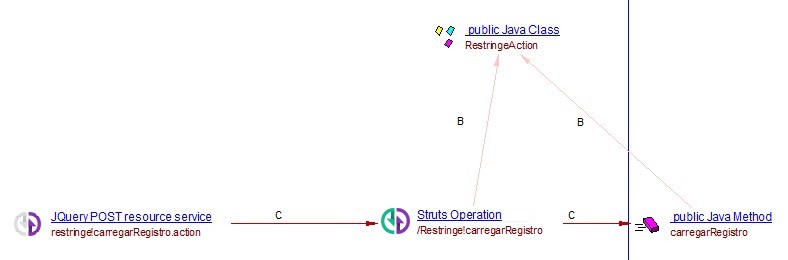
The extension will then search for all methods which are public and have
String as the return type. The extension will create a Struts
Operation with the name /Restringe!carregarRegistro (Restringe
is the class name without the ending “Action”), and a call link to the
method.
For example:
Classes implementing SessionAware
The extension will search for all java classes implementing “org.apache.struts2.interceptor.SessionAware”.
For example:
import org.apache.struts2.interceptor.SessionAware;

public class Login extends ActionSupport implements SessionAware {


    public String execute(){

        User user = getPortfolioService().authenticateUser( getUsername(), getPassword() );
        if ( user == null )
        {
            /* User not valid, return to input page. */
            return INPUT;
        }
        else{
            session.put( Struts2PortfolioConstants.USER, user );
        }

        return SUCCESS;
    }

}
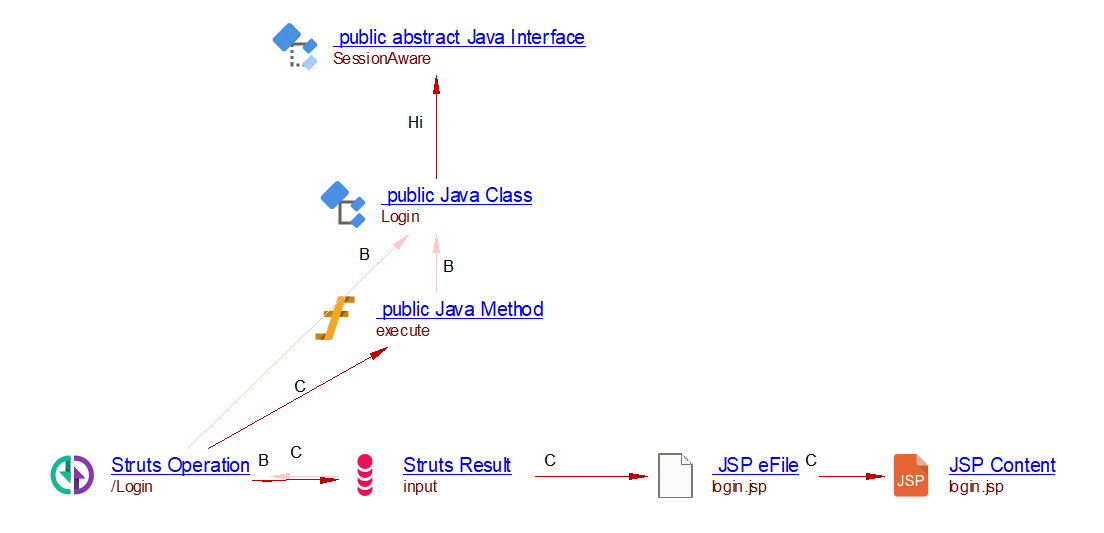
The extension will create a Struts Operation with the name
“/Login” (this name is found in a struts XML config file or the
class name by default), and a call link to the execute method.
For example:
Classes inheriting from com.opensymphony.xwork2.ActionSupport
The extension will search for all java classes implementing “com.opensymphony.xwork2.ActionSupport”.
For example:
import com.opensymphony.xwork2.ActionSupport;

public class ManageFieldsPVAction extends ActionSupport{
    private static final long serialVersionUID = -8126525052448102790L;

    private String first_name;
    private String last_name;

    public String execute() {
        //if (first_name==null)
        //  return "login";
        //setFirst_name(first_name+=" with added thingies from your favorite Action!!!");
        return "success";

    }
...
}
The extension will create a Struts Operation with the name
“/ManageFieldsPV” (this name is found in the class name without the
Action part), and a call link to the execute method.
Class and methods using @Action annotation
Annotations of the Struts2 convention plugin can be used instead of struts.xml
files.
For exemple :
import org.apache.struts2.convention.annotation.Action;

@Action(value = "login", results = {
        @Result(name = "SUCCESS", location = "/welcome.jsp"),
        @Result(name = "ERROR", location = "/error.jsp") })
public class LoginAction {

    public String execute() throws Exception {
        if("pankaj".equals(getName()) && "admin".equals(getPwd()))
        return "SUCCESS";
        else return "ERROR";
    }

    @Action(value = "foopath", results = {
            @Result(name = "SUCCESS", location = "/has_been_in_method.jsp"),
            @Result(name = "ERROR", location = "/error.jsp") })
    public String a_method() throws Exception {
        this.name = "single_annotation";
        return "SUCCESS";
    }
}
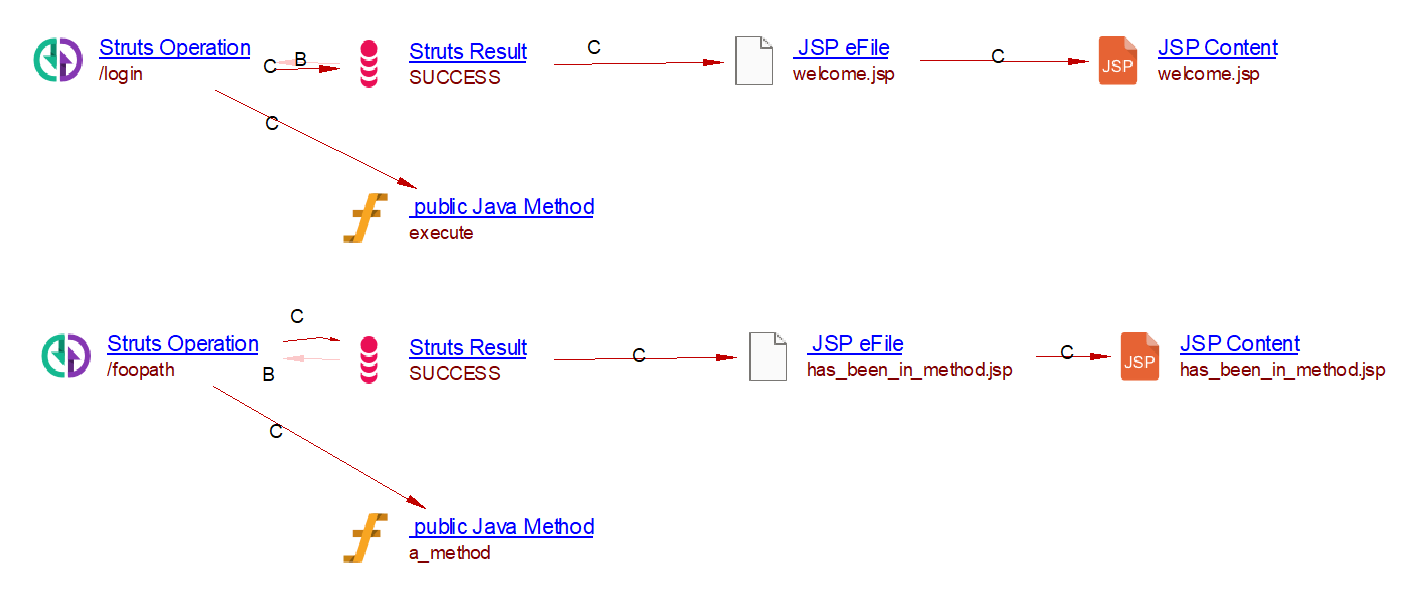
The extension will create two Struts Operations :
- one named
/login(which corresponds to the string assigned tovalue). A callLink from that operation to theexecutemethod is created. - one named
/foopath. A callLink from that operation to thea_methodmethod is created.
(showing only the SUCCESS result, for clarity)
Struts 2.x + Spring
StrutsSpringObjectFactor
Spring offers additional indirection for Struts 2 using org.apache.struts2.spring.StrutsSpringObjectFactory.
<struts>
...
    <constant name="struts.objectFactory" value="org.apache.struts2.spring.StrutsSpringObjectFactory" />
...
    <package name="chapterSixPublic" namespace="/chapterSix" extends="struts-default">

        <action name="Login" class="myBean">

....
    </package>

</struts>
Again the real class will be indicated in a bean.
<bean name="myBean" class="manning.chapterSix.Login"/>
Modeling when the execute method is defined in a parent Struts class
In both struts 1 and struts 2 it is common that the execute method
is not defined within the referred java class but in a parent of that
class. This execute method then calls a method that is overridden
in the referred java class. In that case, a call link is created between
the Struts Operation and this method.
Let’s for instance consider the struts 1 application using the following
config XML file ( which defines that a /logout URL refers to the
com.company.lightspeed.struts.logon.StrutsActionLogout java
class):
<struts-config>
...
  <action-mappings>
    <action
        path="/logout"
        type="com.company.lightspeed.struts.logon.StrutsActionLogout">
        <forward name="loggedOut" path="lightspeed/LoggedOut.jsp" />
    </action>
....
  </action-mappings>
</struts-config>
If no execute method is found in
“com.company.lightspeed.struts.logon.StrutsActionLogout” java class,
the extension searches for the execute method in the class
hierarchy.
For example:
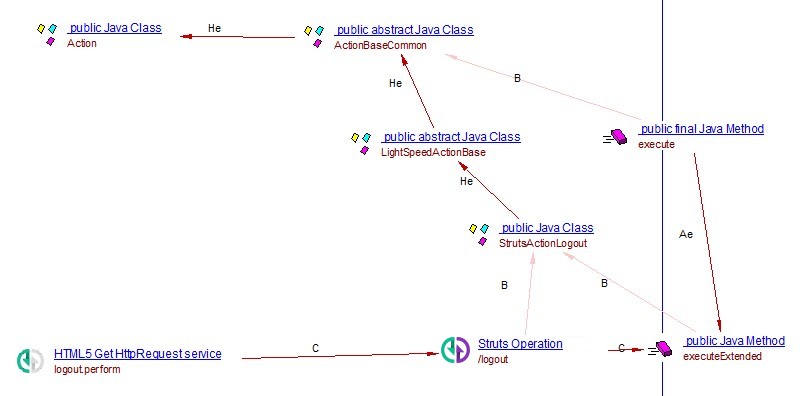
In this example, the execute method is found in the parent java
class ActionBaseCommon. The extension will analyze
this execute method to see if a method of the “referred” java
class (here StrutsActionLogout) is called from execute (here
the execute method calls “executeExtended” which is in the
“referred” java class StrutsActionLogout). The extension will create
a Struts Operation named “/logout” (name found in the Struts xml
file) and a call link between the operation and the
“executeExtended” method.
A Struts 2 action whose execute method is defined in a parent class is
modeled the same way. The Struts Operation is created. It is linked to
the method of the referred java class that execute calls.
Current known limitations
- When Dynamic Method Invocation is used, the method
fooof actionhellocan be accessed with both the URLs:hello!foo.actionandhello.action?method=foo. As the recommended approach is to use the first URL and in order to limit the number of objects created, the analyzer supports only the first approach. - Class-level
@Result/@Resultsapply to@Actionand class-derived actions only. An<action class="...">ofstruts.xmlkeeps its own<result>elements, as in Struts 2. @Namespace,@AllowedMethodsand@ParentPackagedeclared at package level (package-info.java) are not read.@AllowedMethodsand@ParentPackageare read from literal strings and arrays only. Constant expressions are not resolved. An unreadable annotation removes no operation. It is reported at information level.@AllowedMethodsand@ParentPackageapply to class-derived Convention URLs only. No allowed-method list is calculated for each Convention@Action. A method-level@Actionalways creates its operation.- DMI is read from
struts.xmlconstants,struts.propertiesandweb.xml. Custom configuration providers are not executed. - The
web.xmllookup reads the<init-param>of every servlet and filter. An unrelated one declaring the same name can supply the value. - Allowed methods match literal entries,
regex:entries and a fixed wildcard ([A-Za-z0-9_$]*).regex:entries use Python regular expressions. Thestruts.strictMethodInvocation.methodRegexconstant is not read. - When the Struts version cannot be resolved, DMI is considered on, the
XML
strict-method-invocationdefault is off and the Convention allowance is unrestricted. - An undelivered parent package is replaced by the built-in list of the Struts framework. Its actual allowed methods cannot be recovered.
strict-method-invocationis read on each package and is not inherited, as in Struts. It is considered off when the attribute is absent and the Struts version cannot be resolved.- An action that names a method declared in a parent class gets no call link to it. Only methods of the referred class itself are linked.
- An
ActionSupportsubclass that declares noexecute()and is named by no<action>or@Actiongets no operation when DMI is off. This holds when the JEE Analyzer has not created the inheritedexecute()method. Otherwise the operation is created and linked. - When no action is served at the URL of a
redirectActionorchainresult and several only end with it, no link is created. - A
forward/redirectdistinction is not modeled (see Forwards and Results). - A Struts configuration file that is not delivered cannot carry Forward/Result objects. The same holds for an exact duplicate of a file kept by the JEE Analyzer. The objects are not created and a warning names the file.
- Files named like
struts-config.xml.<module>are not delivered by the JEE Analyzer. Their name does not end with.xml.
Quality rules
- 1.5.10-funcrel
- 1.5.9-funcrel
- 1.5.8-funcrel
- 1.5.7-funcrel
- 1.5.6-funcrel
- 1.5.5-funcrel
- 1.5.4-funcrel
- 1.5.3-funcrel
- 1.5.2-funcrel
- 1.5.1-funcrel
- 1.5.0-funcrel