Python - Amazon Web Services SDK support
This page details support for the AWS SDK (boto3) in Python.
Objects
| Icon | Description |
|---|---|
 |
Python Call to AWS Lambda Function |
 |
Python Call to Unknown AWS Lambda Function |
 |
Python AWS SQS Publisher Python AWS SNS Publisher |
 |
Python AWS SQS Receiver Python AWS SNS Subscriber |
 |
Python AWS SQS Unknown Publisher Python AWS SNS Unknown Publisher |
 |
Python AWS SQS Unknown Receiver Python AWS SNS Unknown Subscriber |
 |
Python S3 Bucket |
 |
Python Unknown S3 Bucket |
 |
Python DynamoDB Database |
 |
Python DynamoDB Table |
 |
Python Unknown DynamoDB Table |
 |
Python Email Python SMS |
 |
Python AWS Kinesis Producer |
 |
Python AWS Unknown Kinesis Producer |
 |
Python AWS Kinesis Consumer |
 |
Python AWS Unknown Kinesis Consumer |
| - | Python AWS Firehose Producer Python AWS Unknown Firehose Producer |
Lambda invocation using SDK
| Supported API methods (boto3) | Link Type | Caller | Callee |
|---|---|---|---|
| botocore.client.Lambda.invoke | callLink | Python callable artifact | Python Call to AWS Lambda Function |
| botocore.client.Lambda.invoke_async | callLink | Python callable artifact | Python Call to AWS Lambda Function |
Example
A simple example showing representation of an invocation of a AWS Lambda function:
def func():
    lambda_client.invoke(FunctionName='otherfunctionname',
                     InvocationType='RequestResponse',
                     Payload=lambda_payload)
When the FunctionName argument cannot be resolved to a literal value (for example, when it is
read from an environment variable), a Python Call to Unknown AWS Lambda Function is created
instead — see Environment variable resolution.
AWS SQS
| Supported API methods (boto3) | Link Type | Caller | Callee |
|---|---|---|---|
| botocore.client.SQS.send_message | callLink | Python callable artifact | Python AWS SQS Publisher |
| botocore.client.SQS.send_message_batch | callLink | Python callable artifact | Python AWS SQS Unknown Publisher |
| botocore.client.SQS.receive_message | callLink | Python AWS SQS Unknown Receiver, Python AWS SQS Receiver | Python callable artifact |
Code samples
In this code, the module sqs_send_message.py publishes a message into the “SQS_QUEUE_URL” queue and in sqs_receive_message.py is received:
# Adapted from https://boto3.amazonaws.com/v1/documentation/api/latest/guide/sqs-example-sending-receiving-msgs.html#example
# sqs_receive_message.py

import boto3

# Create SQS client
sqs = boto3.client('sqs')

queue_url = 'SQS_QUEUE_URL'

# Receive message from SQS queue
response = sqs.receive_message(QueueUrl=queue_url, ...)
and:
# Adapted from https://boto3.amazonaws.com/v1/documentation/api/latest/guide/sqs-example-sending-receiving-msgs.html#example
# sqs_send_message.py

import boto3

# Create SQS client
sqs = boto3.client('sqs')

queue_url = 'SQS_QUEUE_URL'

# Send message to SQS queue
response = sqs.send_message(QueueUrl=queue_url, ...)
Results:

When the name of the queue passed to the API method calls is resolvable (either because of unavailability or because of technical limitations), the analyzer will create *Unknown *Publisher and Receive objects.
Known limitations
- The resolved
QueueUrlvalue is used verbatim as the object’s name — a real SQS queue URL (https://sqs.<region>.amazonaws.com/<account-id>/<queueName>) is not parsed down to the bare queue name, unlike Kinesis and Firehose stream ARNs (see below). Code that uses a full queue URL may therefore not name-match a CDK-declared queue of the same short name. - Only the low-level
botocore.client.SQS.*API is supported; the higher-levelboto3.resource('sqs')resource API is not.
AWS SNS
There are two different APIs to manage SNS services, one based on a low-level client and the higher-level one based on resources.
Supported API methods (boto3) |
Link Type | Caller | Callee | Remarks |
|---|---|---|---|---|
botocore.client.SNS.create_topic |
N/A | N/A | N/A |
Determines the topic |
| botocore.client.SNS.publish | callLink | Python callable artifact |
Python AWS SNS Publisher, |
|
| botocore.client.SNS.publish_batch | callLink | Python callable artifact | Python AWS SNS Publisher, Python AWS SNS Unknown Publisher |
|
| botocore.client.SNS.subscribe | callLink | Python AWS SNS Subscriber, |
Python Call to AWS Lambda Function, |
|
| boto3.resources.factory.sns.create_topic | N/A | N/A | N/A | Determines the topic |
| boto3.resources.factory.sns.ServiceResource.Topic | N/A | N/A | N/A | Determines the topic |
| boto3.resources.factory.sns.Topic.publish | callLink | Python callable artifact | Python AWS SNS Publisher, |
|
| boto3.resources.factory.sns.Topic.subscribe | callLink | Python AWS SNS Subscriber, |
Python Call to AWS Lambda Function, Python AWS SQS Publisher, Python SMS, Python Email |
|
| boto3.resources.factory.sns.PlatformEndpoint.publish | callLink | Python callable artifact | Python AWS SNS Publisher, |
The supported protocols are as follows:
| Protocol | Object/s created | Name of the object |
|---|---|---|
| Python AWS Email | an Email (the email addresses are not evaluated) | |
| http/https | Python POST service request | the url (evaluated from the endpoint) |
| lambda | Python Call to AWS Lambda Function | the name of the lambda function (evaluated from the endpoint) |
| sms | Python AWS SMS | an SMS (the SMS numbers are not evaluated) |
| sqs | Python AWS Simple Queue Service Publisher | the name of the queue (evaluated from the endpoint) |
Example
The code example below shows a basic usage of the boto3 library and the results as seen in Enlighten after analysis of the code.
import boto3

client = boto3.client('sns', region_name='eu-west-3')
topicArn1 = client.create_topic( Name = "TOPIC1")['TopicArn']

def publish(topic):
    client.publish(TopicArn=topic, Message='<your message>')

def subscribe(topic):
    client.subscribe(TopicArn=topic, Protocol="email", Endpoint="lili@lala.com")
    client.subscribe(TopicArn=topic, Protocol="sms", Endpoint="123456789")
    client.subscribe(TopicArn=topic, Protocol="sqs", Endpoint="arn:partition:service:region:account-id:queueName")
    client.subscribe(TopicArn=topic, Protocol="http", Endpoint="http://foourl")
    client.subscribe(TopicArn=topic, Protocol="lambda", Endpoint="fooarn:function:lambda_name:v2")

publish(topicArn1)
subscribe(topicArn1)
The callLink links between the Publisher and the respective Subscribers are created by the Web Services Linker extension during application level.
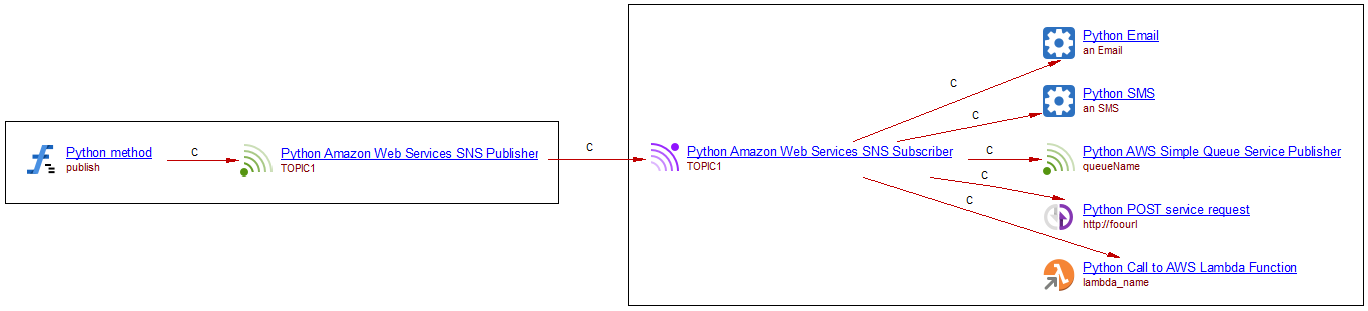
For each method a maximum of one subscriber per given topic will be created as shown in the image above. In the absence of a well-resolved topic, the analyzer will create Unknown Publishers and Subscribers. There is no link created between unknown objects.
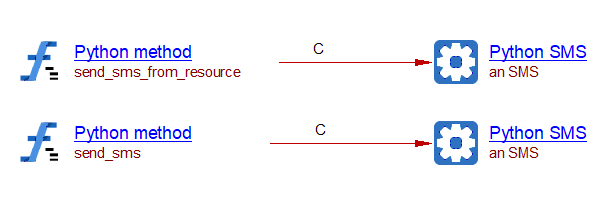
We can also have direct sms deliveries from calls to publish API methods:
import boto3
AWS_REGION = "us-east-1"

def send_sms_from_resource():
    sns = boto3.resource("sns", region_name=AWS_REGION)
    platform_endpoint = sns.PlatformEndpoint('endpointArn')
    platform_endpoint.publish(PhoneNumber='123456789')

def send_sms():
    conn = boto3.client("sns", region_name=AWS_REGION)
    conn.publish(PhoneNumber='123456789')
Where the corresponding objects and links are:
Known limitations
- The
Protocol/Endpointcorrelation onsubscribecalls is an over-approximation: when either argument resolves to several candidate values, every resolved protocol is paired with every resolved endpoint rather than the two being correctly matched one-to-one. - An unresolved http/https endpoint produces no object at all (unlike every other protocol, and unlike every other AWS service’s “Unknown” fallback).
AWS DynamoDB
See DynamoDB support for Python source code.
Known limitations
- PartiQL operations (
execute_statement,execute_transaction,batch_execute_statement), backups, exports/restores, streaming-destination toggles, and most other DDL/metadata operations (update_table,describe_*,list_tables, tag/untag) are not modeled. - Only one
batch_writer()with-block is tracked at a time; nested or concurrent batch-writer scopes are not handled correctly.
AWS S3
Supported PI methods:
Method |
Link Type (CRUD-like) | Caller | Callee |
|---|---|---|---|
botocore.client.S3.put_object() |
useInsertLink | Python callable artifact | Python S3 Bucket, Python Unknown S3 Bucket |
botocore.client.S3.delete_bucket() |
useDeleteLink | Python callable artifact |
Python S3 Bucket. Python Unknown S3 Bucket |
botocore.client.S3.delete_object() |
useDeleteLink | Python callable artifact |
Python S3 Bucket. Python Unknown S3 Bucket |
| botocore.client.S3.delete_objects() | useDeleteLink | Python callable artifact |
Python S3 Bucket. Python Unknown S3 Bucket |
botocore.client.S3.get_object() |
useSelectLink | Python callable artifact | Python S3 Bucket, Python Unknown S3 Bucket |
botocore.client.S3.get_object_torrent() |
useSelectLink | Python callable artifact | Python S3 Bucket, Python Unknown S3 Bucket |
botocore.client.S3.list_objects() |
useSelectLink | Python callable artifact | Python S3 Bucket, Python Unknown S3 Bucket |
| botocore.client.S3.list_objects_v2() | useSelectLink | Python callable artifact | Python S3 Bucket, Python Unknown S3 Bucket |
botocore.client.S3.put_bucket_logging() |
useUpdateLink | Python callable artifact | Python S3 Bucket, Python Unknown S3 Bucket |
| botocore.client.S3.put_bucket_analytics_configuration() | useUpdateLink | Python callable artifact | Python S3 Bucket, Python Unknown S3 Bucket |
Supported API methods() (botocore.client.S3) |
Link Type (generic) | Caller | Callee | Other effects |
|---|---|---|---|---|
botocore.client.S3.create_bucket() |
callLink | Python callable artifact | Python S3 Bucket, Python Unknown S3 Bucket |
Creation of S3 bucket |
abort_multipart_upload,
complete_multipart_upload, |
callLink | Python callable artifact | Python S3 Bucket, Python Unknown S3 Bucket |
In the absence of a create_bucket call, references to buckets in other method calls are used to create table objects. In the case the name is well resolved, a regular S3 Bucket is created, otherwise an Unknown S3 Bucket is created*.* A maximum of one Unknown S3 Bucket per file is created, however a maximum of one per project (as it is already the case in analyzers for other languages such as TypeScript) is under consideration by CAST.
The long list of methods added to the last arrow in the table above correspond to methods that act on S3 Buckets and presumably using the AWS SDK API behind the scenes (those few methods only acting on the boto3 client object are not considered).
Known limitations
- No support for S3 Access Points or Multi-Region Access Points (no
s3controlAPI support). generate_presigned_urlproduces no object or link (it is statically undecidable whether the resulting URL will be used for a GET or a PUT);generate_presigned_post, by contrast, is processed and produces a genericcallLink.- For
copy(), a bucket name read from theCopySource['Bucket']dict literal is not resolved through environment-variable tracing the way every other bucket argument is (see below) — an env-var-sourced copy source will simply be omitted rather than producing an Unknown bucket.
AWS Kinesis
Amazon Kinesis is a family of services for processing and analyzing real-time streaming data at a large scale.
| Supported API methods (boto3) | Link Type | Caller | Callee |
|---|---|---|---|
| botocore.client.Kinesis.put_record | callLink | Python callable artifact | Python AWS Kinesis Producer |
| botocore.client.Kinesis.put_records | callLink | Python callable artifact | Python AWS Kinesis Producer |
| botocore.client.Kinesis.get_shard_iterator | callLink | Python AWS Kinesis Consumer | Python callable artifact |
The stream name is resolved from the StreamName argument, or from StreamARN when StreamName
is not supplied; a full stream ARN (arn:aws:kinesis:region:account:stream/name) is automatically
reduced to the bare stream name.
Example
import boto3
kinesis = boto3.client('kinesis')

def produce():
    kinesis.put_record(StreamName='my-stream', Data=b'some data', PartitionKey='partitionkey')

def consume():
    kinesis.get_shard_iterator(StreamName='my-stream', ShardId='shardId-000000000000',
                                ShardIteratorType='TRIM_HORIZON')

This produces a Python AWS Kinesis Producer object named my-stream with a callLink from
produce, and a Python AWS Kinesis Consumer object also named my-stream with a callLink to
consume. When the stream name cannot be resolved, a Python AWS Unknown Kinesis Producer (or
Unknown Kinesis Consumer) is created instead. These metamodel types are shared with the CDK-side
Kinesis objects described in the CDK support page, so a boto3 producer/consumer and
a CDK-declared stream of the same name resolve to the same object.
Known limitations
- Only
put_record/put_records(producer) andget_shard_iterator(consumer) are modeled. The actual data-read callget_recordsis not separately tracked, nor aredescribe_stream,list_shards,list_streams, or the enhanced fan-out / Kinesis Client Library consumer APIs (subscribe_to_shard,register_stream_consumer).
AWS Firehose
Amazon Data Firehose is a fully managed service for delivering real-time streaming data to destinations such as Amazon S3, Amazon Redshift, Amazon OpenSearch Service, and HTTP endpoints.
| Supported API methods (boto3) | Link Type | Caller | Callee |
|---|---|---|---|
| botocore.client.Firehose.put_record | callLink | Python callable artifact | Python AWS Firehose Producer |
| botocore.client.Firehose.put_record_batch | callLink | Python callable artifact | Python AWS Firehose Producer |
Firehose is a one-way delivery pipe, so unlike Kinesis there is no consumer side. The stream name
is resolved from DeliveryStreamName, or from DeliveryStreamARN
(arn:aws:firehose:region:account:deliverystream/name, reduced to the bare name) when
DeliveryStreamName is absent.
Example
import os
import boto3
firehose = boto3.client('firehose')

def produce():
    firehose.put_record(DeliveryStreamName='my-delivery-stream', Record={'Data': b'some data'})

def produce_batch():
    firehose.put_record_batch(
        DeliveryStreamName='my-batch-stream',
        Records=[{'Data': b'a'}, {'Data': b'b'}]
    )

def produce_unknown():
    firehose.put_record(DeliveryStreamName=os.environ['STREAM_NAME'], Record={'Data': b'some data'})

This produces two distinct Python AWS Firehose Producer objects (my-delivery-stream and
my-batch-stream), each with a callLink from its calling method, plus a Python AWS Unknown
Firehose Producer for the call whose stream name could not be resolved.
Known limitations
- Unlike every other AWS service in this extension, an Unknown Firehose Producer does not currently persist the environment variable name it was read from — see Environment variable resolution.
- No modeling of Lambda data-transformation processors from the boto3 side (this is only available via CDK — see the CDK support page).
Environment variable resolution
Handler code frequently reads a service identity (a queue URL, table name, bucket name, topic ARN,
function name, or stream name) from an environment variable rather than using a literal value.
This extension recognizes the following patterns equally: os.getenv('KEY'),
os.environ.get('KEY'), and os.environ['KEY'].
- If the value of that environment variable is independently known — for instance because it was
parsed from a
Globals.Function.Environment.Variablesblock of a SAM/Serverlesstemplate.yaml/.ymlfile — the literal value is substituted and a fully-resolved object is created, exactly as if a literal string had been passed to the API call. - Otherwise, an Unknown object is created for that call, and the environment variable name is
saved on it as the
CAST_AWS_Unknown_Service.env_var_nameproperty. Distinct environment variable names are kept as distinct Unknown objects (they are not collapsed into a single unnamed “Unknown” object per project/module).
Example
import os
import boto3

lambda_client = boto3.client('lambda')
sqs_client = boto3.client('sqs')
s3_client = boto3.client('s3')
dynamodb_client = boto3.client('dynamodb')
sns_client = boto3.client('sns')

def invoke_lambda():
    lambda_client.invoke(FunctionName=os.environ['FUNCTION_NAME'])

def send_to_queue():
    sqs_client.send_message(QueueUrl=os.environ['SEND_QUEUE_URL'], MessageBody='hello')

def read_from_bucket():
    s3_client.get_object(Bucket=os.environ['BUCKET_NAME'], Key='key')

def read_from_table():
    dynamodb_client.get_item(TableName=os.environ['TABLE_NAME'], Key={'id': {'S': '1'}})

def publish_to_topic():
    sns_client.publish(TopicArn=os.environ['TOPIC_ARN'], Message='hello')

Each resulting Unknown object (Python Call to Unknown AWS Lambda Function, Python AWS SQS
Unknown Publisher, Python Unknown S3 Bucket, Python Unknown DynamoDB Table, Python AWS SNS
Unknown Publisher) carries its own env_var_name — FUNCTION_NAME, SEND_QUEUE_URL,
BUCKET_NAME, TABLE_NAME, and TOPIC_ARN respectively — letting analysts trace an unresolved
cloud dependency back to the environment variable that configures it.
Known limitations
- This mechanism is supported for Lambda, SQS, S3, DynamoDB, SNS (both the publish/subscribe topic
and the sqs/lambda endpoint reached via a subscription), and Kinesis; it is not currently
applied to the boto3 Firehose producer’s
env_var_nameproperty (see above), nor to S3copy()’sCopySource['Bucket']dict literal. - Resolving the environment variable’s value only works when it is declared in a SAM/Serverless
template.yaml/.ymlfile parsed by this extension; a value only known through AWS CDK’senvironment={...}Lambda property (see the CDK support page) is not cross-referenced at this stage.