PL/1 - 1.3
Description
This extension provides support for applications written using Enterprise PL/I for z/OS languages.
Supported Versions of PL/I
| Enterprise PL/I for z/OS | Supported |
|---|---|
| 6.x | ✅ |
| 5.x | ✅ |
| 4.x | ✅ |
| 3.x | ✅ |
Transactions
Transaction support is derived from metamodel concepts used to build CAST Imaging Blueprint and structural transaction flows. Entry Points start transactions; Exit Points include both output/boundary concepts and Data Entities manipulated by transactions.
| Role | Support | Breakdown |
|---|---|---|
| Entry Point |
|
|
| Exit Point |
Unresolved Storage
Data Entity with Accurate FP
|
Data version: 1.3.0-beta2
ISO 5055 Structural Rules
Quality support is based on ISO 5055 structural rules available for the selected extension version.
| Reliability | Maintainability | Security | Performance Efficiency |
|---|---|---|---|
Data version: 1.3.0-beta2
Dependencies with other extensions
Some CAST extensions require the presence of other CAST extensions in order to function correctly. The com.castsoftware.pl1 extension requires that the following other CAST extensions are also installed:
- com.castsoftware.sqlanalyzer (installed automatically)
- com.castsoftware.wbslinker (installed automatically) — required for CICS and IMS integration
Optional companion extensions
The following extensions do not analyze any source code by themselves. They are not installed automatically: add them to the application to enable an option of the PL/I analyzer, and remove them to revert to the default behavior.
| Extension | What it enables |
|---|---|
| com.castsoftware.mainframe.data2data | Saves the variables and structures actually used by the programs, and the data to data links between them. |
| com.castsoftware.pl1.programnamefromfilename | Names the PL/I main procedure objects after their source file name instead of the label coded on the PROC statement. |
Download and installation instructions
The extension will be automatically downloaded and installed when you deliver PL/1 code.
Prepare and deliver the source code
The following file extensions are recognised by CAST Console:
.PLC.PLI
However, PL/I source code files can sometimes be created with any extension (most commonly a .TXT extension) or no extension at all. If these type of files are encountered during the source code delivery process, CAST will try to determine whether the file is a valid PL/I
source file and if so, a built-in preprocessor will change the extension to .PLI or .PLC (for files with extensions other than .PLI or .PLC, such as .TXT) and will add a .PLI or .PLC extension for files with no extension.
Please note the following recommendations and notes about source code:
- It is important to organize the PL/1 source code in a specific way otherwise the preprocessor will not be launched during the delivery:
- In general, CAST recommends ensuring that all PL/I source code (
.PLC/.PLI/.TXT/ files with no extension) is located in one single folder dedicated to PL/1 in the delivery. You can also use multiple folders for your PL/1 source code if necessary. Other source code for other technologies should be located in separate dedicated folders.- to trigger the PL/1 preprocessor, the presence of at least one
.PLCor.PLIfile in a folder in the delivery (including the root if this is used) is required - Do not mix other file types with the PL/1 source code in the same folder (including the root if this used) - these other files may be processed by the PL/1 preprocessor rendering them corrupt and causing the subsequent analysis to fail.
- to trigger the PL/1 preprocessor, the presence of at least one
- In general, CAST recommends ensuring that all PL/I source code (
- The PL/I extension ignores empty files and they will not be considered as valid source code files.
- Binary files should be avoided since it is not always possible to detect whether a given file is binary or not. Presenting binary files in the source code delivery will not result in a packaging failure, but an error message can be expected in the packaging/extraction log.
Source code discovery
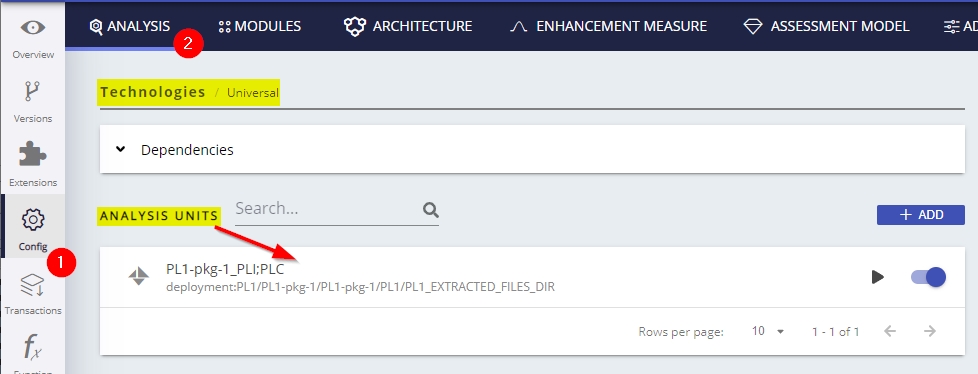
A discoverer is provided with the extension to automatically detect PL/1 code: a PL/1 project will be discovered for the package’s root folder when at least one .PLC or .PLI file in a folder (including post preprocessing) is detected in the root folder or any sub-folders. For every PL/1 project located, one Universal Technology Analysis Unit will be created:
Deliver the source code
- Upload the ZIP file containing your Application source (or define a folder in which to deposit your source code)
- Configure any file/folder exclusions and objectives
- If you want to inspect the version (recommended), disable the analysis/snapshot at this point
- Start the delivery process - the extension will be auto-downloaded during this phase.
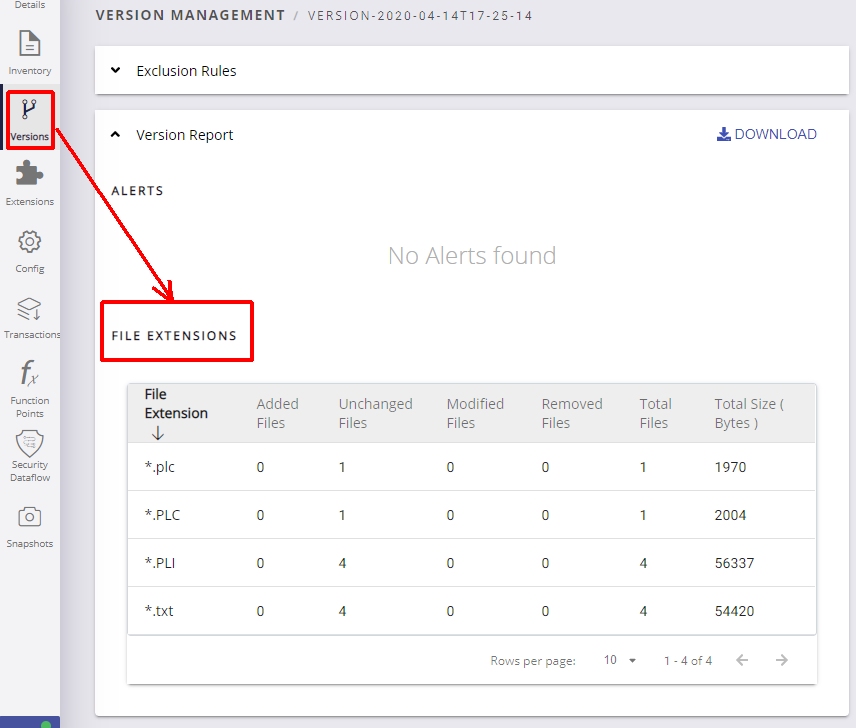
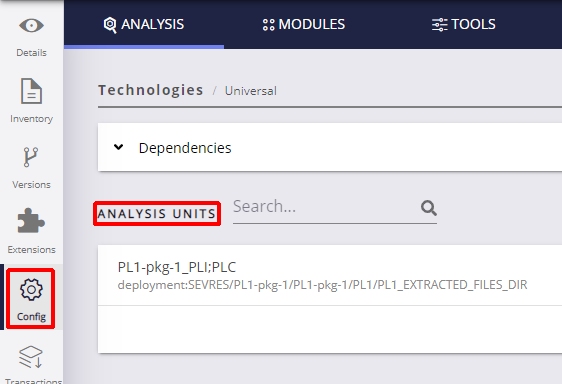
- Validate and accept the version - inspect the delivered files and ensure that you have an Analysis Unit for your PL/I source code:
Logging mechanism
Analysis log files
| Error/Warning Message | Action |
|---|---|
| Unable to find the object end for type ‘XXXXXXX’ | This is caused by complex source code that makes the engine miss the end of the object, whereas the begin of object type was captured. Object won’t be created in Analysis Service, will lead to incomplete analysis. Issue must be reported to CAST Support, along with source code (original source file + preprocessed source code) to allow reproduction and investigation. A few such warnings for object types like PLIProcedure, PLCProcedure, PLIFunction could be acceptable. Same warning for PLIMainProcedure is problematic : the whole program is not saved in Analysis Service. |
| An unnamed object of type ‘PLIWhenCall’ has been detected | This is because PLIWhenCall has no specific name, as such, the CAST framework will give them the name “unnamed”. You can safely ignore this warning. |
| Duplicate object of type ‘PLIWhenCall’ has been detected: ‘ Duplicate object of type ‘PLIErrorBlock’ has been detected |
As mentioned above, PLIWhenCall and PLIErrorBlock have no specific name and are automatically given the name “unnamed” by CAST - as such multiple objects with the name “unnamed” will exist and will cause this error. You can safely ignore this warning. Same for PLIProcSubscriptedVar object type. |
| Duplicate object of type ‘PLIProcedure’ has been detected Duplicate object of type ‘PLCProcedure’ has been detected |
PLIProcedure and PLCProcedure are supposed to be unique within the same source file. So such warning is the sign of an incorrect object type identification. Issue must be reported to CAST Support. |
| end of string ’’’ not found end of string ‘[’]’ not found File skipped |
UA engine did not find the end of a string, whereas the begin of the string was captured. This generally leads to a second warning : File skipped, meaning the source file and contained objects have not been saved in Analysis Service. On large applications, a few such warnings could be acceptable. Otherwise, issue must be reported to CAST Support, along with source code (original source file + preprocessed source code) to allow reproduction and investigation. |
| end of comment ‘[*][/]’ not found | Alone, this warning can be safely ignored. Check if other warnings are present for the same source file. |
| Could not calculate code depth correctly for file File: Could not calculate code depth correctly for file, added |
The analyzer is not capable of detecting the source code depth correctly. |
| PL1 Extractor Version: |
A simple information message to help identify the version of the extractor that is being used. |
PL/I Preprocessor
PL/I source code needs to be preprocessed so that CAST can understand it and analyze it correctly. This source code preprocessing is actioned automatically. In other words you only need to package, deliver and launch an analysis/generate a snapshot for the preprocessing to be completed.
Note that as part of the source code pre-processing phase, from PL1 1.0.5 onwards, CAST will now add “$$” to all PL/I source code just prior to the “;”. For example:
| Original source code | Source code after pre-processing in ≥ 1.0.5 |
|---|---|
someproc:proc; |
someproc:proc$$; |
The impact of this change is as follows:
- When upgrading to PL1 ≥ 1.0.5, existing objects will be shown as updated when a post upgrade snapshot is run.
- There will be a reduction in the number of messages of the type “
end of object of type \<PLC\PLIProcedure\|Function\> not found” that were previously displayed in the log.
This change has been implemented because of a limitation in the analyzer with regard to the way object start and end patterns are handled. In PL/I, object start and end patterns do not match (contrary to most other languages, such as PHP where { and } are used) and therefore the analyzer is not able to correctly identify when an object ends.
Analysis failures
The PL1 extension needs to process all the file extensions delivered in the version because PL/I files can have any extension. During this
parsing if the file is from a different technology, a failure will occur. The file that has caused the failure will be stored under a
“ParsingFailures” folder at the package level and the file extension of the file will be changed to “pfail”. A reason for the failure will also be recorded in each subfolder with name of the exception that caused it. For example StringCommentProcessorException:

What results can you expect?
The code samples used in the examples of this page are available in the analyzer-samples repository. Each folder is self-contained and can be delivered and analyzed on its own.
Objects
PL/I language objects
| Type | Object Name | Creation rule |
|---|---|---|
 |
PLI MainProcedure | Created for each PL/I source file that contains a main procedure (PROC OPTIONS(MAIN)). It is named after the procedure label, or after the source file when the PL/I Program Name From File Name extension is installed. |
|
PLI Procedure | Created for each internal procedure (PROC, PROCEDURE, XPROC or XPROCEDURE) that has no RETURNS attribute and is not the main procedure of the file. |
 |
PLI Function | Created for each internal procedure that has a RETURNS attribute and is not the main procedure of the file. |
 |
PLI Entry Point | Created for each ENTRY statement label, and for each additional label of a PROC statement. It is attached to the top-level object of the file. |
 |
PLI FileStructure | Created for each name declared with the FILE attribute. A FILE VARIABLE declaration is ignored. |
 |
PLI Error Block | Created for each ON CAST_ERROR_BLOCK label BEGIN; unit. An ordinary ON ERROR or ON ENDFILE unit creates no object. |
| PLIVariable | PLI Variable | Created for each declared data item when the Mainframe data to data links extension is installed and saves the data: every item, or only the items used and their parent groups, depending on its option. FILE, ENTRY, built-in and GENERIC declarations are ignored. |
 |
PLC MainProcedure | Created for each PL/I include source file (.plc) that contains a main procedure, unless the file is wrapped in BEGIN_PLC(name). It is named after the procedure label, or after the source file when the PL/I Program Name From File Name extension is installed. |
 |
PLC Include | Created for each .plc file wrapped in BEGIN_PLC(name) and END_PLC(name) whose member is included with %INCLUDE or -INC by at least one other analyzed file. |
| PLCFile | PLC File | Created for each .plc file wrapped in BEGIN_PLC(name) and END_PLC(name) that no other analyzed file includes. |
|
PLC Procedure | Created for each internal procedure (PROC, PROCEDURE, XPROC or XPROCEDURE) that has no RETURNS attribute and is not the main procedure of the file. |
|
PLC Function | Created for each internal procedure that has a RETURNS attribute and is not the main procedure of the file. |
|
PLC Entry Point | Created for each ENTRY statement label, and for each additional label of a PROC statement. It is attached to the top-level object of the file. |
|
PLC FileStructure | Created for each name declared with the FILE attribute. A FILE VARIABLE declaration is ignored. |
 |
PLC Error Block | Created for each ON CAST_ERROR_BLOCK label BEGIN; unit. An ordinary ON ERROR or ON ENDFILE unit creates no object. |
| PLCVariable | PLC Variable | Created for each declared data item when the Mainframe data to data links extension is installed and saves the data: every item, or only the items used and their parent groups, depending on its option. FILE, ENTRY, built-in and GENERIC declarations are ignored. |
 |
PLI Missing Include | Created once for each include member name referenced by a %INCLUDE or -INC directive that is not found in the analyzed code. It is always a PLI object, even when the directive is in a .plc file. |
 |
PLI Missing Program | Created once for each program name referenced by a CALL, EXEC CICS LINK, XCTL or HANDLE ABEND PROGRAM that is not found in the analyzed code. It is always a PLI object, even from a .plc file. |
Embedded SQL objects
| Type | Object Name | Creation rule |
|---|---|---|
 |
PLI SQL Query | Created for each EXEC SQL statement of a PL/I source file. It is named after the first words of the SQL text, keeps the full text in a property and is attached to the enclosing procedure. |
 |
Missing Schema | Created by the SQL Analyzer extension when an SQL query of a PL/I source file uses a schema that is not defined in the analyzed database. |
 |
Missing Table | Created by the SQL Analyzer extension when an SQL query of a PL/I source file uses a table or a view that is not defined in the analyzed database. |
 |
Missing Procedure | Created by the SQL Analyzer extension when an SQL query of a PL/I source file uses a stored procedure that is not defined in the analyzed database. |
|
PLC SQL Query | Created for each EXEC SQL statement of a PL/I include source file (.plc). It is named after the first words of the SQL text, keeps the full text in a property and is attached to the enclosing procedure. |
|
Missing Schema | Created by the SQL Analyzer extension when an SQL query of a PL/I include source file (.plc) uses a schema that is not defined in the analyzed database. |
|
Missing Table | Created by the SQL Analyzer extension when an SQL query of a PL/I include source file (.plc) uses a table or a view that is not defined in the analyzed database. |
|
Missing Procedure | Created by the SQL Analyzer extension when an SQL query of a PL/I include source file (.plc) uses a stored procedure that is not defined in the analyzed database. |
CICS objects
| Type | Object Name | Creation rule |
|---|---|---|
 |
PLI CICS WriteQ TD Queue | Created for each EXEC CICS WRITEQ command that has a QUEUE option, for each name the option can take. The object is named after the resource and attached to the enclosing procedure. |
|
PLI CICS ReadQ TD Queue | Created for each EXEC CICS READQ command that has a QUEUE option, for each name the option can take. The object is named after the resource and attached to the enclosing procedure. |
|
PLI CICS DeleteQ TD Queue | Created for each EXEC CICS DELETEQ command that has a QUEUE option, for each name the option can take. The object is named after the resource and attached to the enclosing procedure. |
 |
PLI CICS Read Dataset | Created for each EXEC CICS READ command that has a FILE option, for each name the option can take. The object is named after the resource and attached to the enclosing procedure. |
|
PLI CICS Write Dataset | Created for each EXEC CICS WRITE command that has a FILE option, for each name the option can take. The object is named after the resource and attached to the enclosing procedure. |
|
PLI CICS Rewrite Dataset | Created for each EXEC CICS REWRITE command that has a FILE option, for each name the option can take. The object is named after the resource and attached to the enclosing procedure. |
|
PLI CICS Delete Dataset | Created for each EXEC CICS DELETE command that has a FILE option, for each name the option can take. The object is named after the resource and attached to the enclosing procedure. |
|
PLI CICS Browse Dataset | Created for each EXEC CICS STARTBR, READNEXT or READPREV command that has a FILE option, for each name the option can take. The object is named after the resource and attached to the enclosing procedure. |
 |
PLI CICS Start Transaction | Created for each EXEC CICS START command that has a TRANSID option, for each name the option can take. The object is named after the resource and attached to the enclosing procedure. |
|
PLI CICS Return Transaction | Created for each EXEC CICS RETURN command that has a TRANSID option, for each name the option can take. The object is named after the resource and attached to the enclosing procedure. |
|
PLI CICS Cancel Transaction | Created for each EXEC CICS CANCEL command that has a TRANSID option, for each name the option can take. The object is named after the resource and attached to the enclosing procedure. |
|
PLI CICS Send Map | Created for each EXEC CICS SEND command that has a MAP option, for each name the option can take. The object is named after the resource and attached to the enclosing procedure. |
|
PLI CICS Receive Map | Created for each EXEC CICS RECEIVE command that has a MAP option, for each name the option can take. The object is named after the resource and attached to the enclosing procedure. |
|
PLI CICS Unknown TD Queue | Created for each EXEC CICS WRITEQ, READQ or DELETEQ command whose QUEUE option is present but whose value cannot be determined. |
 |
PLI CICS Unknown Dataset | Created for each EXEC CICS READ, WRITE, REWRITE, DELETE, STARTBR, READNEXT or READPREV command whose FILE option is present but whose value cannot be determined. |
|
PLI CICS Unknown Transaction | Created for each EXEC CICS START, RETURN or CANCEL command whose TRANSID option is present but whose value cannot be determined. |
|
PLI CICS Unknown Map | Created for each EXEC CICS SEND or RECEIVE command whose MAP option is present but whose value cannot be determined. |
|
PLC CICS WriteQ TD Queue | Created for each EXEC CICS WRITEQ command that has a QUEUE option, for each name the option can take. The object is named after the resource and attached to the enclosing procedure. |
|
PLC CICS ReadQ TD Queue | Created for each EXEC CICS READQ command that has a QUEUE option, for each name the option can take. The object is named after the resource and attached to the enclosing procedure. |
|
PLC CICS DeleteQ TD Queue | Created for each EXEC CICS DELETEQ command that has a QUEUE option, for each name the option can take. The object is named after the resource and attached to the enclosing procedure. |
|
PLC CICS Read Dataset | Created for each EXEC CICS READ command that has a FILE option, for each name the option can take. The object is named after the resource and attached to the enclosing procedure. |
|
PLC CICS Write Dataset | Created for each EXEC CICS WRITE command that has a FILE option, for each name the option can take. The object is named after the resource and attached to the enclosing procedure. |
|
PLC CICS Rewrite Dataset | Created for each EXEC CICS REWRITE command that has a FILE option, for each name the option can take. The object is named after the resource and attached to the enclosing procedure. |
|
PLC CICS Delete Dataset | Created for each EXEC CICS DELETE command that has a FILE option, for each name the option can take. The object is named after the resource and attached to the enclosing procedure. |
|
PLC CICS Browse Dataset | Created for each EXEC CICS STARTBR, READNEXT or READPREV command that has a FILE option, for each name the option can take. The object is named after the resource and attached to the enclosing procedure. |
|
PLC CICS Start Transaction | Created for each EXEC CICS START command that has a TRANSID option, for each name the option can take. The object is named after the resource and attached to the enclosing procedure. |
|
PLC CICS Return Transaction | Created for each EXEC CICS RETURN command that has a TRANSID option, for each name the option can take. The object is named after the resource and attached to the enclosing procedure. |
|
PLC CICS Cancel Transaction | Created for each EXEC CICS CANCEL command that has a TRANSID option, for each name the option can take. The object is named after the resource and attached to the enclosing procedure. |
|
PLC CICS Send Map | Created for each EXEC CICS SEND command that has a MAP option, for each name the option can take. The object is named after the resource and attached to the enclosing procedure. |
|
PLC CICS Receive Map | Created for each EXEC CICS RECEIVE command that has a MAP option, for each name the option can take. The object is named after the resource and attached to the enclosing procedure. |
|
PLC CICS Unknown TD Queue | Created for each EXEC CICS WRITEQ, READQ or DELETEQ command whose QUEUE option is present but whose value cannot be determined. |
|
PLC CICS Unknown Dataset | Created for each EXEC CICS READ, WRITE, REWRITE, DELETE, STARTBR, READNEXT or READPREV command whose FILE option is present but whose value cannot be determined. |
|
PLC CICS Unknown Transaction | Created for each EXEC CICS START, RETURN or CANCEL command whose TRANSID option is present but whose value cannot be determined. |
|
PLC CICS Unknown Map | Created for each EXEC CICS SEND or RECEIVE command whose MAP option is present but whose value cannot be determined. |
CICS web services objects
| Type | Object Name | Creation rule |
|---|---|---|
 |
PLI CICS Invoke Service | Created for each EXEC CICS INVOKE WEBSERVICE command, for each web service name and operation name it can take. It is named service.operation, or after the service alone when no OPERATION is given. |
 |
PLI CICS Unknown Service | Created for each EXEC CICS INVOKE WEBSERVICE command whose web service name cannot be determined. |
|
PLI CICS Service Operation | Created for each operation of a main procedure that acts as a CICS web service provider. The provider is recognized from EXEC CICS GET CONTAINER('DFHWS-OPERATION') followed by a SELECT on the received variable, whose WHEN values are the operation names. The service name is taken from a SELECT on the DFHWS-WEBSERVICE container. |
|
PLC CICS Invoke Service | Created for each EXEC CICS INVOKE WEBSERVICE command, for each web service name and operation name it can take. It is named service.operation, or after the service alone when no OPERATION is given. |
|
PLC CICS Unknown Service | Created for each EXEC CICS INVOKE WEBSERVICE command whose web service name cannot be determined. |
|
PLC CICS Service Operation | Created for each operation of a main procedure that acts as a CICS web service provider. The provider is recognized from EXEC CICS GET CONTAINER('DFHWS-OPERATION') followed by a SELECT on the received variable, whose WHEN values are the operation names. The service name is taken from a SELECT on the DFHWS-WEBSERVICE container. |
IMS DB objects
| Type | Object Name | Creation rule |
|---|---|---|
 |
PLI IMS DL/I Read PCB | Created for each PLITDLI or CEETDLI call that uses a read function (GU, GN, GNP, GHU, GHN, GHNP, GUL, GNL or GNPL) on a PCB other than the I/O PCB, for each PCB position the PCB pointer can take. It is named after the program that owns the PCB. |
| PLIIMSInsertPCB | PLI IMS DL/I Insert PCB | Created for each PLITDLI or CEETDLI call that uses the ISRT function on a PCB other than the I/O PCB, for each PCB position the PCB pointer can take. It is named after the program that owns the PCB. |
| PLIIMSUpdatePCB | PLI IMS DL/I Update PCB | Created for each PLITDLI or CEETDLI call that uses the REPL function on a PCB other than the I/O PCB, for each PCB position the PCB pointer can take. It is named after the program that owns the PCB. |
| PLIIMSDeletePCB | PLI IMS DL/I Delete PCB | Created for each PLITDLI or CEETDLI call that uses the DLET function on a PCB other than the I/O PCB, for each PCB position the PCB pointer can take. It is named after the program that owns the PCB. |
|
PLI IMS DL/I Start Transaction | Created for each destination of a CHNG call. It is named after the destination. |
 |
PLI IMS Unknown DL/I | Created for each DL/I call whose function code cannot be determined. |
|
PLI IMS Read from Unknown PCB | Created for each read call whose PCB is passed through an EXTERNAL pointer and whose PCB position cannot be determined from the calling programs. |
|
PLI IMS Write to Unknown PCB | Created for each insert, update or delete call whose PCB is passed through an EXTERNAL pointer and whose PCB position cannot be determined from the calling programs. |
|
PLC IMS DL/I Read PCB | Created for each PLITDLI or CEETDLI call that uses a read function (GU, GN, GNP, GHU, GHN, GHNP, GUL, GNL or GNPL) on a PCB other than the I/O PCB, for each PCB position the PCB pointer can take. It is named after the program that owns the PCB. |
| PLCIMSInsertPCB | PLC IMS DL/I Insert PCB | Created for each PLITDLI or CEETDLI call that uses the ISRT function on a PCB other than the I/O PCB, for each PCB position the PCB pointer can take. It is named after the program that owns the PCB. |
| PLCIMSUpdatePCB | PLC IMS DL/I Update PCB | Created for each PLITDLI or CEETDLI call that uses the REPL function on a PCB other than the I/O PCB, for each PCB position the PCB pointer can take. It is named after the program that owns the PCB. |
| PLCIMSDeletePCB | PLC IMS DL/I Delete PCB | Created for each PLITDLI or CEETDLI call that uses the DLET function on a PCB other than the I/O PCB, for each PCB position the PCB pointer can take. It is named after the program that owns the PCB. |
|
PLC IMS DL/I Start Transaction | Created for each destination of a CHNG call. It is named after the destination. |
|
PLC IMS Unknown DL/I | Created for each DL/I call whose function code cannot be determined. |
|
PLC IMS Read from Unknown PCB | Created for each read call whose PCB is passed through an EXTERNAL pointer and whose PCB position cannot be determined from the calling programs. |
|
PLC IMS Write to Unknown PCB | Created for each insert, update or delete call whose PCB is passed through an EXTERNAL pointer and whose PCB position cannot be determined from the calling programs. |
IBM MQ objects
| Type | Object Name | Creation rule |
|---|---|---|
 |
PLI IBM MQ Publisher | Created for each queue name of an MQPUT1 call, or of an MQOPEN call opened for output. It is named after the queue. |
 |
PLI IBM MQ Subscriber | Created for each MQGET call on a handle opened for input with MQOPEN, for each queue name of that MQOPEN. It is named after the queue. |
 |
PLI IBM MQ Unknown Publisher | Created for each MQPUT1 call or output MQOPEN call whose queue name cannot be determined, unless it is a reply-to queue. |
 |
PLI IBM MQ Unknown Subscriber | Created for each MQGET call whose handle was not opened for input in the analyzed code, or was opened with a queue name that cannot be determined. |
|
PLC IBM MQ Publisher | Created for each queue name of an MQPUT1 call, or of an MQOPEN call opened for output. It is named after the queue. |
|
PLC IBM MQ Subscriber | Created for each MQGET call on a handle opened for input with MQOPEN, for each queue name of that MQOPEN. It is named after the queue. |
|
PLC IBM MQ Unknown Publisher | Created for each MQPUT1 call or output MQOPEN call whose queue name cannot be determined, unless it is a reply-to queue. |
|
PLC IBM MQ Unknown Subscriber | Created for each MQGET call whose handle was not opened for input in the analyzed code, or was opened with a queue name that cannot be determined. |
Links
In the link tables, a caller that is a procedure applies to the main procedure, the procedure and the function of the same flavour (PLI for a source file, PLC for an include source file).
PL/I language links
| Caller type | Caller description | Link | Callee type | Callee description | Creation rule |
|---|---|---|---|---|---|
|
PLI MainProcedure | call Link | |
PLI MainProcedure | Created when a CALL statement, a function reference or a procedure name passed as an argument refers to a procedure, a function, an entry point or a main procedure that is found in the analyzed code. Only the first match is linked when the name is ambiguous. |
|
PLI MainProcedure | call Link | |
PLI Procedure | Created when a CALL statement, a function reference or a procedure name passed as an argument refers to a procedure, a function, an entry point or a main procedure that is found in the analyzed code. Only the first match is linked when the name is ambiguous. |
|
PLI MainProcedure | call Link | |
PLI Function | Created when a CALL statement, a function reference or a procedure name passed as an argument refers to a procedure, a function, an entry point or a main procedure that is found in the analyzed code. Only the first match is linked when the name is ambiguous. |
|
PLI MainProcedure | call Link | |
PLI Entry Point | Created when a CALL statement, a function reference or a procedure name passed as an argument refers to a procedure, a function, an entry point or a main procedure that is found in the analyzed code. Only the first match is linked when the name is ambiguous. |
|
PLI MainProcedure | call Link | |
PLI Missing Program | Created when a CALL statement refers to a program that is not found in the analyzed code. |
|
PLI MainProcedure | call Link | |
PLI Error Block | Created for each ON CAST_ERROR_BLOCK unit of the enclosing procedure. |
|
PLI MainProcedure | include Link | |
PLC Include | Created when a %INCLUDE or -INC directive refers to an include member found in the analyzed code. |
|
PLI MainProcedure | include Link | |
PLI Missing Include | Created when a %INCLUDE or -INC directive refers to a member that is not found in the analyzed code. |
|
PLI MainProcedure | accessRead Link | |
PLI FileStructure | Created for each file named by a READ or LOCATE statement. Only files declared in the same scope chain or in an included member are resolved. |
|
PLI MainProcedure | accessWrite Link | |
PLI FileStructure | Created for each file named by a WRITE, REWRITE or DELETE statement. Only files declared in the same scope chain or in an included member are resolved. |
|
PLI MainProcedure | accessOpen Link | |
PLI FileStructure | Created for each file named by an OPEN statement. Only files declared in the same scope chain or in an included member are resolved. |
|
PLI MainProcedure | accessClose Link | |
PLI FileStructure | Created for each file named by a CLOSE statement. Only files declared in the same scope chain or in an included member are resolved. |
|
PLI MainProcedure | monitorBefore Link | |
PLI FileStructure | Created for each file named by an ON UNDEFINEDFILE unit. Only files declared in the same scope chain or in an included member are resolved. |
|
PLI MainProcedure | monitorAfter Link | |
PLI FileStructure | Created for each file named by an ON ENDFILE unit. Only files declared in the same scope chain or in an included member are resolved. |
|
PLI MainProcedure | accessRead Link | PLIVariable | PLI Variable | Created when the procedure reads a variable, when the Mainframe data to data links extension is installed and enables the links between programs and data. |
|
PLI MainProcedure | accessWrite Link | PLIVariable | PLI Variable | Created when the procedure writes a variable, when the Mainframe data to data links extension is installed and enables the links between programs and data. |
|
PLI Procedure | call Link | |
PLI MainProcedure | Created when a CALL statement, a function reference or a procedure name passed as an argument refers to a procedure, a function, an entry point or a main procedure that is found in the analyzed code. Only the first match is linked when the name is ambiguous. |
|
PLI Procedure | call Link | |
PLI Procedure | Created when a CALL statement, a function reference or a procedure name passed as an argument refers to a procedure, a function, an entry point or a main procedure that is found in the analyzed code. Only the first match is linked when the name is ambiguous. |
|
PLI Procedure | call Link | |
PLI Function | Created when a CALL statement, a function reference or a procedure name passed as an argument refers to a procedure, a function, an entry point or a main procedure that is found in the analyzed code. Only the first match is linked when the name is ambiguous. |
|
PLI Procedure | call Link | |
PLI Entry Point | Created when a CALL statement, a function reference or a procedure name passed as an argument refers to a procedure, a function, an entry point or a main procedure that is found in the analyzed code. Only the first match is linked when the name is ambiguous. |
|
PLI Procedure | call Link | |
PLI Missing Program | Created when a CALL statement refers to a program that is not found in the analyzed code. |
|
PLI Procedure | call Link | |
PLI Error Block | Created for each ON CAST_ERROR_BLOCK unit of the enclosing procedure. |
|
PLI Procedure | include Link | |
PLC Include | Created when a %INCLUDE or -INC directive refers to an include member found in the analyzed code. |
|
PLI Procedure | include Link | |
PLI Missing Include | Created when a %INCLUDE or -INC directive refers to a member that is not found in the analyzed code. |
|
PLI Procedure | accessRead Link | |
PLI FileStructure | Created for each file named by a READ or LOCATE statement. Only files declared in the same scope chain or in an included member are resolved. |
|
PLI Procedure | accessWrite Link | |
PLI FileStructure | Created for each file named by a WRITE, REWRITE or DELETE statement. Only files declared in the same scope chain or in an included member are resolved. |
|
PLI Procedure | accessOpen Link | |
PLI FileStructure | Created for each file named by an OPEN statement. Only files declared in the same scope chain or in an included member are resolved. |
|
PLI Procedure | accessClose Link | |
PLI FileStructure | Created for each file named by a CLOSE statement. Only files declared in the same scope chain or in an included member are resolved. |
|
PLI Procedure | monitorBefore Link | |
PLI FileStructure | Created for each file named by an ON UNDEFINEDFILE unit. Only files declared in the same scope chain or in an included member are resolved. |
|
PLI Procedure | monitorAfter Link | |
PLI FileStructure | Created for each file named by an ON ENDFILE unit. Only files declared in the same scope chain or in an included member are resolved. |
|
PLI Procedure | accessRead Link | PLIVariable | PLI Variable | Created when the procedure reads a variable, when the Mainframe data to data links extension is installed and enables the links between programs and data. |
|
PLI Procedure | accessWrite Link | PLIVariable | PLI Variable | Created when the procedure writes a variable, when the Mainframe data to data links extension is installed and enables the links between programs and data. |
|
PLI Function | call Link | |
PLI MainProcedure | Created when a CALL statement, a function reference or a procedure name passed as an argument refers to a procedure, a function, an entry point or a main procedure that is found in the analyzed code. Only the first match is linked when the name is ambiguous. |
|
PLI Function | call Link | |
PLI Procedure | Created when a CALL statement, a function reference or a procedure name passed as an argument refers to a procedure, a function, an entry point or a main procedure that is found in the analyzed code. Only the first match is linked when the name is ambiguous. |
|
PLI Function | call Link | |
PLI Function | Created when a CALL statement, a function reference or a procedure name passed as an argument refers to a procedure, a function, an entry point or a main procedure that is found in the analyzed code. Only the first match is linked when the name is ambiguous. |
|
PLI Function | call Link | |
PLI Entry Point | Created when a CALL statement, a function reference or a procedure name passed as an argument refers to a procedure, a function, an entry point or a main procedure that is found in the analyzed code. Only the first match is linked when the name is ambiguous. |
|
PLI Function | call Link | |
PLI Missing Program | Created when a CALL statement refers to a program that is not found in the analyzed code. |
|
PLI Function | call Link | |
PLI Error Block | Created for each ON CAST_ERROR_BLOCK unit of the enclosing procedure. |
|
PLI Function | include Link | |
PLC Include | Created when a %INCLUDE or -INC directive refers to an include member found in the analyzed code. |
|
PLI Function | include Link | |
PLI Missing Include | Created when a %INCLUDE or -INC directive refers to a member that is not found in the analyzed code. |
|
PLI Function | accessRead Link | |
PLI FileStructure | Created for each file named by a READ or LOCATE statement. Only files declared in the same scope chain or in an included member are resolved. |
|
PLI Function | accessWrite Link | |
PLI FileStructure | Created for each file named by a WRITE, REWRITE or DELETE statement. Only files declared in the same scope chain or in an included member are resolved. |
|
PLI Function | accessOpen Link | |
PLI FileStructure | Created for each file named by an OPEN statement. Only files declared in the same scope chain or in an included member are resolved. |
|
PLI Function | accessClose Link | |
PLI FileStructure | Created for each file named by a CLOSE statement. Only files declared in the same scope chain or in an included member are resolved. |
|
PLI Function | monitorBefore Link | |
PLI FileStructure | Created for each file named by an ON UNDEFINEDFILE unit. Only files declared in the same scope chain or in an included member are resolved. |
|
PLI Function | monitorAfter Link | |
PLI FileStructure | Created for each file named by an ON ENDFILE unit. Only files declared in the same scope chain or in an included member are resolved. |
|
PLI Function | accessRead Link | PLIVariable | PLI Variable | Created when the procedure reads a variable, when the Mainframe data to data links extension is installed and enables the links between programs and data. |
|
PLI Function | accessWrite Link | PLIVariable | PLI Variable | Created when the procedure writes a variable, when the Mainframe data to data links extension is installed and enables the links between programs and data. |
|
PLI Entry Point | call Link | |
PLI MainProcedure | Created from each entry point to the procedure that contains its ENTRY statement or its PROC label. |
|
PLI Entry Point | call Link | |
PLI Procedure | Created from each entry point to the procedure that contains its ENTRY statement or its PROC label. |
|
PLI Entry Point | call Link | |
PLI Function | Created from each entry point to the procedure that contains its ENTRY statement or its PROC label. |
|
PLI FileStructure | accessWrite Link | PLIVariable | PLI Variable | Created for each READ ... INTO statement, when the Mainframe data to data links extension is installed and enables the links between data. |
| PLIVariable | PLI Variable | accessWrite Link | |
PLI FileStructure | Created for each WRITE ... FROM or REWRITE ... FROM statement, when the Mainframe data to data links extension is installed and enables the links between data. |
| PLIVariable | PLI Variable | accessWrite Link | PLIVariable | PLI Variable | Created for each assignment, from each variable on the right side to each variable on the left side, when the Mainframe data to data links extension is installed and enables the links between data. |
|
PLC MainProcedure | call Link | |
PLC MainProcedure | Created when a CALL statement, a function reference or a procedure name passed as an argument refers to a procedure, a function, an entry point or a main procedure that is found in the analyzed code. Only the first match is linked when the name is ambiguous. |
|
PLC MainProcedure | call Link | |
PLC Procedure | Created when a CALL statement, a function reference or a procedure name passed as an argument refers to a procedure, a function, an entry point or a main procedure that is found in the analyzed code. Only the first match is linked when the name is ambiguous. |
|
PLC MainProcedure | call Link | |
PLC Function | Created when a CALL statement, a function reference or a procedure name passed as an argument refers to a procedure, a function, an entry point or a main procedure that is found in the analyzed code. Only the first match is linked when the name is ambiguous. |
|
PLC MainProcedure | call Link | |
PLC Entry Point | Created when a CALL statement, a function reference or a procedure name passed as an argument refers to a procedure, a function, an entry point or a main procedure that is found in the analyzed code. Only the first match is linked when the name is ambiguous. |
|
PLC MainProcedure | call Link | |
PLI Missing Program | Created when a CALL statement refers to a program that is not found in the analyzed code. |
|
PLC MainProcedure | call Link | |
PLC Error Block | Created for each ON CAST_ERROR_BLOCK unit of the enclosing procedure. |
|
PLC MainProcedure | include Link | |
PLC Include | Created when a %INCLUDE or -INC directive refers to an include member found in the analyzed code. |
|
PLC MainProcedure | include Link | |
PLI Missing Include | Created when a %INCLUDE or -INC directive refers to a member that is not found in the analyzed code. |
|
PLC MainProcedure | accessRead Link | |
PLC FileStructure | Created for each file named by a READ or LOCATE statement. Only files declared in the same scope chain or in an included member are resolved. |
|
PLC MainProcedure | accessWrite Link | |
PLC FileStructure | Created for each file named by a WRITE, REWRITE or DELETE statement. Only files declared in the same scope chain or in an included member are resolved. |
|
PLC MainProcedure | accessOpen Link | |
PLC FileStructure | Created for each file named by an OPEN statement. Only files declared in the same scope chain or in an included member are resolved. |
|
PLC MainProcedure | accessClose Link | |
PLC FileStructure | Created for each file named by a CLOSE statement. Only files declared in the same scope chain or in an included member are resolved. |
|
PLC MainProcedure | monitorBefore Link | |
PLC FileStructure | Created for each file named by an ON UNDEFINEDFILE unit. Only files declared in the same scope chain or in an included member are resolved. |
|
PLC MainProcedure | monitorAfter Link | |
PLC FileStructure | Created for each file named by an ON ENDFILE unit. Only files declared in the same scope chain or in an included member are resolved. |
|
PLC MainProcedure | accessRead Link | PLCVariable | PLC Variable | Created when the procedure reads a variable, when the Mainframe data to data links extension is installed and enables the links between programs and data. |
|
PLC MainProcedure | accessWrite Link | PLCVariable | PLC Variable | Created when the procedure writes a variable, when the Mainframe data to data links extension is installed and enables the links between programs and data. |
|
PLC Procedure | call Link | |
PLC MainProcedure | Created when a CALL statement, a function reference or a procedure name passed as an argument refers to a procedure, a function, an entry point or a main procedure that is found in the analyzed code. Only the first match is linked when the name is ambiguous. |
|
PLC Procedure | call Link | |
PLC Procedure | Created when a CALL statement, a function reference or a procedure name passed as an argument refers to a procedure, a function, an entry point or a main procedure that is found in the analyzed code. Only the first match is linked when the name is ambiguous. |
|
PLC Procedure | call Link | |
PLC Function | Created when a CALL statement, a function reference or a procedure name passed as an argument refers to a procedure, a function, an entry point or a main procedure that is found in the analyzed code. Only the first match is linked when the name is ambiguous. |
|
PLC Procedure | call Link | |
PLC Entry Point | Created when a CALL statement, a function reference or a procedure name passed as an argument refers to a procedure, a function, an entry point or a main procedure that is found in the analyzed code. Only the first match is linked when the name is ambiguous. |
|
PLC Procedure | call Link | |
PLI Missing Program | Created when a CALL statement refers to a program that is not found in the analyzed code. |
|
PLC Procedure | call Link | |
PLC Error Block | Created for each ON CAST_ERROR_BLOCK unit of the enclosing procedure. |
|
PLC Procedure | include Link | |
PLC Include | Created when a %INCLUDE or -INC directive refers to an include member found in the analyzed code. |
|
PLC Procedure | include Link | |
PLI Missing Include | Created when a %INCLUDE or -INC directive refers to a member that is not found in the analyzed code. |
|
PLC Procedure | accessRead Link | |
PLC FileStructure | Created for each file named by a READ or LOCATE statement. Only files declared in the same scope chain or in an included member are resolved. |
|
PLC Procedure | accessWrite Link | |
PLC FileStructure | Created for each file named by a WRITE, REWRITE or DELETE statement. Only files declared in the same scope chain or in an included member are resolved. |
|
PLC Procedure | accessOpen Link | |
PLC FileStructure | Created for each file named by an OPEN statement. Only files declared in the same scope chain or in an included member are resolved. |
|
PLC Procedure | accessClose Link | |
PLC FileStructure | Created for each file named by a CLOSE statement. Only files declared in the same scope chain or in an included member are resolved. |
|
PLC Procedure | monitorBefore Link | |
PLC FileStructure | Created for each file named by an ON UNDEFINEDFILE unit. Only files declared in the same scope chain or in an included member are resolved. |
|
PLC Procedure | monitorAfter Link | |
PLC FileStructure | Created for each file named by an ON ENDFILE unit. Only files declared in the same scope chain or in an included member are resolved. |
|
PLC Procedure | accessRead Link | PLCVariable | PLC Variable | Created when the procedure reads a variable, when the Mainframe data to data links extension is installed and enables the links between programs and data. |
|
PLC Procedure | accessWrite Link | PLCVariable | PLC Variable | Created when the procedure writes a variable, when the Mainframe data to data links extension is installed and enables the links between programs and data. |
|
PLC Function | call Link | |
PLC MainProcedure | Created when a CALL statement, a function reference or a procedure name passed as an argument refers to a procedure, a function, an entry point or a main procedure that is found in the analyzed code. Only the first match is linked when the name is ambiguous. |
|
PLC Function | call Link | |
PLC Procedure | Created when a CALL statement, a function reference or a procedure name passed as an argument refers to a procedure, a function, an entry point or a main procedure that is found in the analyzed code. Only the first match is linked when the name is ambiguous. |
|
PLC Function | call Link | |
PLC Function | Created when a CALL statement, a function reference or a procedure name passed as an argument refers to a procedure, a function, an entry point or a main procedure that is found in the analyzed code. Only the first match is linked when the name is ambiguous. |
|
PLC Function | call Link | |
PLC Entry Point | Created when a CALL statement, a function reference or a procedure name passed as an argument refers to a procedure, a function, an entry point or a main procedure that is found in the analyzed code. Only the first match is linked when the name is ambiguous. |
|
PLC Function | call Link | |
PLI Missing Program | Created when a CALL statement refers to a program that is not found in the analyzed code. |
|
PLC Function | call Link | |
PLC Error Block | Created for each ON CAST_ERROR_BLOCK unit of the enclosing procedure. |
|
PLC Function | include Link | |
PLC Include | Created when a %INCLUDE or -INC directive refers to an include member found in the analyzed code. |
|
PLC Function | include Link | |
PLI Missing Include | Created when a %INCLUDE or -INC directive refers to a member that is not found in the analyzed code. |
|
PLC Function | accessRead Link | |
PLC FileStructure | Created for each file named by a READ or LOCATE statement. Only files declared in the same scope chain or in an included member are resolved. |
|
PLC Function | accessWrite Link | |
PLC FileStructure | Created for each file named by a WRITE, REWRITE or DELETE statement. Only files declared in the same scope chain or in an included member are resolved. |
|
PLC Function | accessOpen Link | |
PLC FileStructure | Created for each file named by an OPEN statement. Only files declared in the same scope chain or in an included member are resolved. |
|
PLC Function | accessClose Link | |
PLC FileStructure | Created for each file named by a CLOSE statement. Only files declared in the same scope chain or in an included member are resolved. |
|
PLC Function | monitorBefore Link | |
PLC FileStructure | Created for each file named by an ON UNDEFINEDFILE unit. Only files declared in the same scope chain or in an included member are resolved. |
|
PLC Function | monitorAfter Link | |
PLC FileStructure | Created for each file named by an ON ENDFILE unit. Only files declared in the same scope chain or in an included member are resolved. |
|
PLC Function | accessRead Link | PLCVariable | PLC Variable | Created when the procedure reads a variable, when the Mainframe data to data links extension is installed and enables the links between programs and data. |
|
PLC Function | accessWrite Link | PLCVariable | PLC Variable | Created when the procedure writes a variable, when the Mainframe data to data links extension is installed and enables the links between programs and data. |
|
PLC Entry Point | call Link | |
PLC MainProcedure | Created from each entry point to the procedure that contains its ENTRY statement or its PROC label. |
|
PLC Entry Point | call Link | |
PLC Procedure | Created from each entry point to the procedure that contains its ENTRY statement or its PROC label. |
|
PLC Entry Point | call Link | |
PLC Function | Created from each entry point to the procedure that contains its ENTRY statement or its PROC label. |
|
PLC FileStructure | accessWrite Link | PLCVariable | PLC Variable | Created for each READ ... INTO statement, when the Mainframe data to data links extension is installed and enables the links between data. |
| PLCVariable | PLC Variable | accessWrite Link | |
PLC FileStructure | Created for each WRITE ... FROM or REWRITE ... FROM statement, when the Mainframe data to data links extension is installed and enables the links between data. |
| PLCVariable | PLC Variable | accessWrite Link | PLCVariable | PLC Variable | Created for each assignment, from each variable on the right side to each variable on the left side, when the Mainframe data to data links extension is installed and enables the links between data. |
Embedded SQL links
| Caller type | Caller description | Link | Callee type | Callee description | Creation rule |
|---|---|---|---|---|---|
|
PLI MainProcedure | call Link | |
PLI SQL Query | Created for each EXEC SQL statement, from the enclosing procedure to its query. |
|
PLI Procedure | call Link | |
PLI SQL Query | Created for each EXEC SQL statement, from the enclosing procedure to its query. |
|
PLI Function | call Link | |
PLI SQL Query | Created for each EXEC SQL statement, from the enclosing procedure to its query. |
|
PLI SQL Query | useSelect Link | |
Missing Table | Created by the SQL Analyzer extension when the query selects from a table or view that is not defined in the analyzed database. |
|
PLI SQL Query | useInsert Link | |
Missing Table | Created by the SQL Analyzer extension when the query inserts into a table or view that is not defined in the analyzed database. |
|
PLI SQL Query | useUpdate Link | |
Missing Table | Created by the SQL Analyzer extension when the query updates a table or view that is not defined in the analyzed database. |
|
PLI SQL Query | useDelete Link | |
Missing Table | Created by the SQL Analyzer extension when the query deletes from a table or view that is not defined in the analyzed database. |
|
PLI SQL Query | call Link | |
Missing Procedure | Created by the SQL Analyzer extension when the query calls a stored procedure that is not defined in the analyzed database. |
|
PLC MainProcedure | call Link | |
PLC SQL Query | Created for each EXEC SQL statement, from the enclosing procedure to its query. |
|
PLC Procedure | call Link | |
PLC SQL Query | Created for each EXEC SQL statement, from the enclosing procedure to its query. |
|
PLC Function | call Link | |
PLC SQL Query | Created for each EXEC SQL statement, from the enclosing procedure to its query. |
|
PLC SQL Query | useSelect Link | |
Missing Table | Created by the SQL Analyzer extension when the query selects from a table or view that is not defined in the analyzed database. |
|
PLC SQL Query | useInsert Link | |
Missing Table | Created by the SQL Analyzer extension when the query inserts into a table or view that is not defined in the analyzed database. |
|
PLC SQL Query | useUpdate Link | |
Missing Table | Created by the SQL Analyzer extension when the query updates a table or view that is not defined in the analyzed database. |
|
PLC SQL Query | useDelete Link | |
Missing Table | Created by the SQL Analyzer extension when the query deletes from a table or view that is not defined in the analyzed database. |
|
PLC SQL Query | call Link | |
Missing Procedure | Created by the SQL Analyzer extension when the query calls a stored procedure that is not defined in the analyzed database. |
CICS links
| Caller type | Caller description | Link | Callee type | Callee description | Creation rule |
|---|---|---|---|---|---|
|
PLI MainProcedure | call Link | |
PLI CICS WriteQ TD Queue | Created for each EXEC CICS command that creates the object, from the enclosing procedure. |
|
PLI MainProcedure | call Link | |
PLI CICS ReadQ TD Queue | Created for each EXEC CICS command that creates the object, from the enclosing procedure. |
|
PLI MainProcedure | call Link | |
PLI CICS DeleteQ TD Queue | Created for each EXEC CICS command that creates the object, from the enclosing procedure. |
|
PLI MainProcedure | call Link | |
PLI CICS Read Dataset | Created for each EXEC CICS command that creates the object, from the enclosing procedure. |
|
PLI MainProcedure | call Link | |
PLI CICS Write Dataset | Created for each EXEC CICS command that creates the object, from the enclosing procedure. |
|
PLI MainProcedure | call Link | |
PLI CICS Rewrite Dataset | Created for each EXEC CICS command that creates the object, from the enclosing procedure. |
|
PLI MainProcedure | call Link | |
PLI CICS Delete Dataset | Created for each EXEC CICS command that creates the object, from the enclosing procedure. |
|
PLI MainProcedure | call Link | |
PLI CICS Browse Dataset | Created for each EXEC CICS command that creates the object, from the enclosing procedure. |
|
PLI MainProcedure | call Link | |
PLI CICS Start Transaction | Created for each EXEC CICS command that creates the object, from the enclosing procedure. |
|
PLI MainProcedure | call Link | |
PLI CICS Return Transaction | Created for each EXEC CICS command that creates the object, from the enclosing procedure. |
|
PLI MainProcedure | call Link | |
PLI CICS Cancel Transaction | Created for each EXEC CICS command that creates the object, from the enclosing procedure. |
|
PLI MainProcedure | call Link | |
PLI CICS Send Map | Created for each EXEC CICS command that creates the object, from the enclosing procedure. |
|
PLI MainProcedure | call Link | |
PLI CICS Receive Map | Created for each EXEC CICS command that creates the object, from the enclosing procedure. |
|
PLI MainProcedure | call Link | |
PLI CICS Unknown TD Queue | Created for each EXEC CICS command that creates the object, from the enclosing procedure. |
|
PLI MainProcedure | call Link | |
PLI CICS Unknown Dataset | Created for each EXEC CICS command that creates the object, from the enclosing procedure. |
|
PLI MainProcedure | call Link | |
PLI CICS Unknown Transaction | Created for each EXEC CICS command that creates the object, from the enclosing procedure. |
|
PLI MainProcedure | call Link | |
PLI CICS Unknown Map | Created for each EXEC CICS command that creates the object, from the enclosing procedure. |
|
PLI MainProcedure | throw Link | |
PLI MainProcedure | Created for each EXEC CICS HANDLE ABEND PROGRAM command whose program is found in the analyzed code. |
|
PLI MainProcedure | throw Link | |
PLI Missing Program | Created for each EXEC CICS HANDLE ABEND PROGRAM command whose program is not found in the analyzed code. |
|
PLI Procedure | call Link | |
PLI CICS WriteQ TD Queue | Created for each EXEC CICS command that creates the object, from the enclosing procedure. |
|
PLI Procedure | call Link | |
PLI CICS ReadQ TD Queue | Created for each EXEC CICS command that creates the object, from the enclosing procedure. |
|
PLI Procedure | call Link | |
PLI CICS DeleteQ TD Queue | Created for each EXEC CICS command that creates the object, from the enclosing procedure. |
|
PLI Procedure | call Link | |
PLI CICS Read Dataset | Created for each EXEC CICS command that creates the object, from the enclosing procedure. |
|
PLI Procedure | call Link | |
PLI CICS Write Dataset | Created for each EXEC CICS command that creates the object, from the enclosing procedure. |
|
PLI Procedure | call Link | |
PLI CICS Rewrite Dataset | Created for each EXEC CICS command that creates the object, from the enclosing procedure. |
|
PLI Procedure | call Link | |
PLI CICS Delete Dataset | Created for each EXEC CICS command that creates the object, from the enclosing procedure. |
|
PLI Procedure | call Link | |
PLI CICS Browse Dataset | Created for each EXEC CICS command that creates the object, from the enclosing procedure. |
|
PLI Procedure | call Link | |
PLI CICS Start Transaction | Created for each EXEC CICS command that creates the object, from the enclosing procedure. |
|
PLI Procedure | call Link | |
PLI CICS Return Transaction | Created for each EXEC CICS command that creates the object, from the enclosing procedure. |
|
PLI Procedure | call Link | |
PLI CICS Cancel Transaction | Created for each EXEC CICS command that creates the object, from the enclosing procedure. |
|
PLI Procedure | call Link | |
PLI CICS Send Map | Created for each EXEC CICS command that creates the object, from the enclosing procedure. |
|
PLI Procedure | call Link | |
PLI CICS Receive Map | Created for each EXEC CICS command that creates the object, from the enclosing procedure. |
|
PLI Procedure | call Link | |
PLI CICS Unknown TD Queue | Created for each EXEC CICS command that creates the object, from the enclosing procedure. |
|
PLI Procedure | call Link | |
PLI CICS Unknown Dataset | Created for each EXEC CICS command that creates the object, from the enclosing procedure. |
|
PLI Procedure | call Link | |
PLI CICS Unknown Transaction | Created for each EXEC CICS command that creates the object, from the enclosing procedure. |
|
PLI Procedure | call Link | |
PLI CICS Unknown Map | Created for each EXEC CICS command that creates the object, from the enclosing procedure. |
|
PLI Procedure | throw Link | |
PLI MainProcedure | Created for each EXEC CICS HANDLE ABEND PROGRAM command whose program is found in the analyzed code. |
|
PLI Procedure | throw Link | |
PLI Missing Program | Created for each EXEC CICS HANDLE ABEND PROGRAM command whose program is not found in the analyzed code. |
|
PLI Function | call Link | |
PLI CICS WriteQ TD Queue | Created for each EXEC CICS command that creates the object, from the enclosing procedure. |
|
PLI Function | call Link | |
PLI CICS ReadQ TD Queue | Created for each EXEC CICS command that creates the object, from the enclosing procedure. |
|
PLI Function | call Link | |
PLI CICS DeleteQ TD Queue | Created for each EXEC CICS command that creates the object, from the enclosing procedure. |
|
PLI Function | call Link | |
PLI CICS Read Dataset | Created for each EXEC CICS command that creates the object, from the enclosing procedure. |
|
PLI Function | call Link | |
PLI CICS Write Dataset | Created for each EXEC CICS command that creates the object, from the enclosing procedure. |
|
PLI Function | call Link | |
PLI CICS Rewrite Dataset | Created for each EXEC CICS command that creates the object, from the enclosing procedure. |
|
PLI Function | call Link | |
PLI CICS Delete Dataset | Created for each EXEC CICS command that creates the object, from the enclosing procedure. |
|
PLI Function | call Link | |
PLI CICS Browse Dataset | Created for each EXEC CICS command that creates the object, from the enclosing procedure. |
|
PLI Function | call Link | |
PLI CICS Start Transaction | Created for each EXEC CICS command that creates the object, from the enclosing procedure. |
|
PLI Function | call Link | |
PLI CICS Return Transaction | Created for each EXEC CICS command that creates the object, from the enclosing procedure. |
|
PLI Function | call Link | |
PLI CICS Cancel Transaction | Created for each EXEC CICS command that creates the object, from the enclosing procedure. |
|
PLI Function | call Link | |
PLI CICS Send Map | Created for each EXEC CICS command that creates the object, from the enclosing procedure. |
|
PLI Function | call Link | |
PLI CICS Receive Map | Created for each EXEC CICS command that creates the object, from the enclosing procedure. |
|
PLI Function | call Link | |
PLI CICS Unknown TD Queue | Created for each EXEC CICS command that creates the object, from the enclosing procedure. |
|
PLI Function | call Link | |
PLI CICS Unknown Dataset | Created for each EXEC CICS command that creates the object, from the enclosing procedure. |
|
PLI Function | call Link | |
PLI CICS Unknown Transaction | Created for each EXEC CICS command that creates the object, from the enclosing procedure. |
|
PLI Function | call Link | |
PLI CICS Unknown Map | Created for each EXEC CICS command that creates the object, from the enclosing procedure. |
|
PLI Function | throw Link | |
PLI MainProcedure | Created for each EXEC CICS HANDLE ABEND PROGRAM command whose program is found in the analyzed code. |
|
PLI Function | throw Link | |
PLI Missing Program | Created for each EXEC CICS HANDLE ABEND PROGRAM command whose program is not found in the analyzed code. |
|
PLC MainProcedure | call Link | |
PLC CICS WriteQ TD Queue | Created for each EXEC CICS command that creates the object, from the enclosing procedure. |
|
PLC MainProcedure | call Link | |
PLC CICS ReadQ TD Queue | Created for each EXEC CICS command that creates the object, from the enclosing procedure. |
|
PLC MainProcedure | call Link | |
PLC CICS DeleteQ TD Queue | Created for each EXEC CICS command that creates the object, from the enclosing procedure. |
|
PLC MainProcedure | call Link | |
PLC CICS Read Dataset | Created for each EXEC CICS command that creates the object, from the enclosing procedure. |
|
PLC MainProcedure | call Link | |
PLC CICS Write Dataset | Created for each EXEC CICS command that creates the object, from the enclosing procedure. |
|
PLC MainProcedure | call Link | |
PLC CICS Rewrite Dataset | Created for each EXEC CICS command that creates the object, from the enclosing procedure. |
|
PLC MainProcedure | call Link | |
PLC CICS Delete Dataset | Created for each EXEC CICS command that creates the object, from the enclosing procedure. |
|
PLC MainProcedure | call Link | |
PLC CICS Browse Dataset | Created for each EXEC CICS command that creates the object, from the enclosing procedure. |
|
PLC MainProcedure | call Link | |
PLC CICS Start Transaction | Created for each EXEC CICS command that creates the object, from the enclosing procedure. |
|
PLC MainProcedure | call Link | |
PLC CICS Return Transaction | Created for each EXEC CICS command that creates the object, from the enclosing procedure. |
|
PLC MainProcedure | call Link | |
PLC CICS Cancel Transaction | Created for each EXEC CICS command that creates the object, from the enclosing procedure. |
|
PLC MainProcedure | call Link | |
PLC CICS Send Map | Created for each EXEC CICS command that creates the object, from the enclosing procedure. |
|
PLC MainProcedure | call Link | |
PLC CICS Receive Map | Created for each EXEC CICS command that creates the object, from the enclosing procedure. |
|
PLC MainProcedure | call Link | |
PLC CICS Unknown TD Queue | Created for each EXEC CICS command that creates the object, from the enclosing procedure. |
|
PLC MainProcedure | call Link | |
PLC CICS Unknown Dataset | Created for each EXEC CICS command that creates the object, from the enclosing procedure. |
|
PLC MainProcedure | call Link | |
PLC CICS Unknown Transaction | Created for each EXEC CICS command that creates the object, from the enclosing procedure. |
|
PLC MainProcedure | call Link | |
PLC CICS Unknown Map | Created for each EXEC CICS command that creates the object, from the enclosing procedure. |
|
PLC MainProcedure | throw Link | |
PLC MainProcedure | Created for each EXEC CICS HANDLE ABEND PROGRAM command whose program is found in the analyzed code. |
|
PLC MainProcedure | throw Link | |
PLI Missing Program | Created for each EXEC CICS HANDLE ABEND PROGRAM command whose program is not found in the analyzed code. |
|
PLC Procedure | call Link | |
PLC CICS WriteQ TD Queue | Created for each EXEC CICS command that creates the object, from the enclosing procedure. |
|
PLC Procedure | call Link | |
PLC CICS ReadQ TD Queue | Created for each EXEC CICS command that creates the object, from the enclosing procedure. |
|
PLC Procedure | call Link | |
PLC CICS DeleteQ TD Queue | Created for each EXEC CICS command that creates the object, from the enclosing procedure. |
|
PLC Procedure | call Link | |
PLC CICS Read Dataset | Created for each EXEC CICS command that creates the object, from the enclosing procedure. |
|
PLC Procedure | call Link | |
PLC CICS Write Dataset | Created for each EXEC CICS command that creates the object, from the enclosing procedure. |
|
PLC Procedure | call Link | |
PLC CICS Rewrite Dataset | Created for each EXEC CICS command that creates the object, from the enclosing procedure. |
|
PLC Procedure | call Link | |
PLC CICS Delete Dataset | Created for each EXEC CICS command that creates the object, from the enclosing procedure. |
|
PLC Procedure | call Link | |
PLC CICS Browse Dataset | Created for each EXEC CICS command that creates the object, from the enclosing procedure. |
|
PLC Procedure | call Link | |
PLC CICS Start Transaction | Created for each EXEC CICS command that creates the object, from the enclosing procedure. |
|
PLC Procedure | call Link | |
PLC CICS Return Transaction | Created for each EXEC CICS command that creates the object, from the enclosing procedure. |
|
PLC Procedure | call Link | |
PLC CICS Cancel Transaction | Created for each EXEC CICS command that creates the object, from the enclosing procedure. |
|
PLC Procedure | call Link | |
PLC CICS Send Map | Created for each EXEC CICS command that creates the object, from the enclosing procedure. |
|
PLC Procedure | call Link | |
PLC CICS Receive Map | Created for each EXEC CICS command that creates the object, from the enclosing procedure. |
|
PLC Procedure | call Link | |
PLC CICS Unknown TD Queue | Created for each EXEC CICS command that creates the object, from the enclosing procedure. |
|
PLC Procedure | call Link | |
PLC CICS Unknown Dataset | Created for each EXEC CICS command that creates the object, from the enclosing procedure. |
|
PLC Procedure | call Link | |
PLC CICS Unknown Transaction | Created for each EXEC CICS command that creates the object, from the enclosing procedure. |
|
PLC Procedure | call Link | |
PLC CICS Unknown Map | Created for each EXEC CICS command that creates the object, from the enclosing procedure. |
|
PLC Procedure | throw Link | |
PLC MainProcedure | Created for each EXEC CICS HANDLE ABEND PROGRAM command whose program is found in the analyzed code. |
|
PLC Procedure | throw Link | |
PLI Missing Program | Created for each EXEC CICS HANDLE ABEND PROGRAM command whose program is not found in the analyzed code. |
|
PLC Function | call Link | |
PLC CICS WriteQ TD Queue | Created for each EXEC CICS command that creates the object, from the enclosing procedure. |
|
PLC Function | call Link | |
PLC CICS ReadQ TD Queue | Created for each EXEC CICS command that creates the object, from the enclosing procedure. |
|
PLC Function | call Link | |
PLC CICS DeleteQ TD Queue | Created for each EXEC CICS command that creates the object, from the enclosing procedure. |
|
PLC Function | call Link | |
PLC CICS Read Dataset | Created for each EXEC CICS command that creates the object, from the enclosing procedure. |
|
PLC Function | call Link | |
PLC CICS Write Dataset | Created for each EXEC CICS command that creates the object, from the enclosing procedure. |
|
PLC Function | call Link | |
PLC CICS Rewrite Dataset | Created for each EXEC CICS command that creates the object, from the enclosing procedure. |
|
PLC Function | call Link | |
PLC CICS Delete Dataset | Created for each EXEC CICS command that creates the object, from the enclosing procedure. |
|
PLC Function | call Link | |
PLC CICS Browse Dataset | Created for each EXEC CICS command that creates the object, from the enclosing procedure. |
|
PLC Function | call Link | |
PLC CICS Start Transaction | Created for each EXEC CICS command that creates the object, from the enclosing procedure. |
|
PLC Function | call Link | |
PLC CICS Return Transaction | Created for each EXEC CICS command that creates the object, from the enclosing procedure. |
|
PLC Function | call Link | |
PLC CICS Cancel Transaction | Created for each EXEC CICS command that creates the object, from the enclosing procedure. |
|
PLC Function | call Link | |
PLC CICS Send Map | Created for each EXEC CICS command that creates the object, from the enclosing procedure. |
|
PLC Function | call Link | |
PLC CICS Receive Map | Created for each EXEC CICS command that creates the object, from the enclosing procedure. |
|
PLC Function | call Link | |
PLC CICS Unknown TD Queue | Created for each EXEC CICS command that creates the object, from the enclosing procedure. |
|
PLC Function | call Link | |
PLC CICS Unknown Dataset | Created for each EXEC CICS command that creates the object, from the enclosing procedure. |
|
PLC Function | call Link | |
PLC CICS Unknown Transaction | Created for each EXEC CICS command that creates the object, from the enclosing procedure. |
|
PLC Function | call Link | |
PLC CICS Unknown Map | Created for each EXEC CICS command that creates the object, from the enclosing procedure. |
|
PLC Function | throw Link | |
PLC MainProcedure | Created for each EXEC CICS HANDLE ABEND PROGRAM command whose program is found in the analyzed code. |
|
PLC Function | throw Link | |
PLI Missing Program | Created for each EXEC CICS HANDLE ABEND PROGRAM command whose program is not found in the analyzed code. |
CICS web services links
| Caller type | Caller description | Link | Callee type | Callee description | Creation rule |
|---|---|---|---|---|---|
|
PLI MainProcedure | call Link | |
PLI CICS Invoke Service | Created for each EXEC CICS command that creates the object, from the enclosing procedure. |
|
PLI MainProcedure | call Link | |
PLI CICS Unknown Service | Created for each EXEC CICS command that creates the object, from the enclosing procedure. |
|
PLI Procedure | call Link | |
PLI CICS Invoke Service | Created for each EXEC CICS command that creates the object, from the enclosing procedure. |
|
PLI Procedure | call Link | |
PLI CICS Unknown Service | Created for each EXEC CICS command that creates the object, from the enclosing procedure. |
|
PLI Function | call Link | |
PLI CICS Invoke Service | Created for each EXEC CICS command that creates the object, from the enclosing procedure. |
|
PLI Function | call Link | |
PLI CICS Unknown Service | Created for each EXEC CICS command that creates the object, from the enclosing procedure. |
|
PLI CICS Service Operation | call Link | |
PLI MainProcedure | Created from each service operation to the main procedure that implements it. |
|
PLC MainProcedure | call Link | |
PLC CICS Invoke Service | Created for each EXEC CICS command that creates the object, from the enclosing procedure. |
|
PLC MainProcedure | call Link | |
PLC CICS Unknown Service | Created for each EXEC CICS command that creates the object, from the enclosing procedure. |
|
PLC Procedure | call Link | |
PLC CICS Invoke Service | Created for each EXEC CICS command that creates the object, from the enclosing procedure. |
|
PLC Procedure | call Link | |
PLC CICS Unknown Service | Created for each EXEC CICS command that creates the object, from the enclosing procedure. |
|
PLC Function | call Link | |
PLC CICS Invoke Service | Created for each EXEC CICS command that creates the object, from the enclosing procedure. |
|
PLC Function | call Link | |
PLC CICS Unknown Service | Created for each EXEC CICS command that creates the object, from the enclosing procedure. |
|
PLC CICS Service Operation | call Link | |
PLC MainProcedure | Created from each service operation to the main procedure that implements it. |
IMS DB links
| Caller type | Caller description | Link | Callee type | Callee description | Creation rule |
|---|---|---|---|---|---|
|
PLI MainProcedure | call Link | |
PLI IMS DL/I Read PCB | Created for each DL/I object of this kind, from the procedure that makes the call. |
|
PLI MainProcedure | call Link | PLIIMSInsertPCB | PLI IMS DL/I Insert PCB | Created for each DL/I object of this kind, from the procedure that makes the call. |
|
PLI MainProcedure | call Link | PLIIMSUpdatePCB | PLI IMS DL/I Update PCB | Created for each DL/I object of this kind, from the procedure that makes the call. |
|
PLI MainProcedure | call Link | PLIIMSDeletePCB | PLI IMS DL/I Delete PCB | Created for each DL/I object of this kind, from the procedure that makes the call. |
|
PLI MainProcedure | call Link | |
PLI IMS Read from Unknown PCB | Created for each DL/I object of this kind, from the procedure that makes the call. |
|
PLI MainProcedure | call Link | |
PLI IMS Write to Unknown PCB | Created for each DL/I object of this kind, from the procedure that makes the call. |
|
PLI MainProcedure | call Link | |
PLI IMS DL/I Start Transaction | Created for each DL/I object of this kind, from the procedure that makes the call. |
|
PLI MainProcedure | call Link | |
PLI IMS Unknown DL/I | Created for each DL/I object of this kind, from the procedure that makes the call. |
|
PLI Procedure | call Link | |
PLI IMS DL/I Read PCB | Created for each DL/I object of this kind, from the procedure that makes the call. |
|
PLI Procedure | call Link | PLIIMSInsertPCB | PLI IMS DL/I Insert PCB | Created for each DL/I object of this kind, from the procedure that makes the call. |
|
PLI Procedure | call Link | PLIIMSUpdatePCB | PLI IMS DL/I Update PCB | Created for each DL/I object of this kind, from the procedure that makes the call. |
|
PLI Procedure | call Link | PLIIMSDeletePCB | PLI IMS DL/I Delete PCB | Created for each DL/I object of this kind, from the procedure that makes the call. |
|
PLI Procedure | call Link | |
PLI IMS Read from Unknown PCB | Created for each DL/I object of this kind, from the procedure that makes the call. |
|
PLI Procedure | call Link | |
PLI IMS Write to Unknown PCB | Created for each DL/I object of this kind, from the procedure that makes the call. |
|
PLI Procedure | call Link | |
PLI IMS DL/I Start Transaction | Created for each DL/I object of this kind, from the procedure that makes the call. |
|
PLI Procedure | call Link | |
PLI IMS Unknown DL/I | Created for each DL/I object of this kind, from the procedure that makes the call. |
|
PLI Function | call Link | |
PLI IMS DL/I Read PCB | Created for each DL/I object of this kind, from the procedure that makes the call. |
|
PLI Function | call Link | PLIIMSInsertPCB | PLI IMS DL/I Insert PCB | Created for each DL/I object of this kind, from the procedure that makes the call. |
|
PLI Function | call Link | PLIIMSUpdatePCB | PLI IMS DL/I Update PCB | Created for each DL/I object of this kind, from the procedure that makes the call. |
|
PLI Function | call Link | PLIIMSDeletePCB | PLI IMS DL/I Delete PCB | Created for each DL/I object of this kind, from the procedure that makes the call. |
|
PLI Function | call Link | |
PLI IMS Read from Unknown PCB | Created for each DL/I object of this kind, from the procedure that makes the call. |
|
PLI Function | call Link | |
PLI IMS Write to Unknown PCB | Created for each DL/I object of this kind, from the procedure that makes the call. |
|
PLI Function | call Link | |
PLI IMS DL/I Start Transaction | Created for each DL/I object of this kind, from the procedure that makes the call. |
|
PLI Function | call Link | |
PLI IMS Unknown DL/I | Created for each DL/I object of this kind, from the procedure that makes the call. |
|
PLC MainProcedure | call Link | |
PLC IMS DL/I Read PCB | Created for each DL/I object of this kind, from the procedure that makes the call. |
|
PLC MainProcedure | call Link | PLCIMSInsertPCB | PLC IMS DL/I Insert PCB | Created for each DL/I object of this kind, from the procedure that makes the call. |
|
PLC MainProcedure | call Link | PLCIMSUpdatePCB | PLC IMS DL/I Update PCB | Created for each DL/I object of this kind, from the procedure that makes the call. |
|
PLC MainProcedure | call Link | PLCIMSDeletePCB | PLC IMS DL/I Delete PCB | Created for each DL/I object of this kind, from the procedure that makes the call. |
|
PLC MainProcedure | call Link | |
PLC IMS Read from Unknown PCB | Created for each DL/I object of this kind, from the procedure that makes the call. |
|
PLC MainProcedure | call Link | |
PLC IMS Write to Unknown PCB | Created for each DL/I object of this kind, from the procedure that makes the call. |
|
PLC MainProcedure | call Link | |
PLC IMS DL/I Start Transaction | Created for each DL/I object of this kind, from the procedure that makes the call. |
|
PLC MainProcedure | call Link | |
PLC IMS Unknown DL/I | Created for each DL/I object of this kind, from the procedure that makes the call. |
|
PLC Procedure | call Link | |
PLC IMS DL/I Read PCB | Created for each DL/I object of this kind, from the procedure that makes the call. |
|
PLC Procedure | call Link | PLCIMSInsertPCB | PLC IMS DL/I Insert PCB | Created for each DL/I object of this kind, from the procedure that makes the call. |
|
PLC Procedure | call Link | PLCIMSUpdatePCB | PLC IMS DL/I Update PCB | Created for each DL/I object of this kind, from the procedure that makes the call. |
|
PLC Procedure | call Link | PLCIMSDeletePCB | PLC IMS DL/I Delete PCB | Created for each DL/I object of this kind, from the procedure that makes the call. |
|
PLC Procedure | call Link | |
PLC IMS Read from Unknown PCB | Created for each DL/I object of this kind, from the procedure that makes the call. |
|
PLC Procedure | call Link | |
PLC IMS Write to Unknown PCB | Created for each DL/I object of this kind, from the procedure that makes the call. |
|
PLC Procedure | call Link | |
PLC IMS DL/I Start Transaction | Created for each DL/I object of this kind, from the procedure that makes the call. |
|
PLC Procedure | call Link | |
PLC IMS Unknown DL/I | Created for each DL/I object of this kind, from the procedure that makes the call. |
|
PLC Function | call Link | |
PLC IMS DL/I Read PCB | Created for each DL/I object of this kind, from the procedure that makes the call. |
|
PLC Function | call Link | PLCIMSInsertPCB | PLC IMS DL/I Insert PCB | Created for each DL/I object of this kind, from the procedure that makes the call. |
|
PLC Function | call Link | PLCIMSUpdatePCB | PLC IMS DL/I Update PCB | Created for each DL/I object of this kind, from the procedure that makes the call. |
|
PLC Function | call Link | PLCIMSDeletePCB | PLC IMS DL/I Delete PCB | Created for each DL/I object of this kind, from the procedure that makes the call. |
|
PLC Function | call Link | |
PLC IMS Read from Unknown PCB | Created for each DL/I object of this kind, from the procedure that makes the call. |
|
PLC Function | call Link | |
PLC IMS Write to Unknown PCB | Created for each DL/I object of this kind, from the procedure that makes the call. |
|
PLC Function | call Link | |
PLC IMS DL/I Start Transaction | Created for each DL/I object of this kind, from the procedure that makes the call. |
|
PLC Function | call Link | |
PLC IMS Unknown DL/I | Created for each DL/I object of this kind, from the procedure that makes the call. |
IBM MQ links
| Caller type | Caller description | Link | Callee type | Callee description | Creation rule |
|---|---|---|---|---|---|
|
PLI MainProcedure | call Link | |
PLI IBM MQ Publisher | Created for each object of this kind, from the procedure that makes the call. |
|
PLI MainProcedure | call Link | |
PLI IBM MQ Unknown Publisher | Created for each object of this kind, from the procedure that makes the call. |
|
PLI IBM MQ Subscriber | call Link | |
PLI MainProcedure | Created for each object of this kind, in the reverse direction: from the object to the procedure that issues the MQGET call. |
|
PLI IBM MQ Unknown Subscriber | call Link | |
PLI MainProcedure | Created for each object of this kind, in the reverse direction: from the object to the procedure that issues the MQGET call. |
|
PLI Procedure | call Link | |
PLI IBM MQ Publisher | Created for each object of this kind, from the procedure that makes the call. |
|
PLI Procedure | call Link | |
PLI IBM MQ Unknown Publisher | Created for each object of this kind, from the procedure that makes the call. |
|
PLI IBM MQ Subscriber | call Link | |
PLI Procedure | Created for each object of this kind, in the reverse direction: from the object to the procedure that issues the MQGET call. |
|
PLI IBM MQ Unknown Subscriber | call Link | |
PLI Procedure | Created for each object of this kind, in the reverse direction: from the object to the procedure that issues the MQGET call. |
|
PLI Function | call Link | |
PLI IBM MQ Publisher | Created for each object of this kind, from the procedure that makes the call. |
|
PLI Function | call Link | |
PLI IBM MQ Unknown Publisher | Created for each object of this kind, from the procedure that makes the call. |
|
PLI IBM MQ Subscriber | call Link | |
PLI Function | Created for each object of this kind, in the reverse direction: from the object to the procedure that issues the MQGET call. |
|
PLI IBM MQ Unknown Subscriber | call Link | |
PLI Function | Created for each object of this kind, in the reverse direction: from the object to the procedure that issues the MQGET call. |
|
PLC MainProcedure | call Link | |
PLC IBM MQ Publisher | Created for each object of this kind, from the procedure that makes the call. |
|
PLC MainProcedure | call Link | |
PLC IBM MQ Unknown Publisher | Created for each object of this kind, from the procedure that makes the call. |
|
PLC IBM MQ Subscriber | call Link | |
PLC MainProcedure | Created for each object of this kind, in the reverse direction: from the object to the procedure that issues the MQGET call. |
|
PLC IBM MQ Unknown Subscriber | call Link | |
PLC MainProcedure | Created for each object of this kind, in the reverse direction: from the object to the procedure that issues the MQGET call. |
|
PLC Procedure | call Link | |
PLC IBM MQ Publisher | Created for each object of this kind, from the procedure that makes the call. |
|
PLC Procedure | call Link | |
PLC IBM MQ Unknown Publisher | Created for each object of this kind, from the procedure that makes the call. |
|
PLC IBM MQ Subscriber | call Link | |
PLC Procedure | Created for each object of this kind, in the reverse direction: from the object to the procedure that issues the MQGET call. |
|
PLC IBM MQ Unknown Subscriber | call Link | |
PLC Procedure | Created for each object of this kind, in the reverse direction: from the object to the procedure that issues the MQGET call. |
|
PLC Function | call Link | |
PLC IBM MQ Publisher | Created for each object of this kind, from the procedure that makes the call. |
|
PLC Function | call Link | |
PLC IBM MQ Unknown Publisher | Created for each object of this kind, from the procedure that makes the call. |
|
PLC IBM MQ Subscriber | call Link | |
PLC Function | Created for each object of this kind, in the reverse direction: from the object to the procedure that issues the MQGET call. |
|
PLC IBM MQ Unknown Subscriber | call Link | |
PLC Function | Created for each object of this kind, in the reverse direction: from the object to the procedure that issues the MQGET call. |
Example scenarios for SQL queries
Cursor on a table defined in a DDL file
The table ORDERS is defined in a DDL file (CREATE TABLE ORDERS (...)).
    EXEC SQL
       DECLARE ORD_CUR CURSOR FOR
          SELECT ORD_ID, ORD_CUST, ORD_AMOUNT
            FROM ORDERS
           WHERE ORD_STATUS = 'N';
The query is linked to the Table object created from the DDL file:

Select on a table without a DDL file
    EXEC SQL
       SELECT CUST_NAME
         INTO :HV_NAME
         FROM CUSTOMER
        WHERE CUST_ID = :HV_CUST;
CUSTOMER is not defined in any DDL file: the query is linked, with a select link, to a Missing Table object.

Insert on a table without a DDL file
    EXEC SQL
       INSERT INTO ORDER_LOG (ORD_ID, LOG_TEXT)
          VALUES (:HV_KEY, 'PROCESSED');
The query is linked, with an insert link, to a Missing Table object:

Call to a stored procedure
EXEC SQL CALL SP_CLOSE_ORDER(:HV_KEY);
When the procedure is not defined in a DDL file, the query is linked to a Missing Procedure object:

Similarly for PLC code, with tables not defined in a DDL file:

ENTRY points
PL/I programs can define alternate entry points using the ENTRY statement. This allows a single procedure to be called by multiple names, each entering the procedure at a different point.
When the analyzer encounters an ENTRY statement, it creates a PLI Entry Point (or PLC Entry Point) object as a child of the enclosing main procedure, and establishes a call link from the entry point to its enclosing procedure. When another program calls the entry point by name, a call link is created to the entry point object.
MYPROG: PROC(ARG1);
    /* code before ALTENTRY */
    ...
    ENTRY ALTENTRY(ARG2);
    /* code after ALTENTRY */
    ...
END MYPROG;
/* In another file: */
DCL ALTENTRY ENTRY;
CALL ALTENTRY(VALUE);   /* link created to PLIEntryPoint 'ALTENTRY' */
Call to an alternate ENTRY point
ORDALT is an alternate entry point of the procedure ORDVAL.
 ORDVAL: PROC(KEY, RC);
    ...
 ORDALT: ENTRY(KEY2, RC2);
CALL ORDALT(ORD_KEY, ORD_RC);
A PLC Entry Point object is created, with a call link to its enclosing procedure. The caller is linked to the entry point. In this program, ORDMAIN also calls ORDVAL directly, hence the third link.
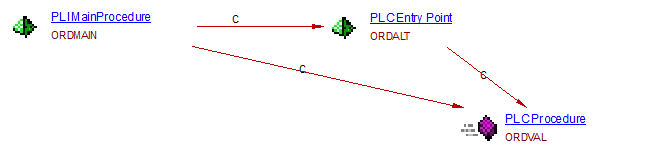
Call to external program
When a PL/I or PLC program calls an external procedure using a CALL statement or a function reference, the analyzer attempts to resolve the callee:
- If the callee is found in the codebase (another PLI or PLC file): a call link is created directly to the target procedure or function.
- If the callee is declared as
EXTERNAL ENTRYbut its definition is in a file recognised as a PLC include (.PLC): the analyzer creates a call link to the PLC procedure defined in that include file. - If the callee cannot be resolved: a PLI Missing Program object is created and a call link is established to it. All subsequent calls to the same unresolved name reuse the same Missing Program object.
DCL EXTPROG EXTERNAL ENTRY;
CALL EXTPROG(ARG1, ARG2);   /* link to PLIMissingProgram if not found */
Call to a procedure
A program calls a delivered subprogram.
 ORDMAIN: PROC OPTIONS(MAIN);
    DCL ORDVAL   ENTRY (CHAR(10), CHAR(2));
    ...
    CALL ORDVAL(ORD_KEY, ORD_RC);
A call link is created from the main procedure ORDMAIN to the procedure ORDVAL:

Program not delivered
    DCL ORDEXT   EXTERNAL ENTRY;
    ...
    CALL ORDEXT(ORD_KEY, ORD_RC);
When the called program is not delivered, the call link goes to a PLI Missing Program object:

Include files (-INC syntax)
In addition to the standard %INCLUDE directive, the -INC syntax is now supported:
-INC MYINCLUDE
This is treated identically to %INCLUDE MYINCLUDE. If the referenced include file cannot be found in the codebase, a PLI Missing Include object is created.
Include file found
%INCLUDE ORDCOMM;
An include link is created from the program to the PLC Include object:

Include file missing
%INCLUDE ORDMISS;
When the include member is not delivered, the link goes to a PLI Missing Include object:

XPROC / XPROCEDURE procedure declarations
IBM Enterprise PL/I accepts XPROC and XPROCEDURE as synonyms for PROC and PROCEDURE in procedure declarations (historically used in some modular/legacy environments). They are recognized identically to PROC/PROCEDURE, including as main procedure indicators (OPTIONS(MAIN)).
MYPROG: XPROC OPTIONS(MAIN);
    ...
END MYPROG;
is equivalent to:
MYPROG: PROC OPTIONS(MAIN);
    ...
END MYPROG;
XPROC main procedure
XPROC is a synonym of PROC.
 ORDXPRC: XPROC OPTIONS(MAIN);
    ...
    CALL ORDVAL(KEY, RC);
The program is handled as a regular main procedure:

CICS integration
PL/I and PLC programs can interact with CICS using EXEC CICS blocks. The analyzer parses these blocks and creates typed objects representing each CICS command. These objects are then linked to the actual CICS elements (TD queues, datasets, transactions, BMS maps) by the com.castsoftware.wbslinker extension (version ≥ 1.7.49). The target CICS objects (queues, datasets, transactions, BMS maps) are produced by the CAST Mainframe analyzer (com.castsoftware.mainframe).
The following CICS commands are supported:
| CICS command | Object created | Resource option |
|---|---|---|
WRITEQ TD |
CICS WriteQ TD Queue | QUEUE |
READQ TD |
CICS ReadQ TD Queue | QUEUE |
DELETEQ TD |
CICS DeleteQ TD Queue | QUEUE |
READ |
CICS Read Dataset | FILE |
WRITE |
CICS Write Dataset | FILE |
REWRITE |
CICS Rewrite Dataset | FILE |
DELETE |
CICS Delete Dataset | FILE |
STARTBR / READNEXT / READPREV |
CICS Browse Dataset | FILE |
START |
CICS Start Transaction | TRANSID |
RETURN (with TRANSID) |
CICS Return Transaction | TRANSID |
CANCEL |
CICS Cancel Transaction | TRANSID |
SEND MAP |
CICS Send Map | MAP / MAPSET |
RECEIVE MAP |
CICS Receive Map | MAP / MAPSET |
LINK / XCTL |
call link to program | PROGRAM |
INVOKE WEBSERVICE |
CICS Invoke Service | WEBSERVICE / OPERATION |
For EXEC CICS LINK PROGRAM(...) and EXEC CICS XCTL PROGRAM(...), the analyzer creates a call link to the target program (or to a PLI Missing Program if the program is not found in the codebase).
Resource names are resolved at analysis time: if the resource name is a string literal it is used directly; if it is a variable, the analyzer evaluates the variable to find its possible values. When the name cannot be resolved, an Unknown object of the appropriate category is created instead (e.g. PLI CICS Unknown TD Queue).
Example:
EXEC CICS WRITEQ TD QUEUE('ERRQUEUE') FROM(MSG) LENGTH(MSGLEN);
EXEC CICS READ FILE('CUSTFILE') INTO(WS-REC) RIDFLD(WS-KEY);
EXEC CICS START TRANSID('TRX1') INTERVAL(100);
EXEC CICS SEND MAP('MAINMAP') MAPSET('MAINMAPS') ERASE;
EXEC CICS LINK PROGRAM('SUBPROG');
Examples
The CSD file used by the examples defines the resources by name:
DEFINE FILE(ORDFILE)
       GROUP(ORDGRP)
       DSNAME(ORD.CICS.ORDFILE)
DEFINE TDQUEUE(ORDIN)
       GROUP(ORDGRP)
       TYPE(INTRAPARTITION)
DEFINE TRANSACTION(ORD2)
       GROUP(ORDGRP)
       PROGRAM(ORDSUBP)
Transient data queues
    EXEC CICS WRITEQ TD QUEUE('ORDERR') FROM(MSG) LENGTH(MSGLEN);
    EXEC CICS READQ TD  QUEUE('ORDIN')  INTO(MSG) LENGTH(MSGLEN);
Each command is linked to the CICS Transient Data object of the same name, with a write access (WRITEQ) or a read access (READQ):

EXEC CICS DELETEQ TD QUEUE('ORDOLD');

Data sets
    EXEC CICS READ FILE('ORDFILE') INTO(WS_REC) RIDFLD(WS_KEY);
    EXEC CICS REWRITE FILE('ORDFILE') FROM(WS_REC);
    EXEC CICS DELETE FILE('ORDFILE') RIDFLD(WS_KEY);
READ is a read access to the CICS DataSet, REWRITE and DELETE are write accesses:
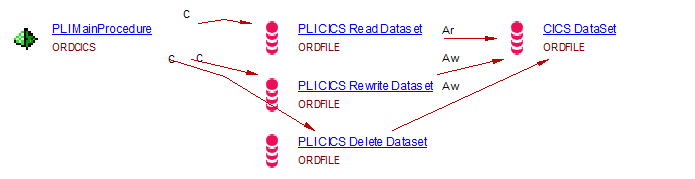
EXEC CICS WRITE FILE('ORDNEW') FROM(WS_REC) RIDFLD(WS_KEY);

    EXEC CICS STARTBR FILE('ORDBRWS') RIDFLD(WS_KEY);
    EXEC CICS READNEXT FILE('ORDBRWS') INTO(WS_REC) RIDFLD(WS_KEY);
STARTBR and READNEXT are two Browse Dataset objects, both read accesses to the same data set:

When the file name is a variable whose value is not known at analysis time, a PLI CICS Unknown Dataset object is created and is not linked to a data set:
EXEC CICS READ FILE(FILE_ANY) INTO(WS_REC) RIDFLD(WS_KEY);

Transactions
START, CANCEL and RETURN with a transaction id are linked to the CICS
Transaction object. This transaction is defined in the CSD file with the program
it runs: the path continues with the CICS CallToProgram object and the program.
EXEC CICS START TRANSID('ORD2') INTERVAL(100);

EXEC CICS CANCEL TRANSID('ORD3');

EXEC CICS RETURN TRANSID('ORD1');

In the three pictures above, the direct call link from ORDCICS to ORDSUBP
comes from the EXEC CICS LINK PROGRAM('ORDSUBP') command of the same program
(see below), not from the transaction.
BMS maps
    EXEC CICS SEND MAP('ORDMAP1') MAPSET('ORDMAPS') FROM(ORD_MAP) ERASE;
    EXEC CICS RECEIVE MAP('ORDMAP1') MAPSET('ORDMAPS') INTO(ORD_MAP);
The commands are linked to the CICS Map object created from the BMS file, with a write access (SEND) and a read access (RECEIVE):

LINK to a program
EXEC CICS LINK PROGRAM('ORDSUBP') COMMAREA(COMMAREA);
A call link is created to the program:

When the program is not delivered, the call link goes to a PLI Missing Program object:
EXEC CICS LINK PROGRAM('ORDNONE') COMMAREA(COMMAREA);

CICS Webservice integration
PL/I and PLC programs can act as CICS web service requesters (calling a SOAP operation) or providers (exposing a SOAP operation). This reuses the same CAST_SOAP_Operation / CAST_SOAP_OperationCall cartography categories as the CAST Mainframe/COBOL CICS webservice support, so a requester and a provider are matched together across the whole application (COBOL or PL/1) by the com.castsoftware.wbslinker extension.
Requester side
EXEC CICS INVOKE WEBSERVICE(...) OPERATION(...) creates a PLI CICS Invoke Service (or PLC CICS Invoke Service) object named <webservice>.<operation> (or just <webservice> when OPERATION is omitted). When the webservice name cannot be statically resolved, a PLI CICS Unknown Service object is created instead.
EXEC CICS INVOKE WEBSERVICE('ECHOSVC') CHANNEL('ECHOCHN') OPERATION('ECHOOP')
          RESP(MY_RESP) RESP2(MY_RESP2);
Provider side
A PLI/PLC program is recognized as a CICS web service provider from a code pattern: the analyzer recognizes the standard CICS web service provider pattern based on GET CONTAINER('DFHWS-OPERATION') INTO(...) and GET CONTAINER('DFHWS-WEBSERVICE') INTO(...), followed by a SELECT block on the retrieved variable(s) to resolve the operation/service name from the WHEN clauses. A PLI CICS Service Operation (or PLC CICS Service Operation) object is created for each operation and linked to the program.
The requester and the provider are linked when the service name of the provider is known: the provider must read the DFHWS-WEBSERVICE container and select on it, otherwise the service name is unknown and the object is named ?.<operation>, which the com.castsoftware.wbslinker extension does not match with a requester that names its service.
A provider described by a .wsdl file is not supported, see Known Limitations.
The provider
The provider reads the web service name and the operation name from the containers, then selects the operation:
 ORDWSOPS: PROC OPTIONS(MAIN);
    DCL OP_GET     CHAR(16) INIT('GETORDER');
    DCL WS_OP      CHAR(255);
    DCL WS_NAME    CHAR(255);

    EXEC CICS GET CONTAINER('DFHWS-WEBSERVICE') INTO(WS_NAME);
    EXEC CICS GET CONTAINER('DFHWS-OPERATION') INTO(WS_OP);

    SELECT (WS_NAME);
       WHEN ('ORDWSOPS')    DO;
          SELECT (WS_OP);
             WHEN (OP_GET)        DO;
                CALL GET_ORDER;
             END;
             WHEN ('CANCELORDER') DO;
                CALL CANCEL_ORDER;
             END;
             OTHERWISE;
          END;
       END;
       OTHERWISE;
    END;
A PLI CICS Service Operation object is created for each operation, linked to the program.
Requester with literal names
    EXEC CICS INVOKE WEBSERVICE('ORDWSOPS') CHANNEL('ORDCHN')
              OPERATION('CANCELORDER')
              RESP(MY_RESP) RESP2(MY_RESP2);
The Invoke Service object is named web service.operation. It is linked to the Service Operation of the provider:

Requester with names in variables
The names can be held in variables whose value is known:
    DCL WS_NAME    CHAR(16) INIT('ORDWSOPS');
    DCL OP_NAME    CHAR(16) INIT('GETORDER');
    ...
    EXEC CICS INVOKE WEBSERVICE(WS_NAME) CHANNEL('ORDCHN')
              OPERATION(OP_NAME)
              RESP(MY_RESP) RESP2(MY_RESP2);

Web service name not known
When the web service name is a variable whose value is not known at analysis time, a PLI CICS Unknown Service object is created and is not linked to a provider:
    EXEC CICS INVOKE WEBSERVICE(WS_ANY) CHANNEL('ORDCHN')
              OPERATION('GETORDER')
              RESP(MY_RESP) RESP2(MY_RESP2);

IMS DB integration
PL/I and PLC programs can interact with IMS DB through the standard DL/I call interfaces. The PLITDLI and CEETDLI interfaces are supported; AIBTDLI is not (see Known Limitations). The analyzer detects calls to the supported interfaces and creates typed objects representing the DL/I operations. These objects are then linked to the actual IMS PCBs and transactions by the com.castsoftware.wbslinker extension. The target IMS objects (PCBs, transactions) are produced by the CAST Mainframe analyzer (com.castsoftware.mainframe).
The function code (the argument following the parameter count) determines the type of object created:
| Function code(s) | Object created |
|---|---|
GU, GN, GNP, GHU, GHN, GHNP, GUL, GNL, GNPL |
IMS DL/I Read PCB |
ISRT |
IMS DL/I Insert PCB |
REPL |
IMS DL/I Update PCB |
DLET |
IMS DL/I Delete PCB |
CHNG |
IMS DL/I Start Transaction |
| (unresolvable) | IMS DL/I Unknown |
When the function code argument cannot be statically resolved, an IMS DL/I Unknown object is created.
When the PCB is passed through an EXTERNAL pointer and its position cannot be determined from the calling programs, an IMS Read from Unknown PCB object (read calls) or an IMS Write to Unknown PCB object (insert, update and delete calls) is created.
Example:
/* Read call using PLITDLI: parameter count, function, PCB, I/O area, SSA */
CALL PLITDLI(4, GU_FUNC, DB_PCB_PTR, IO_AREA, SSA);

/* Read call using CEETDLI: parameter count, function, PCB, I/O area */
CALL CEETDLI(3, GN_FUNC, DB_PCB_PTR, IO_AREA);
The examples below use the PCBs declared in the PSB: the first parameter of the program is the I/O PCB, the second one is the PCB of the database.
Read call
 ORDIMS: PROC(IOPCB_PTR, ORDPCB_PTR, ALTPCB_PTR) OPTIONS(MAIN);
    ...
    CALL PLITDLI(FOUR, GU_FUNC, ORDPCB_PTR, ORD_SEG, SSA_ORD);
    CALL PLITDLI(THREE, GN_FUNC, ORDPCB_PTR, ORD_SEG);
The call is linked to the IMS DB PCB of the PSB with a select link. The PCB is linked to its database definition (DBD) and to the segments it can access:

Insert, update, delete
    CALL PLITDLI(THREE, REPL_FUNC, ORDPCB_PTR, ORD_SEG);
    CALL PLITDLI(THREE, DLET_FUNC, ORDPCB_PTR, ORD_SEG);
    CALL PLITDLI(THREE, ISRT_FUNC, ORDPCB_PTR, ORD_SEG);
An object is created for each kind of call (insert, update and delete), linked to the PCB with the matching link:
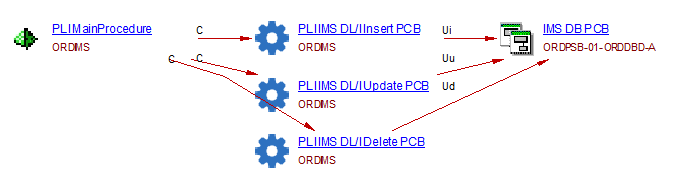
Unknown DL/I call
    ANY_FUNC = SUBSTR(MSG_AREA, 1, 4);
    CALL PLITDLI(THREE, ANY_FUNC, ORDPCB_PTR, ORD_SEG);
When the function code is not known at analysis time, a PLI IMS DL/I Unknown object is created and is not linked to a PCB:

PSB found from the JCL
The PSB of a program is given by the PARM of the JCL that runs it:
//ORDIMSJ  JOB (ACCT),'ORDER IMS BATCH',CLASS=A,MSGCLASS=X
//STEP01   EXEC PGM=DFSRRC00,PARM='DLI,ORDIMS,ORDPSB'
The JCL step is linked to the PSB ORDPSB and to the program, and the program’s DL/I calls are linked to the PCBs of this PSB:

PSB found from the program name
When no JCL is delivered, the PSB with the same name as the program is used. The program ORDIMS2 gets the PCBs of the PSB ORDIMS2:

Start a transaction
The CHNG call changes the destination of a modifiable alternate PCB, which
starts a transaction:
    DCL CHNG_FUNC  CHAR(4) INIT('CHNG');
    DCL NEXT_TRAN  CHAR(8) INIT('ORDTRAN ');
    ...
    CALL PLITDLI(FOUR, CHNG_FUNC, ALTPCB_PTR, NEXT_TRAN);
The transaction is declared in an IMS transaction file (macros APPLCTN and
TRANSACT) that gives the program it runs:
         APPLCTN PSB=ORDIMS2,PGMTYPE=TP,SCHDTYP=PARALLEL
         TRANSACT CODE=ORDTRAN,MSGTYPE=(MULTSEG,RESPONSE,65), X
               PARLIM=0,SEGNO=400,                           X
               MODE=SNGL,PROCLIM=(03,01)
The path goes from the program to the IMS DL/I Start Transaction object, to the IMS Transaction, then to the program it runs:

IBM MQ integration
PL/I and PLC programs can interact with IBM MQ by calling the standard MQ API (MQPUT1, MQOPEN). The analyzer detects these calls and creates Publisher or Subscriber objects named after the target queue. Links between publishers and subscribers sharing the same queue name are produced by the com.castsoftware.wbslinker extension.
The queue name is read from the MQOD.OBJECTNAME field of the object descriptor structure. The direction (publisher or subscriber) is determined from the options passed to MQOPEN, or inferred from MQPUT1 (always a publisher).
When the queue name cannot be statically resolved, an Unknown Publisher or Unknown Subscriber object is created instead.
The MQ handle of an MQOPEN is used by the MQGET that follows it: use one handle per queue.
Publisher linked to a subscriber
The program ORDMQ publishes with MQPUT1 on the queue ORD.NEW.QUEUE:
    MQOD1.OBJECTNAME = 'ORD.NEW.QUEUE';
    CALL MQPUT1(HCONN, MQOD1, MQMD, MQPMO, BUFLEN, BUF, CC, RC);
The program ORDMQRCV reads the same queue:
    MQOD1.OBJECTNAME = 'ORD.NEW.QUEUE';
    CALL MQOPEN(HCONN, MQOD1, MQOO_INPUT_SHARED, HOBJ1, CC, RC);
    CALL MQGET(HCONN, HOBJ1, MQMD, MQGMO, BUFLEN, BUF, DATALEN,
               CC, RC);
The publisher is linked to the subscriber, which is linked to its program:

Unknown publisher
    MQOD4.OBJECTNAME = EXT_QNAME;
    CALL MQPUT1(HCONN, MQOD4, MQMD, MQPMO, BUFLEN, BUF, CC, RC);
When the queue name is a variable whose value is not known at analysis time, a PLI IBM MQ Unknown Publisher object is created and is not linked to a subscriber:

Unknown subscriber
    MQOD3.OBJECTNAME = EXT_QNAME;
    CALL MQOPEN(HCONN, MQOD3, MQOO_INPUT_SHARED, HOBJ2, CC, RC);
    CALL MQGET(HCONN, HOBJ2, MQMD, MQGMO, BUFLEN, BUF, DATALEN,
               CC, RC);
Same case on the subscriber side: a PLI IBM MQ Unknown Subscriber object is created, not linked to a publisher:

Files and JCL data sets
A PL/I FILE is represented by a PLI FileStructure object. When a JCL is
delivered, the PL/I file name is the DD name of the JCL, which binds the file to
a data set. The com.castsoftware.wbslinker extension links the file to the JCL
Data Set created by the Mainframe analyzer (com.castsoftware.mainframe).
Sequential data set
The PL/I file ORDSEQF:
 ORDSEQ: PROC OPTIONS(MAIN);

    DCL ORDSEQF    FILE RECORD INPUT SEQUENTIAL;
    ...
    OPEN FILE(ORDSEQF);
    READ FILE(ORDSEQF) INTO(SEQ_REC);
    ...
    CLOSE FILE(ORDSEQF);
and the JCL that runs the program:
//ORDSEQJ  JOB (ACCT),'ORDER SEQ READ',CLASS=A,MSGCLASS=X
//STEP01   EXEC PGM=ORDSEQ
//STEPLIB  DD DSN=ORD.LOAD.LIBRARY,DISP=SHR
//ORDSEQF  DD DSN=ORD.DAILY.SEQ,DISP=SHR
The program accesses the file, and the file is linked to the data set ORD.DAILY.SEQ of the JCL step that runs the program:

VSAM data sets and generation data groups
The result has the same shape for a VSAM data set and for a generation data
group (GDG): the data set is the one named by the DD statement
(DSN=ORD.MASTER.VSAM, or the current generation of the GDG).
The PL/I file name must be the DD name used in the JCL. The TITLE option, which
decouples the two, is not handled.
Data to data links
This result requires the optional companion extension
com.castsoftware.mainframe.data2data
(see Optional companion extensions). With the extension, the variables
and structures that a program actually uses are saved as PLI Variable objects, and the
flow of data between them is represented by data to data links. A variable that is
never used, such as WK_UNUSED below, is not saved.
The program ORDDATA copies orders from an input file to an output file and computes the tax:
 ORDDATA: PROC OPTIONS(MAIN);

    DCL ORDIN      FILE RECORD INPUT SEQUENTIAL;
    DCL ORDOUT     FILE RECORD OUTPUT SEQUENTIAL;
    ...
    DCL WK_RATE    FIXED DEC(5,3) INIT(0.200);
    DCL WK_UNUSED  CHAR(20);
    ...
    READ FILE(ORDIN) INTO(IN_REC);
    DO WHILE(EOF_FLAG = '0'B);
       OUT_ID     = IN_ID;
       OUT_CUST   = IN_CUST;
       OUT_AMOUNT = IN_AMOUNT;
       OUT_TAX    = IN_AMOUNT * WK_RATE;
       WRITE FILE(ORDOUT) FROM(OUT_REC);
       READ FILE(ORDIN) INTO(IN_REC);
    END;
    ...
Variable to variable links
Each assignment creates a link from the variables that are read to the variable that is written. OUT_TAX is computed from two variables, so it receives two links:
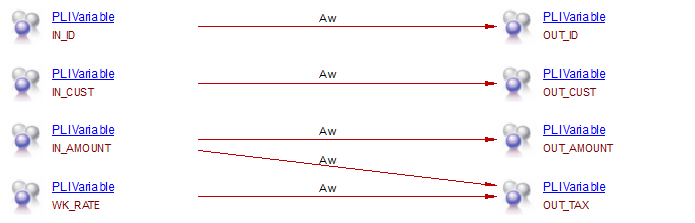
File to variable links
READ ... INTO creates a link from the file to the variable that receives the record,
and WRITE ... FROM creates a link from the variable to the file:
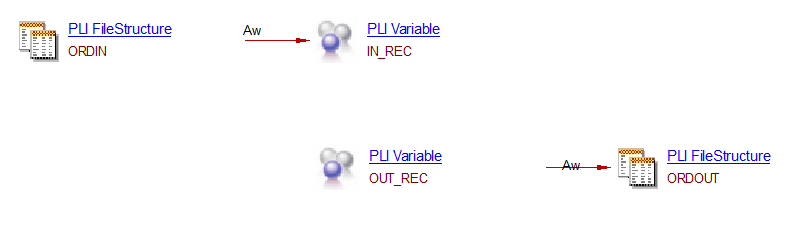
Program name from the source file name
By default, a PL/I main procedure object is named after the label coded on the PROC
statement. When a program is executed and called under the name of its source member, and
that name differs from the label, the callers do not find it. The optional companion
extension
com.castsoftware.pl1.programnamefromfilename
(see Optional companion extensions) names the main
procedure after its source file name instead.
The source member ORDPGM01 has a different label, ORDLABEL:
 ORDLABEL: PROC OPTIONS(MAIN);

    PUT SKIP LIST('ORDER REPORT');

 END ORDLABEL;
It is called by the name of its member from another program:
 ORDCALL: PROC OPTIONS(MAIN);

    DCL ORDPGM01   EXTERNAL ENTRY;

    CALL ORDPGM01;

 END ORDCALL;
and executed by the step of a JCL:
//STEP01 EXEC PGM=ORDPGM01
Without the extension, the main procedure is named ORDLABEL and the call of ORDCALL ends on a PLI Missing Program named ORDPGM01. With the extension, the main procedure is named ORDPGM01: the call of ORDCALL and the program executed by the JCL step both resolve to it.

Quality rules
You can also find a global list here: https://technologies.castsoftware.com/AIP/technologies/1004000 .
Known Limitations
- no PL1 preprocessor support (except %include)
PL/1 integration
- CICS WEB and CICS SOCKET commands are not supported.
- IMS DC (message queue operations) is not supported.
- The IMS
AIBTDLIcall interface is not supported: the PCB used by such a call is designated by name in the AIB structure, which the analyzer does not read, so the call is not reliably linked to its PCB. - A CICS web service provider described by a
.wsdlfile is not supported: the files delivered through the DMT extractor are copied, the path to the original source code is lost and the.wsdlfiles are not part of the files analyzed. Only the code pattern based on theDFHWS-OPERATIONandDFHWS-WEBSERVICEcontainers is recognized.
Quality rules searching for use of the DATE builtin function
The following two rules search for inclusion of the DATE builtin function (e.g. via a DECLARE DATE BUILTIN; statement) rather than its actual use. They are disabled by default since 1.1.0-funcrel; if re-enabled, they will flag every file that includes the function, even when it is never called.
- Avoid Main procedures using the DATE builtin function (PL1) - 1001164
- Avoid Main procedures using the DATE builtin Function via include PLC (PL1) - 1001166
Metrics Assistant (embedded in CAST Imaging Core)
- The Metrics Assistant used for metric search cannot search exclusively in embedded SQL. Some of the affected processing was moved to the extractor in 1.1.0-funcrel, but the following rules can still produce false violations:
- Avoid Main Procedures having queries with joins on more than 4 Tables (PL1) - 1001128
- Avoid Main Procedures with High Raw SQL Complexity (SQL complexity greater than X) (PL1) - 1001130
- The Metrics Assistant cannot reliably exclude comments from metric calculation, especially when a comment starts or ends adjacent to a keyword — this can cause random false violations.