MCP Server - Architecture
This page applies to MCP Server 3.1.0-funcrel or later. For MCP Server 3.0.x and earlier, see CAST Imaging MCP Server 3.0.x.
Overview
This page describes how the components delivered with MCP Server 3.1 fit together: how an MCP request reaches the right MCP server, which tools your client sees, which ports and endpoints are involved, and how the design limits what a connected client can do. It is intended for administrators planning an installation and for anyone writing prompts or instruction files for an MCP-aware client.
Starting release 3.1.0-funcrel, MCP Server is delivered as an MCP Aggregator Gateway and three MCP servers behind it. Instead of registering three separate MCP servers - each with its own endpoint, tool catalog and health state - your client registers one endpoint, completes one initialize handshake and receives the tools of every enabled MCP server in a single tools/list. The gateway performs three jobs:
- Aggregates the tools of every enabled MCP server into a single catalog.
- Forwards each tool call to the MCP server which owns the tool, passing arguments and results through unchanged.
- Isolates each MCP server behind the gateway, so that one component can be enabled, disabled or diagnosed without affecting the others.
Components
The diagram below shows the components involved, the trust boundaries between them and the path a request takes. It also shows the MCP Server for CAST Gatekeeper, which is reached through the same CAST Imaging public gateway on the /mcp/gatekeeper route. Dashed boxes and arrows mark components which are optional and only used when enabled or configured.
Click here to view the image in a dedicated browser tab.
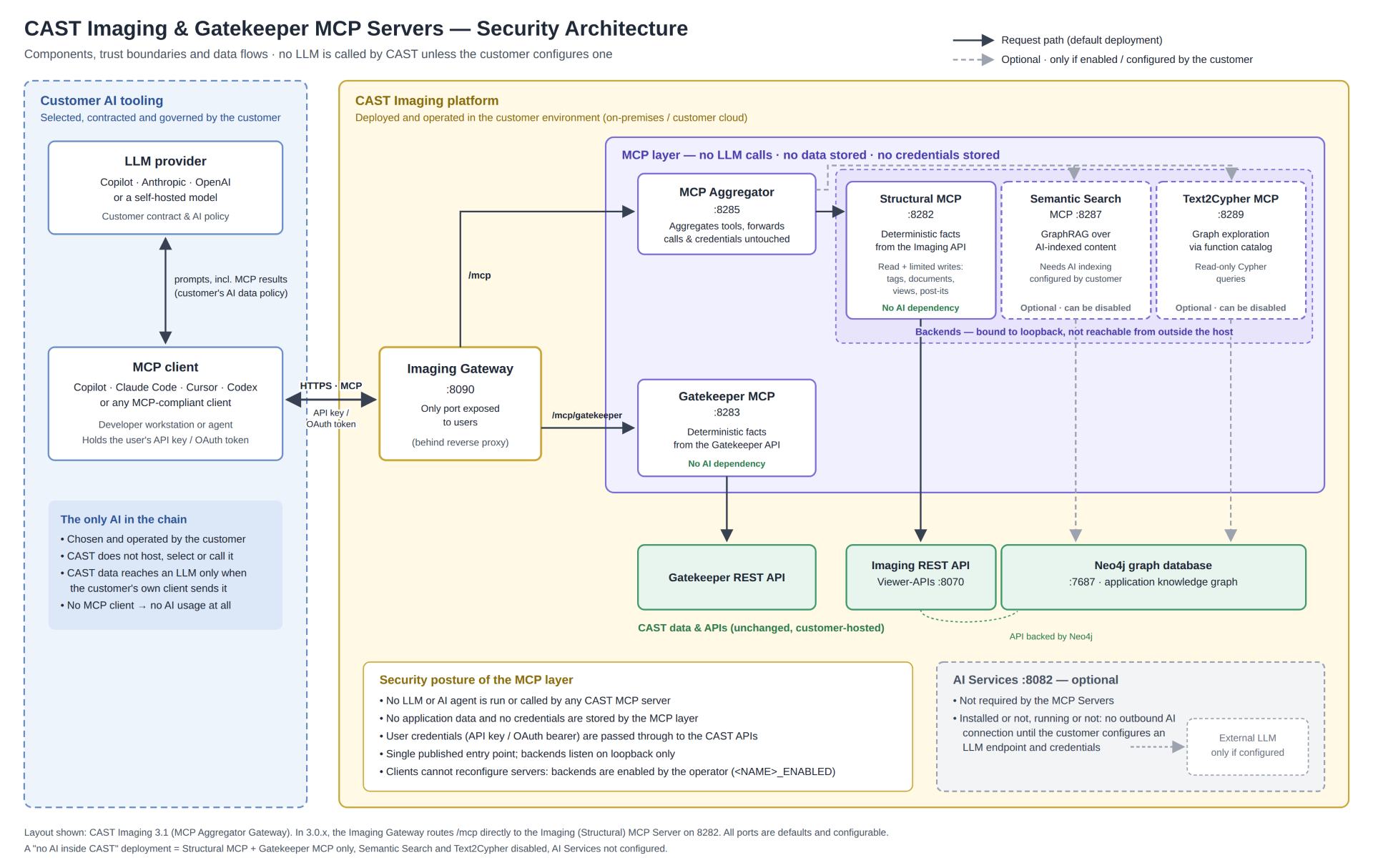
The gateway and the three MCP servers are installed together as a single unit - one container on Linux via Docker, one Windows service on Microsoft Windows. See Installation on Linux via Docker and Installation on Microsoft Windows for the platform-specific layout.
MCP client
GitHub Copilot, Claude Code, Codex or any other MCP-aware client. The client never addresses an individual MCP server and does not need to know how many there are or which one owns a given tool. The credentials it sends in its request headers - the x-api-key header, or an Authorization bearer token when OAuth is used - are forwarded with each request to the MCP server which handles it.
CAST Imaging public gateway
The entry point for all CAST Imaging requests. The MCP Aggregator Gateway registers itself with the CAST Imaging Control Panel under the name MCPSERVER, and the CAST Imaging public gateway redirects every request whose route contains /mcp to the MCP Aggregator Gateway port. For your client, the MCP tools are therefore reachable at the same host and port as the rest of CAST Imaging.
MCP Aggregator Gateway
The only component your client’s requests are routed to. It holds no CAST Imaging data of its own:
- Registry - the MCP servers the gateway knows about are listed in the
mcp_servers.jsonfile, with the URL, health endpoint and request timeout of each. External MCP servers can be added to it - see Registering an additional MCP server. - Discovery - at startup the gateway connects to each enabled MCP server and collects its tools, resources and prompts.
- Aggregation - a
tools/listrequest returns the tools of every enabled MCP server, each tagged with its source. Where two MCP servers expose a tool with the same name, the gateway prefixes it as<server>:<tool>so that neither is hidden. - Forwarding - a
tools/callrequest is forwarded unchanged to the MCP server which owns the tool. The gateway does not re-validate arguments: the MCP server which defines a tool’s schema is the only component which validates calls against it.
Structural MCP server
Answers questions which have a single correct answer that CAST Imaging has already computed, using the CAST Imaging REST API:
- Read: applications, objects, transactions, data call graphs, source files, dependencies, callers and callees, quality insights and ISO-5055 findings.
- Write: tags, documents, views and post-its.
Its catalog holds around 54 functions.
Semantic search MCP server
Answers questions about meaning rather than structure - what a component is for, which business concepts it handles, how a workflow hangs together. It reads the embeddings, entities, clusters and generated documents held in Neo4j, and every answer carries the source documents it is based on. See Query your application with GraphRAG for the underlying feature.
Its catalog holds 13 core functions, plus 5 conversational memory functions when SEMANTIC_MCP_CONVERSATIONAL_MEMORY_ENABLED=true.
Starting from CAST Imaging 3.6.9-funcrel, the semantic search MCP server requires a CAST Imaging license key that includes GraphRAG, identified by the product code P9 - see Manage license keys:
Contributing Developersstrategy: semantic search is available for every application when the global license key includesP9.Named Applicationstrategy: semantic search is available for an application when that application’s license key includesP9.
Without it, semantic search is not available and is reported as Not licensed. The structural and Text2Cypher MCP servers are not affected.
Text2Cypher MCP server
Explores the Neo4j knowledge graph directly, generating read-only Cypher queries from a documented catalog of node labels and relationship types. It supports multi-hop investigations which no purpose-built function covers.
Its catalog holds 94 functions plus a registry of custom functions (saved ad-hoc queries).
Tool surface
By default each MCP server presents a pair of meta-tools rather than its whole catalog: one tool returns the syntax of a function, the other runs it. The full catalogs remain reachable through the execution tool. Together with one tool contributed by the gateway itself, this keeps the aggregated tools/list at seven tools instead of around 160 individual functions - which matters because a client pays the cost of that list in its working memory on every request.
| MCP server | Syntax tool | Execution tool | Catalog reached |
|---|---|---|---|
| Structural | get_structural_search_function_syntax |
run_structural_search_function |
~54 functions |
| Semantic search | get_semantic_search_function_syntax |
run_semantic_search_function |
13 core functions (+5 conversational memory) |
| Text2Cypher | get_text2graph_function_syntax |
run_text2graph_function |
94 functions + custom registry |
| MCP Aggregator Gateway | gateway_health |
- | Reports the health of the gateway and of every MCP server behind it |
The contract is the same for all three MCP servers: call the syntax tool first, then pass the function name it returns to the execution tool. Calling a syntax tool with no arguments lists the functions available.
The structural and semantic search MCP servers can each be switched to the full tool surface, where every function is exposed as an individual tool and the meta-tool pair is withdrawn. The two settings are independent, so mixed surfaces are allowed - see Meta Tool mode. Text2Cypher has no tool surface setting and always presents its meta-tool pair.
Why management is read-only
The gateway exposes no tool which can enable, disable or reconfigure an MCP server. Every client shares the same gateway, so such a tool would let any connected model reconfigure the installation for everyone. Which MCP servers run is a deployment decision, made with the *_MCP_ENABLED settings and a restart - see Choosing which MCP servers run for Linux via Docker or Microsoft Windows.
Choosing a backend
Your client does not need to know which MCP server owns a tool: the gateway routes each call. When you write prompts or instruction files, the intended order of preference is:
- Structural - the question has a single answer already computed by CAST Imaging: facts about applications, objects, transactions, dependencies, quality insights or ISO-5055 findings.
- Semantic search - the question is broad or explanatory, and needs meaning or the documents behind an answer.
- Text2Cypher - only when neither of the above has a fitting function, for arbitrary multi-hop exploration of the graph.
This order keeps deterministic, inexpensive answers first and leaves open-ended graph traversal as the deliberate last resort. Structural and semantic search also complement each other: on an unfamiliar codebase, locate the relevant code with semantic search, then use structural functions for the exact dependencies, callers and transactions.
Ports
Only the CAST Imaging public gateway and the MCP Aggregator Gateway listen on ports reachable from other machines. The three MCP servers bind to the loopback interface and can only be reached through the gateway.
| Component | Default port | Reachable from |
|---|---|---|
| CAST Imaging public gateway | 8090 (when CAST Imaging is not configured in HTTPS mode) |
Your MCP-aware clients |
| MCP Aggregator Gateway | 8285 |
The machine hosting CAST Imaging, and the machine hosting the imaging-viewer component for AI Mode. A firewall rule is needed only when MCP Server is installed on a different machine |
| Structural MCP server | 8282 |
Loopback only |
| Semantic search MCP server | 8287 |
Loopback only |
| Text2Cypher MCP server | 8289 |
Loopback only |
See the requirements for Linux via Docker or Microsoft Windows for the firewall rules and for changing a port.
HTTP endpoints
The MCP Aggregator Gateway serves the MCP protocol on /mcp and a set of administration routes alongside it. The administration routes return plain JSON, so a browser or curl is enough to inspect them:
| Method | Path | Returns |
|---|---|---|
POST |
/mcp |
The MCP endpoint, with the tools of all enabled MCP servers aggregated |
GET |
/mcp/info |
The gateway identity, counts and list of endpoints |
GET |
/mcp/healthcheck |
Whether the gateway process is alive |
GET |
/mcp/status |
The health of every enabled MCP server: 200 when all are healthy, 503 when any is degraded |
GET |
/mcp/servers |
Every MCP server with its URL, whether it is enabled and healthy, and its tool count |
GET |
/mcp/tools |
Every tool, tagged with its source. Add ?server=<name> to filter |
GET |
/mcp/servers/<name>/tools |
The tools of one MCP server. Returns 404 for an unknown name |
For example, from a machine which can reach the MCP Aggregator Gateway port:
$ curl http://<SERVICE_HOST>:8285/mcp/status
The MCP server names used by /mcp/servers/<name>/tools and ?server= are the keys of the mcp_servers.json file: imaging-structural-mcp, imaging-semantic-mcp and imaging-text-to-graph-mcp.
Security posture
- A single published surface - only the MCP Aggregator Gateway port is exposed by the MCP Server installation. The three MCP servers cannot be reached directly from outside the machine or container.
- Credential pass-through - client credentials (
x-api-key, or anAuthorizationbearer token) are forwarded to the MCP servers with each request. The gateway does not issue or store credentials of its own. - No reconfiguration by clients - management is read-only, so no connected model can change which MCP servers run for other clients. See Why management is read-only.
- Operator-only discovery - the lists of MCP servers and tools are served on the HTTP administration routes, not through the MCP tool surface.
- Read-only graph access - Text2Cypher generates read-only Cypher. Writes to CAST Imaging are limited to the structural MCP server’s explicit write actions: tags, documents, views and post-its.
- Schema authority stays with the owner - the gateway forwards arguments unchanged and never re-validates them, so what a client is told about a tool always matches how the tool validates its input.
See also the Frequently Asked Questions about security and data safety.