Search indexes
Overview
Search in the Engineering and Security dashboards is served by Lucene indexes rather than by querying the schema directly, and there are two of them:
| Index | Serves |
|---|---|
| Components | Basic search - rules, assessment model items and object names |
| Violations | Advanced search - objects found through the violations they carry, with filters |
Both are held per domain, and both are maintained for you. The only administration they normally need is the occasional check that they are current, because an index built against one snapshot does not describe the next one: after a new snapshot is generated, an index that has not been refreshed keeps answering from the snapshot it was built against.
The dashboards’ diagnostic page reports the state of both indexes and can rebuild either of them.
Open the diagnostic page
http://<public-url>:8090/static/diagnostic.html
Use the public URL of your CAST Imaging installation.
Note the port. This page is served on 8090, the port CAST Imaging itself is reached on - not 8097, which is the port the dashboards component listens on internally.
Log in with a user holding the ADMIN role. The diagnostic area appears only once this succeeds, and index rebuilding is an administrator action.
Read the index status
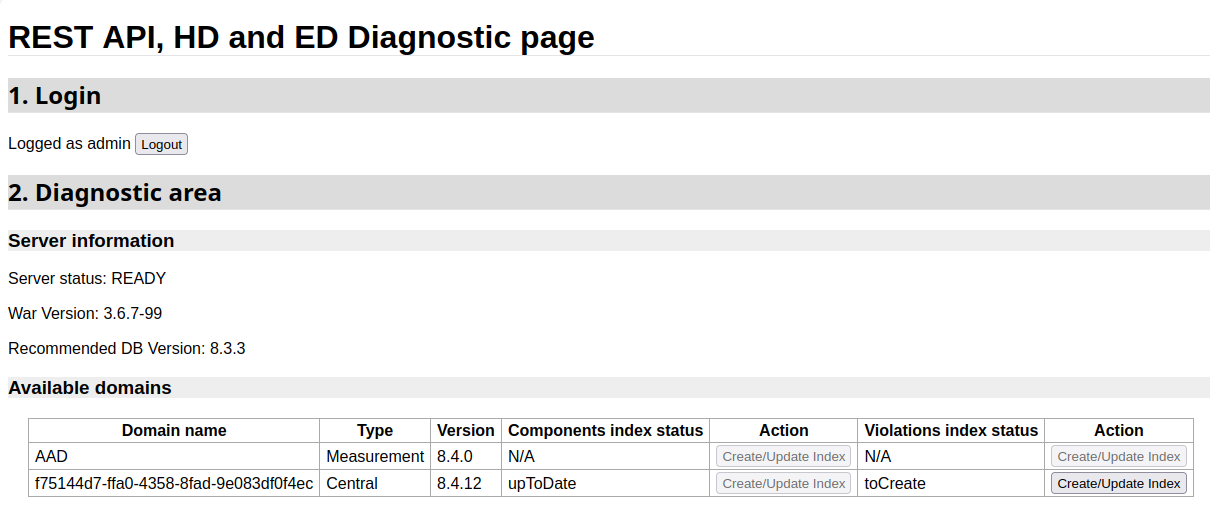
The Available domains table lists every domain the dashboards can reach, with a status and an action for each of the two indexes:
| Column | Shows |
|---|---|
| Domain name | The domain. AAD is the Measurement Service schema behind the Management Dashboard; the rest are Dashboard Service schemas, one per application, named by UUID rather than readably |
| Type | Central for a Dashboard Service schema, Measurement for a Measurement Service schema |
| Version | The schema version |
| Components index status, Violations index status | The state of that index - see below |
| Action | The Create/Update Index button for that index |
Because the domain names are UUIDs, the table does not tell you which application a row belongs to. If you are chasing a stale index for one specific application, the quicker check is the row’s status: after a new snapshot, the domain needing attention is the one that has moved off upToDate.
Each status takes one of four values:
| Status | Meaning |
|---|---|
upToDate |
The index describes the latest snapshot. Nothing to do |
toUpdate |
An index exists but is out of date - a newer snapshot has been generated since it was built |
toCreate |
No index has ever been built for this domain |
N/A |
Search indexes do not apply to this domain. The AAD Measurement domain reports it for both indexes, because the Management Dashboard has no equivalent search. Both of its buttons are disabled |
A toUpdate violations index is the usual explanation for advanced search returning results that look as though they belong to an earlier snapshot.
Rebuild an index
Use the Create/Update Index button on the row and in the column for the index you want to rebuild. The button is disabled while the status is upToDate, so there is no way to trigger unnecessary work: rebuilding only does anything when the index is toCreate or toUpdate.
The status changes to upToDate once the rebuild finishes. Advanced search then reflects the current snapshot.
Building an index reads the whole schema, so on a large Dashboard Service schema a rebuild takes time. Run it when the dashboards are not busy.