The Security Dashboard home page
Overview
The Security Dashboard home page leads with industry security standards. Each tile counts the violations of the rules belonging to one standard, for the most recent snapshot of the application:

This page describes the default home page. Which tiles appear, what they report, and how they are positioned and sized are all defined in the Security Dashboard’s configuration file, so an administrator can add tiles, remove them or rearrange the grid - see Engineering and Security Dashboard tiles. Your home page may therefore not match this set.
The security standard tiles
| Tile | Counts violations of |
|---|---|
| Risk Model | The application’s critical violations overall, as in Engineering |
| CWE-2024 | The CWE Top 25 most dangerous software weaknesses |
| PCI-DSS-V3.2.1 | The Payment Card Industry Data Security Standard |
| ISO-5055-SECURITY | The security characteristic of ISO/IEC 5055 |
| OWASP-2021 | The OWASP Top 10, 2021 edition |
These tiles are built from industry standards, so they depend on the corresponding index extensions being installed before the snapshot was generated.
The tile names carry the edition of the standard they assess, so they change as the standards are revised - CWE-2024 and PCI-DSS-V3.2.1 here. Expect the names in your installation to reflect whichever editions your extensions provide.
A tile whose rules were not triggered at all displays No applicable rules rather than a count of zero. The two mean different things: no applicable rules means the standard was not assessed, whereas zero means it was assessed and nothing failed.
The critical violations filter changes these counts
Turning the critical violations filter on and off changes the number on each standard tile, because it changes which violations are counted:
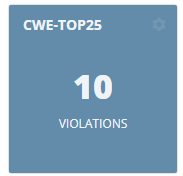
This is the opposite of the Engineering Dashboard, where the industry standard tiles - ISO-5055, CISQ, OWASP and MIPS - ignore the filter and always show non-critical counts. In the Security Dashboard the standard tiles do respond to it, so the same application can report different numbers in the two dashboards depending on the filter state.
Technologies Overview
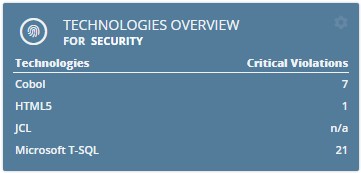
Violations broken down by technology, for the selected Health Measure. Clicking the tile opens Risk investigation with that technology already selected. Drill-down is disabled where the tile shows N/A.
The rest of the home page
The remaining tiles, and everything about arranging the home page - moving and resizing, bookmarking a rule, tile colours, resetting, and the top and side menu bars - work exactly as described for the Engineering Dashboard home page.
The one exception is the Architecture Model Violations tile, which the Security Dashboard does not have.