Default profiles and roles
Reference for the profiles and roles that ship with CAST Imaging. Use it to decide which predefined profile to assign, or which roles to combine when you create a custom profile.
Default predefined profiles
Default profiles are managed in the Profiles tab, where you can also define your own custom profiles. Predefined profiles cannot be removed and are flagged with a “padlock”:
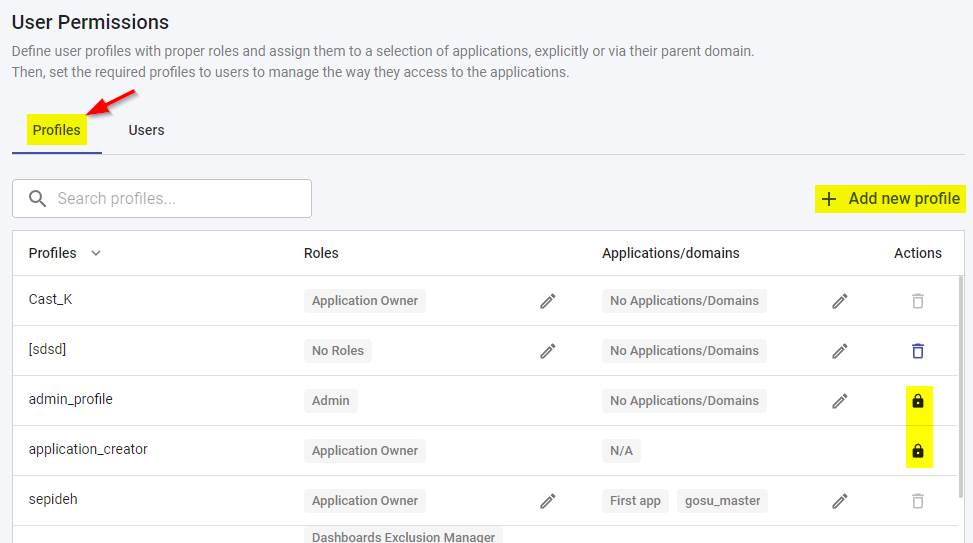
| Profile Name | Roles included |
|---|---|
| Admin | AdministratorThis profile is granted to the default local user called “admin” that is available out of the box. It implicitly also includes all available roles. |
| Application Creator | Access to onboarding (i.e. allows new applications to be added or imported), analysis and configuration features with the following roles: - Application OwnerThis implicitly includes all of the following roles: - Exclusion Manager- Quality Automation Manager- Quality Manager- App-To-App Dependencies - Manage Bulk Import- Manage Custom Object Types- Manage Level 5 View- Custom Aggregation Access- Services Views Access- Source Code Access- AI Features AccessUsers with this profile will have the Application Owner role over their own applications.Specific Applications/Domains cannot be assigned to this profile. |
| Application Architect | Access to result consumption features in CAST Imaging Viewer and Dashboards with the following roles: - Exclusion Manager- Quality Automation Manager- Quality Manager- App-To-App Dependencies- Manage Bulk Import- Manage Custom Object Types- Manage Level 5 View- Custom Aggregation Access- Services Views Access- Source Code Access- AI Features Customization Available in ≥ 3.6.8-funcrel
Specific Applications/Domains can be assigned to this profile. |
| Application User | Access to result consumption features in CAST Imaging Viewer and Dashboards with the following roles: - Exclusion Manager- Quality Automation Manager- Quality Manager- App-To-App Dependencies- Manage Custom Object Types- Custom Aggregation Access- Services Views Access- Source Code AccessSpecific Applications/Domains can be assigned to this profile. |
| Application Guest | Access to result consumption features in CAST Imaging Viewer and Dashboards with the following roles: - Viewer Read OnlySpecific Applications/Domains can be assigned to this profile. |
| App To App Observer | Access to the App to App Dependencies view at application level when consulting analysis results (no other area of CAST Imaging will be available) with the following roles:App-To-App DependenciesAccess is granted to all applications automatically. |
Default roles
Roles are grouped by the component they relate to, presented from data production through to result consumption:
The Bulk AI Summary and Generate Automated Module roles have been removed and are replaced by the single AI Features Access role described below. When you upgrade, any profile that used either of the removed roles is automatically updated to use AI Features Access instead. The Transaction Summary role is also no longer available: it was withdrawn in an earlier release and its capability is now covered by AI Features Access.
Administrator
| Role Name | Permissions granted |
|---|---|
Administrator |
Grants access to all admin resources and any aspect of any application, including results consumption in CAST Imaging Viewer and CAST Dashboards. Cannot be combined with another role in the same profile and applies to all applications. |
Data production
| Role Name | Permissions granted |
|---|---|
Application Owner |
Grants access to application analysis, configuration and result consumption in CAST Dashboards and CAST Imaging Viewer. Always has permission for the owned application, therefore if a user is assigned two different profiles on the same application and one profile contains a Viewer Read Only role, this will not impact the application where the user has the Application Owner role. Does not grant the right to add or import applications. Cannot be combined with another role in the same profile. |
Manage Level 5 View |
Grants permission to hide nodes in Level 5 when consulting analysis results. |
Manage Bulk Import |
Grants permissions to bulk import tags and post-its when consulting analysis results. |
Consumption
| Role Name | Permissions granted |
|---|---|
Viewer Read Only |
Grants permission to view analysis results in CAST Dashboards and CAST Imaging Viewer without any edit permissions on any features. Cannot be combined with another role in the same profile. |
AI Features Access |
Available in ≥ 3.6.7-funcrel
Grants permission to run the AI-driven features that generate new content, for those features that have been enabled in AI Settings:- Generate AI Summary, including linking a generated summary to a saved view - Explain Object with AI and Explain Object Context with AI - The CAST Imaging Assistant chatbot - CAST Imaging Agents Available in ≥ 3.6.8-funcrel
- AI Functional Report, covering the generation and the cancellation of Functional Documentation and Executive Summary reports - AI Mode in Custom Aggregation and Global Search Updated in ≥ 3.6.8-funcrel
The options reached from Customize the results - the Bulk AI Summary tab, the Module Assistant tab and GraphRAG - are granted by the AI Features Customization role described below, not by this role. In releases before 3.6.8-funcrel they were granted by this role.This role is not granted by default: add it to a profile explicitly. The Administrator and Application Owner roles already include it.Users without this role can still open the AI screens and consult results that have already been generated, but any action that produces new AI output is blocked and displays the message “You are unauthorized to access AI Features. Please contact your administrator.” |
AI Features Customization |
Available in ≥ 3.6.8-funcrel
Grants access to the AI-driven options under Customize the results: the Bulk AI Summary tab, the Module Assistant tab, and GraphRAG.This role is one of the three that make the Customize the results option available on the application landing page - see Application landing page. It is included in the Application Architect profile.This role covers those options only. The AI features elsewhere in the CAST Imaging Viewer are granted by the AI Features Access role described above. |
Services Views Access |
Grants permission to access “Aggregated by” services view and services if applicable for an application when consulting analysis results. |
Source Code Access |
Grants permission to view source code when consulting analysis results. |
Cypher Search Access |
Grants permission to run cypher queries when consulting analysis results. |
Manage Custom Object Types |
Grants permissions to create custom Object Types in Level 5 when consulting analysis results. |
Custom Aggregation Access |
Grants permission to create custom aggregation views when consulting analysis results. |
App-To-App Dependencies |
Grants access to App to App Dependencies View when consulting analysis results. |
Dashboards
| Role Name | Permissions granted |
|---|---|
Quality Manager |
Grants permission to add and remove objects from the Action Plan and to use the Action Plan Recommendation features in the CAST Engineering Dashboard. |
Exclusion Manager |
Grants permission to add and remove objects from the Exclusion List when consulting analysis results in the CAST Engineering Dashboard. |
Quality Automation Manager |
Grants permission to add and remove objects from the Education list in the CAST Engineering Dashboard. |