Using the Maven Dependencies Settings option
These settings are targeted at the com.castsoftware.jee technology extension. The dependency extraction settings are consumed by the com.castsoftware.jee-mavenhttp extension, which CAST Imaging installs automatically when it is required.
Overview
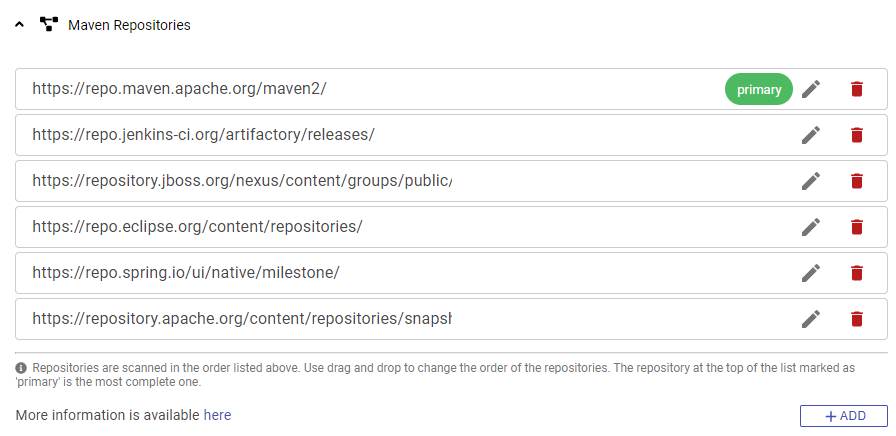
When analyzing an application that includes Maven based source code, nodes need to know where to find any required Maven local or remote HTTP/S repositories: this panel allows you to do this on a “global” level, (i.e. for all applications managed in CAST Imaging). The location of the repositories is crucial to ensure that any associated JAR files can be automatically discovered and that POM dependencies can also be located during the analysis.
The panel also provides dependency extraction settings which control how many Maven dependencies are extracted when those POM dependencies are resolved.
The same functionality also exists at application level, i.e. specific to each application - see Maven Dependency Settings. Each application inherits the repositories defined here until it is given its own repository configuration, at which point only the repositories defined for that application are used. Dependency extraction settings defined for an individual application always take priority over those defined here.
Maven Repositories
Several well known public repositories will already be predefined: https://repo.maven.apache.org/maven2 is marked as the primary repository (i.e. the most complete repository) which will always be searched first.
Does the order of the repositories matter?
Yes, the order of the repositories does matter: CAST Imaging will search the repositories for Maven artifacts required by your source code in the order that they appear in the panel. CAST Imaging will use the artifact in the first repository it finds it in.
Use drag and drop to change the order:

Access to Maven repositories when using a proxy
If you are using CAST Imaging via a proxy (see Proxy Settings), you must ensure that you follow and understand the way in which access to Maven repositories behaves via the proxy:
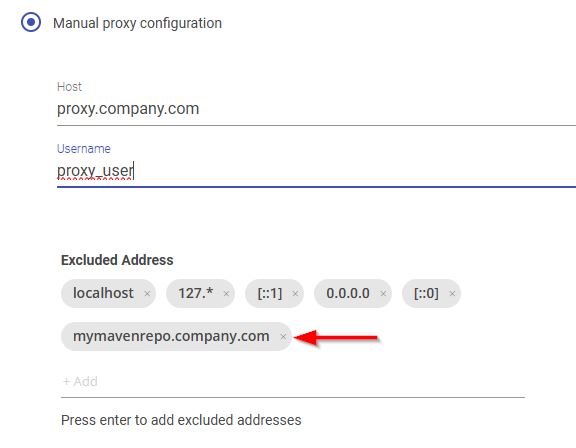
- You must add the hostname (e.g. FQDN or internal hostname) of all Maven repositories that do NOT require access via the proxy (typically these are internal Maven repositories) to the proxy exclusion list, for example:
- CAST Imaging follows an “all-or-nothing” rule for proxy usage based on your primary repository:
- If your primary repository needs a proxy:
- ✅ CAST will use Maven repositories that need a proxy
- ❌ CAST will ignore Maven repositories that don’t need a proxy
- If your primary repository doesn’t need a proxy:
- ✅ CAST will use Maven repositories that don’t need a proxy
- ❌ CAST will ignore Maven repositories that need a proxy
- If your primary repository needs a proxy:
Troubleshooting issues accessing remote HTTPS repositories
In certain situations, an error may be registered in the Delivery log when the Node attempts to access an HTTPS repository. For example, in the log located at delivery\{app-guid}\data\{guid}\{guid}\{guid}\DMTDeliveryReport.CastLog2:
ERROR cast.dmt.engine.extractor.jee.maven.http.connectionFailed Unknown format id: cast.dmt.engine.extractor.jee.maven.http.connectionFailed =>  %URL%="https://my.maven.repo/artifactory/maven-release/"

%MESSAGE%="sun.security.validator.ValidatorException: PKIX path building failed: sun.security.provider.certpath.SunCertPathBuilderException: unable to find valid certification path to requested target"

javax.net.ssl.SSLHandshakeException:sun.security.validator.ValidatorException: PKIX path building failed: sun.security.provider.certpath.SunCertPathBuilderException: unable to find valid certification path to requested target at sun.security.ssl.Alerts.getSSLException(:0).
The error reported in the log is generated by the DeliveryManagerTool-CLI.exe tool located on the node. This tool uses the Java JRE delivered with CAST Imaging Core in the following location:
%PROGRAMFILES%\CAST\<release>\jre\
This error usually occurs if the remote HTTPS repository you have defined is using an SSL certificate:
- where the signing authority is not listed in the Java JRE cacerts file located at
%PROGRAMFILES%\CAST\<release>\jre\security\cacerts - that is self-signed
Resolving the issue involves importing the required SSL certificates into the Java JRE cacerts Java keystore (located in %PROGRAMFILES%\CAST\8.4\jre\lib\security) delivered with CAST Imaging Core. You should ensure that all certificates are imported, especially if you have a “bundle” containing multiple embedded certificates. This process is out of the scope of this document and you should contact CAST Support for advice.
The guidance above applies to a Microsoft Windows installation. For a Linux via Docker/Podman installation, the node runs in a hardened container, so the certificate must be trusted via the container Java trust store instead - see Trusting custom or self-signed certificates.
Dependency extraction settings
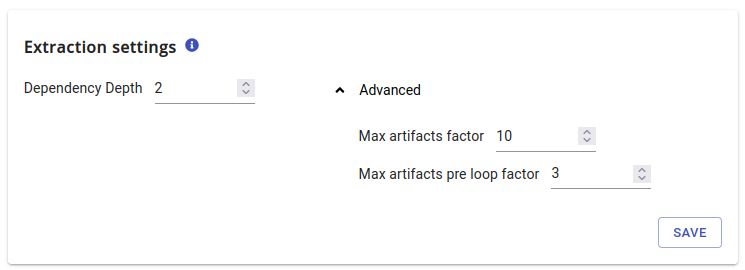
These settings control how many Maven dependencies are extracted when POM dependencies are resolved during source code delivery. They apply to all applications managed in CAST Imaging and ensure stability of transaction call graphs.
These options should not be modified unless you are specifically having issues such as missing JARs, missing classes, broken transactions etc. In the vast majority of situations, the default values for these options are sufficient:
| Setting | Default | Description |
|---|---|---|
| Dependency Depth | 2 |
How many levels of Maven transitive dependencies are extracted. |
| Max artifacts factor | 10 |
Upper bound factor for the number of extracted artifacts. |
| Max artifacts pre loop factor | 3 |
Upper bound factor applied before loop detection. |
Max artifacts factor and Max artifacts pre loop factor are advanced settings: increasing them increases both the number of artifacts extracted and the time taken to deliver the source code.
- The same settings exist for each individual application - see Maven Dependency Settings. Values defined for an application always take priority over the values defined here.
- For each application, CAST Imaging pushes the values that apply - the global values, or the application values where these are defined - into the configuration of the
com.castsoftware.jee-mavenhttpextension.
Unlimited extraction settings
To extract as many artifacts as needed, you can use the following settings:
- Dependency Depth: 99
- Max artifacts factor: 999
- Max artifacts pre loop factor: 999
However, when using these unlimited options, the maximum extracted artifacts would be 999 * minimum remediated artifacts. This level of extraction can lead to performance issues, therefore, using unlimited settings should be done with caution.