Configure analysis behavior
Settings on this page control how CAST Imaging runs analyses and stores their results across all applications. They are found in the Global Configuration panel of the admin Settings and are available only to users with the Admin profile, or a custom profile with the Administrator role.
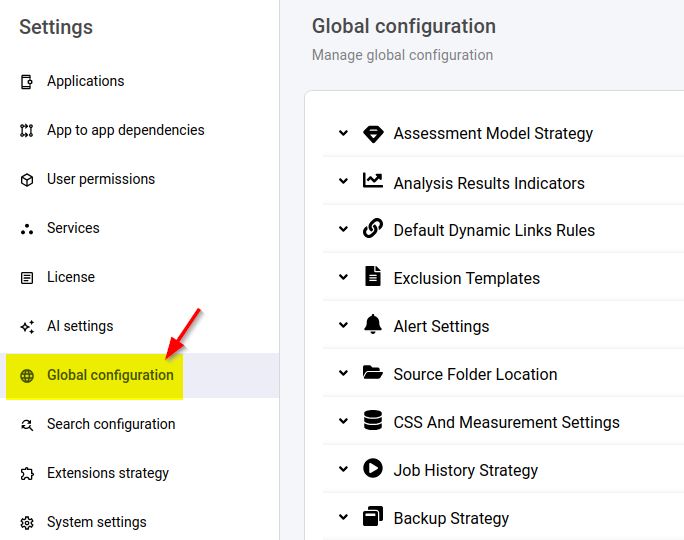
Control what source code is analyzed
- Exclusion Templates: define reusable sets of file/folder patterns to exclude source code from analysis.
- Source Folder Location: configure a disk folder as a source code delivery location for your applications.
- Default Dynamic Links Rules: upload global rules that validate or ignore dynamic links found during analysis.
Resolve language-specific dependencies
- Maven Dependencies Settings: tell the JEE analyzer where to find Maven repositories to resolve dependencies, and configure how Maven dependencies are extracted.
- .NET Assemblies: tell the .NET analyzer where external assemblies are located.
- PDS Dump: configure recognition of Mainframe PDS dump files for the mainframe analyzer.
Shape assessment and quality results
- Assessment Model Strategy: choose whether to share one Assessment Model across applications and how models are handled on upgrade.
- Analysis Results Indicators: enable or disable the indicators that score analysis completeness and quality.
- Alert Settings: raise alerts from analysis logs using patterns, log message IDs, and thresholds.
Manage result storage and retention
- CSS and Measurement Settings: manage the PostgreSQL instances used to store analysis results, and optimize/back up their schemas.
- Snapshot Strategy: set how many snapshots, and of what age, are retained.
- Backup Strategy: set how application backups are retained (by age or count).
- Job History Strategy: limit how much historic job data is retained to preserve performance.
- Delivery Strategy: block analyses when source code has changed too much, or not at all.