Overview - Header section

Last action date & time
Date and time the any action was performed: scan, analysis etc.
Status
Indicates the current state of the application:
- Fast scan done > The fast scan process is complete - i.e. the uploaded source code has been scanned to determine the contents: technologies/languages/frameworks.
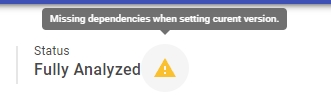
- Deep analysis done > The source code has been analyzed and results are ready. Note that if any missing dependencies are detected in your source code during the analysis (i.e. code that is calling another piece of code that cannot be found) a warning icon will be displayed. This should be fully investigated and corrected because it means that results may not be coherent. Clicking the warning triangle will direct you straight to the log file to see the missing dependencies alerts:
Total files
Two values are displayed:
- Total number of files found during the fast scan process, including files that are not considered source code (i.e. image files)
- Total number of files that have been designated as source code (i.e. programming language types) during the fast scan process or during a Refresh/Upload New (see below).
Application size
Two values are displayed:
- Total number of files in all files found during the fast scan process, including files that are not considered source code
- Total number of Lines of Code (LoC) in the designated source code, found during the fast scan process or during a Refresh/Upload New (see below)
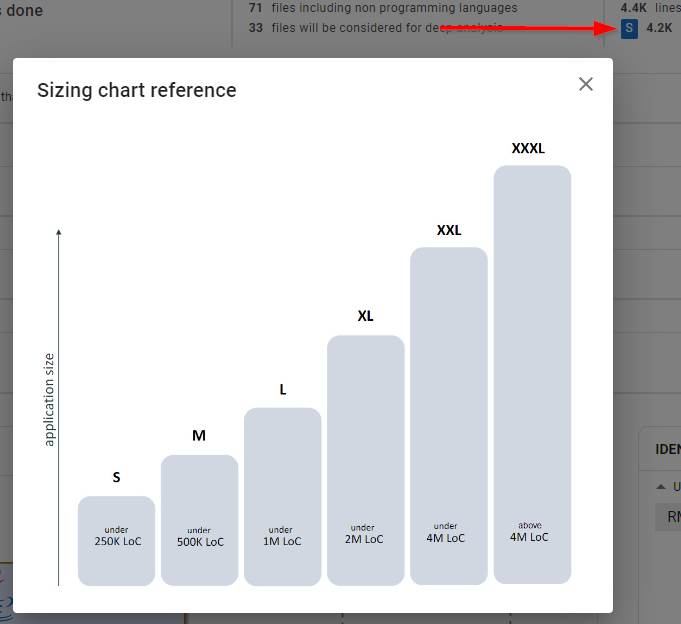
In addition, an indicator shows the “size” of the application as determined by CAST:
Alert

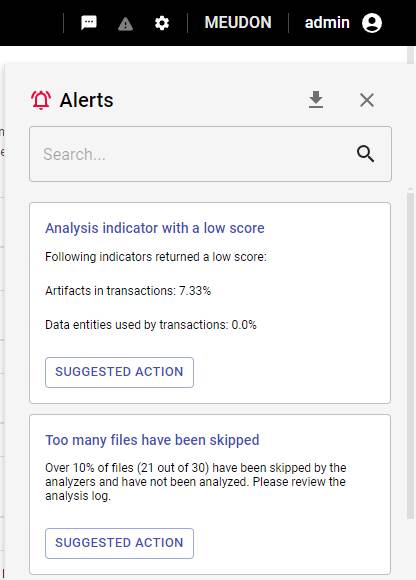
The alert icon indicates that the most recent job actioned on the current application contains one or more alerts (the number of alerts is indicated) that need to be looked at. Clicking the icon will display the alerts as a slide in panel on the right:
New scan
Enables you to deliver new source code for the application. You can do this even if you have not yet run an analysis, i.e. when the previous fast scan has highlighted some deficiencies in the delivered code that you want to correct.
The button displays the same Scan a new application dialog box that is used when you onboard an application - see Register and deliver source code. Choose how you want to deliver the new source code:
- Drag and Drop files or Browse to upload a source code archive. Only
.zipand.tar.gzfile extensions are accepted. - Select source path to choose a path from a configured source folder location. Ensure this folder contains the new updated source code before proceeding.
A new fast scan is then automatically actioned on the new source code.
Where the application was previously delivered from a source folder location, CAST Imaging checks that the folder it used is still reachable each time the dialog is opened. Where it is not, the warning Previously selected source folder not accessible is displayed in place of the folder path. This happens when:
- the source folder location has been removed - the Replace option is disabled in this case
- the source folder location has been changed
- the path itself is no longer reachable, because the folder has been moved or renamed, or because an
analysis-nodehas lost read access to it
Restore or correct the source folder location before running the scan - see Which folder should I choose? for the access the folder must grant.
If an upload is interrupted before it completes and an immediate retry of the same file fails with a 422 fileUploadError, see Interrupted source code uploads.
Technical information
Technically, the following things occur when a New Scan is triggered:
- any excluded files are discarded
- the current version is deleted and a new one is created with the same name, same title, same release date
- the new source code is scanned and data in the Overview page is refreshed using the scan results
- no associated snapshots are deleted