Step 4 - Declare the PostgreSQL
This documentation is valid for situations where you need to add a new PostgreSQL configured with certificate based authentication to an existing CAST Imaging installation. See this documentation if you need to install or update CAST Imaging and your PostgreSQL(s) is already using certificate based authentication.
Overview
The final step in the configuration process is to declare the PostgreSQL instance(s) in the CAST Imaging UI and ensure that it is configured to use a secure connection.
You must declare ALL PostgreSQL instance(s) that you have listed in the .ini file described in Step 3 - Configure CAST components to function with certificate-based authentication.
Define the instance
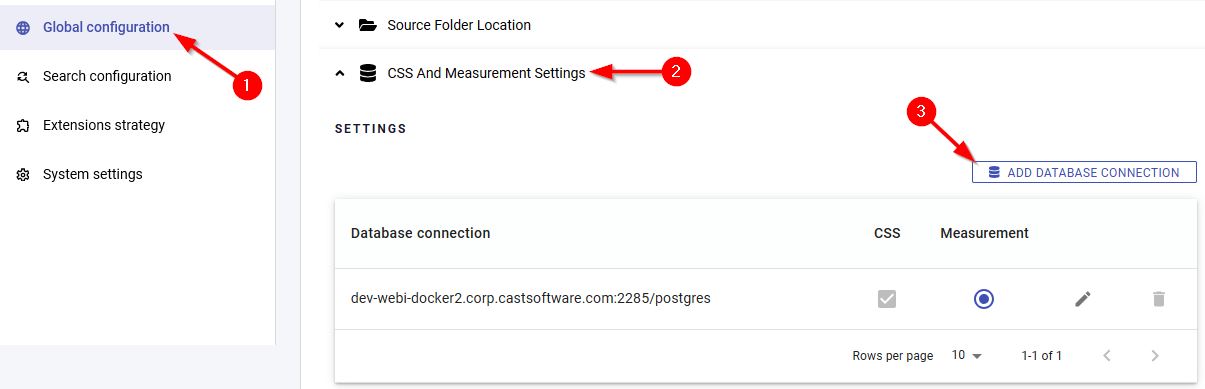
Log in to CAST Imaging with a user that has the Admin profile, or a custom profile with the Administrator role (see User Permissions). Move to the UI Admin Settings panel:

Move to the CSS and Measurement Settings panel and click Add Database Connection:
Define the target PostgreSQL instance, ensuring you tick the Use SSL option:
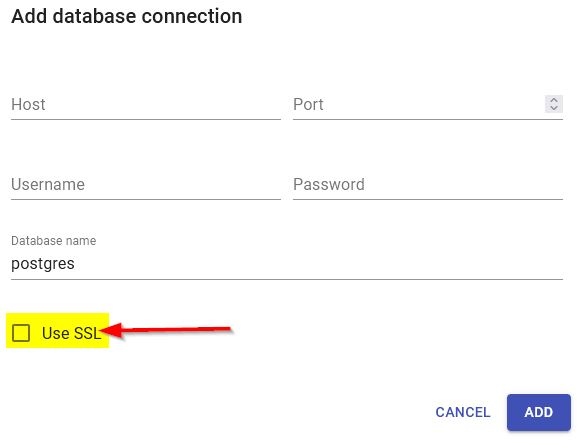
You can also edit existing database connections and set them to use a secure connection by ticking the Use SSL option.
What’s next?
Now that you have secured access to your PostgreSQL instance(s), you should now be able to onboard, analyze and consult application results as normal.