Configuring source code delivery from a folder
Overview
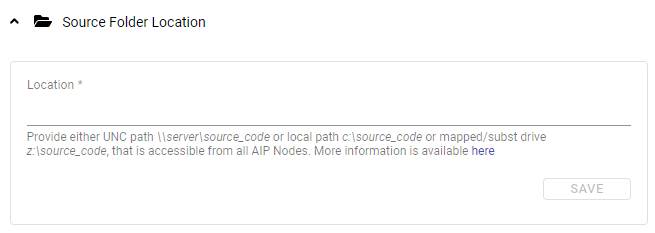
The Source Folder Location option allows you to configure a location on a disk from which you want to deliver source code. Configuring this option is in addition to the default option to deliver source code from a ZIP/archive file.
The Source Folder Location should only contain “raw” source code, and not ZIP/archive files.
Why would I need to deliver from a disk location, rather than a ZIP file?
You could choose to deliver your application source code direct from a cloned Git repository located somewhere on your network, or your application source code may be very large which means creating a ZIP file is not possible.
Which folder should I choose?
You can choose any folder on disk provided it meets the requirements listed below:
- the folder must not be a child folder of the standard
deployordeliveryfolders, e.g.:/opt/cast/shared/delivery/my_source_code_folder, orS:\share\delivery\my_source_code_folder - the folder must already exist on disk
- all
analysis-nodeinstances must have read access to this path therefore CAST highly recommends using a shared network drive - for a Microsoft Windows deployment:
- the login configured to run the various Windows Services must have read access to this path
- if you have issues with regard to the accessibility of a mapped/subst drive, you can resolve it using the
map-drives.batfile.
- for a Linux/Docker/Podman deployment:
- since the
analysis-nodeis provided in a Docker container, the container must have access to the folder you select via Docker mapping. CAST therefore recommends using a custom folder in the/opt/cast/shared/common-data/path, which theanalysis-nodecontainer already has access to and will also be accessible to otheranalysis-nodeinstances when running in distributed mode. Ensure that you grant the new folder the same permissions as used for the parent folders, for example runchown user:user /opt/cast/shared/common-data/<some-folder>
- since the
Source code will be analyzed direct from this folder. It will not be moved into the deploy or delivery folders as is the case when delivering source code for analysis via a ZIP file.
What path syntax is accepted?
| Type | Path Syntax |
|---|---|
| UNC network path (Microsoft Windows) | \\server\source_code |
| Local path (Microsoft Windows) | C:\source_codeC:/source_codeD:\source_code\tempD:/source_code/temp |
| Mapped or subst drives (Microsoft Windows) | S:\T:\source_code |
| Linux/Docker | /opt/cast/shared/common-data/<some-folder>See note below. |
How do I deliver code from a folder?
If you have configured the location, when onboarding a new application, use the Select source path option:
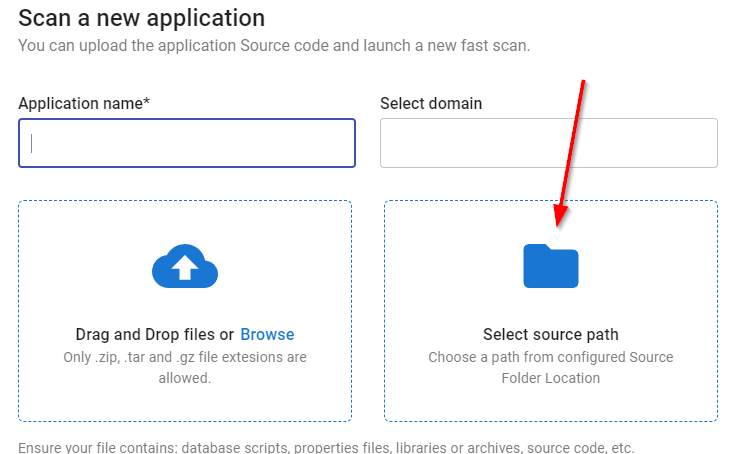
Only one folder in the designated path can be selected per application, so you must ensure that all source code for a given application is presented in one “root” folder (you can organise it however you need to underneath this root folder).
Can I set the source code folder location during the installation process?
Yes, this is possible but only for Microsoft Windows in a single machine/standalone deployment scenario. Use the SOURCES_FOLDER_LOCATION variable.