Explore links
Overview
A link represents a relationship between two objects - typically a call (one object invokes another) or an access (one object reads or writes data belonging to another). In the view, a link is drawn as a line between the two objects, with an arrowhead showing the direction of the relationship and the link type labelled on the line.
Link types
How a link is drawn tells you whether the relationship is direct or inferred from the objects’ children:
- Direct link - a solid line representing a direct relationship between two objects, for example one method calling or accessing another.
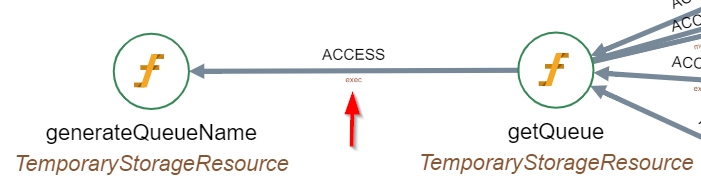
- Indirect (escalated) link - a dashed line representing an indirect relationship. These arise when a child of one object links to another object (or to a child of another object), creating a relationship between the parents. Between aggregated nodes (Levels 1-5), multiple underlying links are grouped and labelled References with a count in brackets; you can drill into a grouped link to see the direct links it represents.
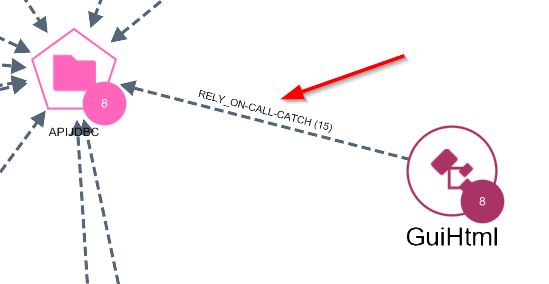
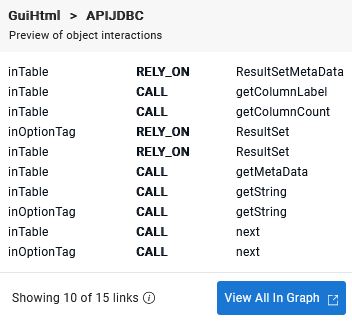
See also Graph options - Direct link / Indirect link for more details about how these are shown in the graph.
Link categories
Each link also has a category that reflects how the relationship was established during analysis:
- Static - resolved directly from the source code at analysis time; the most certain type of link.
- Dynamic - inferred rather than read directly from the code (for example by pattern matching, or a virtual/polymorphic call). A dynamic link may be flagged as reviewed or not reviewed to indicate how much confidence to place in it.
- Remote - a relationship that crosses an application or technology boundary, typically over a protocol.
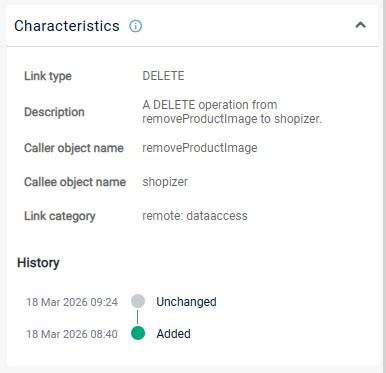
Each category maps to a more specific sub-category (for example, remote:dataaccess), and links that correspond to a SQL query are flagged separately. The full breakdown for a selected link - its category, sub-category, history, and any SQL query - is shown in the Characteristics tab of the right panel:
Show, hide, and inspect links
Use these when you want to understand how two objects are connected, or to declutter a busy view by hiding link types you don’t need.
- To show or hide link types in the view, see Objects and links in the view.
- To inspect an individual link’s properties, see Characteristics.