CMS Snapshot Analysis - Run Analyzer - Warnings - DOTNet with extension - DotNet Analyzer - No definition found for the name
Problem Description
While running the .NET analysis you may get the below type of warnings in your analysis log:
DOTNET.0050:Starting analysis of C:\CASTMS\Deploy\Netcore_test\code\net_core_app.csproj (1 / 1)
[com.castsoftware.html5] start project C:\CASTMS\Deploy\Netcore_test\code\net_core_app.csproj
DOTNET.0150:No definition found for the name ‘AutoMapper’. Therefore no link will be drawn to that object.
DOTNET.0150:No definition found for the name ‘Mapper’. Therefore no link will be drawn to that object.
DOTNET.0150:No definition found for the name ‘SevenZip’. Therefore no link will be drawn to that object.
DOTNET.0150:No definition found for the name ‘Class1’. Therefore no link will be drawn to that object.
DOTNET.0150:No definition found for the name ‘SevenZipCompressor’. Therefore no link will be drawn to that object.
DOTNET.0150:No definition found for the name ‘AutoMapperMappingException’. Therefore no link will be drawn to that object.
DOTNET.0150:No definition found for the name ‘IConfigurationProvider’. Therefore no link will be drawn to that object.
DOTNET.0150:No definition found for the name ‘ConfigurationValidator’. Therefore no link will be drawn to that object.
Log screenshot below:

Observed in CAST Extension Version
| Release | Yes/No |
|---|---|
| 1.2 | ✅ |
Observed in RDBMS
| RDBMS | Yes/No |
|---|---|
| CSS3 | ✅ |
| CSS2 | ✅ |
Step by Step Scenario
- Package the source code
- Run the analysis
Action Plan
Perform the below actions
- Check in the analysis log to find out which project (analysis unit) the warnings are coming.
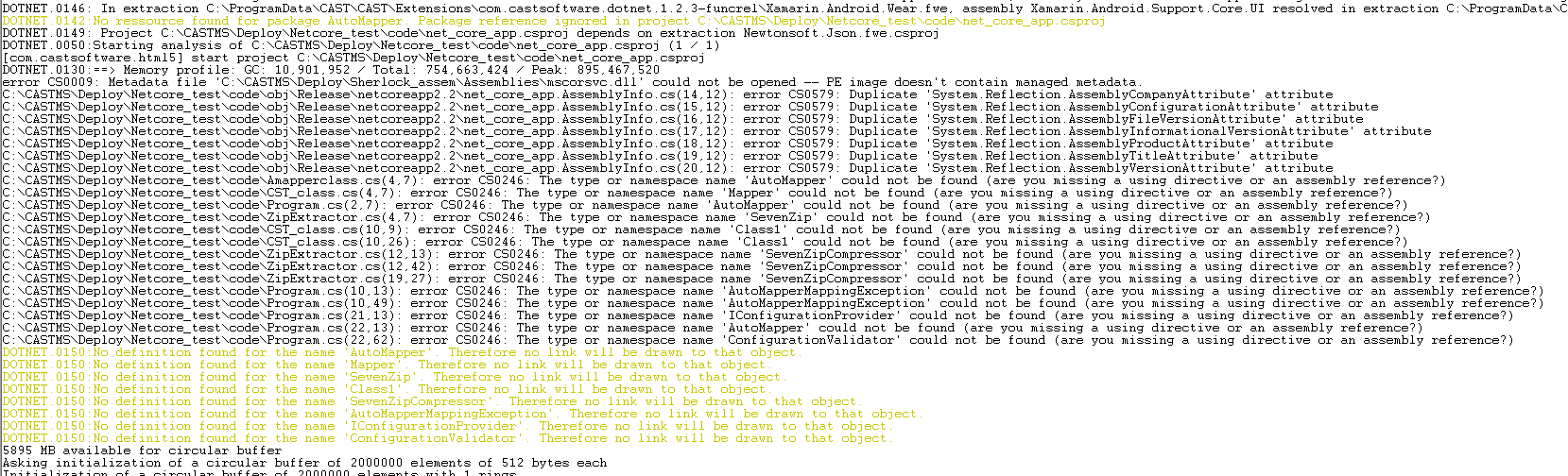
- Run the analysis in debug mode to get the class files which has the warnings, once you run it you will have log some what like below, where you will get the information of the class file which has the warnings:
- Open the project file and check for the assemblies referred and the presence of assemblies in the deploy folder.
- If the assemblies are present check for the missing dependency in the CAST-MS.
- Once you improve the above and if still you are getting the warnings then contact CAST Technical Support. with the Relevant Input for the reproduction of the issue
Notes/comments
Related Pages