CMS Extension SDK - Performance issue
Description
While running a snapshot Run Extensions takes long time and never finish, as shown in the screen shot attached below:
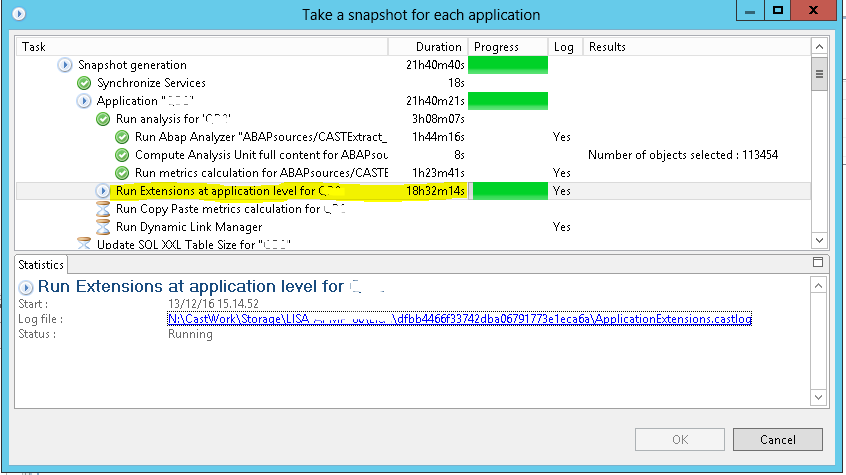
Observed in CAST AIP
| Release | Yes/No |
|---|---|
| 8.3.x | ✅ |
Observed on RDBMS
| RDBMS | Yes/No |
|---|---|
| CSS | ✅ |
Step by Step Scenario
Below is the step-by-step scenario leading to the problem:
- Package the source code and deliver it using DMT.
- Accept the sources in CMS and set it as current version and run the snapshot.
- While running the Run Extensions takes long time to finish or some times never finish.
Impact of the Problem
The impact of the problem on the analysis or the dashboard is: The snapshot will not end and you will not see any objects on the dashboard.
Action Plan
To fix the problem, proceed as follows:
- Open the log of Run Extensions, to see the log location please check this page
- Check the last line of the log, if the last line of the log says “Updating cast system views …” and the time taken is huge then you can do the below,
- Find attached a script file to install instead of the existing one.
- Rename <INSTALL_FOLDER>\Third-Party\Python34\Lib\site-packages\cast\application\internal\run_plugins.py into run_plugins.old.
- Put the attached file into <INSTALL_FOLDER>\Third-Party\Python34\Lib\site-packages\cast\application\internal
- Relaunch analysis + snapshot
Installing the attached script will skip the Update cast system view step while running the Run Extensions step, but at last the Run CSV will run post snapshot.
The Run CSV was put in the script just in case if the script use CAST System View.
Impact of the Solution
Impact of the solution on the analysis or the dashboard is: There is no impact.
Notes/comments
Ticket #7401
Related Pages