CAST Imaging System - Configuration process - Memory configuration - Neo4j service failed
Purpose (problem description)
This page describes possible issues that may be encountered due to memory configuration of imaging.
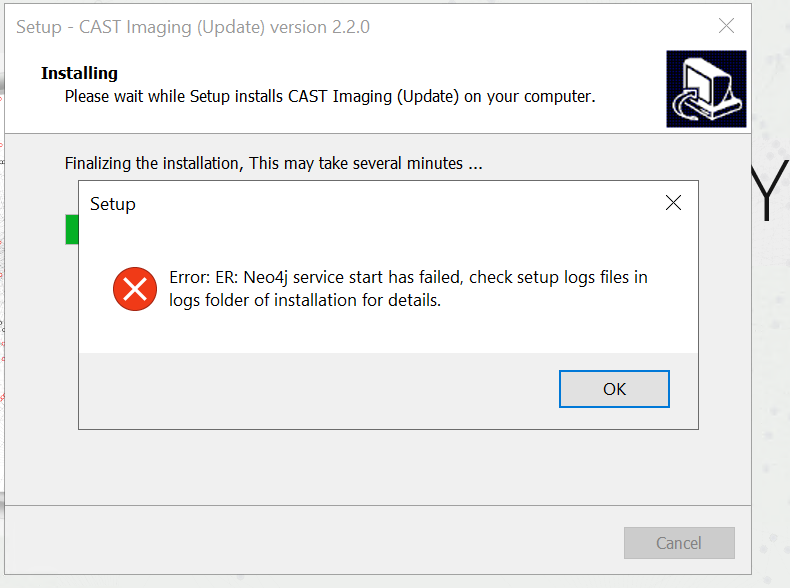
Imaging version
| Imaging version | Yes/No |
|---|---|
| 2..x | ✅ |
Step by Step scenario
- Launch Imaging
- Observe Neo4j service failed
Action Plan
If you encounter the above mentioned issue then perform the following actions :
Check the values set for below parameters from neo4j.conf file :
dbms.memory.heap.initial_size dbms.memory.heap.max_size dbms.memory.pagecache.size
2. Make sure that **dbms.memory.heap.max\_size** and **dbms.memory.pagecache.size** is not more than 50% of your RAM size.
3. You can also run an optimization test (**memrec**) that will recommend memory allocation and database settings for you. Please follow the below steps.
i. Open command prompt.
ii. cd %PROGRAMFILES%\CAST\ImagingSystem\neo4j\bin
iii. Run the command **"neo4j-admin memrec --memory=32G".**
4. Settings will be recommended as per your memory configuration. For example, below screenshot shows the result for same command in machine that has 16 GB RAM :
1. 
2. 
5. Restarting the Neo4j service may not adequately reflect the configuration changes made. It is essential to update the service as well. To update the service, run **bin\neo4j update-service**. Then restart the service to run it with the new configuration. For Docker restarting the container should be enough..
6. If the above steps do not solve your issue contact [CAST Technical Support](https://help.castsoftware.com/hc/en-us/requests/new). with the following [Relevant input](#CASTImagingSystemConfigurationprocessMemoryconfigurationNeo4jservicefailed-Relevantinput)
#### Relevant input
- [CAST Support Tool (CST)](https://help.castsoftware.com/hc/en-us/articles/203751708-CAST-Support-Tool-CST-alias-Sherlock) [-](https://help.castsoftware.com/hc/en-us/articles/203751708-CAST-Support-Tool-CST-alias-Sherlock) [alias Sherlock](https://help.castsoftware.com/hc/en-us/articles/203751708-CAST-Support-Tool-CST-alias-Sherlock) export with the following options **Export CAST Bases** with Knowledge Base
- Memory configuration screenshot
**Notes/comments**
Ticket #28694
**Related Pages**