Server Manager - Information - Generating Log file in SHOW SQL Mode
Purpose
This page provides information on generating log file in SHOW SQL Mode
Applicable in CAST Version
| Release | Yes/No |
|---|---|
| 8.3.x | ✅ |
| 8.2.x | ✅ |
Applicable RDBMS
| RDBMS | Yes/No |
|---|---|
| Oracle Server | ✅ |
| Microsoft SQL Server | ✅ |
| CSS2 | ✅ |
| CSS1 | ✅ |
Details
You can activate SQL mode as shown below
- Right-click on Windows shortcut for Server Manager,then select Properties.
- Add ‘-SHOW(SQL)’ to the end of the command line as shown in the screenshot below.
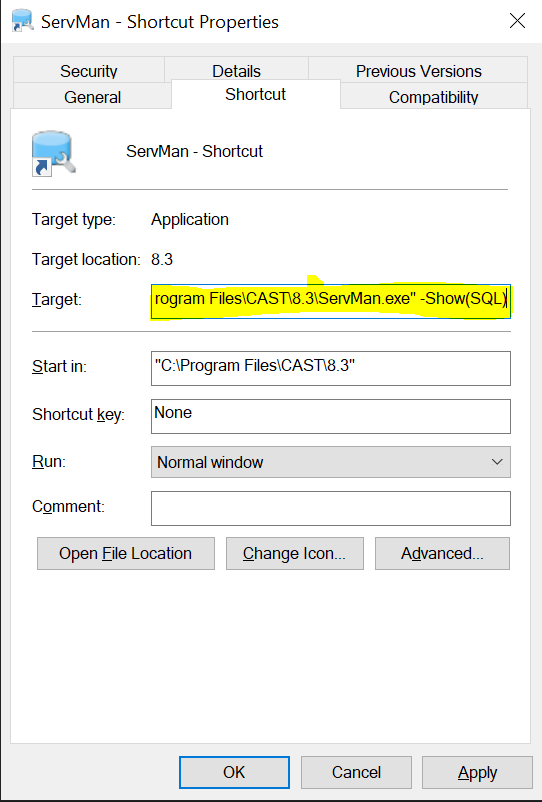 .
.
- To distinguish the above from the server manager log, check the start of the the log as shown below , and in the log you will see Show SQL queries populated wherever it is executing.

Notes/comments
Related Pages