Architecture Checker - Information - How to launch Architecture Checker in SHOW SQL mode
Purpose
This page explains, how to activate SQL traces in Architecture Checker.
Applicable in CAST Version
| Release | Yes/No |
|---|---|
| 8.3.x | ✅ |
| 8.2.x | ✅ |
| 8.1.x | ✅ |
| 8.0.x | ✅ |
Applicable RDBMS
| RDBMS | Yes/No |
|---|---|
| Oracle Server | ✅ |
| Microsoft SQL Server | ✅ |
| CSS2 | ✅ |
Details
SHOW SQL mode can be activated for AC by adding -ShowSQL at the end of the command line of AC. This can be done by using either one of the following methods:
By creating a shortcut
- Create a shortcut for TCC executable from the flat (TCC executable is named CAST-TransactionConfig.exe)
- Right click on the shortcut → Properties → Shortcut tab, then add ‘-ShowSQL’ to the end of the command line as shown below.
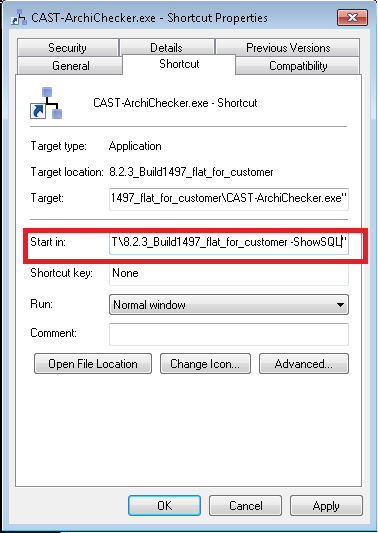
By running AC from CMD by adding the option -ShowSQL
   SQL trace will be present in AC log file, for the location of the log file refer to [CAST Management Studio - Information - How to find logs](/export-v2/tg/information-guides/information-guides-by-cast-aip-component/cast-management-studio-cms/cast-management-studio-information-how-to-find-logs/)

**Notes/comments**

**Related Pages**