AIP Console - Information - How to Access Console and Node Databases
Purpose
This page provides information about how to access AIP Console and AIP Node h2 Databases.
For more information on AIP Console, refer to:
- Official documentation for AIP Console:: AIP Console
- For Standalone Extension server, please see this page: Install and configure the offline Extend package
CAST Component Version
| Release | Yes/No |
|---|---|
| AIP Console V1 | ✅ |
Applicable RDBMS
| RDBMS | Yes/No |
|---|---|
| Oracle Server | N/A |
| Microsoft SQL Server | N/A |
| CSS3 | N/A |
| CSS2 | N/A |
Details
To access your Node and Console h2 database
Launch the file - run-h2-console.bat from the path -
/AipNode/admin It will ask you the login details for H2 DB.
Copy the jdbc URL from the aip-node-app.properties file and copy the spring.datasource.url and copy it to the JDBC URL field in the login page.
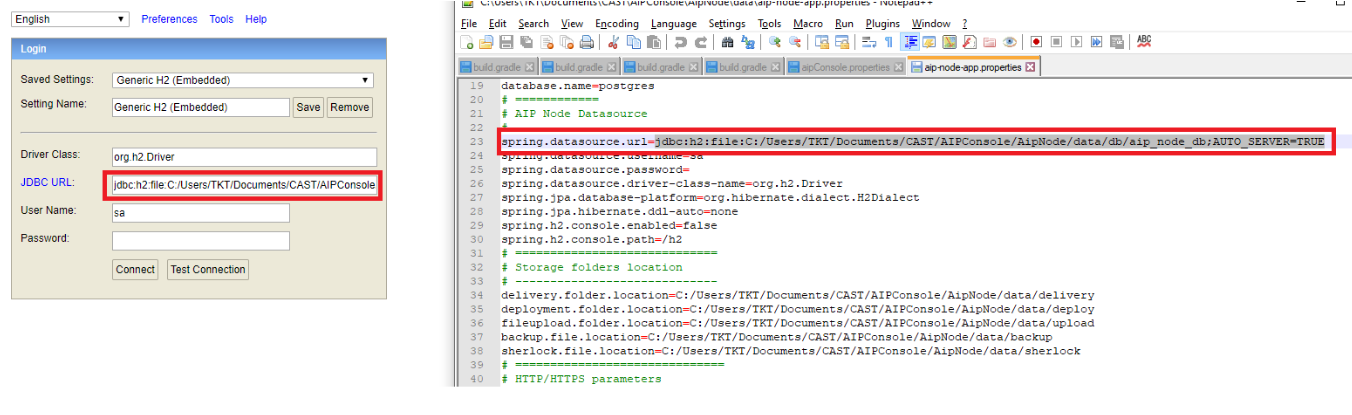
Click on connect now.
Similar steps are to be followed for AIP Console H2 database.
The location of the batch file is here -
/AipConsole/admin The JDBC URL has to be fetched from the aipConsole.properties file.
You need to restart the services once any change are done to the H2 database.
Notes/comments
Related Pages