CAST Database Extractor - Source panel
This section provides a detailed description of the contents of the Source panel in the CAST Database Extractor.
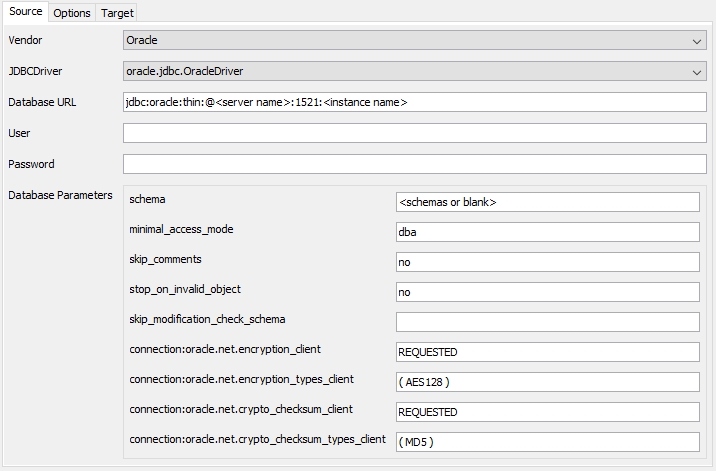
This panel enables you to define the parameters for the extraction process, i.e. your source database server, how to connect to it, what to extract etc. Each item is explained in more detail below:
| Vendor | Use this option to choose the target RDBMS vendor for the extraction process:
Choosing an option will display configuration options specific to that Vendor. | |||||||||||||||||||
| JDBC Driver | Choose the JDBC Driver from the drop down list that is appropriate for the platform chosen above:
Note that in early beta releases of this component, the driver com.microsoft.jdbc.sqlserver.SQLServerDriver is available for use. PLEASE DO NOT USE THIS DRIVER - INSTEAD ALWAYS USE THE net.sourceforge.jtds.jdbc.Driver DRIVER FOR BOTH MICROSOFT SQL SERVER AND SYBASE ASE | |||||||||||||||||||
| Database URL | This command is used to specify the source server for connection purposes. Manually enter the JDBC Connection parameters for the platform/JDBC driver chosen above. Note that by default the field will be populated with the Oracle database URL, therefore you may need to change it as described below. | |||||||||||||||||||
oracle.jdbc.OracleDriver (default) SID/INSTANCE NAME: jdbc:oracle:thin:@<SERVER NAME>:<PORT>:<INSTANCE NAME> SERVICE NAME: jdbc:oracle:thin:@//<SERVER_NAME>:<PORT>/<SERVICE>
| ||||||||||||||||||||
net.sourceforge.jtds.jdbc.Driver jdbc:jtds:<SERVER_TYPE>://<SERVER>[:<PORT>][/<DATABASE>][;<PROPERTY>=<VALUE>[;...]]
See http://jtds.sourceforge.net/faq.html#urlFormat for more information about the jTDS URL format. Specific situation: Azure SQL Example Azure SQL database URL: jdbc:jtds:sqlserver://my_server.database.windows.net:1433/my_database;encrypt=true;trustServerCertificate=false;hostNameInCertificate=*.database.windows.net;loginTimeout=30 Specific situations: Windows authentication If your target server requires that you use Windows authentication, you can use the following URL format when running the extractor on a Windows machine: jdbc:jtds:<SERVER_TYPE>://<SERVER>[:<PORT>];useNTLMv2=true;domain=xxx Note that:
Specific situations: SSL encryption If your target server requires that you use SSL encryption, you can use the following URL format when running the extractor on a Windows machine: jdbc:jtds:<SERVER_TYPE>://<SERVER>[:<PORT>];ssl=require | ||||||||||||||||||||
| User | This command tells the extraction tool what login to use to access the source server. Enter a login with sufficient rights as explained in SQL - Required RDBMS rights for packaging a database using the legacy CAST Delivery Manager Tool. When attempting to connect to an Azure SQL database, the user name should be entered as follows: [User]@[Server] | |||||||||||||||||||
| Password | This command tells the extraction tool what password to use to access the source server (corresponds to the login specified above). Enter the correct password for the login specified above. | |||||||||||||||||||
| Database Parameters | These commands specify the schema/database you would like to extract:
Notes
|